一:threeJs 简介
- ThreeJs是采用javaScript编写的类库
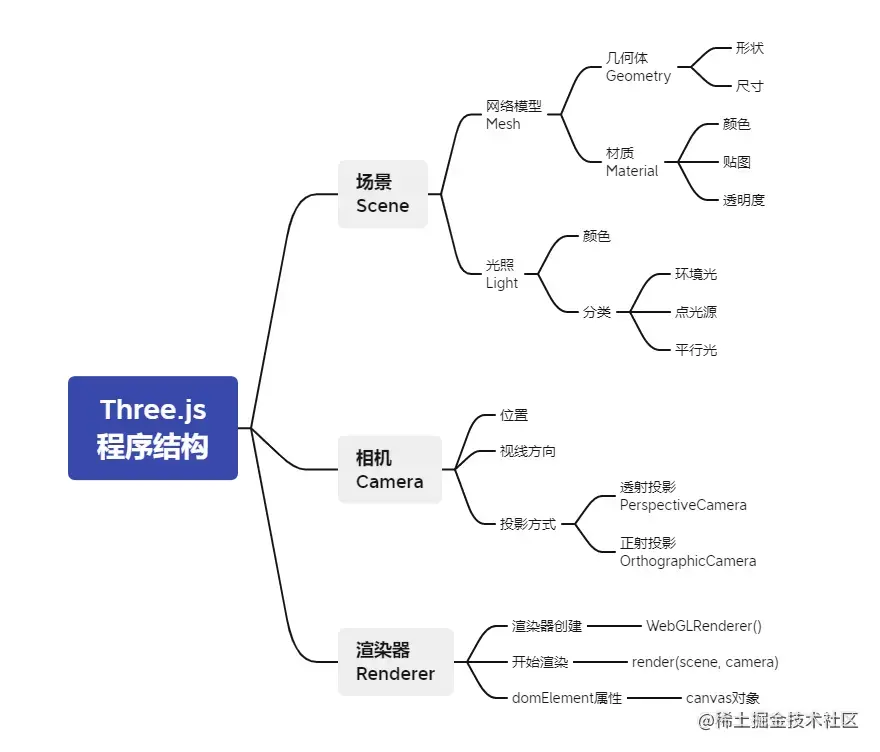
- 需要理解的核心概念:场景,相机,渲染,几何体
- 虚拟场景 + 虚拟相机 -> 渲染器执行渲染操作 = 得到渲染结果
- 场景就是一个显示呈现的舞台
- 浏览器端呈现的内容都是相机拍摄
- 渲染器决定了内容如何呈现至屏幕
- 几何体就是我们需要绘制显示的物体
- 按照使用预览官网:www.webgl3d.cn/
二:threeJs 绘制立方体
<script type="module">
const scene = new THREE.Scene()
const camera = new THREE.PerspectiveCamera(
45,
window.innerWidth / window.innerHeight,
1,
1000
)
const renderer = new THREE.WebGLRenderer({
antialias: true,
})
renderer.setClearColor(0xffffff)
renderer.setSize(window.innerWidth, window.innerHeight)
document.body.appendChild(renderer.domElement)
const geometry = new THREE.BoxGeometry(1, 1, 1)
const material = new THREE.MeshBasicMaterial({
color: 0x285b43,
wireframe: true,
})
const cube = new THREE.Mesh(geometry, material)
scene.add(cube)
camera.position.z = 5
function animate() {
requestAnimationFrame(animate)
cube.rotation.y += 0.01
cube.rotation.x += 0.01
renderer.render(scene, camera)
}
animate()
</script>
三:threeJs 材质与相机控制
<script>
let scene, camera, geometry, mesh, renderer, controls
function initScene() {
scene = new THREE.Scene()
const axesHelper = new THREE.AxesHelper(100)
scene.add(axesHelper)
}
function initCamera() {
camera = new THREE.PerspectiveCamera(
45,
window.innerWidth / window.innerHeight,
1,
1000
)
camera.position.set(0, 0, 15)
controls = new THREE.TrackballControls(
camera,
renderer.domElement
)
}
function initRenderer() {
renderer = new THREE.WebGLRenderer({ antialias: true })
renderer.setSize(window.innerWidth, window.innerHeight)
renderer.setPixelRatio(window.devicePixelRatio)
document.body.appendChild(renderer.domElement)
}
function initMesh() {
geometry = new THREE.BoxGeometry(2, 2, 2)
const texture = new THREE.TextureLoader().load('img/crate.gif')
material = new THREE.MeshBasicMaterial({
map: texture,
side: THREE.DoubleSide,
})
mesh = new THREE.Mesh(geometry, material)
scene.add(mesh)
}
function animate() {
requestAnimationFrame(animate)
controls.update()
renderer.render(scene, camera)
}
function init() {
initRenderer()
initScene()
initCamera()
initMesh()
animate()
}
init()
</script>
四:threeJs 光源操作
<script>
let scene, camera, geometry, mesh, renderer, controls
function initScene() {
scene = new THREE.Scene()
const axesHelper = new THREE.AxesHelper(100)
scene.add(axesHelper)
const hemisphereLight = new THREE.HemisphereLight('red')
hemisphereLight.position.set(0, 30, 0)
scene.add(hemisphereLight)
}
function initCamera() {
camera = new THREE.PerspectiveCamera(
45,
window.innerWidth / window.innerHeight,
1,
1000
)
camera.position.set(0, 0, 15)
controls = new THREE.TrackballControls(
camera,
renderer.domElement
)
}
function initRenderer() {
renderer = new THREE.WebGLRenderer({ antialias: true })
renderer.setSize(window.innerWidth, window.innerHeight)
renderer.setPixelRatio(window.devicePixelRatio)
document.body.appendChild(renderer.domElement)
}
function initMesh() {
geometry = new THREE.SphereGeometry(3, 26, 26)
const texture = new THREE.TextureLoader().load('img/crate.gif')
material = new THREE.MeshPhongMaterial({
map: texture,
side: THREE.DoubleSide,
})
mesh = new THREE.Mesh(geometry, material)
scene.add(mesh)
}
function animate() {
requestAnimationFrame(animate)
controls.update()
renderer.render(scene, camera)
}
function init() {
initRenderer()
initScene()
initCamera()
initMesh()
animate()
}
init()
</script>
五:threeJs 精灵材质与交互操作
<script>
let scene, camera, geometry, mesh, renderer, controls
const raycaster = new THREE.Raycaster()
const mouse = new THREE.Vector2()
function onMouseMove(event) {
mouse.x = (event.clientX / window.innerWidth) * 2 - 1
mouse.y = -(event.clientY / window.innerHeight) * 2 + 1
}
window.addEventListener('mousemove', onMouseMove, false)
window.addEventListener(
'click',
function () {
const intersects = raycaster.intersectObjects([mesh])
if (intersects.length > 0) {
mesh.rotation.x += 01
}
},
false
)
function initScene() {
scene = new THREE.Scene()
const axesHelper = new THREE.AxesHelper(100)
scene.add(axesHelper)
}
function initCamera() {
camera = new THREE.PerspectiveCamera(
45,
window.innerWidth / window.innerHeight,
1,
1000
)
camera.position.set(0, 0, 15)
controls = new THREE.TrackballControls(
camera,
renderer.domElement
)
}
function initRenderer() {
renderer = new THREE.WebGLRenderer({ antialias: true })
renderer.setSize(window.innerWidth, window.innerHeight)
renderer.setPixelRatio(window.devicePixelRatio)
document.body.appendChild(renderer.domElement)
}
function initMesh() {
geometry = new THREE.BoxGeometry(2, 2, 2)
const texture = new THREE.TextureLoader().load('img/crate.gif')
material = new THREE.MeshBasicMaterial({
map: texture,
side: THREE.DoubleSide,
})
mesh = new THREE.Mesh(geometry, material)
scene.add(mesh)
}
function animate() {
requestAnimationFrame(animate)
controls.update()
renderer.render(scene, camera)
}
function init() {
initRenderer()
initScene()
initCamera()
initMesh()
animate()
}
init()
</script>
六:threeJsVr全景拼接
<script>
let scene, camera, geometry, mesh, renderer, controls
function initRenderer() {
renderer = new THREE.WebGLRenderer({ antialias: true })
renderer.setSize(window.innerWidth, window.innerHeight)
renderer.setPixelRatio(window.devicePixelRatio)
document.body.appendChild(renderer.domElement)
}
function initScene() {
scene = new THREE.Scene()
const axesHelper = new THREE.AxesHelper(100)
scene.add(axesHelper)
}
function initCamera() {
camera = new THREE.PerspectiveCamera(
45,
window.innerWidth / window.innerHeight,
1,
1000
)
camera.position.set(0, 0, 15)
controls = new THREE.TrackballControls(camera, renderer.domElement)
}
function initMesh() {
const geometryF = new THREE.PlaneGeometry(4, 4)
const materialF = new THREE.MeshBasicMaterial({
map: new THREE.TextureLoader().load('img/0_f.jpg'),
side: THREE.DoubleSide,
})
const meshF = new THREE.Mesh(geometryF, materialF)
meshF.rotation.y = (180 * Math.PI) / 180
meshF.position.z = 2
scene.add(meshF)
const geometryB = new THREE.PlaneGeometry(4, 4)
const materialB = new THREE.MeshBasicMaterial({
map: new THREE.TextureLoader().load('img/0_b.jpg'),
side: THREE.DoubleSide,
})
const meshB = new THREE.Mesh(geometryB, materialB)
meshB.position.z = -2
scene.add(meshB)
const geometryL = new THREE.PlaneGeometry(4, 4)
const materialL = new THREE.MeshBasicMaterial({
map: new THREE.TextureLoader().load('img/0_l.jpg'),
side: THREE.DoubleSide,
})
const meshL = new THREE.Mesh(geometryL, materialL)
meshL.rotation.y = (-90 * Math.PI) / 180
meshL.position.x = 2
scene.add(meshL)
const geometryR = new THREE.PlaneGeometry(4, 4)
const materialR = new THREE.MeshBasicMaterial({
map: new THREE.TextureLoader().load('img/0_r.jpg'),
side: THREE.DoubleSide,
})
const meshR = new THREE.Mesh(geometryR, materialR)
meshR.rotation.y = (90 * Math.PI) / 180
meshR.position.x = -2
scene.add(meshR)
const geometryU = new THREE.PlaneGeometry(4, 4)
const materialU = new THREE.MeshBasicMaterial({
map: new THREE.TextureLoader().load('img/0_u.jpg'),
side: THREE.DoubleSide,
})
const meshU = new THREE.Mesh(geometryU, materialU)
meshU.rotation.x = (90 * Math.PI) / 180
meshU.rotation.z = (180 * Math.PI) / 180
meshU.position.y = 2
scene.add(meshU)
const geometryD = new THREE.PlaneGeometry(4, 4)
const materialD = new THREE.MeshBasicMaterial({
map: new THREE.TextureLoader().load('img/0_d.jpg'),
side: THREE.DoubleSide,
})
const meshD = new THREE.Mesh(geometryD, materialD)
meshD.rotation.x = (-90 * Math.PI) / 180
meshD.rotation.z = (180 * Math.PI) / 180
meshD.position.y = -2
scene.add(meshD)
}
function animate() {
requestAnimationFrame(animate)
controls.update()
renderer.render(scene, camera)
}
function init() {
initRenderer()
initScene()
initCamera()
initMesh()
animate()
}
init()
</script>
七:threeJS 全景看房地标添加
<script>
let scene, camera, geometry, mesh, renderer, controls
function initRenderer() {
renderer = new THREE.WebGLRenderer({ antialias: true })
renderer.setSize(window.innerWidth, window.innerHeight)
renderer.setPixelRatio(window.devicePixelRatio)
document.body.appendChild(renderer.domElement)
}
function initScene() {
scene = new THREE.Scene()
const axesHelper = new THREE.AxesHelper(100)
scene.add(axesHelper)
}
function initCamera() {
camera = new THREE.PerspectiveCamera(
45,
window.innerWidth / window.innerHeight,
1,
1000
)
camera.position.set(0, 0, 15)
controls = new THREE.TrackballControls(camera, renderer.domElement)
}
function initMesh() {
const geometryF = new THREE.PlaneGeometry(4, 4)
const materialF = new THREE.MeshBasicMaterial({
map: new THREE.TextureLoader().load('img/0_f.jpg'),
side: THREE.DoubleSide,
})
const meshF = new THREE.Mesh(geometryF, materialF)
meshF.rotation.y = (180 * Math.PI) / 180
meshF.position.z = 2
scene.add(meshF)
const geometryB = new THREE.PlaneGeometry(4, 4)
const materialB = new THREE.MeshBasicMaterial({
map: new THREE.TextureLoader().load('img/0_b.jpg'),
side: THREE.DoubleSide,
})
const meshB = new THREE.Mesh(geometryB, materialB)
meshB.position.z = -2
scene.add(meshB)
const geometryL = new THREE.PlaneGeometry(4, 4)
const materialL = new THREE.MeshBasicMaterial({
map: new THREE.TextureLoader().load('img/0_l.jpg'),
side: THREE.DoubleSide,
})
const meshL = new THREE.Mesh(geometryL, materialL)
meshL.rotation.y = (-90 * Math.PI) / 180
meshL.position.x = 2
scene.add(meshL)
const geometryR = new THREE.PlaneGeometry(4, 4)
const materialR = new THREE.MeshBasicMaterial({
map: new THREE.TextureLoader().load('img/0_r.jpg'),
side: THREE.DoubleSide,
})
const meshR = new THREE.Mesh(geometryR, materialR)
meshR.rotation.y = (90 * Math.PI) / 180
meshR.position.x = -2
scene.add(meshR)
const geometryU = new THREE.PlaneGeometry(4, 4)
const materialU = new THREE.MeshBasicMaterial({
map: new THREE.TextureLoader().load('img/0_u.jpg'),
side: THREE.DoubleSide,
})
const meshU = new THREE.Mesh(geometryU, materialU)
meshU.rotation.x = (90 * Math.PI) / 180
meshU.rotation.z = (180 * Math.PI) / 180
meshU.position.y = 2
scene.add(meshU)
const geometryD = new THREE.PlaneGeometry(4, 4)
const materialD = new THREE.MeshBasicMaterial({
map: new THREE.TextureLoader().load('img/0_d.jpg'),
side: THREE.DoubleSide,
})
const meshD = new THREE.Mesh(geometryD, materialD)
meshD.rotation.x = (-90 * Math.PI) / 180
meshD.rotation.z = (180 * Math.PI) / 180
meshD.position.y = -2
scene.add(meshD)
}
function animate() {
requestAnimationFrame(animate)
controls.update()
renderer.render(scene, camera)
}
function init() {
initRenderer()
initScene()
initCamera()
initMesh()
animate()
}
init()
</script>