下拉表格框代码实现
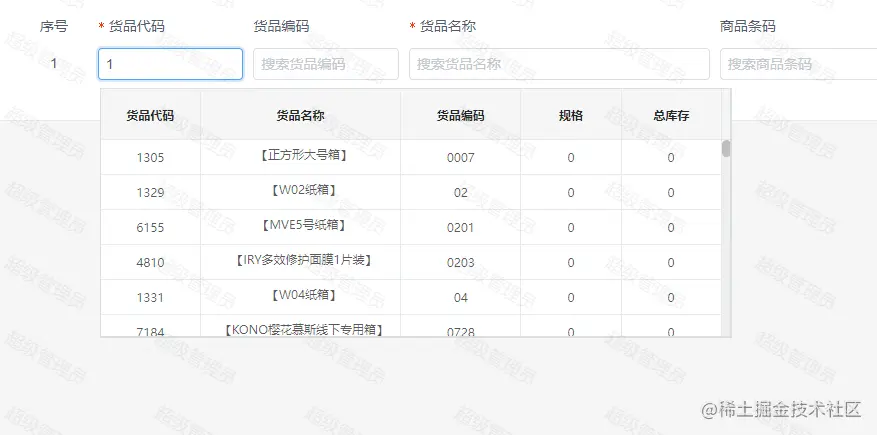
如何实现下拉框里面嵌套表格
<template>
<div class="TableSelect" :style="styles" v-clickoutside="handleOnBlur" ref="inputRef">
<Input
v-model="searchLabel"
:placeholder="placeholder"
:size="size"
:disabled="disabled"
clearable
@on-change="searchQueryChange"
@on-clear="handleQueryClear"
@on-blur="handleBlurInput"
/>
<transition name="fade">
<div :class="inGoodsDelivery ? 'search-content-goods-delivery' : 'search-content'" transfer>
<Table
:style="positionTop"
transfer
size="large"
max-height="250"
v-show="isTableShow && searchLabel"
border
:columns="tableColumn"
:data="tableData"
@on-row-click="handelRowClick"
:loading="loading"
>
<template slot="goodsName" slot-scope="{ row }">
<Poptip trigger="hover" :content="row.goodsName">
<div class="goods-name-col-content">{{row.goodsName}}</div>
</Poptip>
</template>
</Table>
</div>
</transition>
</div>
</template>
 {
return {
inGoodsDelivery: false,
searchLabel: '',
isTableShow: false,
tableData: [],
tableColumn,
loading: false,
searchQueryChange: this.$ondebounce(this.handleQueryChange, 800),
positionTop: {}
}
},
watch: {
value(val) {
this.searchLabel = val
},
searchLabel(newVal) {
this.$emit('input', newVal)
}
},
mounted() {
this.inGoodsDelivery = Boolean(this.$route.name === 'data-statistics/goods-delivery')
this.searchLabel = this.value
if(this.onlyShowName) {
this.tableColumn = tableColumn.filter(item => {
return item.title === '货品代码' || item.title === '货品名称'
})
}
if (this.apiType === 'stockBatchList') {
this.tableColumn = this.apiType === 'stockBatchList' ? tableColumnBatch : tableColumn
}
if (this.apiType === 'warehouseing') {
this.tableColumn = tableColumnMin
}
},
methods: {
settingInputVal(val = '') {
this.searchLabel = val
},
handleOnFocus() {
this.isTableShow = true
},
handleOnBlur() {
this.isTableShow = false
},
handelRowClick(row, index) {
this.$emit('on-change', { row, index })
this.searchLabel = row[this.searchType]
this.handleOnBlur()
this.$emit('getid', row.id)
},
handleQueryClear() {
this.$emit('on-query-clear', this.value)
},
handleBlurInput() {
this.$emit('on-blur-input', this.searchLabel, this.searchType, this.itemIndex)
},
handleQueryChange (e, type = this.searchType) {
console.log(e, type);
let top = (this.$refs.inputRef?.getBoundingClientRect().top) + 40 + 'px'
this.positionTop = this.position ? {top} : {}
this.isTableShow = true
this.loading = true
let postData = {}
postData[`${type}`] = e.target.value
postData.goodsStatus = this.searchStatus
postData.excludeGroup = this.excludeGroup
if (this.apiType === 'stockBatchList') {
for (const [key, value] of Object.entries(postData)) value === '' && (postData[key] = undefined)
postData.pageIndex = 1
postData.pageSize = 1000
this.$API
.stockBatchList(postData)
.then((res) => {
if (res.code === 0) {
this.tableData = res.data.list
}
})
.finally(() => {
this.loading = false
})
} else {
this.$API
.getGoodsInquiry(postData)
.then((res) => {
if (res.code === 0) {
this.tableData = res.data.map((item) => {
item.goodsQuantity = item.quantity ? item.quantity : 1
return item
})
}
})
.finally(() => {
this.loading = false
})
}
},
},
}
</script>
<style scoped>
.fade-enter-active,
.fade-leave-active {
transition: opacity 0.5s;
}
.fade-enter,
.fade-leave-to {
opacity: 0;
}
.TableSelect {
position: relative;
}
.search-content {
position: absolute;
overflow: auto;
padding: 8px 2px 28px 2px;
box-sizing: border-box;
width: auto;
z-index: 2;
margin: 0 0 20px 0;
}
.search-content-goods-delivery {
position: fixed;
overflow: auto;
padding: 8px 2px 28px 2px;
box-sizing: border-box;
width: auto;
z-index: 21;
margin: 0 0 20px 0;
}
.goods-name-col-content{
width: 170px;
line-height: normal;
overflow: hidden;
text-overflow: ellipsis;
}
</style>