vue、springboot
实现场景
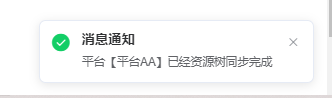
 点击同步之后更新数据,更新时间比较长,因此使用异步,之后该按钮置灰,在数据更新完成之后,服务端通知客户端已经同步成功,通知提示框,用户即可查看数据
前端
1、在对应的页面编写初始化、连接成功,错误,接受信息方法
// 初始化方法
init() {

  //1、websocket接口的url
      let ws =
        "http://localhost:21204/ws/platofrmAsync/" +
        this.$store.state.user.userId;

      // 实例化socket
      this.socket = new WebSocket(ws);
      // 监听socket连接
      this.socket.onopen = this.socketopen;
      // 监听socket错误信息
      this.socket.onerror = this.error;
      // 监听socket消息
      this.socket.onmessage = this.getMessage;
      // 监听socket断开连接的消息
      this.socket.close = this.close;
    },

// 连接成功方法
    socketopen() {
      console.log("socket连接成功");
    },
// 连接错误
    error() {
      console.log("连接错误");
    },
// 接受信息接口
    getMessage(message) {
      console.log("收到消息");
      //当接受到信息之后,就可以做后续的处理了
      let data = JSON.parse(message.data);
      this.$notify({
        title: "消息通知",
        type: "success",
        message: "平台【" + data.platformName + "】已经资源树同步完成",
        position: "bottom-right",
      });
      this.getList();
    },
// 关闭处理
    close() {
      console.log("连接关闭");
    },
2、mounted或者created方法中启动初始化方法
  mounted() {
    this.init();
  },
后端
1、配置ServerEndpointExporter
package com.eshore.framework.config.websocket;

import org.springframework.context.annotation.Bean;
import org.springframework.context.annotation.Configuration;
import org.springframework.web.socket.server.standard.ServerEndpointExporter;

@Configuration
public class WebSocketConfig {
    /**
     * 这个Bean的作用是自动注册使用了@ServerEndpoint注解的Bean
     */
    @Bean
    public ServerEndpointExporter serverEndpointExporter(){
        return new ServerEndpointExporter();
    }
}
2、编写ServerEndpoint
package com.eshore.web.websocket;

import lombok.extern.slf4j.Slf4j;
import org.springframework.stereotype.Component;

import javax.websocket.*;
import javax.websocket.server.ServerEndpoint;
import java.io.IOException;
import java.util.List;
import java.util.Map;
import java.util.concurrent.ConcurrentHashMap;

/**
 * author:walker
 * time: 2023/6/28
 * description:  平台同步
 */
@Component
@Slf4j
// 类似于controlelr 服务点
@ServerEndpoint(value = "/ws/platofrmAsync/{userId}")
public class PlatformAsyncWebSocket {

    // 用来存储每一个客户端对象对应的WsController对象
    private static Map<String, PlatformAsyncWebSocket> onlineUsers = new ConcurrentHashMap<>();
    // 声明Session对象,通过该对象可以给指定的用户发送请求
    private Session session;

    /**
     * 连接建立时被调用
     */
    @OnOpen
    public void onOpen(Session session, EndpointConfig config) {
        log.info("连接成功");
        // 将局部的session对象赋值给成员session对象
        this.session = session;
        // 这里是因为前端在传数据的时候,会将userId传过来
        //所以使用将userId和websocket对象存储起来,方便下次服务端推送信息的时候使用
        Map<String, List<String>> requestParameterMap = this.session.getRequestParameterMap();
        List<String> userIds = requestParameterMap.get("userId");
        String userId = userIds.get(0);
        onlineUsers.put(userId, this);

    }

    /**
     * 接收到客户端消息时被调用
     */
    @OnMessage
    public void onMessage(String message, Session session) {

    }

    /**
     * 连接被关闭时调用
     */
    @OnClose
    public void onClose(Session session) {
        //关闭时则将map中的用户移除
        Map<String, List<String>> requestParameterMap = session.getRequestParameterMap();
        List<String> userIds = requestParameterMap.get("userId");
        String userId = userIds.get(0);
        onlineUsers.remove(userId);
    }


    //推送消息
    //将消息推送给某个指定的用户
    public void sendMsg(String userId, String message) {
        try {
            PlatformAsyncWebSocket wsController = onlineUsers.get(userId);
            wsController.session.getBasicRemote().sendText(message);
        } catch (IOException e) {
            log.error("用户{} 发送信息{}失败", userId, message);
            e.printStackTrace();
        }

    }


}
3、编写测试服务端推送方法
package com.eshore.web.controller.test;

import com.alibaba.fastjson.JSON;
import com.eshore.biz.domain.BizPlatformInfo;
import com.eshore.web.websocket.PlatformAsyncWebSocket;
import org.springframework.beans.factory.annotation.Autowired;
import org.springframework.web.bind.annotation.GetMapping;
import org.springframework.web.bind.annotation.PathVariable;
import org.springframework.web.bind.annotation.RequestMapping;
import org.springframework.web.bind.annotation.RestController;

@RestController
@RequestMapping("/test")
public class WebsocketTest {

    @Autowired
    private PlatformAsyncWebSocket platformAsyncWebSocket;

    @GetMapping("/send/{userId}")
    public void testWsSend(@PathVariable(value = "userId") String userId){
        BizPlatformInfo bizPlatformInfo = new BizPlatformInfo();
        bizPlatformInfo.setId(1L);
        bizPlatformInfo.setPlatformName("平台AA");
        platformAsyncWebSocket.sendMsg(userId, JSON.toJSONString(bizPlatformInfo));
    }

}
测试
1、首先前端进入对应的页面,就会出现连接成功

2、调用测试方法
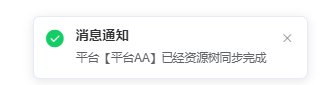
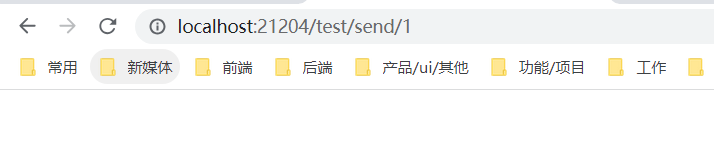 之后就可以看到 通知成功的信息了
本文由mdnice多平台发布