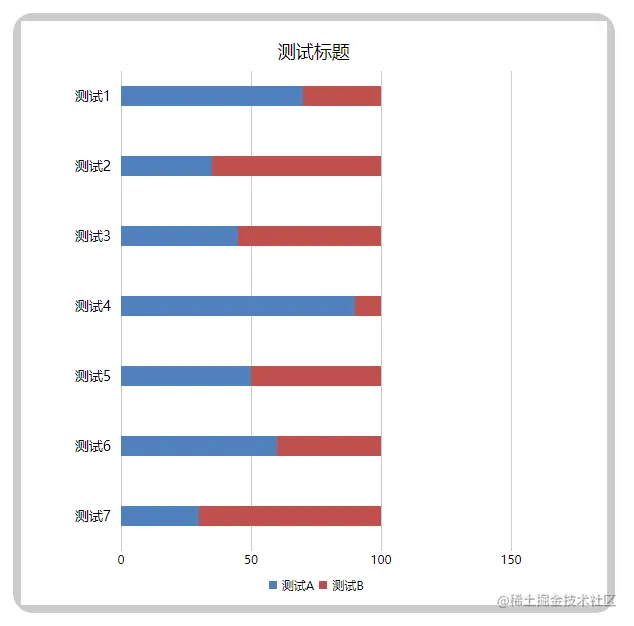
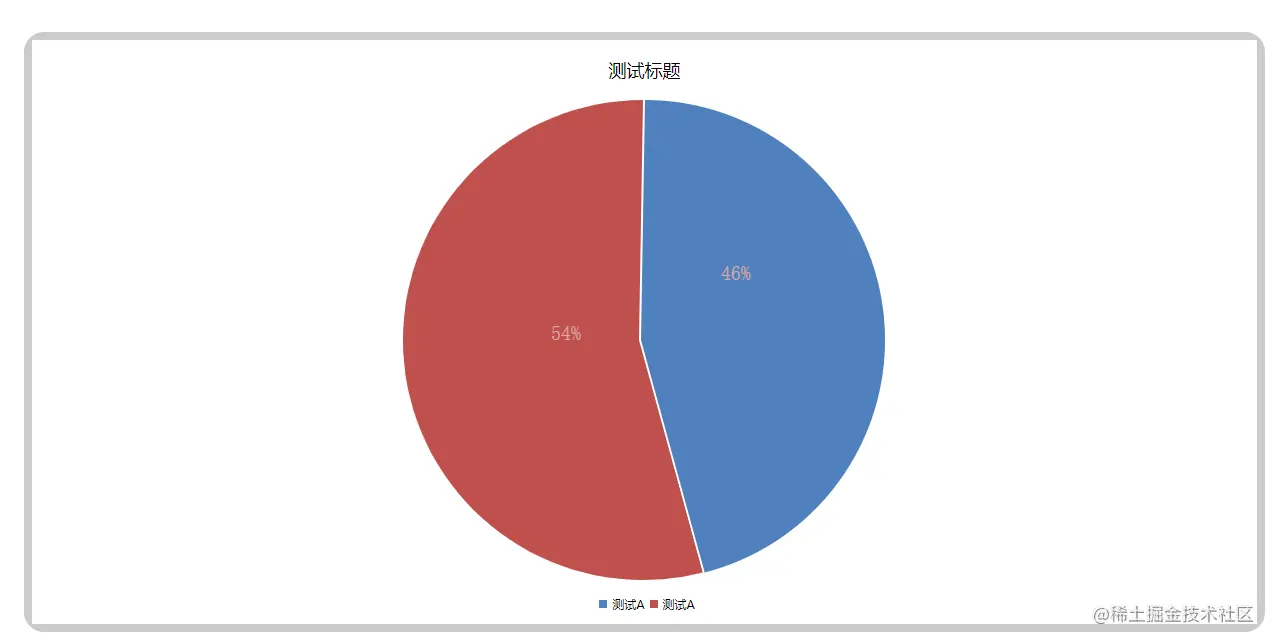
一、代码注释详解
- 柱状占比图通过
style占比实现,标识线及标识数字通过循环加style动态定位实现
- 动态饼状图通过canvas画圆中的
起点、终点、顺逆时针等实现,文字位置通过数据占比的多元表达式实现
- 需要注意的是当
左侧盒子高度及右侧盒子高度发生变化时,需要微调相关属性,否则会出现偏差
- 具体代码及注释如下:
<template>
<div class="box">
<div class="graphicalProportion">
<div class="leftCylindricality">
<div class="leftCylindricalityContent">
<div class="title">测试标题</div>
<div class="chartColumn">
<div class="chartColumnTerm" v-for="item in list">
<div class="category">
{{ item.category }}
</div>
<div class="proportion">
<div class="called" :style="{ 'width': item.called + '%' }"></div>
<div class="uncalled" :style="{ 'width': item.uncalled + '%' }"></div>
</div>
</div>
<div class="call" v-for="ele, index in 4" :style="{ 'left': index * 130 + 100 + 'px' }">
<div class="callLine"></div>
<div class="callNum">{{ 50 * index }}</div>
</div>
</div>
<div class="identifying">
<div class="identifyingLeft">
<div class="identifyingLeftBlock"></div>
<div class="identifyingLeftText">测试A</div>
</div>
<div class="identifyingRight">
<div class="identifyingRightBlock"></div>
<div class="identifyingRightText">测试B</div>
</div>
</div>
</div>
</div>
<div class="rightCylindricality">
<div class="rightCylindricalityContent">
<div class="title">测试标题</div>
<div class="sectorProportion">
<canvas id="myCanvas" ref="myCanvas" width="488" height="480"> </canvas>
</div>
<div class="identifying" style="margin-top: 15px;">
<div class="identifyingLeft">
<div class="identifyingLeftBlock"></div>
<div class="identifyingLeftText">测试A</div>
</div>
<div class="identifyingRight">
<div class="identifyingRightBlock"></div>
<div class="identifyingRightText">测试A</div>
</div>
</div>
</div>
</div>
</div>
</div>
</template>
<script setup>
import { ref, reactive, toRefs } from 'vue';
const data = reactive({
list: [{
category: '测试1',
called: 70,
uncalled: 30
}, {
category: '测试2',
called: 35,
uncalled: 65
}, {
category: '测试3',
called: 45,
uncalled: 55
}, {
category: '测试4',
called: 90,
uncalled: 10
}, {
category: '测试5',
called: 50,
uncalled: 50
}, {
category: '测试6',
called: 60,
uncalled: 40
}, {
category: '测试7',
called: 30,
uncalled: 70
}],
leftProportion: 54,
rightProportion: 46,
})
const { list } = toRefs(data)
onMounted(() => {
const canvas = document.getElementById('myCanvas');
const ctx = canvas.getContext('2d');
ctx.beginPath()
ctx.moveTo(238, 240)
ctx.arc(canvas.width / 2 - 2, canvas.height / 2, 240, 1.5 * Math.PI, (1.5 - data.leftProportion / 50) * Math.PI, true)
ctx.closePath()
ctx.fillStyle = '#c0504d'
ctx.fill()
ctx.beginPath()
ctx.moveTo(240, 240)
ctx.arc(canvas.width / 2, canvas.height / 2, 240, 1.5 * Math.PI, (1.5 + data.rightProportion / 50) * Math.PI, false)
ctx.closePath()
ctx.fillStyle = '#4f81bd'
ctx.fill()
ctx.beginPath();
ctx.fillStyle = '#dfa7a6';
ctx.font = '20px serif';
ctx.fillText(data.leftProportion + '%', data.leftProportion > 20 ? 150 : data.leftProportion <= 10 ? data.leftProportion <= 5 ? 220 : 200 : 170, data.leftProportion > 20 ? data.leftProportion > 25 ? data.leftProportion > 50 ? 240 : 180 : 130 : data.leftProportion <= 10 ? 60 : 90);
ctx.closePath();
ctx.beginPath();
ctx.fillStyle = '#dfa7a6';
ctx.font = '20px serif';
ctx.fillText(data.rightProportion + '%', data.rightProportion > 20 ? 320 : data.rightProportion <= 10 ? data.rightProportion <= 5 ? 245 : 270 : 290, data.rightProportion > 20 ? data.rightProportion > 25 ? data.rightProportion > 50 ? 240 : 180 : 130 : data.rightProportion <= 10 ? 60 : 90);
ctx.closePath();
})
</script>
<style scoped lang="scss">
.box {
padding: 20px;
}
.title {
line-height: 60px;
text-align: center;
font-size: 18px;
}
.identifying {
display: flex;
align-items: center;
font-size: 12px;
justify-content: center;
margin-top: 5px;
.identifyingLeft,
.identifyingRight {
display: flex;
align-items: center;
}
.identifyingLeftBlock,
.identifyingRightBlock {
width: 8px;
height: 8px;
margin: 5px;
}
.identifyingLeftBlock {
background-color: #4f81bd;
}
.identifyingRightBlock {
background-color: #c0504d;
}
}
.graphicalProportion {
display: flex;
justify-content: space-between;
.leftCylindricality {
width: 32%;
height: 600px;
background-color: #ccc;
padding: 8px;
border-radius: 20px;
box-sizing: border-box;
.leftCylindricalityContent {
position: relative;
background-color: #fff;
width: 100%;
height: 100%;
.call {
font-size: 12px;
position: absolute;
top: 50px;
.callLine {
height: 480px;
width: 1px;
background-color: #ccc;
}
.callNum {
transform: translateX(-50%);
}
}
.chartColumn {
.chartColumnTerm {
display: flex;
>div {
margin-bottom: 45px;
margin-top: 5px;
}
.category {
width: 100px;
text-align: right;
padding-right: 10px;
line-height: 20px;
font-size: 14px;
}
.proportion {
display: flex;
align-items: center;
width: 260px;
height: 20px;
z-index: 999;
.called {
background-color: #4f81bd;
height: 100%;
}
.uncalled {
background-color: #c0504d;
height: 100%;
}
}
}
}
}
}
.rightCylindricality {
width: 66%;
height: 600px;
background-color: #ccc;
padding: 8px;
border-radius: 20px;
margin-left: 20px;
box-sizing: border-box;
.rightCylindricalityContent {
position: relative;
background-color: #fff;
width: 100%;
height: 100%;
.sectorProportion {
width: 488px;
height: 480px;
margin: 0 auto;
}
}
}
}
</style>
二、效果展示