效果图
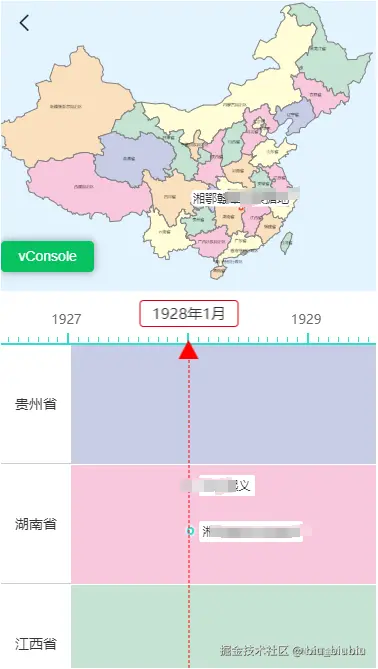
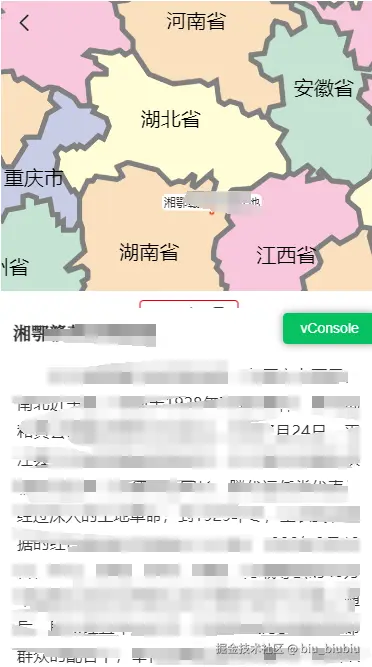
该功能分为地图和刻度尺两个模块,地图是使用了d3js,有缩放功能,刻度尺是直接使用了js,并且选中的时候可以弹窗形式展示详情信息,直接看源码
- 地图模块
<template>
  <div class="china-map" id="chinaMap"></div>
</template>
<script setup>
import defUrl from '@/assets/img/def.png'
const { proxy } = getCurrentInstance()
import * as d3 from 'd3'
import { geoPath } from 'd3-geo'
import mapSource from './china.json'
const svgVo = reactive({
width: 0,
height: 0,
vm: null,
gVm: null,
projectionVm: null
})
const mapColor = new Map([
['黑龙江省', '#C5E4D4'],
['内蒙古自治区', '#FFFDD7'],
['吉林省', '#F8C7DC'],
['辽宁省', '#C7CDE7'],
['河北省', '#F8C7DC'],
['北京市', '#FFFDD7'],
['天津市', '#FFFDD6'],
['上海市', '#F8C7DC'],
['山西省', '#C5E4D4'],
['山东省', '#FFFDD7'],
['河南省', '#FAE0BF'],
['安徽省', '#C5E4D4'],
['江苏省', '#F8C7DC'],
['浙江省', '#FFFDD7'],
['福建省', '#FAE0BF'],
['江西省', '#F8C7DC'],
['湖南省', '#FAE0BF'],
['湖北省', '#FFFDD7'],
['陕西省', '#F8C7DC'],
['宁夏回族自治区', '#FAE0BF'],
['甘肃省', '#C5E4D4'],
['四川省', '#FAE0BF'],
['重庆市', '#C7CDE7'],
['贵州省', '#C5E4D4'],
['广西壮族自治区', '#F8C7DC'],
['广东省', '#FFFDD7'],
['海南省', '#FAE0BF'],
['台湾省', '#C5E4D4'],
['云南省', '#FFFDD7'],
['青海省', '#C7CDE7'],
['西藏自治区', '#F8C7DC'],
['新疆维吾尔自治区', '#FAE0BF'],
['香港特别行政区', '#F8C7DC'],
['澳门特别行政区', '#C5E4D4']
])
const emit = defineEmits(['change'])
const BD09ToWGS84 = ([lng, lat]) => {
return gcoord.transform(
[lng, lat],
gcoord.BD09,
gcoord.WGS84
)
}
const removePoi = () => {
svgVo.gVm.selectAll('.poi-text-group').remove()
}
const createPoiImg = ([x, y], info) => {
const g = svgVo.gVm
.append('g')
.attr('id', 'ccca')
.attr('class', 'poi-text-group')
.attr('transform', `translate(${x},${y})`)
g.append('pattern')
.attr('height', '1')
.attr('width', '1')
.attr('patternContentUnits', 'objectBoundingBox')
.attr('id', 'poiImg')
.append('image')
.attr('height', '1')
.attr('width', '1')
.attr('preserveAspectRatio', 'none')
.attr('xlink:href', info.imgUrl || defUrl)
.style('object-fit', 'cover')
g.append('marker')
.attr('id', 'resolved')
.attr('markerUnits', 'userSpaceOnUse')
.attr('viewBox', '0 -5 10 10')
.attr('refX', 0)
.attr('refY', 0)
.attr('markerWidth', 20)
.attr('markerHeight', 10)
.attr('orient', '90deg')
.attr('stroke-width', 10)
.append('path')
.attr('d', 'M0,-5L10,0L0,5')
.attr('fill', '#fff')
g.append('line')
.attr('x1', 0)
.attr('y1', 0)
.attr('x2', 0)
.attr('y2', -10)
.attr('stroke', 'rgba(255,255,255,0)')
.attr('stroke-width', 5)
.attr('marker-end', 'url(#resolved)')
g.append('circle')
.attr('r', 20)
.attr('cx', 0)
.attr('cy', -28)
.attr('stroke', '#fff')
.attr('stroke-width', '3')
.attr('fill', 'url(#poiImg)')
}
const createPoiText = ([x, y], info) => {
const { eventName: text } = info
const fontSize = 12
const padding = 4
const rectW = text.length * fontSize + padding
const rectX = -(rectW / 2)
const g = svgVo.gVm
.append('g')
.attr('id', x + y + '')
.attr('class', 'poi-text-group')
.attr('transform', `translate(${x},${y})`)
.attr('_x', x)
.attr('_y', y)
g.append('circle')
.attr('r', 3)
.attr('stroke', '#fff')
.attr('stroke-width', '0.5')
.attr('fill', 'rgba(223, 51, 0, 0.60)')
.attr('cx', 0)
.attr('cy', 0)
.style('transform', 'rotateX(45deg)')
g.append('marker')
.attr('id', 'resolved')
.attr('markerUnits', 'userSpaceOnUse')
.attr('viewBox', '0 -5 10 10')
.attr('refX', 0)
.attr('refY', 0)
.attr('markerWidth', 10)
.attr('markerHeight', 5)
.attr('orient', '90deg')
.attr('stroke-width', 5)
.append('path')
.attr('d', 'M0,-5L10,0L0,5')
.attr('fill', '#fff')
g.append('line')
.attr('x1', 0)
.attr('y1', 0)
.attr('x2', 0)
.attr('y2', -4.5)
.attr('stroke', 'rgba(255,255,255,0)')
.attr('stroke-width', 5)
.attr('marker-end', 'url(#resolved)')
g.append('rect')
.attr('rx', 5)
.attr('fill', 'rgba(255, 255, 255, 1)')
.attr('width', rectW)
.attr('height', 16.5)
.attr('x', rectX)
.attr('y', -19)
g.append('text')
.attr('x', rectX + padding / 2)
.attr('y', -6)
.attr('fill', '#333333')
.attr('font-size', fontSize)
.text(text)
.on('click', () => {
emit('change', info.eventId)
})
}
const createPoi = (info, isText = true) => {
if (!info) {
return
}
const newCp = svgVo.projectionVm(BD09ToWGS84([info.longitude, info.latitude]))
if (isText) {
createPoiText(newCp, info)
} else {
createPoiImg(newCp, info)
}
}
const init = async () => {
const projection = d3
.geoMercator()
.center([106.6113, 26.9385])
.scale(350)
.translate([svgVo.width / 2 + 10, svgVo.height - 70])
svgVo.projectionVm = projection
const _geoPath = geoPath(projection)
svgVo.vm = d3
.select('#chinaMap')
.append('svg')
.attr('id', 'chinaMapSvg')
.attr('width', svgVo.width)
.attr('height', svgVo.height)
const g = svgVo.vm
.append('g')
.attr('id', 'mapG')
.attr('width', 300)
.attr('height', 300)
.attr('translate', '0,0')
.attr('scale', 1)
.attr('height', 300)
.attr('transform', 'translate(0,0) scale(1)')
svgVo.gVm = g
const zoomd = d3
.zoom()
.scaleExtent([1, 5])
.on('zoom', ({ transform }) => {
const poiTextGroup = svgVo.gVm.selectAll('.poi-text-group')
let k = 1 / transform.k
poiTextGroup._groups.map((nodeList) => {
for (let i = 0; i < nodeList.length; i++) {
const _ = nodeList[i]
_.setAttribute(
'transform',
`translate(${_.getAttribute('_x')},${_.getAttribute(
'_y'
)}) scale(${k})`
)
}
})
g.attr('translate', `${transform.x},${transform.y}`)
.attr('scale', transform.k)
.attr(
'transform',
`translate(${transform.x},${transform.y}) scale(${transform.k})`
)
})
svgVo.vm.call(zoomd).on('dblclick.zoom', null)
g.append('g')
.selectAll('path')
.data(mapSource.features)
.enter()
.append('path')
.attr('stroke', 'gray')
.attr('stroke-width', 1)
.attr('d', (d) => {
return _geoPath(d)
})
.attr('fill', (d) => {
return mapColor.get(d.properties.name)
})
g.append('g')
.selectAll('text')
.data(mapSource.features)
.enter()
.append('text')
.attr('font-size', 4)
.attr('text-anchor', 'middle')
.attr('x', (d, i) => {
const position = projection(d.properties.cp || [0, 0])
return position[0]
})
.attr('y', (d, i) => {
const position = projection(d.properties.cp || [0, 0])
return position[1]
})
.attr('dy', (d, i) => {
if (d.properties.name === '澳门特别行政区') {
return 10
}
})
.text((d, i) => {
return d.properties.name
})
}
defineExpose({
createPoi,
removePoi
})
onMounted(() => {
proxy.$nextTick(() => {
svgVo.width = document.getElementById('chinaMap').offsetWidth
svgVo.height = document.getElementById('chinaMap').offsetHeight
init()
})
})
</script>
<style scoped lang="scss">
.china-map {
  height: 100%;
  width: 100%;
  svg {
    width: 100%;
    height: 100%;
  }
}
</style>
- 刻度尺
<template>
<div class="chronological-table">
<NavBar ref="pageContainer" fixed :share="false" />
<header>
<ChinaMap ref="chinaMap" @change="changePoi" />
</header>
<section
class="hide-scroll"
@touchstart="_touchstart"
@touchend="_touchend"
@touchmove="_touchmove"
@scroll="scrollFn"
ref="section"
>
<div class="rulers">
<div class="left-ruler-line"></div>
<div class="ruler" ref="ruler">
<div class="ruler-ticks">
<div
class="ruler-tick"
:class="[index % 12 === 0 && 'ruler-tick-big']"
v-for="(tick, index) in state.ticks"
:key="tick"
>
<span>{{
index % 12 === 0 ? getNowTime(index * interval, false) : ''
}}</span>
</div>
</div>
<div class="ruler-line"></div>
</div>
<div class="right-ruler-line"></div>
</div>
<div class="list">
<div class="list-item" v-for="(item, index) in list" :key="index">
<div class="list-item-menu">
<label>{{ item.name }}</label>
</div>
<div class="list-item-content" :style="listItemContentStyle(item)">
<div class="placeholder"></div>
<div class="year-section">
<div class="mask-text"></div>
<div
class="poi-text"
:class="nowPoiText === info.id && 'now-poi-text'"
v-for="(info, infoIndex) in item.eventList"
:key="infoIndex + '-' + index"
:style="poiTextStyle(info, info.yearInt, infoIndex)"
@touchend.stop
@click.stop="changeText(info, info.yearInt)"
>
{{ info.eventName }}
</div>
</div>
</div>
</div>
</div>
</section>
<div class="pointer">
<p class="poi-x">{{ nowTime }}</p>
</div>
</div>
<ActionSheet v-model="show" :topH="topH" :overlay="false">
<template #default>
<div class="sheet-content">
<header>
<img v-lazy="details.imgUrl" v-if="details.imgUrl" />
<div class="right">
<div class="right-title">{{ details.title }}</div>
<div class="right-dsc">
{{ details.subtitle }}
</div>
</div>
</header>
<div class="texts">
<div class="text-item">
<div class="dsc" v-html="details.summaryText"></div>
</div>
</div>
</div>
</template>
</ActionSheet>
</template>
<script setup>
import NavBar from '@/components/navBar/index.vue'
import { useTouch } from '@/hooks/chartTool'
import ChinaMap from '@/views/chronologicalTable/ChinaMap.vue'
import { apiRedChinaMediaEventHistoryChronologyV2 } from '@/api'
import { useEventDetails } from '@/hooks/tool'
import ActionSheet from '@/components/ActionSheet.vue'
const { proxy } = getCurrentInstance()
const show = ref(false)
const pageContainer = ref()
const topH = ref(0)
const tickStartTime = 1919
const tickEndTime = new Date().getFullYear()
const nowM = new Date().getMonth() + 1
const month = (tickEndTime - tickStartTime) * 12 + nowM
const placeholderW = document.body.offsetWidth / 2 - 70
const blockH = '120px'
const interval = 10
const nowPoiText = ref(null)
const state = reactive({
timeScaleEvent: {},
nowTime: '',
letGo: false,
timeId: '',
poiX: '',
ticks: [],
tickInterval: interval,
rulerLength: month * interval
})
const { details, getApiEventDetails, openUrl } = useEventDetails()
const list = ref([])
const poiXTimeId = ref('')
const nowTime = computed({
get: () => getNowTime(state.poiX),
set: (poiX) => getNowTime(poiX)
})
const _touchstart = (e) => {
touchAction.value = 'auto'
state.letGo = false
touchstart(e)
}
const _touchend = (e) => {
touchend(e)
}
const touchAction = ref('auto')
const _touchmove = (e) => {
touchMove(e)
}
const getList = async () => {
list.value = await apiRedChinaMediaEventHistoryChronologyV2()
getTimeScaleEvent()
proxy.$nextTick(() => {
list.value = list.value.map((item) => {
item.startYear =
Math.min.apply(
Math,
item.eventList.map((_) => _.yearInt)
) + ''
item.startYearInfo =
item.eventList[
item.eventList.findIndex((_) => _.yearInt === item.startYear)
]
return item
})
const minYear =
Math.min.apply(
Math,
list.value.map((_) => _.startYear)
) + ''
const minInfo =
list.value[list.value.findIndex((_) => _.startYear === minYear)]
.startYearInfo
proxy.$refs.section.scrollLeft = timeToPoiX(
minInfo.yearInt,
minInfo.monthStr,
tickStartTime
)
})
}
const getTimeScaleEvent = () => {
list.value.map((item) => {
item.eventList.map((_) => {
const y = _.yearInt + '年'
const m = (_.monthStr ? Number(_.monthStr) : 1) + '月'
const key = y + m
if (!state.timeScaleEvent.hasOwnProperty(key)) {
state.timeScaleEvent[key] = []
}
state.timeScaleEvent[key].push({
..._,
parentInfo: item
})
})
})
}
const timeTOEvent = (time) => {
const arr = state.timeScaleEvent[time] || []
proxy.$refs.chinaMap.removePoi()
arr.map((item) => {
proxy.$refs.chinaMap.createPoi(item)
})
arr.length && show.value && getApiEventDetails(arr[0].eventId)
}
const timeToPoiX = (time, M = 1, startTime) => {
const _ = Number(M) * interval
return Math.abs(time - startTime) * 10 * 12 + _
}
const changePoi = (eventId) => {
getApiEventDetails(eventId)
}
const changeText = (info) => {
nowPoiText.value = info.id
const nowPoiX = state.poiX
const targetPoiX = timeToPoiX(info.yearInt, info.monthStr, tickStartTime)
disMove(proxy.$refs.section, 'scrollLeft', nowPoiX, targetPoiX)
getApiEventDetails(info.eventId)
}
watch(
() => details.value,
(data) => {
console.log(data)
if (data.summaryUrl) {
openUrl(data.summaryUrl)
} else {
show.value = true
}
}
)
const disMove = (moveDom, direction, start, end, speed = 10) => {
let timer = null
const _diff = Math.abs(start - end)
let i = 0
const fn = () => {
if (start > end) {
moveDom[direction] -= parseInt(_diff / speed)
} else {
moveDom[direction] += parseInt(_diff / speed)
}
++i
if (i === speed) {
cancelAnimationFrame(timer)
return
}
timer = requestAnimationFrame(fn)
}
timer = requestAnimationFrame(() => {
fn()
})
}
const getNowTime = (poiX, showMonth = true) => {
const year = poiX / 10 / 12
const nowMonth = parseInt((poiX / 10) % 12) + 1
const nowYear = parseInt(tickStartTime + year)
const text = showMonth ? nowYear + '年' + nowMonth + '月' : nowYear
return text
}
const color = ['#C5E4D4', '#FFFDD7', '#F8C7DC', '#C7CDE7', '#F8C7DC', '#FAE0BF']
const listItemContentStyle = (info) => {
if (!info._color) {
info._color = color[Math.floor(Math.random() * 6)]
}
return {
background: info._color
}
}
const poiTextStyle = (info, startTIme, index) => {
const diffTopH = 23
const startTop = [0, diffTopH, diffTopH * 2, diffTopH * 3]
return {
left: timeToPoiX(info.yearInt, info.monthStr, tickStartTime) + 'px',
top: startTop[index % 4] + 'px'
}
}
watch(
() => state.poiX,
(newValue) => {
poiXTimeId.value && clearTimeout(poiXTimeId.value)
const _newValue = newValue
if (_newValue === newValue) {
poiXTimeId.value = setTimeout(() => {
timeTOEvent(nowTime.value)
}, 300)
}
}
)
const scrollFn = () => {
state.poiX = proxy.$refs.section.scrollLeft
state.timeId && clearTimeout(state.timeId)
state.timeId = setTimeout(() => {
if (state.letGo && state.poiX === proxy.$refs.section.scrollLeft) {
corrPoiX(true)
}
}, 200)
}
const corrPoiX = (status) => {
const diff = state.poiX % state.tickInterval
if (!diff) {
proxy.$refs.section.scrollLeft = state.poiX
} else if (diff <= 5) {
state.poiX -= diff
} else {
state.poiX = state.poiX - diff + state.tickInterval
}
proxy.$refs.section.scrollLeft = state.poiX
nowTime.value = state.poiX
if (status) {
}
setTimeout(() => {}, 200)
console.log('修正的poiX', state.poiX, status)
}
const touchendFn = () => {
state.poiX = proxy.$refs.section.scrollLeft
state.letGo = true
corrPoiX()
}
const { moveDirection, touchstart, touchMove, touchend } = useTouch(
0,
touchendFn
)
const rulerLengthPx = computed(() => {
return state.rulerLength + 'px'
})
const leftRulerLinePx = computed(() => {
return document.body.offsetWidth / 2 + 'px'
})
const placeholderWPx = computed(() => {
return placeholderW + 'px'
})
const allLenPx = computed(() => {
return document.body.offsetWidth + state.rulerLength + 'px'
})
const isIos = computed(() => {
return /ios|iphone|ipad|ipod/.test(navigator.userAgent.toLowerCase())
})
watch(
() => moveDirection.value,
(newValue) => {
if (!isIos.value) {
return
}
if (newValue === 1 || newValue === 2) {
touchAction.value = 'pan-y'
} else if (newValue === 3 || newValue === 4) {
touchAction.value = 'pan-x'
} else {
touchAction.value = 'auto'
}
}
)
const generateTicks = () => {
const numTicks = Math.floor(state.rulerLength / state.tickInterval)
state.ticks = Array.from(
{ length: numTicks + 1 },
(_, index) => index * state.tickInterval
)
proxy.$nextTick(() => {
state.poiX = proxy.$refs.section.scrollLeft
})
}
onMounted(() => {
getList()
generateTicks()
proxy.$nextTick(async () => {
const { height } = await rch.getStatusBarHeight()
topH.value = height
})
})
</script>
<style scoped lang="scss">
.chronological-table {
height: 100%;
display: flex;
flex-direction: column;
align-items: center;
user-select: none;
position: relative;
header {
width: 100%;
height: 290px;
background: #e3f4ff;
}
.pointer {
width: 0;
height: calc(100% - 290px - 54px);
box-sizing: border-box;
border-left: 2px dashed red;
position: fixed;
left: 50%;
bottom: 0;
transform: translate(-50%, 0);
z-index: 99;
.poi-x {
padding: 2px 12px;
position: absolute;
white-space: nowrap;
left: -50%;
transform: translateX(-50%);
top: -60px;
font-size: 15px;
font-family: PingFangSC-Regular, PingFang SC;
font-weight: 400;
color: #333333;
line-height: 21px;
background: #ffffff;
border-radius: 4px;
border: 1px solid #df0010;
backdrop-filter: blur(10px);
}
&:after {
position: absolute;
content: ' ';
left: -11px;
top: -5px;
border-left: 10px solid transparent;
border-right: 10px solid transparent;
border-bottom: 20px solid red;
}
}
section {
width: 100%;
height: calc(100% - 290px);
overflow: auto;
overflow-scrolling: touch;
overscroll-behavior-x: none;
overscroll-behavior-y: none;
touch-action: v-bind(touchAction);
.list {
position: relative;
z-index: 8;
&-item {
display: flex;
width: v-bind(allLenPx);
height: v-bind(blockH);
border-bottom: 1px solid #fff;
&-menu {
width: 70px;
position: sticky;
font-size: 14px;
font-family: PingFangSC-Regular, PingFang SC;
font-weight: 400;
color: #333333;
line-height: 20px;
top: 0;
left: 0;
will-change: transform;
z-index: 11;
border-bottom: 1px solid #cccccc;
label {
width: 100%;
height: 100%;
user-select: none;
background: white;
text-align: center;
display: flex;
align-items: center;
justify-content: center;
}
}
&-content {
flex: 1;
display: flex;
.placeholder {
width: v-bind(placeholderWPx);
height: 100%;
}
.year-section {
width: v-bind(rulerLengthPx);
position: relative;
user-select: none;
height: 100%;
.mask-text {
font-size: 11px;
font-family: PingFangSC-Regular, PingFang SC;
font-weight: 400;
color: rgba(0, 0, 0, 0.5);
line-height: 16px;
height: 100%;
display: flex;
align-items: center;
justify-content: center;
}
.poi-text {
position: absolute;
z-index: 1;
padding: 2px 4px;
background: #ffffff;
border-radius: 2px;
transform: translate(10px, 10px);
left: 100px;
top: 0;
font-size: 12px;
font-family: PingFangSC-Regular, PingFang SC;
font-weight: 400;
color: #333333;
line-height: 17px;
white-space: nowrap;
&:nth-child(2n + 2) {
top: 21px;
}
&:nth-child(2n + 3) {
top: 63px;
}
&:after {
position: absolute;
content: '';
width: 8px;
height: 8px;
border-radius: 50%;
background: #fff;
border: 2.5px solid rgba(52, 219, 201, 1);
left: -12px;
top: 30%;
box-shadow: 0px 0px 2px 2px rgba(255, 255, 255, 0.5);
}
}
.now-poi-text {
z-index: 7;
}
}
}
.menu-relative {
}
.menu-fixed {
}
}
}
.rulers {
display: -webkit-box;
-webkit-box-align: end;
width: v-bind(allLenPx);
position: sticky;
position: -webkit-sticky;
padding-top: 42px;
top: 0;
z-index: 10;
background: white;
.left-ruler-line,
.right-ruler-line {
width: v-bind(leftRulerLinePx);
height: 2px;
background-color: rgba(52, 219, 201, 1);
}
.ruler {
display: flex;
align-items: center;
flex-direction: column;
}
.ruler-line {
width: v-bind(rulerLengthPx);
height: 2px;
background-color: rgba(52, 219, 201, 1);
}
.ruler-ticks {
display: flex;
justify-content: space-between;
width: v-bind(rulerLengthPx);
}
.ruler-tick {
display: inline-block;
width: 1px;
height: 5px;
margin-top: 4px;
background-color: rgba(52, 219, 201, 1);
&-big {
margin-top: 0px;
width: 2px;
height: 10px;
position: relative;
span {
font-size: 13px;
font-family: PingFangSC-Regular, PingFang SC;
font-weight: 400;
color: #666666;
line-height: 18px;
position: absolute;
left: -50%;
top: -50%;
transform: translate(-50%, -100%);
}
}
}
}
}
}
.sheet-content {
header {
display: flex;
padding: 12px;
img {
width: 100px;
height: 128px;
border-radius: 6px;
object-fit: cover;
margin-right: 12px;
}
.right {
&-title {
font-size: 18px;
font-family: PingFangSC-Medium, PingFang SC;
font-weight: bold;
color: #333333;
line-height: 25px;
}
&-dsc {
margin-top: 4px;
font-size: 12px;
font-family: PingFangSC-Medium, PingFang SC;
font-weight: 500;
color: #999999;
line-height: 20px;
}
}
}
.texts {
.text-item {
border: 0;
font-size: 14px;
font-family: PingFangSC-Light, PingFang SC;
font-weight: 300;
color: #333333;
line-height: 20px;
padding-top: 0;
:deep(.dsc) {
> p:nth-child(1) {
margin-top: 0;
}
}
}
}
}
</style>