1. 3D场景构成要素
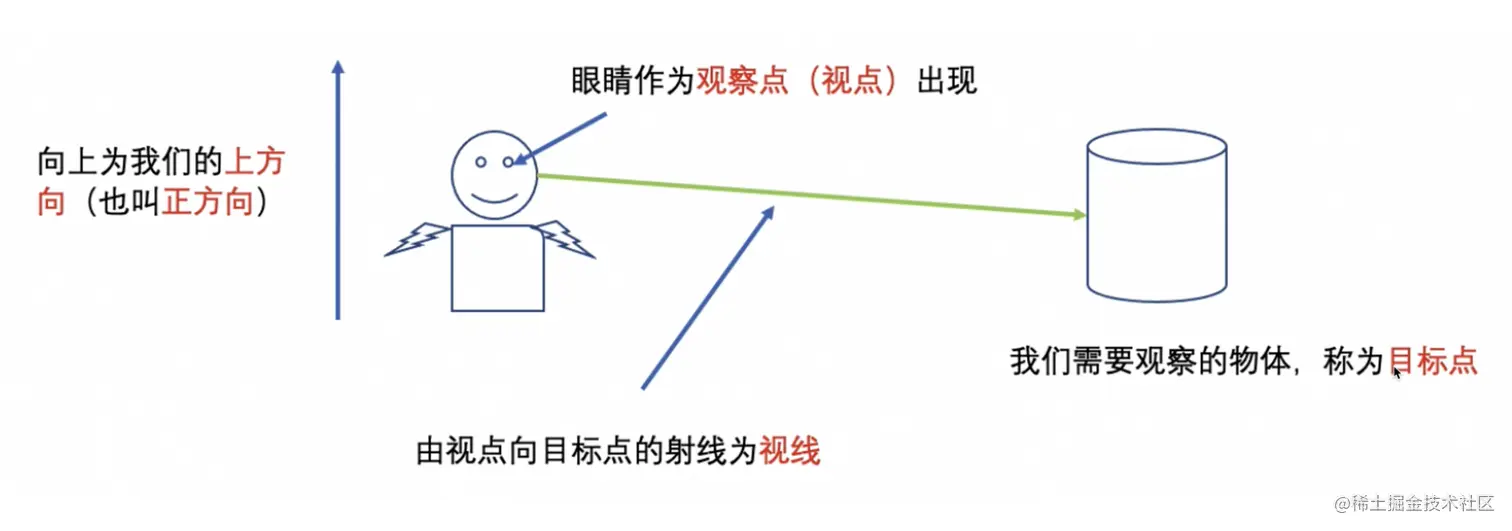
2. 观察平面
(1) 通过观察平面显示物体
- 观察平面创建新的坐标系
- 物体的所有坐标投影到坐标系上
(2) 创建坐标系的辅助函数
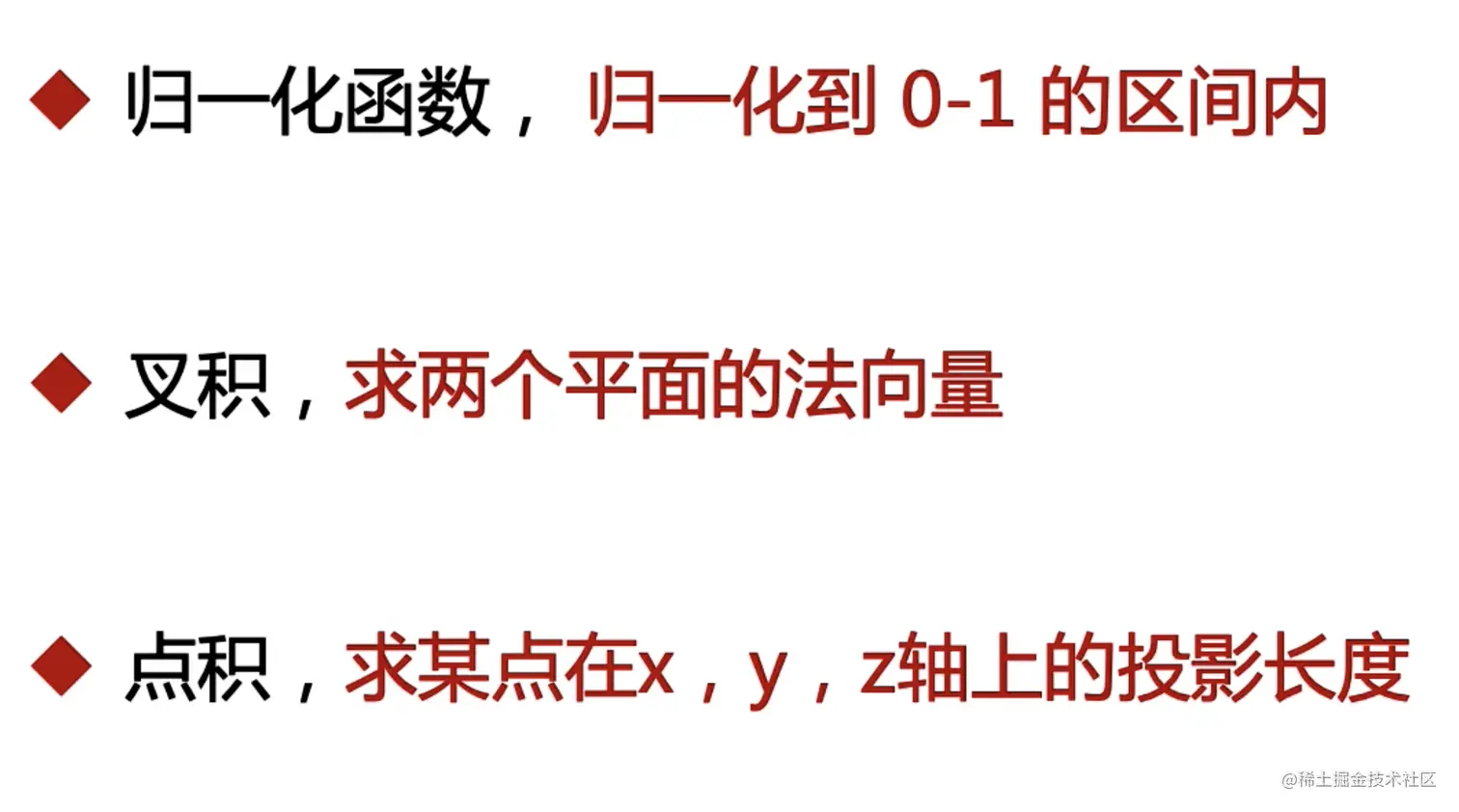

(3) 公共方法
function initShader(gl, VERTEX_SHADER_SOURCE, FRAGMENT_SHADER_SOURCE) {
const vertexShader = gl.createShader(gl.VERTEX_SHADER)
const fragmentShader = gl.createShader(gl.FRAGMENT_SHADER)
gl.shaderSource(vertexShader, VERTEX_SHADER_SOURCE)
gl.shaderSource(fragmentShader, FRAGMENT_SHADER_SOURCE)
gl.compileShader(vertexShader)
gl.compileShader(fragmentShader)
const program = gl.createProgram()
gl.attachShader(program, vertexShader)
gl.attachShader(program, fragmentShader)
gl.linkProgram(program)
gl.useProgram(program)
return program
}
function getTranslateMatrix(x = 0, y = 0, z = 0) {
return new Float32Array([
1.0, 0.0, 0.0, 0.0,
0.0, 1.0, 0.0, 0.0,
0.0, 0.0, 1.0, 0.0,
x, y, z, 1,
])
}
function getScaleMatrix(x = 1, y = 1, z = 1) {
return new Float32Array([
x, 0.0, 0.0, 0.0,
0.0, y, 0.0, 0.0,
0.0, 0.0, z, 0.0,
0.0, 0.0, 0.0, 1,
])
}
function getRotateMatrix(deg) {
return new Float32Array([
Math.cos(deg), Math.sin(deg), 0.0, 0.0,
-Math.sin(deg), Math.cos(deg), 0.0, 0.0,
0.0, 0.0, 1.0, 0.0,
0.0, 0.0, 0.0, 1,
])
}
function mixMatrix(A, B) {
const result = new Float32Array(16)
for (let i = 0; i < 4; i++) {
result[i] = A[i] * B[0] + A[i + 4] * B[1] + A[i + 8] * B[2] + A[i + 12] * B[3]
result[i + 4] = A[i] * B[4] + A[i + 4] * B[5] + A[i + 8] * B[6] + A[i + 12] * B[7]
result[i + 8] = A[i] * B[8] + A[i + 4] * B[9] + A[i + 8] * B[10] + A[i + 12] * B[11]
result[i + 12] = A[i] * B[12] + A[i + 4] * B[13] + A[i + 8] * B[14] + A[i + 12] * B[15]
}
return result
}
function normalized(arr) {
let sum = 0;
for (let i = 0; i < arr.length; i++) {
sum += arr[i] * arr[i]
}
const middle = Math.sqrt(sum);
for (let i = 0; i < arr.length; i++) {
arr[i] = arr[i] / middle;
}
}
function cross(a,b) {
return new Float32Array([
a[1] * b[2] - a[2] * b[1],
a[2] * b[0] - a[0] * b[2],
a[0] * b[1] - a[1] * b[0],
])
}
function dot(a, b) {
return a[0] * b[0] + a[1] * b[1] + a[2] * b[2]
}
function minus(a, b) {
return new Float32Array([
a[0] - b[0],
a[1] - b[1],
a[2] - b[2],
])
}
function getViewMatrix(eyex, eyey, eyez, lookAtx, lookAty, lookAtz, upx, upy, upz) {
const eye = new Float32Array([eyex, eyey, eyez])
const lookAt = new Float32Array([lookAtx, lookAty, lookAtz])
const up = new Float32Array([upx, upy, upz])
const z = minus(eye, lookAt);
normalized(z);
normalized(up);
const x = cross(z, up);
normalized(x);
const y = cross(x, z);
return new Float32Array([
x[0], y[0], z[0], 0,
x[1], y[1], z[1], 0,
x[2], y[2], z[2], 0,
-dot(x,eye),-dot(y,eye),-dot(z,eye),1
])
}
function getOrtho(l, r, t, b, n, f) {
return new Float32Array([
2 / (r - l), 0, 0, 0,
0, 2/(t-b), 0, 0,
0, 0, -2/(f-n), 0,
-(r+l)/(r-l),-(t+b)/(t-b),-(f+n)/(f-n),1
])
}
function getPerspective(fov, aspect, far, near) {
fov = fov * Math.PI / 180;
return new Float32Array([
1/(aspect*Math.tan(fov / 2)), 0, 0, 0,
0, 1/(Math.tan(fov/2)),0,0,
0,0,-(far+near)/(far-near),-(2*far*near)/(far-near),
0,0,-1,0,
])
}
function distanceSelf(a, b) {
const x = a[0] - b[0]
const y = a[1] - b[1]
const z = a[2] - b[2]
const v = x * x + y * y + z * z;
return Math.sqrt(v)
}
3. 透视投影
/** @type {HTMLCanvasElement} */
const canvas = document.querySelector('#canvas')
const gl = canvas.getContext('webgl')
// 创建着色器源码
const VERTEX_SHADER_SOURCE = `
attribute vec4 aPosition
attribute vec4 aColor
varying vec4 vColor
uniform mat4 mat
void main() {
gl_Position = mat * aPosition
vColor = aColor
}
` // 顶点着色器
const FRAGMENT_SHADER_SOURCE = `
precision lowp float
varying vec4 vColor
void main() {
gl_FragColor = vColor
}
` // 片元着色器
const program = initShader(
gl,
VERTEX_SHADER_SOURCE,
FRAGMENT_SHADER_SOURCE
)
const aPosition = gl.getAttribLocation(program, 'aPosition')
const aColor = gl.getAttribLocation(program, 'aColor')
const mat = gl.getUniformLocation(program, 'mat')
// 创建三个点的数组
const points = new Float32Array([
0.75,1.0,-0.6, 1.0,0.0,0.0,
0.25,-1.0,-0.6, 1.0,0.0,0.0,
1.0, -1.0,-0.6, 1.0,0.0,0.0,
0.75,1.0,-0.5, 0.0,1.0,0.0,
0.25,-1.0,-0.5, 0.0,1.0,0.0,
1.0, -1.0,-0.5, 0.0,1.0,0.0,
0.75,1.0,-0.4, 0.0,0.0,1.0,
0.25,-1.0,-0.4, 0.0,0.0,1.0,
1.0, -1.0,-0.4, 0.0,0.0,1.0,
-0.75,1.0,-0.6, 1.0,0.0,0.0,
-0.25,-1.0,-0.6, 1.0,0.0,0.0,
-1.0, -1.0,-0.6, 1.0,0.0,0.0,
-0.75,1.0,-0.5, 0.0,1.0,0.0,
-0.25,-1.0,-0.5, 0.0,1.0,0.0,
-1.0, -1.0,-0.5, 0.0,1.0,0.0,
-0.75,1.0,-0.4, 0.0,0.0,1.0,
-0.25,-1.0,-0.4, 0.0,0.0,1.0,
-1.0, -1.0,-0.4, 0.0,0.0,1.0,
])
// 创建缓冲区对象
const buffer = gl.createBuffer()
// 绑定缓冲区对象
gl.bindBuffer(gl.ARRAY_BUFFER, buffer)
// 将数据写入缓冲区对象
gl.bufferData(gl.ARRAY_BUFFER, points, gl.STATIC_DRAW)
// 获取数据字节数
const BYTES = points.BYTES_PER_ELEMENT
// 将数据写入缓冲区对象
gl.vertexAttribPointer(aPosition, 3, gl.FLOAT, false, BYTES * 6, 0)
// 启用 attribute 变量
gl.enableVertexAttribArray(aPosition)
gl.vertexAttribPointer(aColor, 3, gl.FLOAT, false, BYTES * 6, BYTES * 3)
gl.enableVertexAttribArray(aColor)
let eyex = 0.0
let eyey = -0.1
let eyez = 0.2
function animation() {
const vm = getViewMatrix(eyex, eyey, eyez, 0.0, 0.0, 0.0, 0.0, 0.6, 0.0)
const perspective = getPerspective(150, canvas.width / canvas.height, 100, 1)
// 解决后面图形覆盖前面图形的问题
gl.enable(gl.DEPTH_TEST)
/*
* 修改矩阵变量 gl.uniformMatrix4fv(location, transpose, array)
* @params: transpose 在webgl中恒为false
* @params: array 矩阵数组
*/
gl.uniformMatrix4fv(mat, false, mixMatrix(vm, perspective))
gl.drawArrays(gl.TRIANGLES, 0, 3 * 6)
// requestAnimationFrame(animation)
}
animation()
document.onkeydown = function (e) {
switch (e.keyCode) {
case 37:
eyex += 0.01
break
case 38:
eyex -= 0.01
break
case 39:
eyey += 0.01
break
case 40:
eyey -= 0.01
break
default:
break
}
animation()
}
4. 立方体绘制
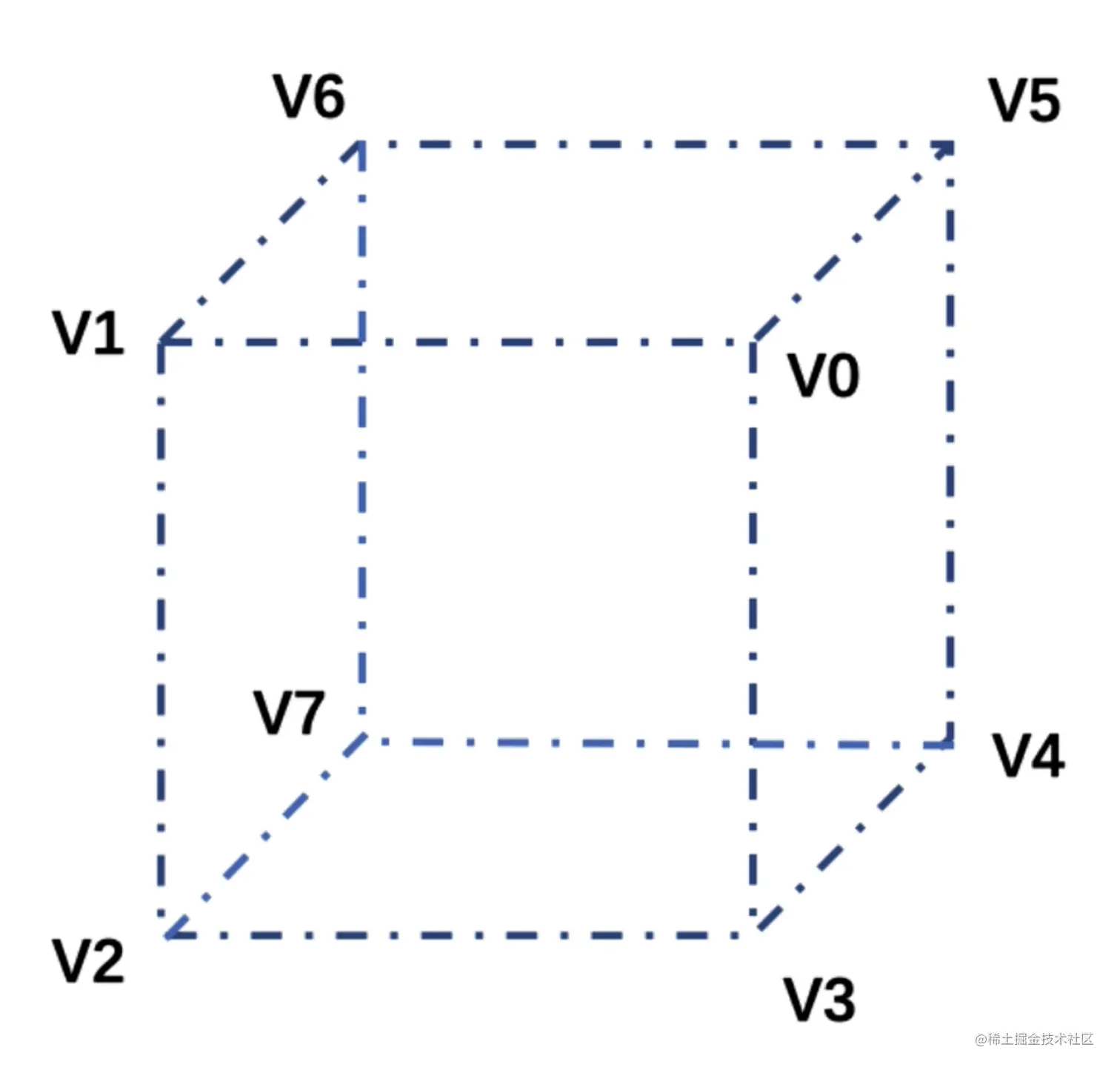
(1) 顶点法
/** @type {HTMLCanvasElement} */
const canvas = document.querySelector('#canvas')
const gl = canvas.getContext('webgl')
// 创建着色器源码
const VERTEX_SHADER_SOURCE = `
attribute vec4 aPosition
attribute vec4 aColor
varying vec4 vColor
uniform mat4 mat
void main() {
gl_Position = mat * aPosition
vColor = aColor
}
` // 顶点着色器
const FRAGMENT_SHADER_SOURCE = `
precision lowp float
varying vec4 vColor
void main() {
gl_FragColor = vColor
}
` // 片元着色器
const program = initShader(
gl,
VERTEX_SHADER_SOURCE,
FRAGMENT_SHADER_SOURCE
)
const aPosition = gl.getAttribLocation(program, 'aPosition')
const aColor = gl.getAttribLocation(program, 'aColor')
const mat = gl.getUniformLocation(program, 'mat')
// 顶点
const v0 = [1,1,1]
const v1 = [-1,1,1]
const v2 = [-1,-1,1]
const v3 = [1,-1,1]
const v4 = [1,-1,-1]
const v5 = [1,1,-1]
const v6 = [-1,1,-1]
const v7 = [-1,-1,-1]
const points = new Float32Array([
...v0,...v1,...v2, ...v0,...v2, ...v3, // 前
...v0,...v3,...v4, ...v0,...v4, ...v5, // 右
...v0,...v1,...v6, ...v0,...v6, ...v5, // 上面
...v1,...v2,...v7, ...v1,...v7, ...v6, // 左
...v2,...v3,...v4, ...v2,...v4, ...v7, // 底
...v4,...v7,...v6, ...v4,...v6, ...v5, // 后
])
// 创建缓冲区对象
const buffer = gl.createBuffer()
// 绑定缓冲区对象
gl.bindBuffer(gl.ARRAY_BUFFER, buffer)
// 将数据写入缓冲区对象
gl.bufferData(gl.ARRAY_BUFFER, points, gl.STATIC_DRAW)
// 获取数据字节数
const BYTES = points.BYTES_PER_ELEMENT
// 将数据写入缓冲区对象
gl.vertexAttribPointer(aPosition, 3, gl.FLOAT, false, 0, 0)
// 启用 attribute 变量
gl.enableVertexAttribArray(aPosition)
const colorData = new Float32Array([
1,0,0,1,0,0,1,0,0,1,0,0,1,0,0,1,0,0,
0,1,0,0,1,0,0,1,0,0,1,0,0,1,0,0,1,0,
0,0,1,0,0,1,0,0,1,0,0,1,0,0,1,0,0,1,
1,1,1,1,1,1,1,1,1,1,1,1,1,1,1,1,1,1,
0,0,0,0,0,0,0,0,0,0,0,0,0,0,0,0,0,0,
0,1,1,0,1,1,0,1,1,0,1,1,0,1,1,0,1,1,
])
const colorBuffer = gl.createBuffer()
gl.bindBuffer(gl.ARRAY_BUFFER, colorBuffer)
gl.bufferData(gl.ARRAY_BUFFER, colorData, gl.STATIC_DRAW)
gl.vertexAttribPointer(aColor, 3, gl.FLOAT, false, 0, 0)
gl.enableVertexAttribArray(aColor)
let eyex = 3
let eyey = 3
let eyez = 5
let deg = 0
function animation() {
deg += 0.01
const rotate = getRotateMatrix(deg)
const vm = getViewMatrix(eyex, eyey, eyez, 0.0, 0.0, 0.0, 0.0, 0.6, 0.0)
const perspective = getPerspective(30, canvas.width / canvas.height, 100, 1)
gl.enable(gl.DEPTH_TEST)
gl.uniformMatrix4fv(mat, false, mixMatrix(mixMatrix(perspective, vm), rotate))
gl.drawArrays(gl.TRIANGLES, 0, points.length / 3)
requestAnimationFrame(animation)
}
animation()
(2) 索引法
/** @type {HTMLCanvasElement} */
const canvas = document.querySelector('#canvas')
const gl = canvas.getContext('webgl')
// 创建着色器源码
const VERTEX_SHADER_SOURCE = `
attribute vec4 aPosition
attribute vec4 aColor
varying vec4 vColor
uniform mat4 mat
void main() {
gl_Position = mat * aPosition
vColor = aColor
}
` // 顶点着色器
const FRAGMENT_SHADER_SOURCE = `
precision lowp float
varying vec4 vColor
void main() {
gl_FragColor = vColor
}
` // 片元着色器
const program = initShader(
gl,
VERTEX_SHADER_SOURCE,
FRAGMENT_SHADER_SOURCE
)
const aPosition = gl.getAttribLocation(program, 'aPosition')
const aColor = gl.getAttribLocation(program, 'aColor')
const mat = gl.getUniformLocation(program, 'mat')
// 顶点
const vertices = new Float32Array([
// 0123
1, 1, 1,
-1, 1, 1,
-1,-1, 1,
1,-1, 1,
// 0345
1, 1, 1,
1,-1, 1,
1,-1,-1,
1, 1,-1,
// 0156
1, 1, 1,
1, 1, -1,
-1, 1,-1,
-1, 1,1,
// 1267
-1, 1, 1,
-1,1, -1,
-1, -1,-1,
-1,-1,1,
// 2347
-1,-1, 1,
1,-1, 1,
1,-1,-1,
-1,-1,-1,
// 4567
1,-1,-1,
1, 1,-1,
-1, 1,-1,
-1,-1,-1,
])
// 创建缓冲区对象
const buffer = gl.createBuffer()
// 绑定缓冲区对象
gl.bindBuffer(gl.ARRAY_BUFFER, buffer)
// 将数据写入缓冲区对象
gl.bufferData(gl.ARRAY_BUFFER, vertices, gl.STATIC_DRAW)
// 获取数据字节数
const BYTES = vertices.BYTES_PER_ELEMENT
// 将数据写入缓冲区对象
gl.vertexAttribPointer(aPosition, 3, gl.FLOAT, false, 0, 0)
// 启用 attribute 变量
gl.enableVertexAttribArray(aPosition)
const colors = new Float32Array([
0.4,0.4,1.0,0.4,0.4,1.0,0.4,0.4,1.0,0.4,0.4,1.0,
0.4,1.0,0.4,0.4,1.0,0.4,0.4,1.0,0.4,0.4,1.0,0.4,
1.0,0.4,0.4,1.0,0.4,0.4,1.0,0.4,0.4,1.0,0.4,0.4,
1.0,1.0,0.4,1.0,1.0,0.4,1.0,1.0,0.4,1.0,1.0,0.4,
1.0,0.0,1.0,1.0,0.0,1.0,1.0,0.0,1.0,1.0,0.0,1.0,
0.0,1.0,1.0,0.0,1.0,1.0,0.0,1.0,1.0,0.0,1.0,1.0,
])
const colorBuffer = gl.createBuffer()
gl.bindBuffer(gl.ARRAY_BUFFER, colorBuffer)
gl.bufferData(gl.ARRAY_BUFFER, colors, gl.STATIC_DRAW)
gl.vertexAttribPointer(aColor, 3, gl.FLOAT, false, 0, 0)
gl.enableVertexAttribArray(aColor)
const indeces = new Uint8Array([
0,1,2,0,2,3,
4,5,6,4,6,7,
8,9,10,8,10,11,
12,13,14,12,14,15,
16,17,18,16,18,19,
20,21,22,20,22,23,
])
const indexBuffer = gl.createBuffer()
gl.bindBuffer(gl.ELEMENT_ARRAY_BUFFER, indexBuffer)
gl.bufferData(gl.ELEMENT_ARRAY_BUFFER, indeces, gl.STATIC_DRAW)
let eyex = 3
let eyey = 3
let eyez = 5
let deg = 0
function animation() {
deg += 0.01
const rotate = getRotateMatrix(deg)
const vm = getViewMatrix(eyex, eyey, eyez, 0.0, 0.0, 0.0, 0.0, 0.6, 0.0)
const perspective = getPerspective(30, canvas.width / canvas.height, 100, 1)
gl.enable(gl.DEPTH_TEST)
gl.uniformMatrix4fv(mat, false, mixMatrix(mixMatrix(perspective, vm), rotate))
gl.drawElements(gl.TRIANGLES, indeces.length, gl.UNSIGNED_BYTE, 0)
requestAnimationFrame(animation)
}
animation()
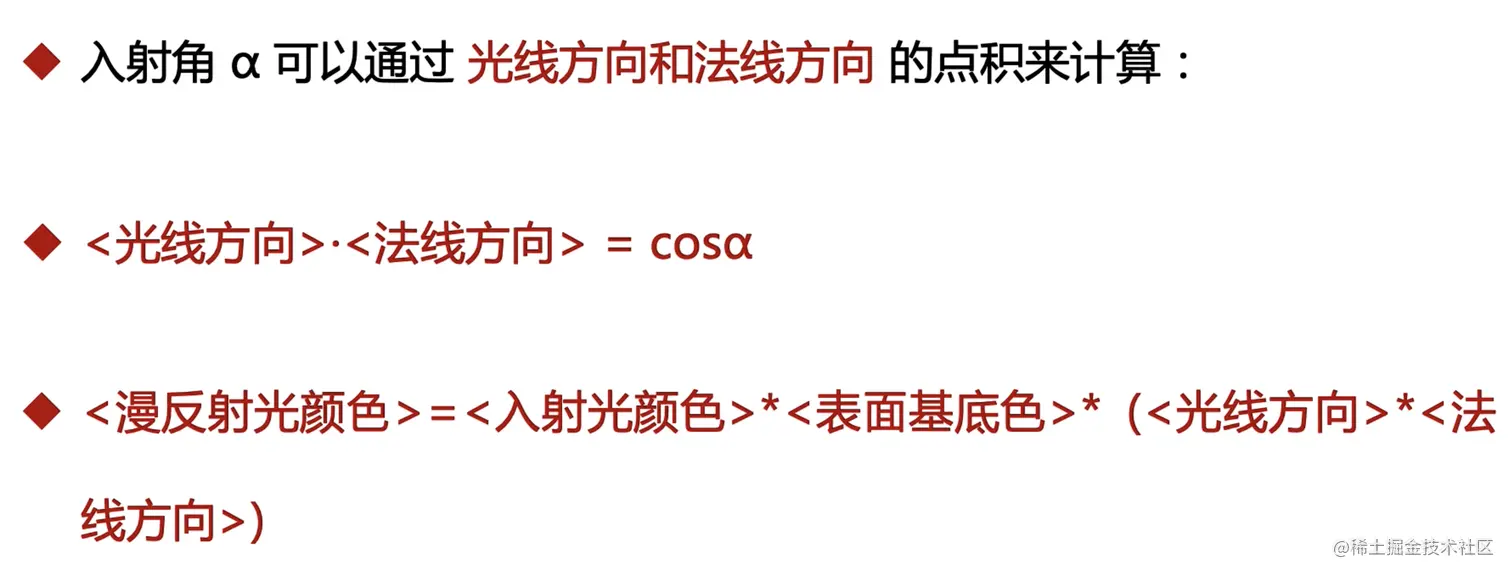
5. 光照


/** @type {HTMLCanvasElement} */
const canvas = document.querySelector('#canvas')
const gl = canvas.getContext('webgl')
// 创建着色器源码
const VERTEX_SHADER_SOURCE = `
attribute vec4 aPosition
attribute vec4 aNormal
varying vec4 vColor
uniform mat4 mat
void main() {
// 定义点光源的颜色
vec3 uPointLightColor = vec3(1.0,1.0,0.0)
// 点光源的位置
vec3 uPointLightPosition = vec3(-5.0,6.0,10.0)
// 环境光
vec3 uAmbientLightColor = vec3(0.2,0.2,0.2)
// 物体表面的颜色
vec4 aColor = vec4(1.0,0.0,0.0,1.0)
// 顶点的世界坐标
vec4 vertexPosition = mat * aPosition
// 点光源的方向
vec3 lightDirection = normalize(uPointLightPosition - vec3(vertexPosition))
// 环境反射
vec3 ambient = uAmbientLightColor * vec3(aColor)
// 计算入射角 光线方向和法线方向的点积
float dotDeg = dot(lightDirection, vec3(aNormal))
// 漫反射光的颜色
vec3 diffuseColor = uPointLightColor * vec3(aColor) * dotDeg
gl_Position = vertexPosition
vColor = vec4(ambient + diffuseColor, aColor.a)
}
` // 顶点着色器
const FRAGMENT_SHADER_SOURCE = `
precision lowp float
varying vec4 vColor
void main() {
gl_FragColor = vColor
}
` // 片元着色器
const program = initShader(
gl,
VERTEX_SHADER_SOURCE,
FRAGMENT_SHADER_SOURCE
)
const aPosition = gl.getAttribLocation(program, 'aPosition')
const aNormal = gl.getAttribLocation(program, 'aNormal')
const mat = gl.getUniformLocation(program, 'mat')
// 顶点
const vertices = new Float32Array([
// 0123
1, 1, 1,
-1, 1, 1,
-1,-1, 1,
1,-1, 1,
// 0345
1, 1, 1,
1,-1, 1,
1,-1,-1,
1, 1,-1,
// 0156
1, 1, 1,
1, 1, -1,
-1, 1,-1,
-1, 1,1,
// 1267
-1, 1, 1,
-1,1, -1,
-1, -1,-1,
-1,-1,1,
// 2347
-1,-1, 1,
1,-1, 1,
1,-1,-1,
-1,-1,-1,
// 4567
1,-1,-1,
1, 1,-1,
-1, 1,-1,
-1,-1,-1,
])
// 创建缓冲区对象
const buffer = gl.createBuffer()
// 绑定缓冲区对象
gl.bindBuffer(gl.ARRAY_BUFFER, buffer)
// 将数据写入缓冲区对象
gl.bufferData(gl.ARRAY_BUFFER, vertices, gl.STATIC_DRAW)
// 获取数据字节数
const BYTES = vertices.BYTES_PER_ELEMENT
// 将数据写入缓冲区对象
gl.vertexAttribPointer(aPosition, 3, gl.FLOAT, false, 0, 0)
// 启用 attribute 变量
gl.enableVertexAttribArray(aPosition)
// 法向量
const normals = new Float32Array([
0.0,0.0,1.0,0.0,0.0,1.0,0.0,0.0,1.0,0.0,0.0,1.0,
0.0,0.0,-1.0,0.0,0.0,-1.0,0.0,0.0,-1.0,0.0,0.0,-1.0,
-1.0,0.0,0.0,-1.0,0.0,0.0,-1.0,0.0,0.0,-1.0,0.0,0.0,
1.0,0.0,0.0,1.0,0.0,0.0,1.0,0.0,0.0,1.0,0.0,0.0,
0.0,1.0,0.0,0.0,1.0,0.0,0.0,1.0,0.0,0.0,1.0,0.0,
0.0,-1.0,0.0,0.0,-1.0,0.0,0.0,-1.0,0.0,0.0,-1.0,0.0,
])
const normalsBuffer = gl.createBuffer()
gl.bindBuffer(gl.ARRAY_BUFFER, normalsBuffer)
gl.bufferData(gl.ARRAY_BUFFER, normals, gl.STATIC_DRAW)
gl.vertexAttribPointer(aNormal, 3, gl.FLOAT, false, 0, 0)
gl.enableVertexAttribArray(aNormal)
const indeces = new Uint8Array([
0,1,2,0,2,3,
4,5,6,4,6,7,
8,9,10,8,10,11,
12,13,14,12,14,15,
16,17,18,16,18,19,
20,21,22,20,22,23,
])
const indexBuffer = gl.createBuffer()
gl.bindBuffer(gl.ELEMENT_ARRAY_BUFFER, indexBuffer)
gl.bufferData(gl.ELEMENT_ARRAY_BUFFER, indeces, gl.STATIC_DRAW)
function animation() {
const vm = getViewMatrix(3, 3, 5, 0.0, 0.0, 0.0, 0.0, 0.6, 0.0)
const perspective = getPerspective(30, canvas.width / canvas.height, 100, 1)
gl.enable(gl.DEPTH_TEST)
gl.uniformMatrix4fv(mat, false, mixMatrix(perspective, vm))
gl.drawElements(gl.TRIANGLES, indeces.length, gl.UNSIGNED_BYTE, 0)
}
animation()
6. 雾化

7. 半透明物体
...
`vColor = vec4(ambient + diffuseColor, 0.5);
}
`
...
gl.enable(gl.BLEND);
gl.blendFunc(gl.SRC_ALPHA, gl.ONE_MINUS_SRC_ALPHA);
8. 绘制圆形的点
const canvas = document.querySelector('#canvas')
const gl = canvas.getContext("webgl")
// 创建着色器源码
const VERTEX_SHADER_SOURCE = `
void main() {
gl_Position = vec4(0.0, 0.0, 0.0, 1.0)
gl_PointSize = 60.0
}
`
const FRAGMENT_SHADER_SOURCE = `
precision lowp float
void main() {
// 计算当前点gl_PointCoord 和 点范围vec2(0.5, 0.5)的距离
float dis = distance(gl_PointCoord, vec2(0.5, 0.5))
if(dis > 0.5 || dis < 0.4) {
discard
}
gl_FragColor = vec4(1.0, 0.0, 0.0, 1.0)
}
`
initShader(gl, VERTEX_SHADER_SOURCE, FRAGMENT_SHADER_SOURCE)
// 执行绘制
// 要绘制的图形是什么?从哪个开始?使用几个顶点
gl.drawArrays(gl.POINTS, 0, 1)