枚举
swift 中的枚举是定义一组相关值的通用类型,并且能够在代码中以类型安全的方式使用这些值。
熟悉 swift 开发同学应该经常会用到枚举,今天我们主要来介绍下枚举关联值的高阶用法。
例子
我们使用 swift 官方文档给出的示例,假设库存跟踪系统需要通过两种不同类型的条形码跟踪产品。某些产品使用条形码,该条形码使用四组数字:
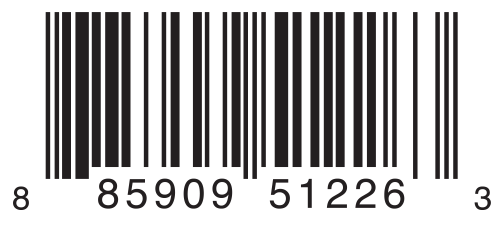
另一种产品标有二维码格式的二维条形码,可以使用任何 ISO 8859-1 字符,并且可以编码长达 2953 个字符的字符串。

我们先来定义这个枚举
enum Barcode {
    case upc(Int, Int, Int, Int) // 条形码
    case qrCode(String) // 二维码
}
以上代码定义一个名为 Barcode 的枚举类型,它可以采用值 upc 关联四个数字 ( Int , Int , Int , Int ),或者值 qrCode 关联一个 String。
可以使用以下代码创建一个条形码:
var productBarcode = Barcode.upc(8, 85909, 51226, 3)
或者使用以下代码创建一个二维码:
var productBarcode = Barcode.qrCode("ABCDEFGHIJKLMNOP")
普通的处理方式
接下来用最常用的 switch 语句处理这个值:
var productBarcode = Barcode.upc(8, 85909, 51226, 3)

switch productBarcode {
case .upc(let numberSystem, let manufacturer, let product, let check):
    print("这是一个条形码,值为: \(numberSystem), \(manufacturer), \(product), \(check).")
case .qrCode(let productCode):
    print("这是一个二维码,值为: \(productCode).")
}

// 打印:这是一个条形码,值为: 8, 85909, 51226, 3.
利用 where 关键字做额外的筛选
如果我有个需求,只需要打印 numberSystem 大于 10 的值,可以在 case 后增加 where 限制:
var productBarcode = Barcode.upc(18, 85909, 51226, 3)

switch productBarcode {
case .upc(let numberSystem, _, _, _) where numberSystem > 10:
    print("这是一个条形码,并且 numberSystem 的值大于 10.")
case .qrCode(let productCode):
    print("这是一个二维码,值为: \(productCode).")
case .upc:
    print("这是一个条形码,并且 numberSystem 的值小于 10.")
}
// 打印:这是一个条形码,并且 numberSystem 的值大于 10.
for 循环中做筛选
假设我们有一系列产品,并且我们只想查看 numberSystem 数大于 10 的产品。我们可以通过在 for-in 循环中使用 where 子句来实现这一点,如下所示。
var productBarcodes: [Barcode] = [
    .upc(5, 85909, 51226, 3),
    .upc(18, 85909, 51226, 3),
    .upc(30, 85909, 51226, 3),
    .upc(2, 85909, 51226, 3),
    .upc(9, 85909, 51226, 3),
    .qrCode("ABCDEFGHIJKLMNOP")
]

for case let .upc(numberSystem,
                  manufacturer,
                  product,
                  check) in
        productBarcodes where numberSystem > 10 {
    print("这是一个条形码,值为: \(numberSystem), \(manufacturer), \(product), \(check).")
}

// 打印
// 这是一个条形码,值为: 18, 85909, 51226, 3.
// 这是一个条形码,值为: 30, 85909, 51226, 3.
while 循环中的条件
除此之外,也可以在 while 循环中增加条件
var productBarcodes: [Barcode] = [
    .upc(5, 85909, 51226, 3),
    .upc(18, 85909, 51226, 3),
    .upc(30, 85909, 51226, 3),
    .upc(2, 85909, 51226, 3),
    .upc(9, 85909, 51226, 3),
    .qrCode("ABCDEFGHIJKLMNOP")
]

var index = 0
while case let .upc(numberSystem,
                    manufacturer,
                    product,
                    check) =
          productBarcodes[index], numberSystem > 10 {
    print("这是一个条形码,值为: \(numberSystem), \(manufacturer), \(product), \(check).")
    index += 1
}

// 打印
// 这是一个条形码,值为: 18, 85909, 51226, 3.
// 这是一个条形码,值为: 30, 85909, 51226, 3.
if-case 语句中的条件
在单个 if 判断中,也可以增加额外的筛选
var productBarcode = Barcode.upc(18, 85909, 51226, 3)

if case let .upc(numberSystem,
                 manufacturer,
                 product,
                 check) = productBarcode, numberSystem > 10 {
    print("这是一个条形码,值为: \(numberSystem), \(manufacturer), \(product), \(check).")
}

// 打印:这是一个条形码,值为: 18, 85909, 51226, 3.
通过我们在这篇文章中介绍的用法,我们可以为 Swift 中的模式匹配添加一层灵活性和表现力。无论我们使用 switch 语句、循环还是像 if-case 这样的控制流语句,我们都可以精确、清晰地处理复杂的场景。
参考资料
[1]
官方文档: docs.swift.org/swift-book/…
点击下方公众号卡片,关注我,每天分享一个关于 iOS 的新知识
本文同步自微信公众号 “iOS新知”,每天准时分享一个新知识,这里只是同步,想要获得更好的体验就来关注我吧!