在日常的开发中,大家一定见过这样一种的函数,参数非常多,参数类型又比较复杂,所有参数挤在同一行导致这一行代码非常长,既不便于阅读,又不便于维护。
我们以 Kingfisher 的 setImage 方法为例,这个函数的声明如下:
@discardableResult
func setImage(with resource: Resource?, placeholder: Placeholder? = nil, options: KingfisherOptionsInfo? = nil, progressBlock: DownloadProgressBlock? = nil, completionHandler: ((Result<RetrieveImageResult, KingfisherError>) -> Void)? = nil) -> DownloadTask?
可以看出这行代码非常的长,通常这种情况下,我们会选择让参数换行,使其更易读,转换多行之后:
@discardableResult
func setImage(
    with resource: Resource?,
    placeholder: Placeholder? = nil,
    options: KingfisherOptionsInfo? = nil,
    progressBlock: DownloadProgressBlock? = nil,
    completionHandler: ((Result<RetrieveImageResult, KingfisherError>) -> Void)? = nil) -> DownloadTask?
这样看起来就好多了。但是这个操作如果一个个的操作往往比较繁琐,每次需要点好多下,而且容易把缩进弄乱。之前介绍过的多光标方式,稍微能够简化一点,但总体来说不够方便。
在 Xcode 15 中,苹果为我们带来了新的方式,只需要选中代码,鼠标右键,在菜单栏中选择 Refactor > Format to Multiple Lines 即可一键转换。
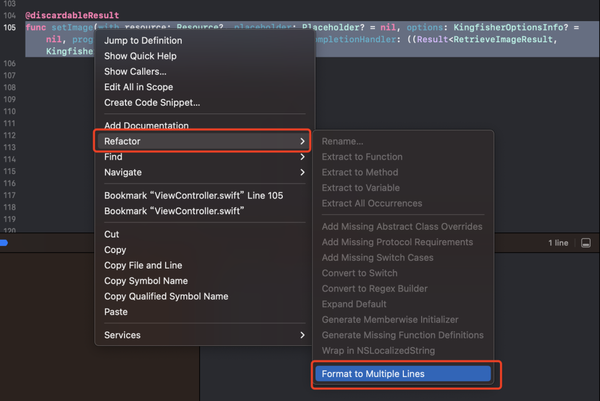

转换之后的格式为:
@discardableResult
func setImage(
    with resource: Resource?,
    placeholder: Placeholder? = nil,
    options: KingfisherOptionsInfo? = nil,
    progressBlock: DownloadProgressBlock? = nil,
    completionHandler: (
        (
            Result<RetrieveImageResult,
            KingfisherError>
        ) -> Void
    )? = nil
) -> DownloadTask?
函数的调用一样可以转换:
转换前:
imageView.setImage(with: resource, placeholder: placeholder, options: info, progressBlock: block, completionHandler: handler)
转换后
imageView.setImage(
    with: resource,
    placeholder: placeholder,
    options: info,
    progressBlock: block,
    completionHandler: handler
)
点击下方公众号卡片,关注我,每天分享一个关于 iOS 的新知识
本文同步自微信公众号 “iOS新知”,每天准时分享一个新知识,这里只是同步,想要获得更好的体验就扫描下方二维码关注我吧!