

参考文档
安装ES
创建网络:docker network create es-net
加载镜像:docker load -i es.tar
启动ES : docker run -d --name es -e "ES_JAVA_OPTS=-Xms512m -Xmx512m" -e "discovery.type=single-node" -v es-data:/usr/share/elasticsearch/data -v es-plugins:/usr/share/elasticsearch/plugins --privileged --network es-net -p 9200:9200 -p 9300:9300 elasticsearch:7.12.1
-e "cluster.name=es-docker-cluster":设置集群名称-e "http.host=0.0.0.0":监听的地址,可以外网访问-e "ES_JAVA_OPTS=-Xms512m -Xmx512m":内存大小-e "discovery.type=single-node":非集群模式-v es-data:/usr/share/elasticsearch/data:挂载逻辑卷,绑定es的数据目录-v es-logs:/usr/share/elasticsearch/logs:挂载逻辑卷,绑定es的日志目录-v es-plugins:/usr/share/elasticsearch/plugins:挂载逻辑卷,绑定es的插件目录--privileged:授予逻辑卷访问权--network es-net:加入一个名为es-net的网络中-p 9200:9200:端口映射配置
在浏览器中输入:http://127.0.0.1:9200/ 即可看到elasticsearch的响应结果
安装kibana
作用:ES的可视化界面
加载镜像:docker load -i kibana.tar
启动:docker run -d --name kibana -e ELASTICSEARCH_HOSTS=http://es:9200 --network=es-net -p 5601:5601 kibana:7.12.1
--network es-net:加入一个名为es-net的网络中,与elasticsearch在同一个网络中-e ELASTICSEARCH_HOSTS=http://es:9200":设置elasticsearch的地址,因为kibana已经与elasticsearch在一个网络,因此可以用容器名直接访问elasticsearch-p 5601:5601:端口映射配置
在浏览器中输入:http://127.0.0.1:5601/app/dev_tools#/console 即可看到的响应结果
常见mapping
type : 字段类型
index: 是否创建索引,是:可以创建搜索
analyzer: 使用哪种分词器
properties: 该字段的子字段
语法
索引操作
创建索引库
PUT /xy
{
  "mappings": {
    "properties": {
      "info":{
        "type": "text",
        "analyzer": "ik_smart"
      },
      "email":{
        "type": "keyword",
        "index": false
      },
      "name":{
        "type": "object",
        "properties": {
          "firstName":{
             "type":"keyword"
          },
          "lastName":{
            "type":"keyword"
          }
        }
      }
    }
  }
}
查看索引
GET /xy
删除索引
DELETE /xy
修改索引库
只能新增,不能修改
PUT /xy/_mapping
{
  "properties":{
    "age":{
      "type":"integer"
    }
  }
}
文档操作
新增文档
POST /xy/_doc/2
{
  "info":"这是一个标题",
  "email":"123@qq.com",
  "name":{
    "firstName":"云",
    "lastName":"赵"
  }
}
查看文档
get /xy/_doc/2
删除文档
DELETE /xy/_doc/1
修改文档
全量修改
PUT /xy/_doc/2
{
  "info":"这是一个标题",
  "email":"1234@qq.com",
  "name":{
    "firstName":"云",
    "lastName":"赵"
  }
}
增量修改
POST /xy/_update/2
{
  "doc":{
    "info":"这是一个标题",
  "email":"1234567@qq.com"
  }
}
RestClient操作
相关表结构
DROP TABLE IF EXISTS `tb_hotel`;
CREATE TABLE `tb_hotel`  (
  `id` bigint(20) NOT NULL COMMENT '酒店id',
  `name` varchar(255) CHARACTER SET utf8mb4 COLLATE utf8mb4_general_ci NOT NULL COMMENT '酒店名称',
  `address` varchar(255) CHARACTER SET utf8mb4 COLLATE utf8mb4_general_ci NOT NULL COMMENT '酒店地址',
  `price` int(10) NOT NULL COMMENT '酒店价格',
  `score` int(2) NOT NULL COMMENT '酒店评分',
  `brand` varchar(32) CHARACTER SET utf8mb4 COLLATE utf8mb4_general_ci NOT NULL COMMENT '酒店品牌',
  `city` varchar(32) CHARACTER SET utf8mb4 COLLATE utf8mb4_general_ci NOT NULL COMMENT '所在城市',
  `star_name` varchar(16) CHARACTER SET utf8mb4 COLLATE utf8mb4_general_ci NULL DEFAULT NULL COMMENT '酒店星级,1星到5星,1钻到5钻',
  `business` varchar(255) CHARACTER SET utf8mb4 COLLATE utf8mb4_general_ci NULL DEFAULT NULL COMMENT '商圈',
  `latitude` varchar(32) CHARACTER SET utf8mb4 COLLATE utf8mb4_general_ci NOT NULL COMMENT '纬度',
  `longitude` varchar(32) CHARACTER SET utf8mb4 COLLATE utf8mb4_general_ci NOT NULL COMMENT '经度',
  `pic` varchar(255) CHARACTER SET utf8mb4 COLLATE utf8mb4_general_ci NULL DEFAULT NULL COMMENT '酒店图片',
  PRIMARY KEY (`id`) USING BTREE
) ENGINE = InnoDB CHARACTER SET = utf8mb4 COLLATE = utf8mb4_general_ci ROW_FORMAT = Compact;
对应索引库
PUT /hotel_index
{
  "mappings": {
    "properties": {
      "id":{
        "type":"keyword"
      },
      "name":{
        "type":"text",
        "analyzer": "ik_max_word",
        "copy_to": "all"
      },
      "address":{
        "type": "keyword",
        "index":false
      },
      "price":{
        "type": "integer"
      },
      "score":{
        "type": "integer"
      },
      "brand":{
        "type": "keyword",
        "copy_to": "all"
      },
      "city":{
        "type": "keyword"
      },
      "startName":{
        "type": "keyword"
      },
      "bussiness":{
        "type": "keyword",
        "copy_to": "all"
      },
      "location":{
        "type": "geo_point"
      },
      "pic":{
        "index": false,
        "type": "keyword"
      },
      "all":{
        "type": "text",
        "analyzer": "ik_smart"
      }
    }
  }
}
导入依赖
<dependency>
    <groupId>org.elasticsearch.client</groupId>
    <artifactId>elasticsearch-rest-high-level-client</artifactId>
    <version>7.12.1</version>
</dependency>

<dependency>
    <groupId>org.elasticsearch.client</groupId>
    <artifactId>elasticsearch-rest-client</artifactId>
    <version>7.12.1</version>
</dependency>

<dependency>
    <groupId>org.elasticsearch</groupId>
    <artifactId>elasticsearch</artifactId>
    <version>7.12.1</version>
</dependency>
测试
@SpringBootTest
class HotelAdminApplicationTests {

    private RestHighLevelClient client;
    @Autowired
    private IHotelService hotelService;

    @BeforeEach
    void setUp(){
        this.client = new RestHighLevelClient(RestClient.builder(
                HttpHost.create("http://127.0.0.1:9200")
        ));
    }

    @AfterEach
    void tearDown() throws IOException {
        this.client.close();
    }

    @Test
    void contextLoads() {
        System.out.println(client);
    }
   }
索引操作
创建索引库
@Test
void createHotelIndex() throws IOException {
    // 创建Request对象
    CreateIndexRequest request = new CreateIndexRequest("hotel_index");
    // 准备请求的参数:DSL
    request.source(MAPPING_TEMPLATE, XContentType.JSON);
    // 发送请求
    client.indices().create(request, RequestOptions.DEFAULT);
}
删除索引库
@Test
void deleteHotelIndex() throws IOException {
    // 创建Request对象
    DeleteIndexRequest request = new DeleteIndexRequest("hotel_index");
    // 发送请求
    client.indices().delete(request, RequestOptions.DEFAULT);
}
查看索引是否存在
@Test
void existsHotelIndex() throws IOException {
    // 创建Request对象
    GetIndexRequest request = new GetIndexRequest("hotel_index");
    // 发送请求
    boolean exists = client.indices().exists(request, RequestOptions.DEFAULT);
    System.out.println(exists?"存在":"不存在");
}
文档操作
新增文档
// 新增文档
@Test
void addDocument() throws IOException {

    Hotel hotel = hotelService.getById(38609L);
    HotelDoc hotelDoc = new HotelDoc(hotel);

    BeanUtils.copyProperties(hotel,hotelDoc,"longitude","latitude");
    // 准备request对象
    IndexRequest request = new IndexRequest("hotel_index").id(String.valueOf(hotelDoc.getId()));
    // 准备json对象
    request.source(JSON.toJSONString(hotelDoc),XContentType.JSON);
    // 发生请求
    client.index(request,RequestOptions.DEFAULT);
}
获取文档数据
@Test
void getDocumentById() throws IOException {
    // 准备request
    GetRequest request = new GetRequest("hotel_index", "38609");
    // 发生请求,得到响应
    GetResponse response = client.get(request, RequestOptions.DEFAULT);
    // 解析响应结果
    String json = response.getSourceAsString();
    HotelDoc hotelDoc = JSON.parseObject(json, HotelDoc.class);
    System.out.println(hotelDoc);
}
修改文档
@Test
void updateDocumentById() throws IOException {
    // 准备request
    UpdateRequest request = new UpdateRequest("hotel_index", "38609");
    // 更新内容
    request.doc(
            "price","666",
            "startName","六钻"
    );
    // 发生请求,得到响应
     client.update(request, RequestOptions.DEFAULT);
}
删除文档
@Test
void deleteDocumentById() throws IOException {
    // 准备request
    DeleteRequest request = new DeleteRequest("hotel_index", "38609");
    // 发生请求,得到响应
    client.delete(request, RequestOptions.DEFAULT);
}
批量更新文档
@Test
void bulkDocument() throws IOException {

    List<Hotel> list = hotelService.list();
    BulkRequest bulkRequest = new BulkRequest();

    for (Hotel hotel : list) {
        HotelDoc hotelDoc = new HotelDoc(hotel);
        BeanUtils.copyProperties(hotel,hotelDoc,"longitude","latitude");
        // 准备request对象
        bulkRequest.add(new IndexRequest("hotel_index")
            .id(hotelDoc.getId().toString())
            .source(JSON.toJSONString(hotelDoc),XContentType.JSON));
    }
    // 发生请求
    client.bulk(bulkRequest,RequestOptions.DEFAULT);
}
DSL语法
参考文档
查询所有
# 查询所有
GET /hotel_index/_search
{
  "query": {
    "match_all": {}
  }
}
match检索
GET /hotel_index/_search
{
  "query": {
    "match": {
      "all": "外滩如家"
    }
  }
}
multi_match检索
GET /hotel_index/_search
{
  "query": {
    "multi_match": {
      "query": "外滩如家",
      "fields": ["brand","name","business"]
    }
  }
}
term 查询
GET /hotel_index/_search
{
  "query": {
    "term": {
      "city": {
        "value" : "上海"
      }
    }
  }
}
range 查询
GET /hotel_index/_search
{
  "query": {
    "range": {
      "price": {
        "gte": 100,
        "lte": 300
      }
    }
  }
}
distance 查询
GET /hotel_index/_search
{
  "query": {
    "geo_distance": {
      "distance":"15km",
      "location":"31,121.479"
    }
  }
}
function score查询
GET /hotel_index/_search
{
  "query": {
    "function_score": {
     "query": {"match": {
       "all": "外滩"
     }},
      "functions": [
       {
         "filter": {
           "term": {
             "brand": "如家"
           }
         }
        , "weight": 10
       }
     ],
     "boost_mode": "sum"
    }
  }
}
boolean query 符合查询
GET /hotel_index/_search
{
  "query": {
    "bool": {
      "must": [
        {
          "match": {
            "name": "如家"
          }
        }
      ],
      "must_not": [
        {
          "range": {
            "price": {
              "gte": 400

            }
          }
        }
      ],
      "filter": [
        {
          "geo_distance": {
          "distance":"15km",
          "location":"31,121.479"
        }}
      ]
    }
  }
}
sort排序
GET /hotel_index/_search
{
  "query": {
    "match_all": {}
  },
  "sort": [
    {
      "score": "desc"
    },
    {
      "price": "asc"
    }
  ]
}
GET /hotel_index/_search
{
  "query": {
    "match_all": {}
  },
  "sort": [
    {
      "_geo_distance": {
        "location": {
          "lat": 31,
          "lon": 121
        },
        "unit": "km",
        "order": "asc"
      }
    },
    {
      "price": "asc"
    }
  ]
}
分页查询
GET /hotel_index/_search
{
  "query": {
    "match_all": {}
  },
  "sort": [
    {
      "price": "desc"
    }
  ],
  "from": 0,
  "size": 5
}
高亮
默认搜索字段必须与高亮字段一致
GET /hotel_index/_search
{
  "query": {
    "match": {
      "all": "如家"
    }
  },
   "highlight": {
    "fields": {
      "name": {
        "require_field_match": "false"
      }
    }
  }
}
RestClient操作
 @Test
 void match() throws IOException {
     // Request
     SearchRequest request = new SearchRequest("hotel_index");
     //准备DSL
     /*模糊查询*/
     // 全文检索
     //request.source().query(QueryBuilders.matchAllQuery());

     // 单字段查询
     //request.source().query(QueryBuilders.matchQuery("all","如家"));

     // 多字段查询
     //request.source().query(QueryBuilders.multiMatchQuery("如家","name","business"));

     /*精确查询*/
     //词条查询
     //request.source().query(QueryBuilders.termQuery("city","杭州"));
     // 范围查询
     //request.source().query(QueryBuilders.rangeQuery("price").gte(100).lte(150));

     /*boolen 复合查询*/
     //创建布查询
     /*BoolQueryBuilder boolQueryBuilder = QueryBuilders.boolQuery();
     //添加must条件
     boolQueryBuilder.must(QueryBuilders.termQuery("city","上海"));
     //添加filter条件
     boolQueryBuilder.filter(QueryBuilders.rangeQuery("price").gte(250));
     request.source().query(boolQueryBuilder);
     */

     /*排序和分页*/
/*     // 分页
     request.source().from(0).size(5);
     //价格排序
     request.source().sort("price", SortOrder.ASC);*/

     /*高亮*/
     // 查询字段
     request.source().query(QueryBuilders.matchQuery("all","如家"));
     // 高亮显示
     request.source().highlighter(new HighlightBuilder()
             .field("name")
             .requireFieldMatch(false)
     );


     //发送请求
     SearchResponse response = client.search(request, RequestOptions.DEFAULT);
     //解析结果
     SearchHits searchHits = response.getHits();
     //获取总条数
     TotalHits totalHits = searchHits.getTotalHits();
     System.out.println("总条数为:"+totalHits);
     //文档数组
     SearchHit[] hits = searchHits.getHits();
     for (SearchHit hit : hits) {
         //获取文档source
         String json = hit.getSourceAsString();
         // 反序列化
         HotelDoc hotelDoc = JSON.parseObject(json, HotelDoc.class);

         /*高亮字段*/
         Map<String, HighlightField> map = hit.getHighlightFields();
         if(!CollectionUtils.isEmpty(map)){
             //获取高亮结果
             HighlightField name = map.get("name");
             if(name!=null){
                 String string = name.getFragments()[0].string();
                 hotelDoc.setName(string);
             }
         }

         System.out.println(hotelDoc);
     }
 }
聚合操作
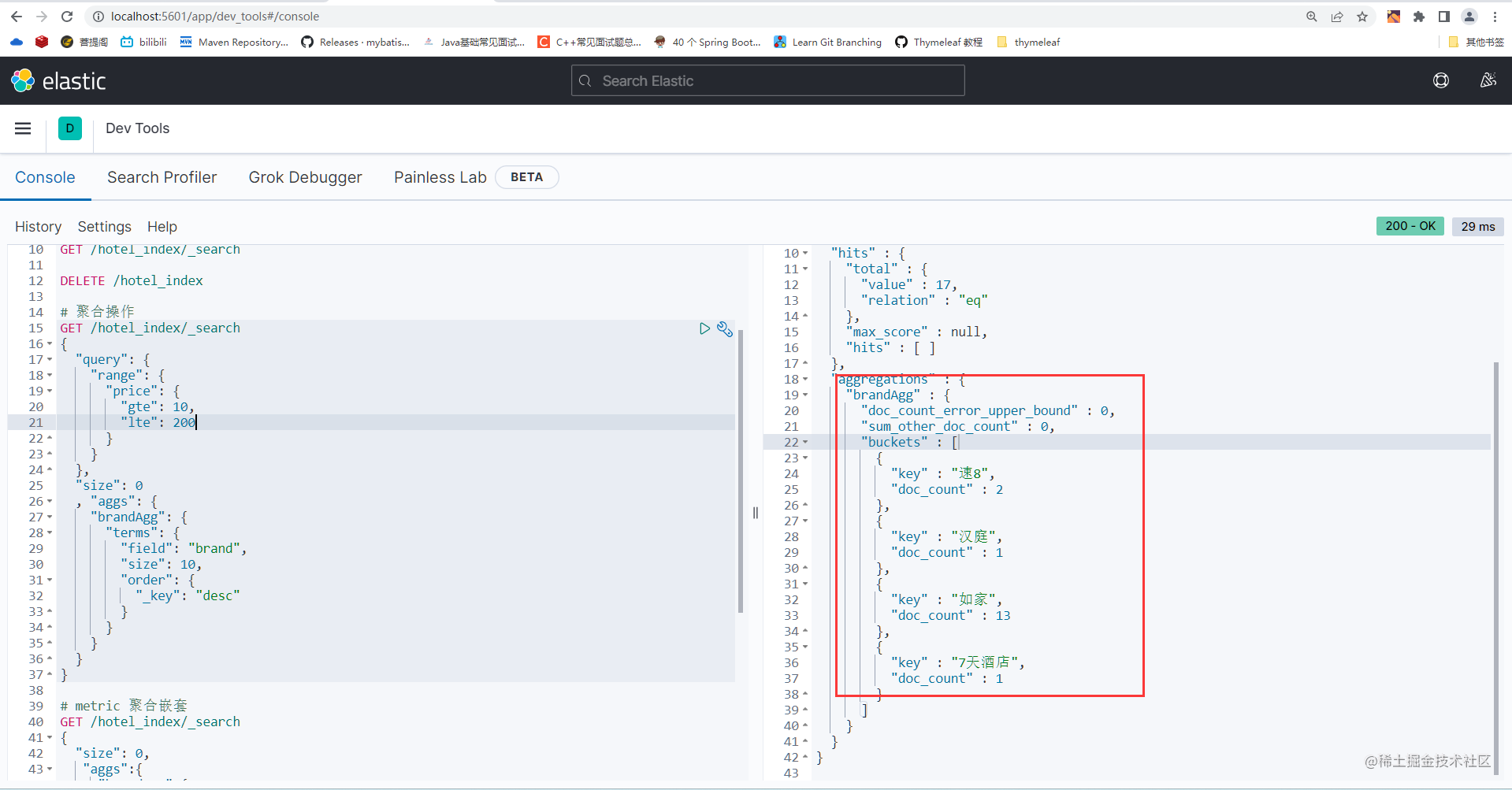
Bucket聚合
GET /hotel_index/_search
{
"query": {
"range": {
"price": {
"gte": 10,
"lte": 200
}
}
},
"size": 0
, "aggs": {
"brandAgg": {
"terms": {
"field": "brand",
"size": 10,
"order": {
"_key": "desc"
}
}
}
}
}
## metric 聚合嵌套
GET /hotel_index/_search
{
"size": 0,
"aggs":{
"brandAgg":{
"terms": {
"field": "brand",
"size": 10,
"order": {
"scoreAgg.avg": "desc"
}
},
"aggs": {
"scoreAgg": {
"stats": {
"field": "score"
}
}
}
}
}
}
DSL实现聚合
@Test
void aggregation() throws IOException {
    // 准备request
    SearchRequest request = new SearchRequest("hotel_index");
    //设置size
    request.source().size(0);
    //聚合
    request.source().aggregation(AggregationBuilders
            .terms("brandAgg")
            .field("brand")
            .size(10)
    );
    //发出请求
    SearchResponse response = client.search(request, RequestOptions.DEFAULT);
    // 解析结果
    //System.out.println(response);
    Aggregations aggregations = response.getAggregations();
    Terms terms = aggregations.get("brandAgg");
    //获取buckets
    List<? extends Terms.Bucket> buckets = terms.getBuckets();
    // 遍历
    for (Terms.Bucket bucket : buckets) {
        //获取key
        System.out.println(bucket.getKeyAsString());
    }

}

