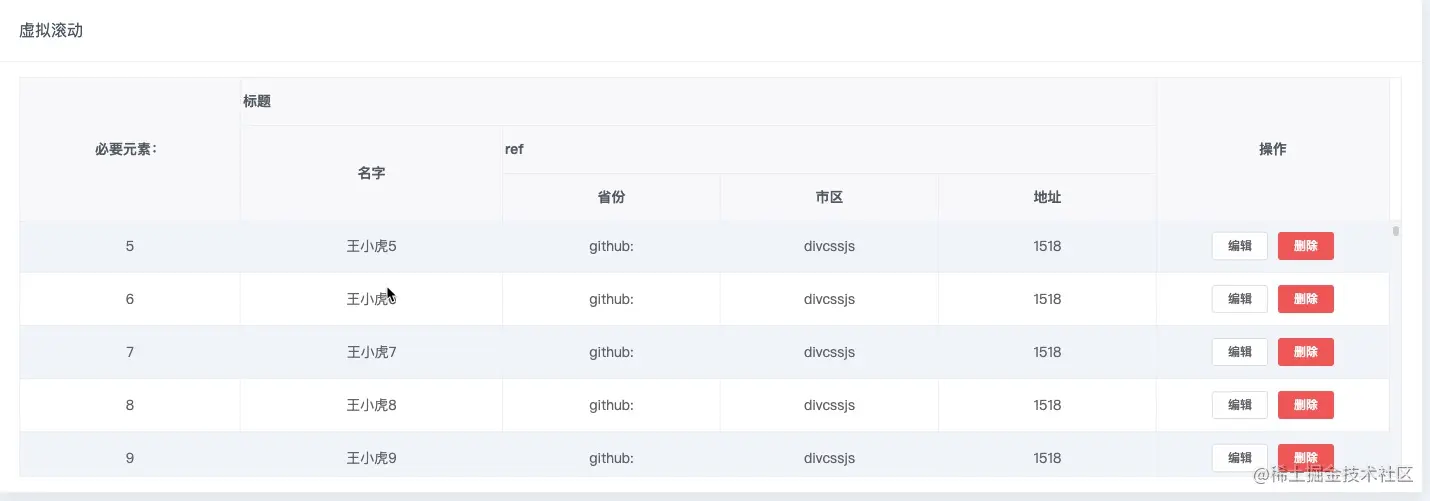

  <div>
    <el-table
      :data="tableData"
      ref="tableRef"
      max-height="400"
      border
      stripe
      class="myTable"
    >
      <el-table-column
        prop="date"
        label="必要元素:"
        min-width="150"
        align="center"
        fixed="left"
      >
      </el-table-column>
      <el-table-column label="标题">
        <el-table-column
          prop="name"
          label="名字"
          min-width="180"
          align="center"
        >
        </el-table-column>
        <el-table-column label="ref">
          <el-table-column
            prop="province"
            label="省份"
            min-width="150"
            align="center"
          >
          </el-table-column>
          <el-table-column
            prop="city"
            label="市区"
            min-width="150"
            align="center"
          >
          </el-table-column>
          <el-table-column
            prop="address"
            label="地址"
            min-width="150"
            align="center"
          >
          </el-table-column>
        </el-table-column>
      </el-table-column>
      <el-table-column
        label="操作"
        fixed="right"
        min-width="160"
        align="center"
      >
        <template>
          <el-button size="mini">编辑</el-button>
          <el-button size="mini" type="danger">删除</el-button>
        </template>
      </el-table-column>
    </el-table>
  </div>
</template>

<script>
export default {
  name: "bigTable",
  data() {
    return {
      tableData: [], // 需要渲染的数据
      saveDATA: [], // 所有数据
      tableRef: null, // 设置了滚动的那个盒子
      tableWarp: null,
      fixLeft: null,
      fixRight: null,
      tableFixedLeft: null,
      tableFixedRight: null,
      scrollTop: 0,
      num: 0,
      start: 0,
      end: 42, // 3倍的pageLis
      starts: 0,
      ends: 42,
      pageList: 14, // 一屏显示
      itemHeight: 41, // 每一行高度
      timeOut: 300, // 延迟
      /** * 是否为mac系统(包含iphone手机) * */
      isMac: (function () {
        return /macintosh|mac os x/i.test(navigator.userAgent);
      })(),

      /** * 是否为windows系统 * */
      isWindows: (function () {
        return /windows|win32/i.test(navigator.userAgent);
      })(),
    };
  },
  watch: {
    num: function (newV) {
      if (newV > 1) {
        this.start = (newV - 1) * this.pageList;
        this.end = (newV + 2) * this.pageList;
        requestAnimationFrame(() => {
          // 计算偏移量
          this.tableWarp.style.transform = `translateY(${
            this.start * this.itemHeight
          }px)`;
          if (this.fixLeft) {
            this.fixLeft.style.transform = this.isWindows
              ? `translateY(${this.start * this.itemHeight + 2}px)`
              : `translateY(${this.start * this.itemHeight}px)`;
          }
          if (this.fixRight) {
            this.fixRight.style.transform = this.isWindows
              ? `translateY(${this.start * this.itemHeight + 2}px)`
              : `translateY(${this.start * this.itemHeight}px)`;
          }
          this.tableData = this.saveDATA.slice(this.start, this.end);
        });
      } else {
        requestAnimationFrame(() => {
          this.tableData = this.saveDATA.slice(this.starts, this.ends);
          this.tableWarp.style.transform = "translateY(0px)";
          if (this.fixLeft) {
            this.fixLeft.style.transform = this.isWindows
              ? "translateY(+2px)"
              : "translateY(0px)";
          }
          if (this.fixRight) {
            this.fixRight.style.transform = this.isWindows
              ? "translateY(+2px)"
              : "translateY(0px)";
          }
        });
      }
    },
  },
  created() {
    this.initBigTableData();
    this.bigTable();
  },
  mounted() {},
  methods: {
    //虚拟滚动
    bigTable() {
      this.saveDATA = [];
      for (let i = 0; i < 10000; i++) {
        this.saveDATA.push({
          date: i,
          name: "王小虎" + i,
          address: "1518",
          province: "github:",
          city: "divcssjs",
          zip: "divcssjs" + i,
        });
      }
      this.tableData = this.saveDATA.slice(this.start, this.end);
    },
    //滚动监听
    onScroll() {
      this.scrollTop = this.tableRef.scrollTop;
      this.num = Math.floor(this.scrollTop / (this.itemHeight * this.pageList));
    },
    //初始复制
    initBigTableData() {
      this.$nextTick(() => {
        // 设置了滚动的盒子
        this.tableRef = this.$refs.tableRef.bodyWrapper;
        // 左侧固定列所在的盒子
        this.tableFixedLeft = document.querySelector(
          ".el-table .el-table__fixed .el-table__fixed-body-wrapper"
        );
        // 右侧固定列所在的盒子
        this.tableFixedRight = document.querySelector(
          ".el-table .el-table__fixed-right .el-table__fixed-body-wrapper"
        );
        /**
         * fixed-left | 主体 | fixed-right
         */
        // 主体改造
        // 创建内容盒子divWarpPar并且高度设置为所有数据所需要的总高度
        let divWarpPar = document.createElement("div");
        // 如果这里还没获取到saveDATA数据就渲染会导致内容盒子高度为0,可以通过监听saveDATA的长度后再设置一次高度
        divWarpPar.style.height = this.saveDATA.length * this.itemHeight + "px";
        // 新创建的盒子divWarpChild
        let divWarpChild = document.createElement("div");
        divWarpChild.className = "fix-warp";
        // 把tableRef的第一个子元素移动到新创建的盒子divWarpChild中
        divWarpChild.append(this.tableRef.children[0]);
        // 把divWarpChild添加到divWarpPar中,最把divWarpPar添加到tableRef中
        divWarpPar.append(divWarpChild);
        this.tableRef.append(divWarpPar);

        // left改造
        let divLeftPar = document.createElement("div");
        divLeftPar.style.height = this.saveDATA.length * this.itemHeight + "px";
        let divLeftChild = document.createElement("div");
        divLeftChild.className = "fix-left";
        this.tableFixedLeft &&
          divLeftChild.append(this.tableFixedLeft.children[0]);
        divLeftPar.append(divLeftChild);
        this.tableFixedLeft && this.tableFixedLeft.append(divLeftPar);

        // right改造
        let divRightPar = document.createElement("div");
        divRightPar.style.height =
          this.saveDATA.length * this.itemHeight + "px";
        let divRightChild = document.createElement("div");
        divRightChild.className = "fix-right";
        this.tableFixedRight &&
          divRightChild.append(this.tableFixedRight.children[0]);
        divRightPar.append(divRightChild);
        this.tableFixedRight && this.tableFixedRight.append(divRightPar);

        // 被设置的transform元素
        this.tableWarp = document.querySelector(
          ".el-table .el-table__body-wrapper .fix-warp"
        );
        this.fixLeft = document.querySelector(
          ".el-table .el-table__fixed .el-table__fixed-body-wrapper .fix-left"
        );
        this.fixRight = document.querySelector(
          ".el-table .el-table__fixed-right .el-table__fixed-body-wrapper .fix-right"
        );

        this.tableRef.addEventListener("scroll", this.onScroll);
        this.isWindows
          ? (this.tableWarp.style.transform = "translateY(2px)")
          : (this.tableWarp.style.transform = "translateY(0px)");
      });
    },
  },
};
</script>
<style lang="scss" scoped>
/deep/.el-table--striped
  .el-table__body
  tr.el-table__row--striped
  td.el-table__cell {
  background: $background-color-base !important;
}
</style>