1. 先上效果图
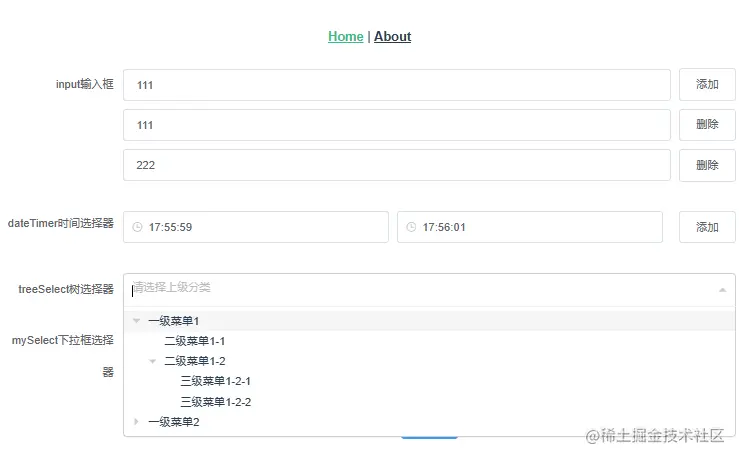
目录结构
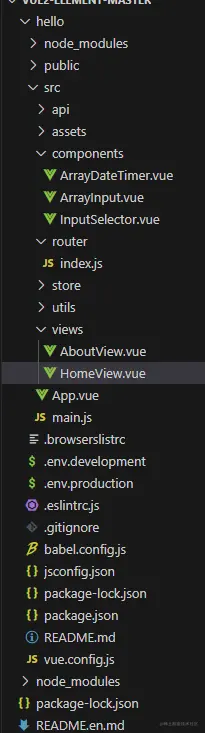
2. 挨个说明一下
2.1 封装的组件(ArrayInput.vue)
<template>
  <div>
    <div v-for="(inputValue, index) in inputValues" :key="index" class="array-input-row">
      <el-input v-model="inputValues[index]" @input="updateInputValues" class="array-input"></el-input>
      <el-button @click="index === 0 ? addInput() : removeInput(index)" class="array-input-btn">
        {{ index === 0 ? '添加' : '删除' }}
      </el-button>
    </div>
  </div>
</template>

<script>
export default {
  data() {
    return {
      inputValues: [''],
    };
  },
  methods: {
    addInput() {
      this.inputValues.push('');
      this.updateInputValues();
    },
    removeInput(index) {
      this.inputValues.splice(index, 1);
      this.updateInputValues();
    },
    updateInputValues() {
      this.$emit('input', this.inputValues);
    },
  },
};
</script>

<style scoped>
.array-input-row {
  display: flex;
  align-items: center;
  margin-bottom: 10px;
}

.array-input {
  flex: 1;
  margin-right: 10px;
}
</style>
2.2 封装的组件(ArrayDateTimer.vue)
<template>
  <div>
      <div v-for="(time, index) in times" :key="index" class="time-select-row">
        <el-time-picker
          placeholder="选择时间"
          v-model="times[index].time1"
          format="HH:mm:ss"
          value-format="HH:mm:ss"
          @change="updateTimes"
          class="time-select"
        ></el-time-picker>
        <el-time-picker
          placeholder="选择时间"
          v-model="times[index].time2"
          format="HH:mm:ss"
          value-format="HH:mm:ss"
          @change="updateTimes"
          class="time-select"
        ></el-time-picker>
        <el-button @click="index === 0 ? addTime() : removeTime(index)" class="time-select-btn">
          {{ index === 0 ? '添加' : '删除' }}
        </el-button>
      </div>
  </div>
</template>

<script>
export default {
  name: 'ArrayTimeSelect',
  data() {
    return {
      times: [{ time1: '', time2: '' }],
    };
  },
  methods: {
    addTime() {
      this.times.push({ time1: '', time2: '' });
      this.updateTimes();
    },
    removeTime(index) {
      this.times.splice(index, 1);
      this.updateTimes();
    },
    updateTimes() {
      this.$emit('input', this.times);
    },
  },
};
</script>

<style scoped>
.no-wrap {
  white-space: nowrap;
}

.time-select-row {
  display: flex;
  align-items: center;
  margin-bottom: 10px;
}

.time-select {
  flex: 1;
  margin-right: 10px;
}

.time-select-btn {
  margin-left: 10px;
}
</style>
2.3 封装的组件(inputSelector.vue)
<template>
  <el-select v-model="selectedValue" :placeholder="placeholder" @change="handleChange" style="width:100%">
    <el-option v-for="option in options" :key="option.value" :label="option.label" :value="option.value" />
  </el-select>
</template>

<script>
export default {
  name: "MySelect",
  props: {
    options: {
      type: Array,
      required: true,
    },
    value: {
      type: [String, Number],
      default: null,
    },
    placeholder: {
      type: String,
      default: "请选择",
    },
  },
  data() {
    return {
      selectedValue: this.value,
    };
  },
  watch: {
    value(newValue) {
      this.selectedValue = newValue;
    },
  },
  methods: {
    handleChange(value) {
      this.$emit("input", value);
      this.$emit("change", value);
    },
  },
};
</script>
父组件(HomeView.vue)
<template>
<div>
<el-form ref="form" :model="form" label-width="150px">
<el-form-item label="input输入框">
<array-input v-model="form.arrayInput"></array-input>
</el-form-item>
<el-form-item label="dateTimer时间选择器">
<array-time-select v-model="form.arrayTimeSelect"></array-time-select>
</el-form-item>
<el-form-item label="treeSelect树选择器">
<treeselect
v-model="form.parentCode"
:multiple="false"
:options="categoryTreeData"
placeholder="请选择上级分类"
@select="handleSelect"
/>
</el-form-item>
<el-form-item label="mySelect下拉框选择器" style="width: 100%;">
<my-select :options="options" v-model="form.selectedValue" @change="handleChange" />
</el-form-item>
<el-form-item>
<el-button type="primary" @click="handleSubmit">确定</el-button>
</el-form-item>
</el-form>
</div>
</template>
<script>
import ArrayInput from '../components/ArrayInput.vue';
import ArrayTimeSelect from '../components/ArrayDateTimer.vue';
import MySelect from '../components/InputSelector.vue'
import Treeselect from "@riophae/vue-treeselect";
import "@riophae/vue-treeselect/dist/vue-treeselect.css";
export default {
components: {
ArrayInput,
ArrayTimeSelect,
MySelect,
Treeselect
},
data() {
return {
form: {
arrayInput: [],
arrayTimeSelect: [],
parentCode:null,
selectedValue: null,
},
categoryTreeData: [
{
id: 1,
label: "一级菜单1",
children: [
{
id: 11,
label: "二级菜单1-1",
},
{
id: 12,
label: "二级菜单1-2",
children: [
{
id: 121,
label: "三级菜单1-2-1",
},
{
id: 122,
label: "三级菜单1-2-2",
},
],
},
],
},
{
id: 2,
label: "一级菜单2",
children: [
{
id: 21,
label: "二级菜单2-1",
},
{
id: 22,
label: "二级菜单2-2",
},
],
},
],
options: [
{ label: "选项1", value: "1" },
{ label: "选项2", value: "2" },
{ label: "选项3", value: "3" },
],
};
},
methods: {
handleSubmit() {
console.log('表单数据:', this.form);
},
handleSelect(selectedNode) {
console.log("选中的节点: ", selectedNode);
},
handleChange(value) {
console.log("选中的值:", value);
},
},
};
</script>