#InkResponse 和 InkWell
-
内部使用了Ink;
-
可以包裹 不具备事件处理的组件,实现水波纹等点击事件的效果;
-
InkWell 水波纹限制在文本组件之内; InkResponse 水波纹没有限制; InkResponse 和 InkWell 都可以指定各种响应颜色、手势等相关属性;
#属性 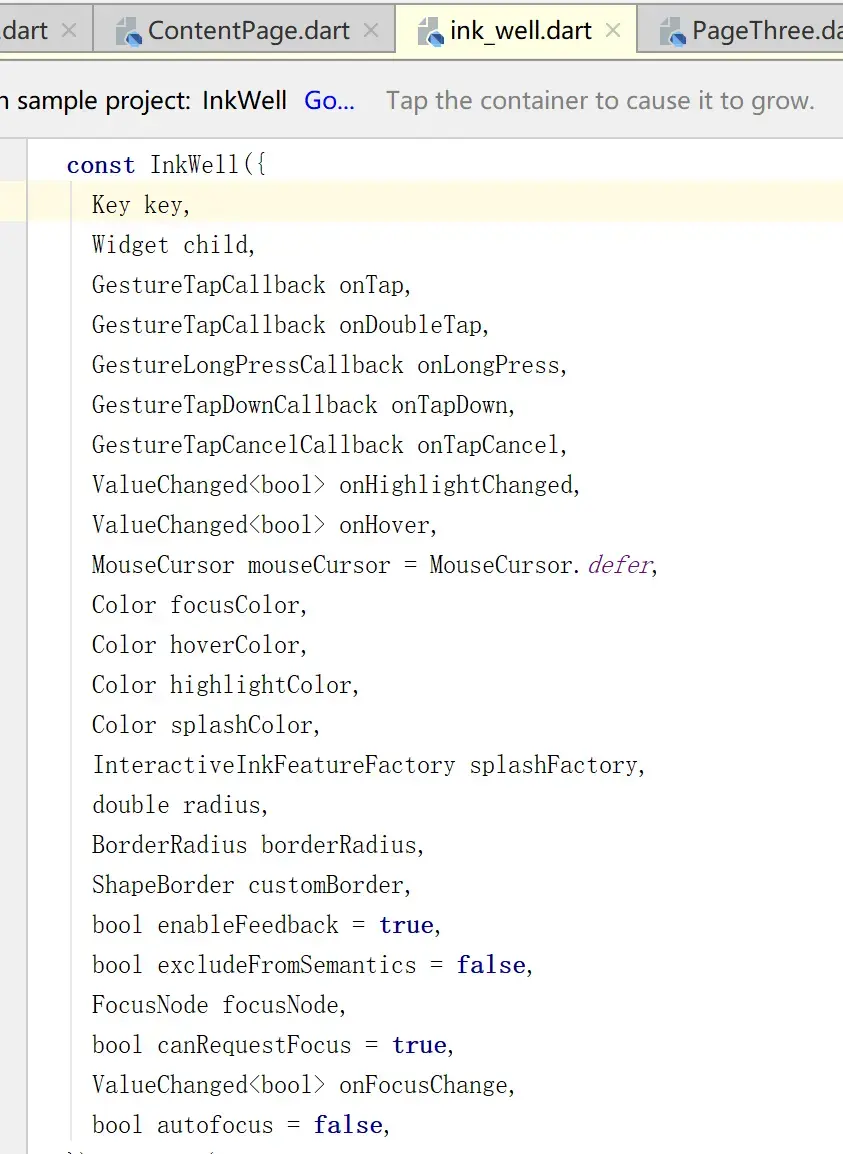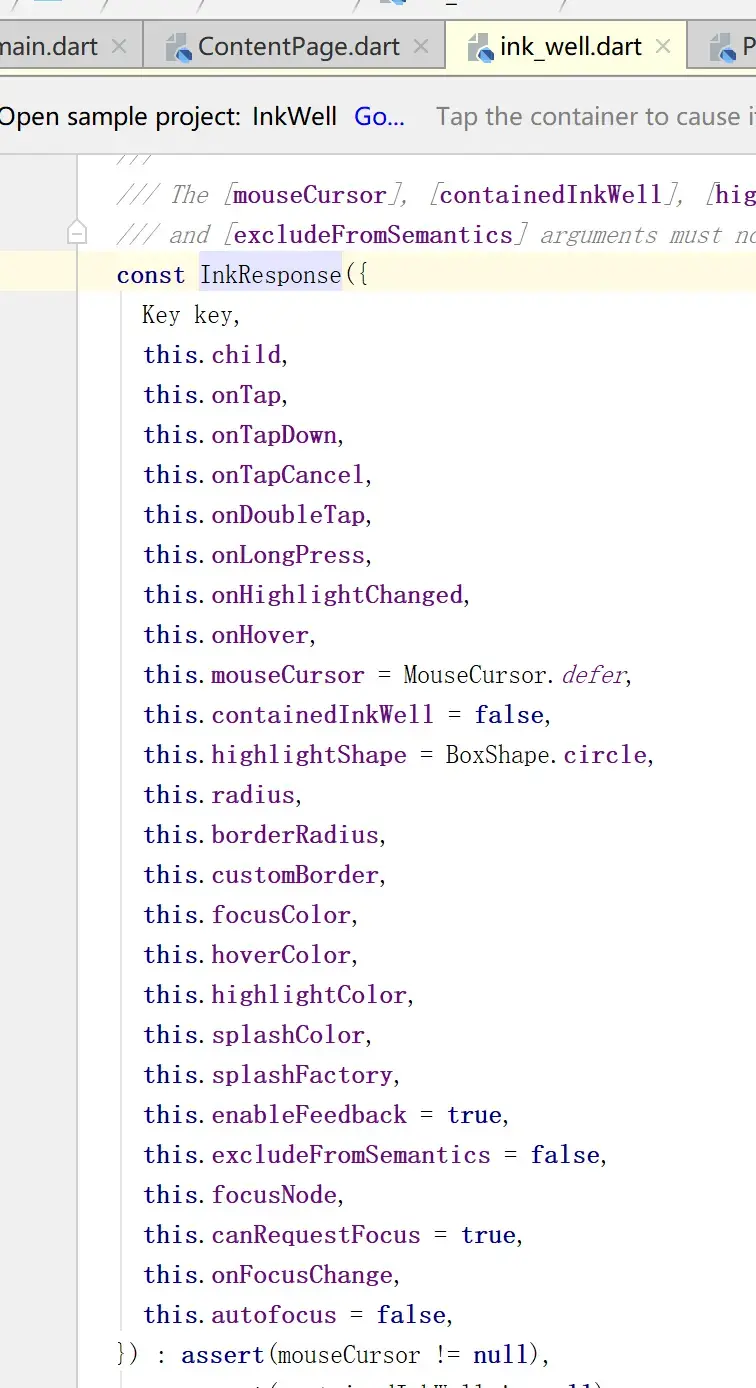
#案例代码 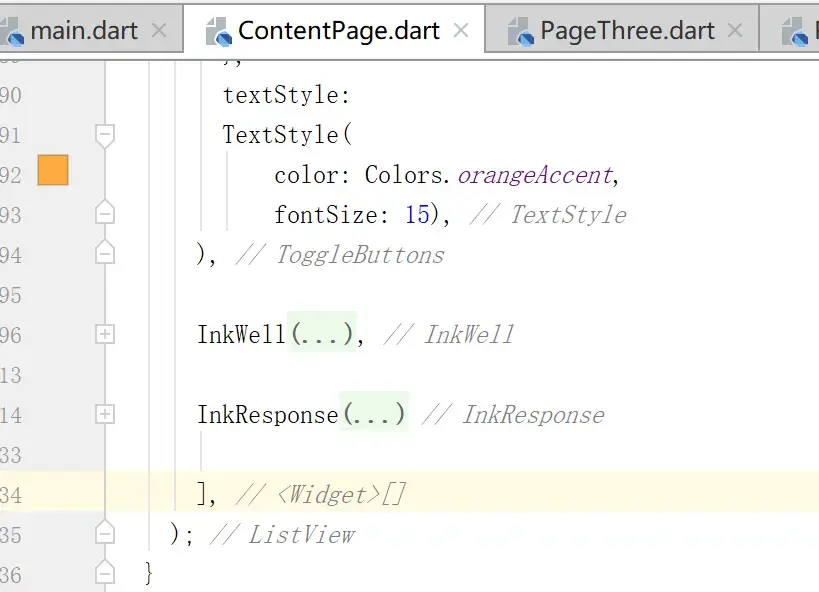 ``` InkWell( radius: 200.0, focusColor: Colors.red, hoverColor: Colors.blue,
    highlightColor: Colors.teal,//长按
    splashColor: Colors.orangeAccent,//点击时水波纹
    onTap: (){
      print('点击了按钮');
    },
    child: Text(
      '需要点击的事件',
      style: TextStyle(
          color: Colors.orangeAccent,
          fontSize: 30),
    ),
  ),

    InkResponse(
      radius: 200.0,
      focusColor: Colors.red,
      hoverColor: Colors.blue,

      highlightColor: Colors.teal,
      //长按
      splashColor: Colors.orangeAccent,
      //点击时水波纹
      onTap: () {
        print('点击了按钮');
      },
      child: Text(
        '需要点击的事件',
        style: TextStyle(
            color: Colors.orangeAccent,
            fontSize: 30),
      ),
    )
效果比较多的是动态体验,可以编写后查看效果;


<br>
<br><br><br><br>
---
参考自[CSDN的Flutter入门课程](https://edu.csdn.net/mycollege)
import 'package:flutter/material.dart';
import 'PageOne.dart';
class ContentPage extends StatefulWidget { ContentPage(this.counter);
int counter = 0;
@override _ContentPageState createState() => _ContentPageState(); }
class _ContentPageState extends State { @override Widget build(BuildContext context) { // 使用Column // return Center( // // Center is a layout widget. It takes a single child and positions it // // in the middle of the parent. // Column组件是不可拓展的 // child: Column( // // Column is also a layout widget. It takes a list of children and // // arranges them vertically. By default, it sizes itself to fit its // // children horizontally, and tries to be as tall as its parent. // // // // Invoke "debug painting" (press "p" in the console, choose the // // "Toggle Debug Paint" action from the Flutter Inspector in Android // // Studio, or the "Toggle Debug Paint" command in Visual Studio Code) // // to see the wireframe for each widget. // // // // Column has various properties to control how it sizes itself and // // how it positions its children. Here we use mainAxisAlignment to // // center the children vertically; the main axis here is the vertical // // axis because Columns are vertical (the cross axis would be // // horizontal). // mainAxisAlignment: MainAxisAlignment.center, // children: [ // Text( // 'You have pushed the button this many times:', // ), // Text( // '${widget.counter}', // style: Theme.of(context).textTheme.display1, // ), // // /// color 颜色 // /// decoration 删除线 // /// decorationColor 删除线颜色 // /// decorationStyle 删除线样式 // /// fontSize 大小 // /// fontStyle 斜体 // /// fontFamily 字体 // /// fontWeight 字体粗细 // /// height 跨度 // /// letterSpacing 字母间隔 // // new Text( // // 'Text组件使用11111111111111111111111111hello-world11111111111111111111111111111end', // // style: TextStyle( // // color: const Color(0xffff0000), // // // none 不显示装饰线条 underline 字体下方 overline 字体上方 lineThrough 穿过文字 // // decoration: TextDecoration.underline, // // // solid 直线 double 双下划线 dotted 虚线 dashed 点下划线 wavy 波浪线 // // decorationStyle: TextDecorationStyle.wavy, // // decorationColor: const Color(0xff00ff00), // // // decorationColor: Colors.red, // // fontSize: 25.0, // // // normal 正常 italic 斜体 // // fontStyle: FontStyle.normal, // // // monospace serif // // fontFamily: 'serif', // // // w100 - w900 normal(w400) bold(w700) // // fontWeight: FontWeight.bold, // // letterSpacing: 5.0, // // height: 2, // // ), // // // 段落的间距样式 // // strutStyle: StrutStyle( // // fontFamily: 'serif', // // fontFamilyFallback: ['monospace', 'serif'], // // fontSize: 25.0, // // height: 2, // // leading: 2.0, // // fontWeight: FontWeight.w200, // // fontStyle: FontStyle.normal, // // forceStrutHeight: true, // // debugLabel: 'text demo', // // ), // // textAlign: TextAlign.left, // // textDirection: TextDirection.ltr, // // locale: Locale('zh_CN'), // // // 软包裹 文字是否应该在软断行处断行 // // softWrap: false, // // //clip 裁剪 fade 淡入 ellipsis 省略号 visible 容器外也会渲染组件 // // overflow: TextOverflow.ellipsis, // // textScaleFactor: 1.0, // // maxLines: 3, // // // 语义标签 // // semanticsLabel: 'text demo', // // textWidthBasis: TextWidthBasis.longestLine, // // ), // // /// Container介绍 // // alignment // // padding // // margin // // constraints // // width // // height // // decoration // // foregroundDecoration // // child // // transform // // new Container( // // alignment: Alignment.center, // // padding: const EdgeInsets.all(8.0), // // margin: const EdgeInsets.all(8.0), // // constraints: new BoxConstraints.expand( // // height: // // Theme.of(context).textTheme.display1.fontSize * 1.1 + 200.0, // // ), // // width: 300.0, // // height: 200.0, // // decoration: buildBoxDecoration(), // //// foregroundDecoration: buildBoxDecorations(), // // child: new Text('容器演示'), // // transform: new Matrix4.rotationZ(0.2), // // ), // // RaisedButton( // onPressed: () { // Scaffold.of(context).showBottomSheet( // (BuildContext context) { // return new Container( // child: Text('hello world1'), // width: 300, // height: 100, // ); // }, // backgroundColor: Theme.of(context).primaryColor, // elevation: 10, // shape: RoundedRectangleBorder( // borderRadius: BorderRadius.circular(5.0)), // clipBehavior: Clip.antiAlias, // ); // Scaffold.of(context) // .showSnackBar(SnackBar(content: Text('hello'))); // }, // child: Text('点击显示BottomSheet'), // color: Theme.of(context).primaryColor, // ), // ], // ), // ); // 使用 ListView return buildListViews(widget.counter); } }
class buildListViews extends StatefulWidget { buildListViews(this.counter);
int counter = 0;
@override buildListViewsState createState() => new buildListViewsState(); }
class buildListViewsState extends State { String data = '联系人';
bool isChecked = false; bool isChecked2 = false;
final List colorDatas = [ 50, 100, 200, 300, 400, 500, 600, 700, 800, 900 ];
// @override // Widget build(BuildContext context) { // return ListView.builder( // padding: EdgeInsets.all(8.0), // //类似于onBindViewHolder,index类比position // // %10 是为了 颜色数据 可以在 colorDatas中循环读取 // itemBuilder: (BuildContext context,int index){ // return Icon( // Icons.image, // color: Colors.blue[colorDatas[index%10]], // size: 100, // ); // }, // itemCount: 20, // ); // }
String results; String results2; String results3; //封装一个函数 处理路由返回的数据 // 接收数据是异步的,需要加 async关键字; // 需要接收数据,需要加 await关键字; // 需要准备一个数据类型变量,来承载; // 指定函数返回类型为String,Alt+enter 改成 Future Future pushData(BuildContext context, String datapush) async{ //Navigator 路由导航类 ********************************************** // of()返回一个NavigatorState,一个状态,包含了相关的一些属性之类的; // 通过这个状态实例,可以去调用里面的一些函数; // push()要求传入一个Route对象,一般用 MaterialPageRoute类 var datas = await Navigator.of(context).push(MaterialPageRoute(builder: (context){ return new PageOne(datapush); })); return datas; }
//多页面路由 Future pushNamedData(BuildContext context, String namedStr) async{ var datas = await Navigator.of(context).pushNamed(namedStr); return datas; }
bool flag; List indexs = [true,false,false];
@override Widget build(BuildContext context) { return ListView( // 列表滑动的方向 scrollDirection: Axis.vertical, // scrollDirection: Axis.horizontal, children: [ // Text( // 'You have pushed the button this many times:', // ), // // new Divider(height: 1.0, color: Colors.grey), // // new VerticalDivider(width: 1.0, color: Colors.grey), // Text( // '{widget.counter}', // style: Theme.of(context).textTheme.display1, // ), // new Divider(height: 1.0, color: Colors.grey), // new VerticalDivider(width: 1.0, color: Colors.grey), ListTile( //预览小图标 leading: new Icon(Icons.account_circle), //标题 title: new Text(results == null ? data : results), //子标题 subtitle: new Text('简介: ' + (results2 == null ? data : results2)), // 右边的图标 trailing: new Icon(Icons.chevron_right), onTap: () { print('点击事件:点击了 ListTile ==== title为:$data');
        //Navigator 路由导航类   **********************************************
        // of()返回一个NavigatorState,一个状态,包含了相关的一些属性之类的;
        // 通过这个状态实例,可以去调用里面的一些函数;
        // push()要求传入一个Route对象,一般用 MaterialPageRoute类
// Navigator.of(context).push(MaterialPageRoute(builder: (context){ // return new PageOne(data); // }));
        //********************************************************************

        //把以上代码 封装一个函数 处理路由返回的数据
        // 利用Future变量类型的 then方法,拿到返回的数据
        // value位置是一个形参,名字可以随便起,这个形参位置就是返回的数据
// pushData(context, "我是来自ContentPage的数据").then((value){ // //注意这里要把results 写进setState() // // 这样results刷新时,相关UI才会跟着刷新!!! // setState(() { // results = value; // }); // print('接收到返回的数据:$results'); // });
        //********************************************************************

        //发送命名路由
        pushNamedData(context, "/pageone").then((value){
          //注意这里要把results 写进setState()
          // 这样results刷新时,相关UI才会跟着刷新!!!
          setState(() {
            results = value;
          });
          print('【pushNamedData()】接收到返回的数据:$results');
        });


      },
      onLongPress: () {
        print('长按事件:长按了 ListTile  ==== title为:$data');

        //发送命名路由
        pushNamedData(context, "/pagetwo").then((value){
          //注意这里要把results 写进setState()
          // 这样results刷新时,相关UI才会跟着刷新!!!
          setState(() {
            results2 = value;
          });
          print('【pushNamedData()】接收到返回的数据:$results2');
        });

      },
      selected: true,
    ),

    new CheckboxListTile(
      value: isChecked,
      //点击后的回调
      onChanged: ((bool value) {
        print('点击了CheckboxListTile , 选中状态为: $value');
        setState(() {
          isChecked = !isChecked;
        });

        //发送命名路由
        pushNamedData(context, "/pagethree").then((value){
          //注意这里要把results 写进setState()
          // 这样results刷新时,相关UI才会跟着刷新!!!
          setState(() {
            results3 = value;
          });
          print('【pushNamedData()】接收到返回的数据:$results3');
        });
      }),
      title: new Text('相册'),
// subtitle: new Text('相册的描述'), subtitle: new Text(results3 == null ? data : results3), //选中 selected: true, //选中的颜色 activeColor: Colors.teal, ),
// new SwitchListTile( // //选中状态值 // value: isChecked2, // //点击后的回调 // onChanged: ((bool value) { // print('点击了SwitchListTile , 选中状态为: $value'); // setState(() { // isChecked2 = !isChecked2; // }); // }), // //主次标题 // title: new Text('相册'), // subtitle: new Text( // '相册的描述。这是相册的描述。这是相册的描述。这是相册的描述。这是相册的描述。这是相册的描述。这是相册的描述。这是相册的描述。'), // //选中 // selected: true, // //选中的颜色 // activeColor: Colors.teal, // //左侧图标 // secondary: new Icon(Icons.account_circle), // //文字过多时,是否三行显示 // isThreeLine: true, // ),
// new AboutListTile( // icon: new Icon(Icons.panorama), // //公司logo // applicationIcon: new FlutterLogo(), // //app名称 // applicationName: '凌川江雪', // //app版本号 // applicationVersion: 'V1.0.0', // //版权信息 // applicationLegalese: '版权归XX科技有限公司所有...', // // child: ,//关于应用名 // // aboutBoxChildren: [],//更多信息 // ),
// Text( // '{widget.counter}', // style: Theme.of(context).textTheme.display1, // ), // Text( //// '{widget.counter}', //// style: Theme.of(context).textTheme.display1, //// ), //// Text( //// '{widget.counter}', // style: Theme.of(context).textTheme.display1, // ), // Text( // '{widget.counter}', // style: Theme.of(context).textTheme.display1, // ), // Text( // '{widget.counter}', // style: Theme.of(context).textTheme.display1, // ), // Text( // '${widget.counter}', // style: Theme.of(context).textTheme.display1, // ), /// color 颜色 /// decoration 删除线 /// decorationColor 删除线颜色 /// decorationStyle 删除线样式 /// fontSize 大小 /// fontStyle 斜体 /// fontFamily 字体 /// fontWeight 字体粗细 /// height 跨度 /// letterSpacing 字母间隔 // new Text( // 'Text组件使用11111111111111111111111111hello-world11111111111111111111111111111end', // style: TextStyle( // color: const Color(0xffff0000), // // none 不显示装饰线条 underline 字体下方 overline 字体上方 lineThrough 穿过文字 // decoration: TextDecoration.underline, // // solid 直线 double 双下划线 dotted 虚线 dashed 点下划线 wavy 波浪线 // decorationStyle: TextDecorationStyle.wavy, // decorationColor: const Color(0xff00ee00), //// decorationColor: Colors.red, // //字体大小 // fontSize: 15.0, // // normal 正常 italic 斜体 // fontStyle: FontStyle.normal, // // monospace serif // fontFamily: 'serif', // // w100 - w900 normal(w400) bold(w700) 字体宽度 //// fontWeight: FontWeight.bold, // fontWeight: FontWeight.w100, // //字体间隙 // letterSpacing: 2.0, // //高度 // height: 2, // ), // // // 段落的间距样式!!!!!!!!可以注释掉这一部分,看看效果!!! // strutStyle: StrutStyle( // fontFamily: 'serif',//字体,如果此属性没设置,则从fontFamilyFallback去找; // fontFamilyFallback: ['monospace', 'serif'],//字体集合,如果这两个都没设置,则使用系统默认 // fontSize: 10.0, // height: 2, // leading: 2.0,//首字母到后面字母的倍数 // fontWeight: FontWeight.w200, // fontStyle: FontStyle.normal, // forceStrutHeight: true,//是否强制设置间距和高度 // debugLabel: 'text demo',//类似于 semanticsLabel!!! // ), // // textAlign: TextAlign.left,//居左 // textDirection: TextDirection.ltr,//文字的方向 // //用于配置国际化语言!!! // locale: Locale('zh_CN'), // // 软包裹 文字是否应该在软断行处断行 // //软断行 指 文本中有英文横杆之类的,会自动软断行!!!!! // softWrap: false, // //文字超出显示区域时候,超出的部分怎么表示 // // clip 裁剪 fade 淡入 ellipsis 省略号 visible 容器外也会渲染组件 // overflow: TextOverflow.ellipsis, // //文字的缩放比例 // textScaleFactor: 1.0, // //文字最多显示几行 // maxLines: 2, // // 语义标签 // semanticsLabel: 'text demo', // //文字的宽度的基准, longestLine 以文字的最长的线为基准 // textWidthBasis: TextWidthBasis.parent, // ),
// / Container介绍 // alignment // padding // margin // constraints // width // height // decoration // foregroundDecoration // child // transform // new Container( // alignment: Alignment.center,//居中 // padding: const EdgeInsets.all(50.0), // margin: const EdgeInsets.all(60.0), // //Container的宽高 的约束!!!!! // constraints: new BoxConstraints.expand( // height: // Theme.of(context).textTheme.display1.fontSize * 1.1 + 100.0, // ), // //容器的宽高,子组件超过则显示不出来 // width: 250.0, // height: 100.0, // //背景的装饰 // decoration: buildBoxDecoration(), // //前景的装饰 //// foregroundDecoration: buildBoxDecorations(), // child: new Text('容器演示'), // //绕Z轴旋转 // transform: new Matrix4.rotationZ(0.1), // ),
// RaisedButton( // onPressed: () { // //注意这里的context是BuildContext // Scaffold.of(context).showBottomSheet( // (BuildContext context) { // //这里可以是一个自定义的View Text组件亦可,Container亦可 // return new Container( // //底部弹出文本框 // child: Text('hello world1'), // width: 150, // height: 50, // ); // }, // //颜色 // backgroundColor: Theme.of(context).primaryColor, // //高度值 // elevation: 10, // //边角 // shape: RoundedRectangleBorder( // borderRadius: BorderRadius.circular(5.0)), // //防锯齿 // clipBehavior: Clip.antiAlias, // ); // // // 生成一个 SnackBar // Scaffold.of(context).showSnackBar(SnackBar(content: Text('hello'))); // }, // child: Text('点击显示BottomSheet'),//按钮文本 // color: Theme.of(context).primaryColor,//颜色 // ),
  ToggleButtons(
    children: [
      Text('Data1'),
      Text('Data2'),
      Text('Data3'),
    ],
    isSelected: indexs,
    onPressed: (int index){
      int count = 0;

      print('点击了: $index');

      //每次点击 遍历indexs数组,点击的页面设置为true,其他页面设置false
      setState(() {
        for(int buttonIndex =0;buttonIndex < indexs.length;buttonIndex++) {
          if(buttonIndex == index) {
            indexs[buttonIndex] = true;
          }else{
            indexs[buttonIndex] = false;
          }
        }
      });
    },
    textStyle:
    TextStyle(
        color: Colors.orangeAccent,
        fontSize: 15),
  ),

  InkWell(
    radius: 200.0,
    focusColor: Colors.red,
    hoverColor: Colors.blue,

    highlightColor: Colors.teal,//长按
    splashColor: Colors.orangeAccent,//点击时水波纹
    onTap: (){
      print('点击了按钮');
    },
    child: Text(
      '需要点击的事件',
      style: TextStyle(
          color: Colors.orangeAccent,
          fontSize: 30),
    ),
  ),

  InkResponse(
      radius: 200.0,
      focusColor: Colors.red,
      hoverColor: Colors.blue,

      highlightColor: Colors.teal,
      //长按
      splashColor: Colors.orangeAccent,
      //点击时水波纹
      onTap: () {
        print('点击了按钮');
      },
      child: Text(
        '需要点击的事件',
        style: TextStyle(
            color: Colors.orangeAccent,
            fontSize: 30),
      ),
    )

  ],
);
}
//返回Decoration对象 Decoration buildBoxDecoration() { return new BoxDecoration( color: const Color(0xfffce5cd), //设置Border属性给容器添加边框 border: new Border.all( //为边框添加颜色 color: const Color(0xff6d9eed), //为边框宽度 width: 8.0, ) ); }
Decoration buildBoxDecorations() { return BoxDecoration( color: const Color(0xfffce5cd), //设置Border属性给容器添加边框 border: new Border.all( //为边框添加颜色 color: Colors.red, //为边框宽度 width: 8.0, style: BorderStyle.solid ) ); }
@override void initState() { // TODO: implement initState super.initState(); }
@override void dispose() { // TODO: implement dispose super.dispose(); } }