using System
using System.Collections.Generic
using System.ComponentModel
using System.Data
using System.Drawing
using System.Linq
using System.Text
using System.Windows.Forms
using System.Drawing.Imaging
using System.IO
using System.Runtime.InteropServices
using System.Drawing.Drawing2D
namespace Note
{
public partial class frmMain : Form
{
string info = ""
string ImgPath = Application.StartupPath + "\\Img\\"
string TplPath = Application.StartupPath + "\\NoteTpl\\"
FontDialog fontDialog1 = new FontDialog()
ColorDialog colorDialog1 = new ColorDialog()
OpenFileDialog openFileDialog1 = new OpenFileDialog()
public frmMain()
{
InitializeComponent()
}
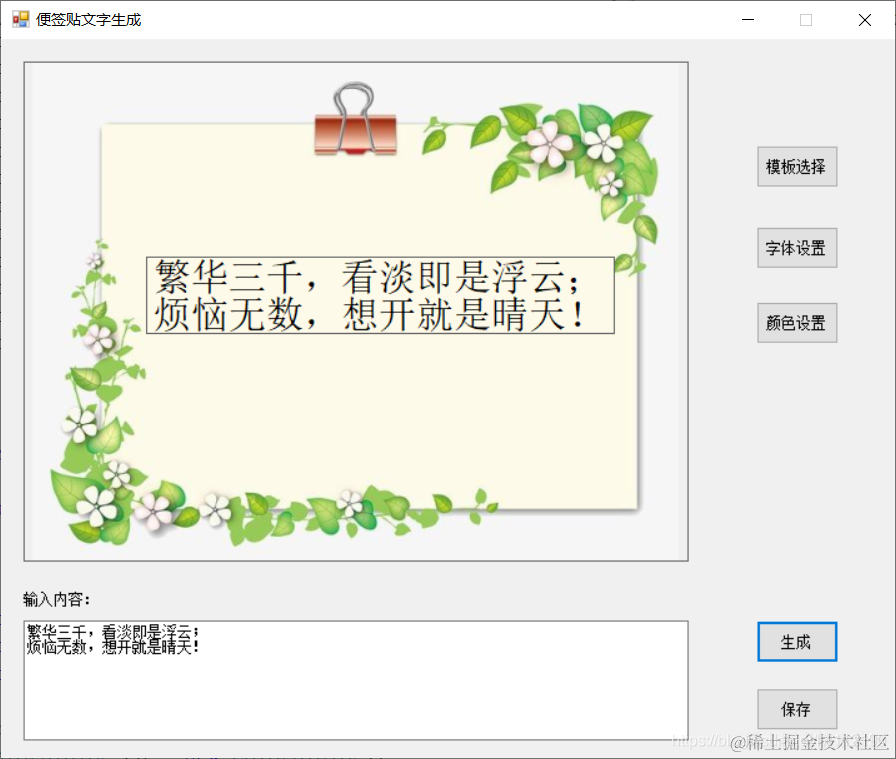
private void btnCreate_Click(object sender, EventArgs e)
{
info = txtInfo.Text
lblInfo.Text = info
}
private void btnSave_Click(object sender, EventArgs e)
{
if (Directory.Exists(ImgPath) == false)
{
Directory.CreateDirectory(ImgPath)
}
string path = ImgPath + DateTime.Now.ToString("yyyyMMddHHmmss") + ".jpg"
Bitmap bitmap = GetPicThumbnail(picInfo.Image, picInfo.Height, picInfo.Width, 100)
Graphics g = Graphics.FromImage(bitmap)
Font font = lblInfo.Font
Brush brush = new SolidBrush(lblInfo.ForeColor)
PointF point = lblInfo.Location
g.DrawString(info, font, brush, point)
bitmap.Save(path)
System.Diagnostics.Process.Start("explorer.exe", ImgPath)
}
private void frmMain_Load(object sender, EventArgs e)
{
lblInfo.Parent = picInfo
lblInfo.BackColor = Color.Transparent
}
private void btnFont_Click(object sender, EventArgs e)
{
//显示字体对话框
DialogResult dr = fontDialog1.ShowDialog()
//如果在对话框中单击“确认”按钮,则更改文本框中的字体
if (dr == DialogResult.OK)
{
lblInfo.Font = fontDialog1.Font
}
}
private void btnColor_Click(object sender, EventArgs e)
{
if (colorDialog1.ShowDialog() == DialogResult.OK)
{
lblInfo.ForeColor = colorDialog1.Color
}
}
private void btnTplSelect_Click(object sender, EventArgs e)
{
openFileDialog1.InitialDirectory = TplPath
if (openFileDialog1.ShowDialog() == DialogResult.OK)
{
picInfo.Image = new Bitmap(openFileDialog1.FileName)
}
}
[DllImport("User32.DLL")]
public static extern int SendMessage(IntPtr hWnd, uint Msg, int wParam, int lParam)
[DllImport("User32.DLL")]
public static extern bool ReleaseCapture()
public const uint WM_SYSCOMMAND = 0x0112
public const int SC_MOVE = 61456
public const int HTCAPTION = 2
private void lblInfo_MouseDown(object sender, MouseEventArgs e)
{
ReleaseCapture()
SendMessage(((Label)sender).Handle, WM_SYSCOMMAND, SC_MOVE | HTCAPTION, 0)
}
public static Bitmap GetPicThumbnail(System.Drawing.Image iSource, int dHeight, int dWidth, int flag)
{
ImageFormat tFormat = iSource.RawFormat
int sW = 0, sH = 0
//按比例缩放
Size tem_size = new Size(iSource.Width, iSource.Height)
if (tem_size.Width > dHeight || tem_size.Width > dWidth)
{
if ((tem_size.Width * dHeight) > (tem_size.Width * dWidth))
{
sW = dWidth
sH = (dWidth * tem_size.Height) / tem_size.Width
}
else
{
sH = dHeight
sW = (tem_size.Width * dHeight) / tem_size.Height
}
}
else
{
sW = tem_size.Width
sH = tem_size.Height
}
Bitmap ob = new Bitmap(dWidth, dHeight)
Graphics g = Graphics.FromImage(ob)
g.Clear(Color.WhiteSmoke)
g.CompositingQuality = CompositingQuality.HighQuality
g.SmoothingMode = SmoothingMode.HighQuality
g.InterpolationMode = InterpolationMode.HighQualityBicubic
g.DrawImage(iSource, new Rectangle((dWidth - sW) / 2, (dHeight - sH) / 2, sW, sH), 0, 0, iSource.Width, iSource.Height, GraphicsUnit.Pixel)
g.Dispose()
//设置压缩质量
EncoderParameters ep = new EncoderParameters()
long[] qy = new long[1]
qy[0] = flag
EncoderParameter eParam = new EncoderParameter(System.Drawing.Imaging.Encoder.Quality, qy)
ep.Param[0] = eParam
try
{
ImageCodecInfo[] arrayICI = ImageCodecInfo.GetImageEncoders()
ImageCodecInfo jpegICIinfo = null
for (int x = 0
{
if (arrayICI[x].FormatDescription.Equals("JPEG"))
{
jpegICIinfo = arrayICI[x]
break
}
}
return ob
}
catch
{
return null
}
}
}
}
源码下载