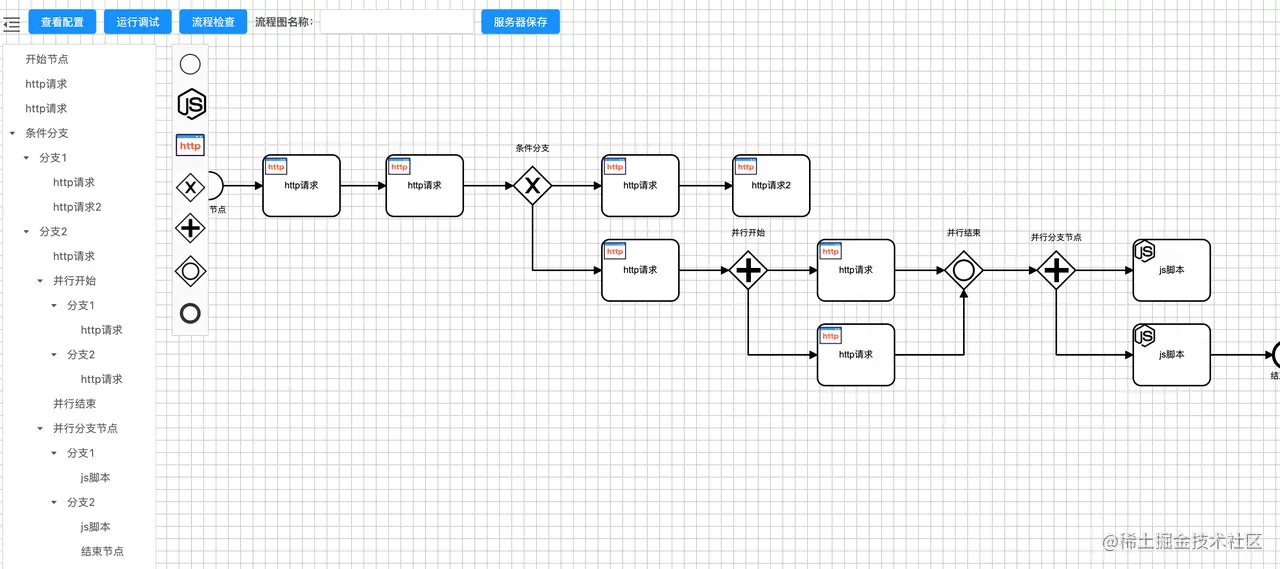
解决问题
- 通过分支判断、并行执行等编排能力,将业务中的控制逻辑剥离出来,从而辅助开发人员更加专注实现原子业务,再通过编排来控制原子业务的流转,从而支撑产品的可配置能力;
- 通过变量定义、请求api、执行脚本等自定义能力,将数据聚合、转换、计算等定制开发,通过统一的方式进行开发与沉淀,实现前端请求与接收数据的标准化,前端能力通过json配置化沉淀;
工具特性
- 可以请求http内部服务(第三方需要授权的服务延缓支持);
- 可以自定义上文变量,任意节点可以新增、赋值、取值;
- 可以执行自定义js脚本;
- 可以并行执行任务,并等待并行全部完成后继续执行;
- 可以支持条件分支,分支判断条件支持js表达式;
- 工具使用nodejs开发,跨平台,无数据库,可独立使用部署,作为前端向后端请求的中间层使用,为了便于配置信息的版本管理,配置以json格式保存,便于随项目代码一同进行git管理;
- 可随时将配置导入设计器修改再导出,并生成带时间戳的版本号,放回项目工程管理。
- 可以导出原生js代码放入工程,脱离BFF工具运行时使用;
可以设置轮询节点,用于监听异步返回;(暂通过js脚本实现)不同节点执行都有相对的重试机制、补偿机制来避免一些意外情况;(暂通过js脚本实现)
节点类型
1. 上下文变量定义
- 变量声明;
- 默认值定义,支持从流程提交的入参取值;
- 定义时支持js表达式;
{
"id": "dataDefine",
"name": "数据定义",
"describe": "数据定义",
"type": "data",
"shareData": [
{
"name": "c",
"fromJsonPath": {
"path": "c"
},
{
"name": "ids",
"fromJsonPath": {
"path": "dataIds"
},
{
"name": "d1",
"type":"int",
"value":"10"
},
{
"name": "add",
"type":"fn",
"value":"(x)=>{return x+1}"
}
],
}
2. Http请求
- 请求地址、方式、请求头、请求参数、出参共享到上下文
{
"id": "http1",
"name": "http1",
"describe": "节点描述",
"type": "http",
"url": "http://192.168.44.68:31000/api/services/app/App/GetAll",
"method": "get",
"headers": {
"content-type": "application/json"
},
"parameter": "`{ "formId": "e64ea35b-d59f-4006-bcfa-55813b74654b", "pars":[${ids}] }`",
"nextStepId": "js1",
"shareData": [
{
"name": "httpResCount",
"fromJsonPath": {
"path": "$.data.result.totalCount"
}
}
]
}
3. js 脚本
{
    "id": "jsdelay",
    "name": "jsdelay脚本",
    "delay": 0,
    "describe": "脚本描述",
    "type": "js",
    "script": "return add(d1)",
    "nextStepId": "js1"
}
4. 并行执行
{
"id": "p1",
"name": "并行开始节点",
"describe": "",
"type": "parallel",
"branches": [
{
"nextStepId": "http1"
},
{
"nextStepId": "jsdelay"
}
],
"nextStepId": "p2"
},
{
"id": "p2",
"name": "并行结束节点",
"describe": "",
"type": "parallel-end",
"nextStepId": "2"
}
5. 条件分支
{
"id": "2",
"name": "条件分支",
"describe": "描述",
"type": "branch",
"condition": "'2'",
"branches": [
{
"when": "1",
"nextStepId": "http1"
},
{
"when": "2",
"nextStepId": "js3"
}
]
}
6. 条件分支2-ifelse模式
{
    "id": "2",
    "name": "条件分支",
    "describe": "描述",
    "type": "ifelse",
    "branches": [//严格安装存储顺序执行
        {
            "when": "1",//表达式,返回true、false,通常最后一个节点不配置,默认ture,类似于else
            "nextStepId": "http1"
        },
        {
            "when": "2",
            "nextStepId": "js3"
        },
        {
            "nextStepId": "js2"
        }
    ]
}
测试用例
{
  "config": {
    "steps": [
      {
        "id": "start",
        "name": "开始节点",
        "describe": "脚本描述",
        "type": "start",
        "script": "",
        "nextStepId": "p1"
      },
      {
        "id": "p1",
        "name": "并行开始节点",
        "describe": "",
        "type": "parallel",
        "branches": [
          {
            "nextStepId": "http1"
          },
          {
            "nextStepId": "jsdelay"
          }
        ],
        "nextStepId": "p2"
      },
      {
        "id": "js1",
        "name": "js1脚本",
        "describe": "脚本描述",
        "type": "js",
        "script": "return d1",
        "nextStepId": "p2"
      },
      {
        "id": "jsdelay",
        "name": "jsdelay脚本",
        "delay": 0,
        "describe": "脚本描述",
        "type": "js",
        "script": "return add(d1)",
        "nextStepId": "js1"
      },
      {
        "id": "http1",
        "name": "http1",
        "describe": "节点描述",
        "type": "http",
        "url": "http://192.168.44.68:31000/api/services/app/App/GetAll",
        "method": "get",
        "headers": {
          "content-type": "application/json"
        },
        "parameter": "`{ "formId": "e64ea35b-d59f-4006-bcfa-55813b74654b", "pars":[${ids}] }`",
        "reqAdaptor": "function(parameter,step){return {parameter,step}}",
        "resAdaptor": "function(data,response,step){return {data,code}}",
        "nextStepId": "js1",
        "shareData": [
          {
            "name": "httpResCount",
            "fromJsonPath": {
              "path": "$.data.result.totalCount"
            }
          }
        ]
      },
      {
        "id": "2",
        "name": "条件分支",
        "describe": "描述",
        "type": "branch",
        "condition": "add(1)==2?'2':'1'",
        "branches": [
          {
            "when": "1",
            "nextStepId": "http1"
          },
          {
            "when": "2",
            "nextStepId": "js3"
          }
        ]
      },
      {
        "id": "p2",
        "name": "并行结束节点",
        "describe": "",
        "type": "parallel-end",
        "nextStepId": "2"
      },
      {
        "id": "js3",
        "name": "并行结束的下一节点",
        "describe": "脚本描述",
        "type": "js",
        "script": "return httpResCount"
      }
    ]
  },
  "input": {
    "c": "2",
    "dataIds": [1, 2, 4]
  }
}



