1.vuex概述
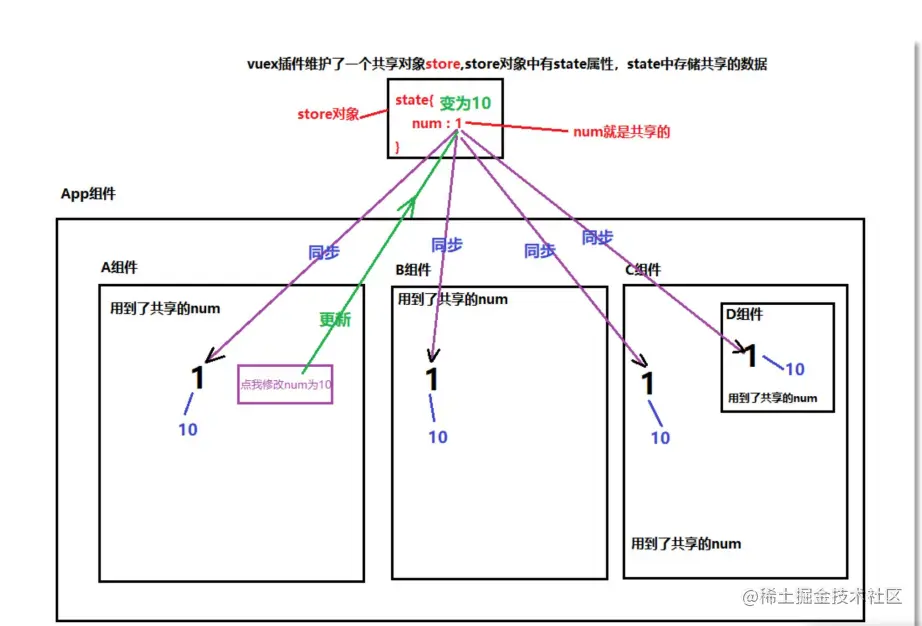
- vuex是实现数据
集中式状态管理插件。数据由vuex统一管理。其他组件都去使用vuex中的数据
- 只要有其中一个组件去修改了这个共享的数据,其他组件就会同步更新。
- 注意:全局事件总线和vuex插件的区别:
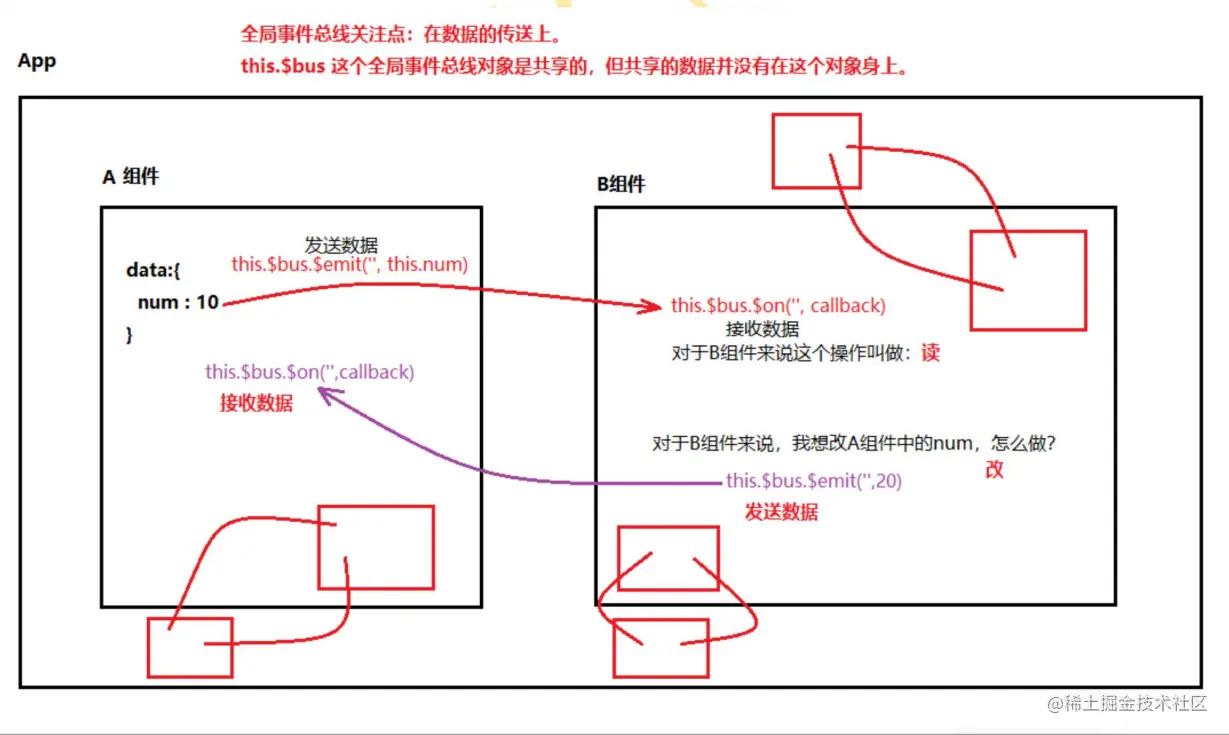
- 1.全局事件总线关注点:组件和组件之间数据如何传递,一个绑定
$on,一个触发$emit。数据实际上还是在局部组件中,并没有真正实现数据共享,只是数据传来传去
- 2.vuex插件的关注点:共享数据本身就在vuex上。其中任何一个组件去操作这个数据,其他组件都会同步更新,是真正意义的数据共享。
2.vuex 环境搭建
1.安装 vuex
- vue2安装vue3版本
- vue3安装vuex4版本
2.创建目录和js文件(目录和文件名不是必须叫这个)
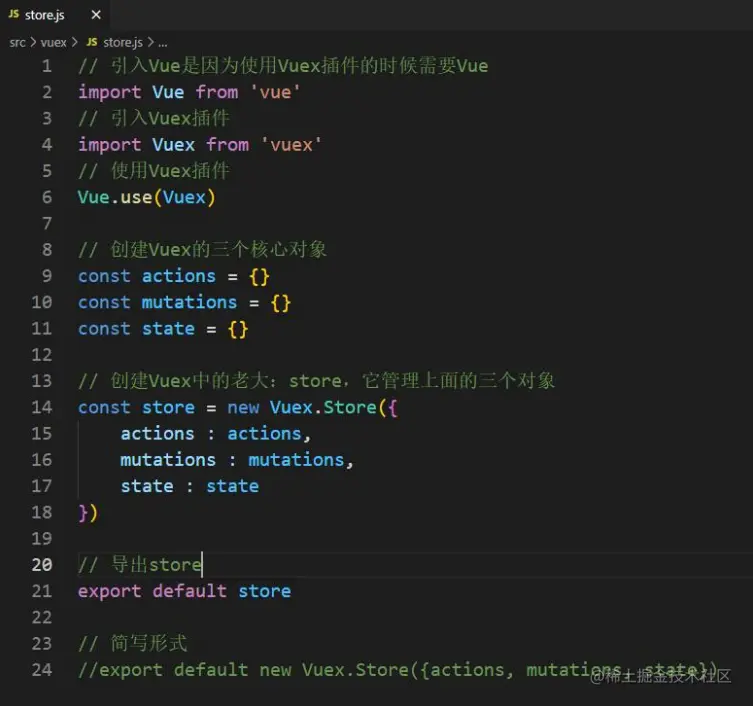
3.在store.js文件中创建核心store对象,并暴露
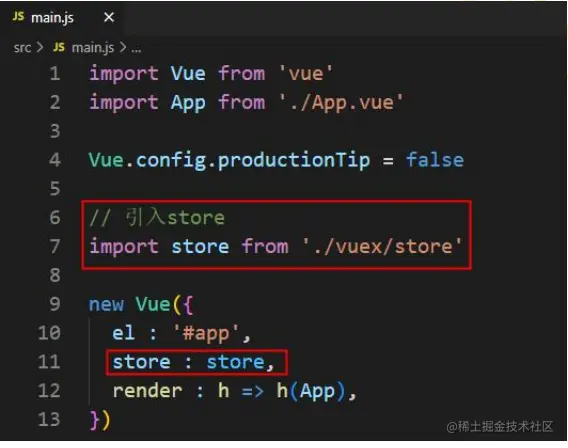
4.在 main.js 文件中关联 store,这一步很重要,完成这一步之后,所有的 vm 和 vc 对象上会多一个store属性
3.vuex实现一个最简单的案例
- 使用vuex实现一个点我加一的简单功能
- App.vue
<div>
<h1>数字:{{$store.state.num}}</h1>
<button @click="plusOne">点我加1</button>
</div>
methods: {
plusOne(){
this.$store.dispatch('plusOne', this.startNum)
}
}
const actions = {
plusOne(context, value){
value = value + 1
context.commit('PLUS_ONE', value)
},
}
const mutations = {
PLUS_ONE(state, value){
state.num += value
}
}
const state = {
num : 0
}
- 为什么要这么折腾?
- 通过以上案例,可以看出num可以被多个组件共享(vuex可以管理多个组件共享的数据)
- 通过
$on 和$emit 这种全局事件总线不好吗?可以。但如果组件多的话,并且涉及到读和写的操作会导致混乱。
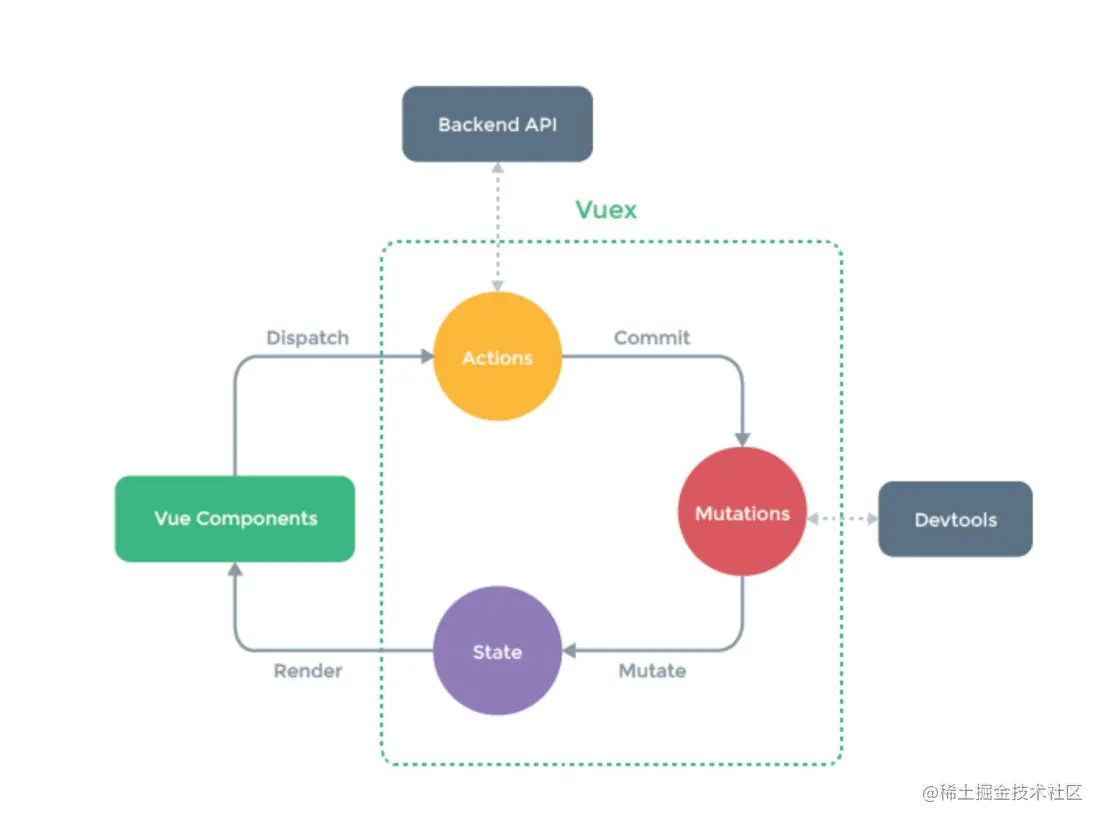
- actions中的回调函数,参数context
- 如果业务逻辑非常复杂,需要多个actions中的方法联合起来才能完成,可以在回调函数中使用context继续调用dispatch方法触发下一个action方法的执行
this.$store.commit('SAVE_USER', {id:Date.now(),name:this.username})
const actions = {
}
const mutations = {
SAVE_USER(state, value){
state.users.unshift(value)
},
SAVE_VIP(state, value){
state.vips.unshift(value)
}
}
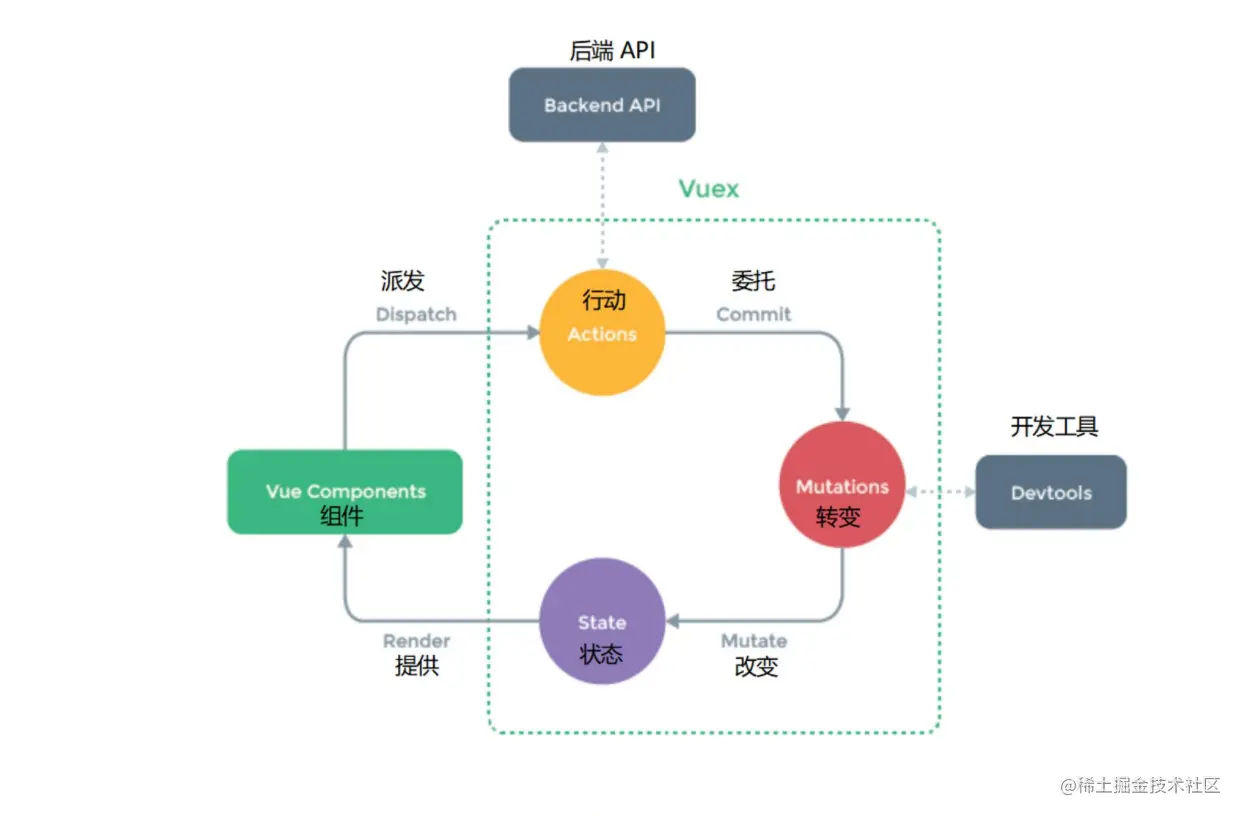
4.vuex工作原理
- 如果业务逻辑非常简单,也不需要发送 AJAX 请求的话,可以不调用 dispatch 方法,直接调用 commit 方法也是可以的
5.多组件数据共享
1.实现以下功能

<template>
<div>
<h1>用户列表</h1>
<input type="text" v-model="username">
<button @click="saveUser">保存用户</button>
<ul>
<li v-for="user in $store.state.users" :key="user.id">
用户名:{{user.name}}
</li>
</ul>
<h3>当前用户数量:{{$store.state.users.length}}</h3>
<h3>当前会员数量:{{$store.state.vips.length}}</h3>
</div>
</template>
<script>
export default {
name : 'User',
data() {
return {
username : '',
}
},
methods: {
saveUser(){
this.$store.dispatch('saveUser', {id:Date.now(),name:this.username})
}
},
}
</script>
<template>
<div>
<h1>会员列表</h1>
<input type="text" v-model="vipname">
<button @click="saveVip">保存会员</button>
<ul>
<li v-for="vip in $store.state.vips" :key="vip.id">
会员名:{{vip.name}}
</li>
</ul>
<h3>当前用户数量:{{$store.state.users.length}}</h3>
<h3>当前会员数量:{{$store.state.vips.length}}</h3>
</div>
</template>
<script>
export default {
name : 'Vip',
data() {
return {
vipname : ''
}
},
methods: {
saveVip(){
this.$store.dispatch('saveVip', {id:Date.now(), name:this.vipname})
}
},
}
</script>
import Vue from 'vue'

import Vuex from 'vuex'

Vue.use(Vuex)

const actions = {
    saveUser(context, value){
        context.commit('SAVE_USER', value)
    },
    saveVip(context, value){
        context.commit('SAVE_VIP', value)
    }
}
const mutations = {
    SAVE_USER(state, value){
        state.users.unshift(value)
    },
    SAVE_VIP(state, value){
        state.vips.unshift(value)
    }
}
const state = {
    users : [
        {id:'001', name:'孙悟空'},
        {id:'002', name:'猪八戒'},
        {id:'003', name:'沙和尚'}
    ],
    vips : [
        {id:'001', name:'高启强'},
        {id:'002', name:'高启盛'},
        {id:'003', name:'张三'}
    ]
}

export default new Vuex.Store({actions, mutations, state})
import store from './vuex/store'

new Vue({
  el : '#app',
  store,
  render : h => h(App),
})
2.getters配置项
- 如果想将
state中的数据进行加工计算,并且这个计算逻辑复杂,而且要在多个位置使用,建议使用getters配置项
- 怎么用?
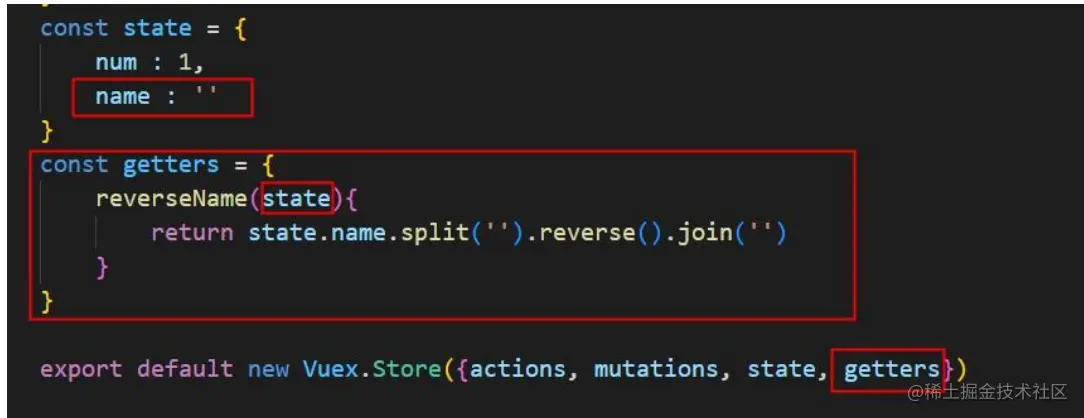
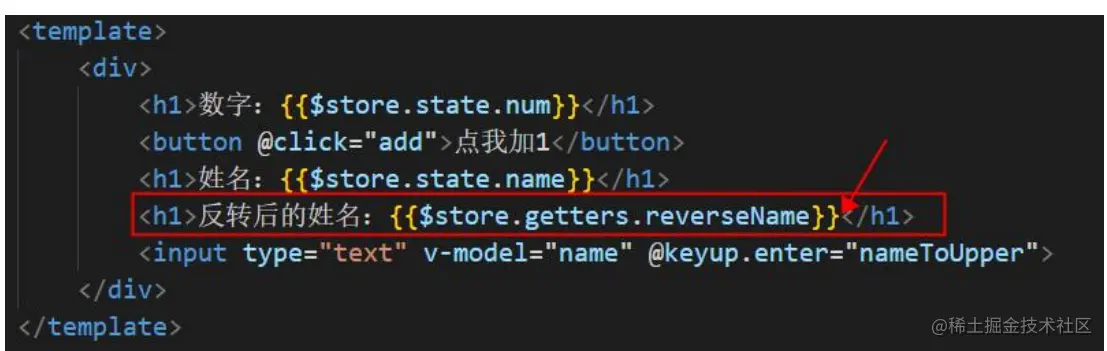
- 类似于 Vue中的:data 和 computed 的关系
3.mapState 和 mapGetters的使用(优化计算属性)
- 组件中在使用state上的数据和getters上的数据时,都有固定的前缀
- {{this.$store.state.name}}
- {{this.$store.getters.reverseName}}
- 使用mapState 和 mapGetters进行名称映射,可以简化以上写法
- 使用mapState 和 mapGetters的前提是先引入
- import {mapState,mapGetters} form 'vuex'
- mapState如何使用,在computed中使用ES6语法:
...运算符进行引入
- computed是一个对象,在对象中合并属性使用
...运算符
- 第一种方式:对象形式:
- ...mapGetters({name:"name"})
- 第二种方式:数组形式:
- ...mapGetters(["name"])
- 只有属性名和属性值一致时才可以使用数组形式
4.mapMutations 和 mapActions的使用(优化methods)
- import {mapMutations,mapActions} from 'vuex'
methods:{
...mapActions({add:'plusOne',reverseName:'reverseName'})
...mapActions(['plusOne','reverseName'])
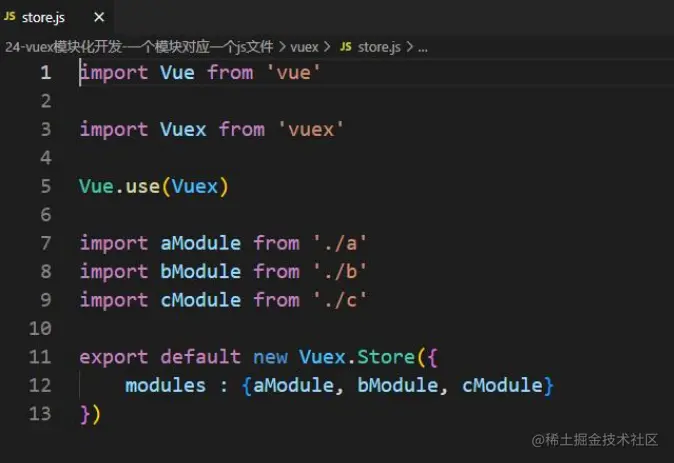
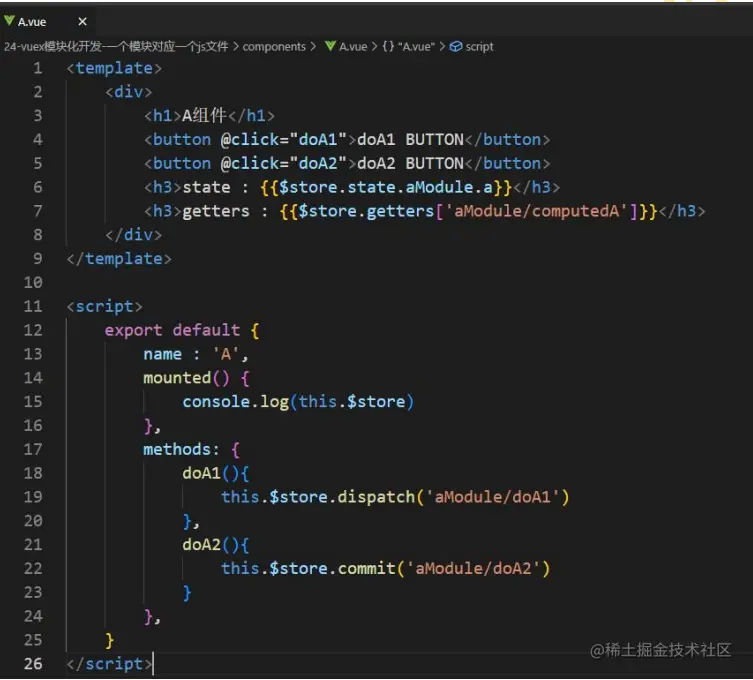
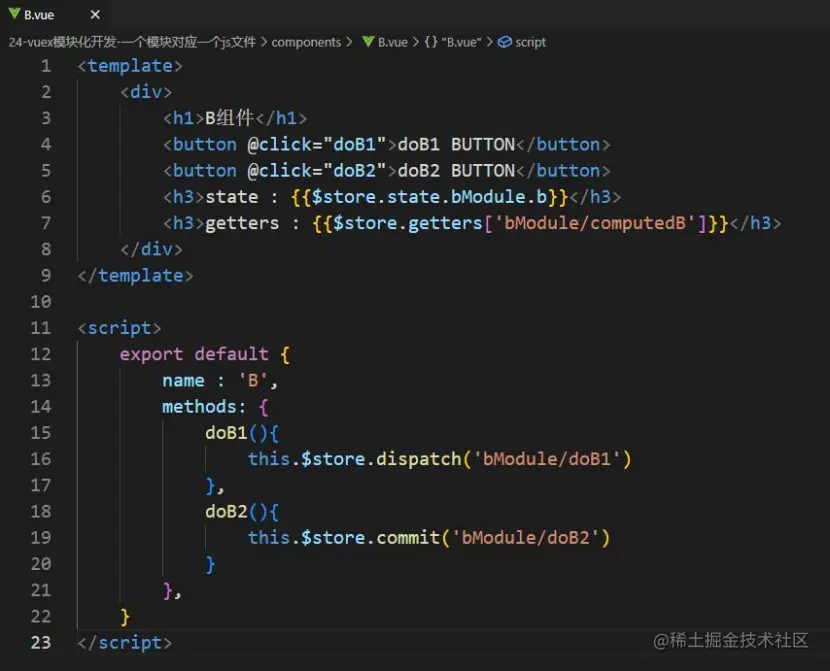
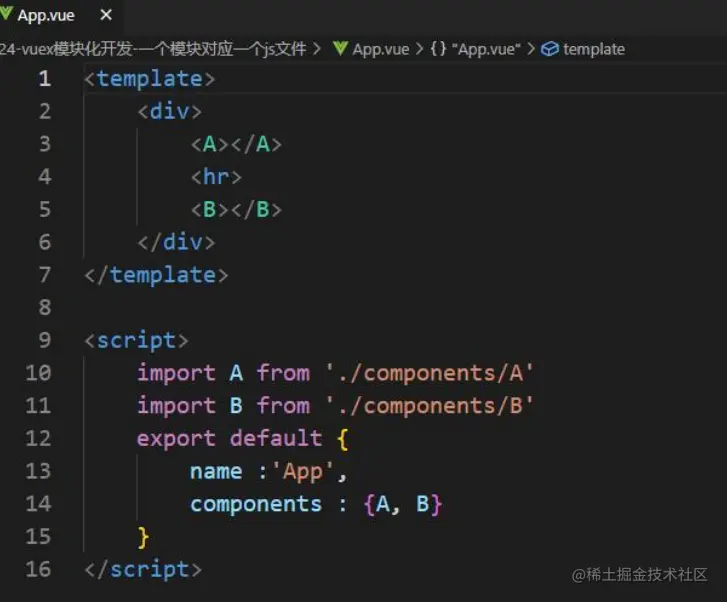
6.vuex的模块化开发
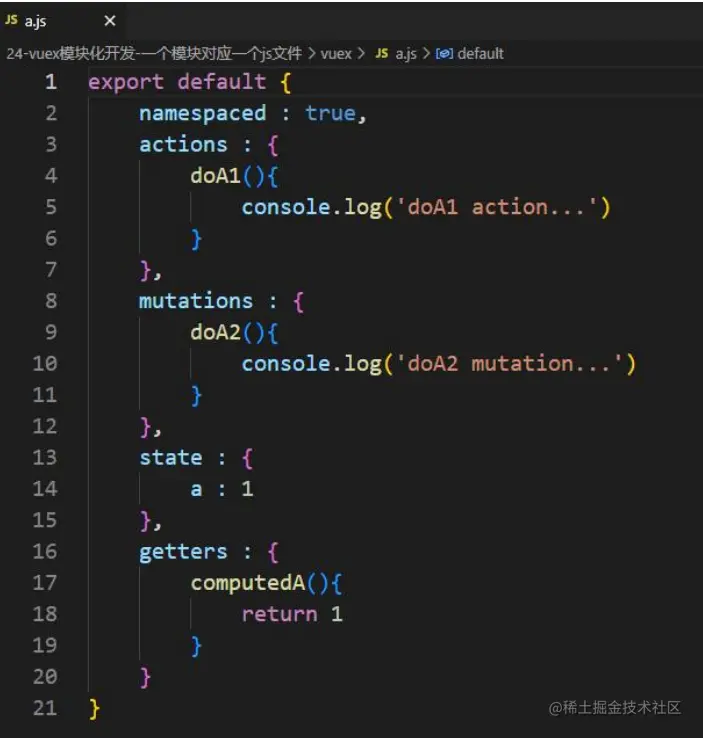
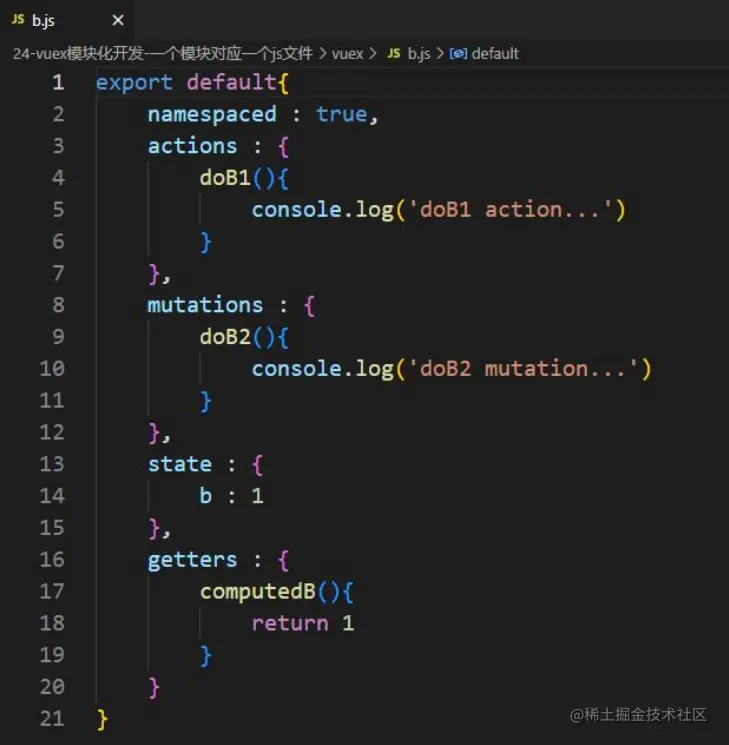
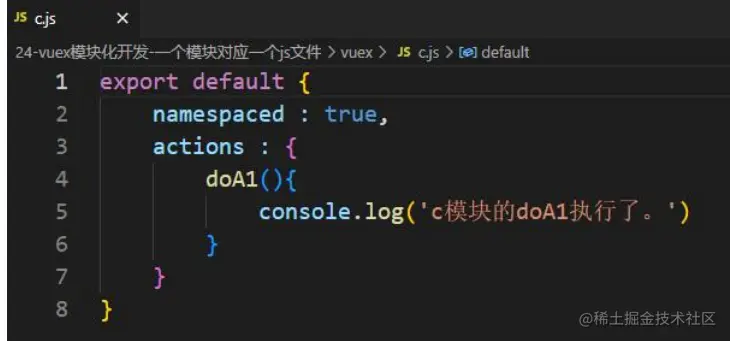
1. 未使用mapXxxx的模块化开发
- a模块
- b模块
- c模块
- 在store.js中引入各个模块
- A组件
- B组件
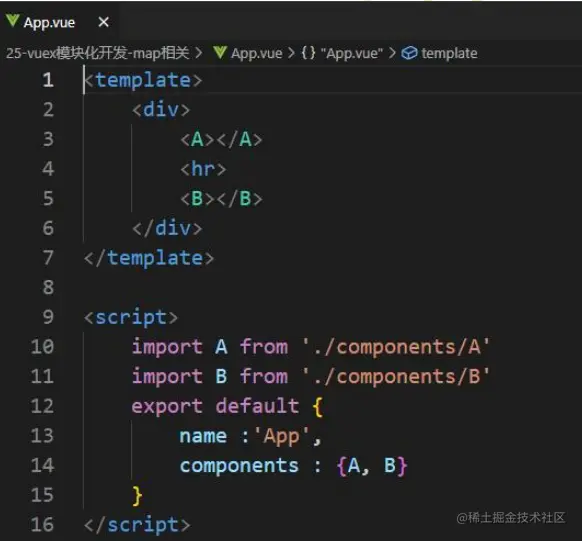
- 将A组件和B组件在App组件注册
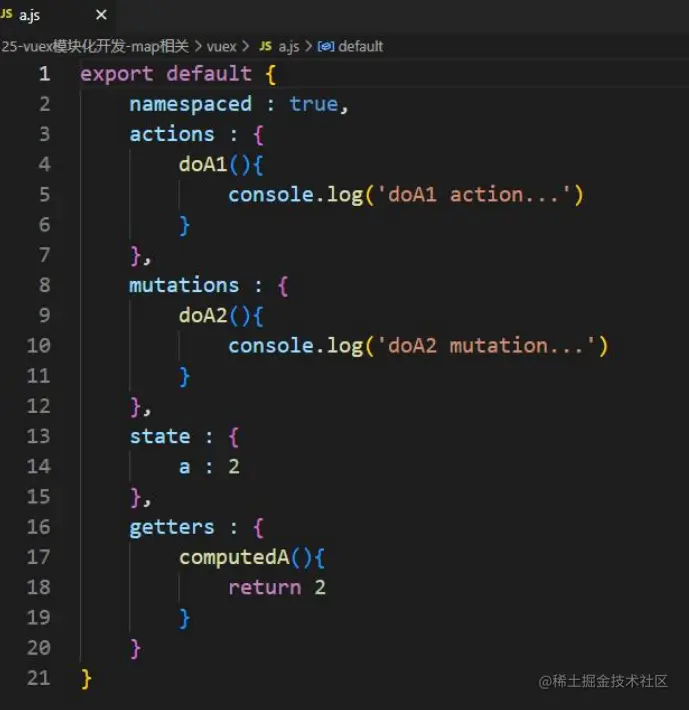
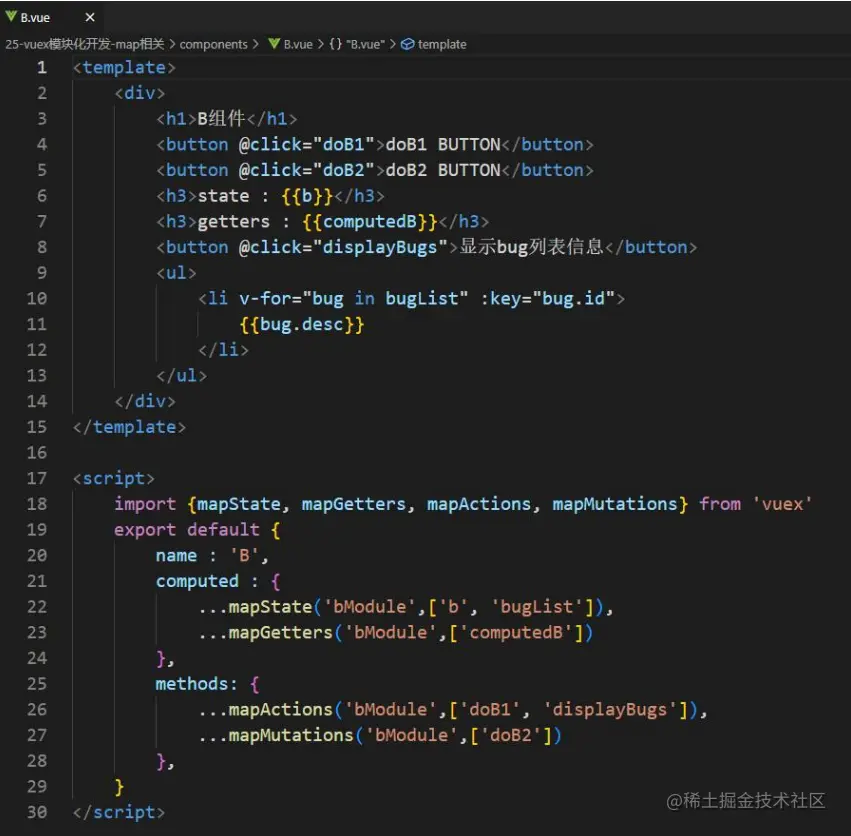
2.使用mapXxxx的模块化开发
- a模块
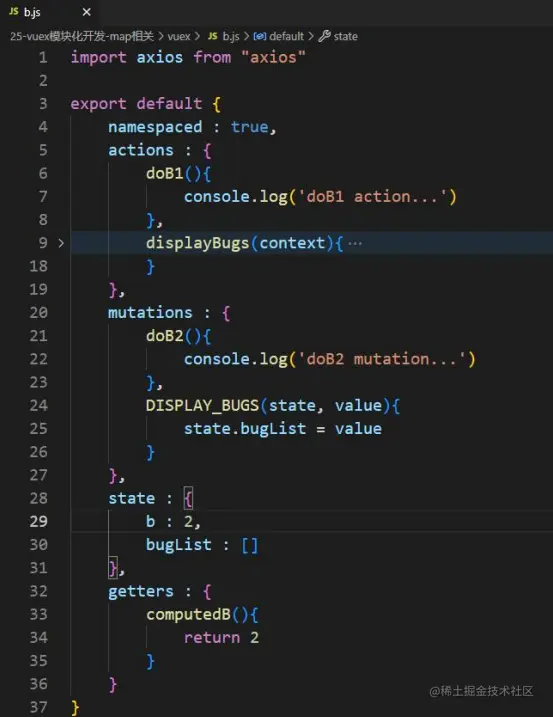
- b模块
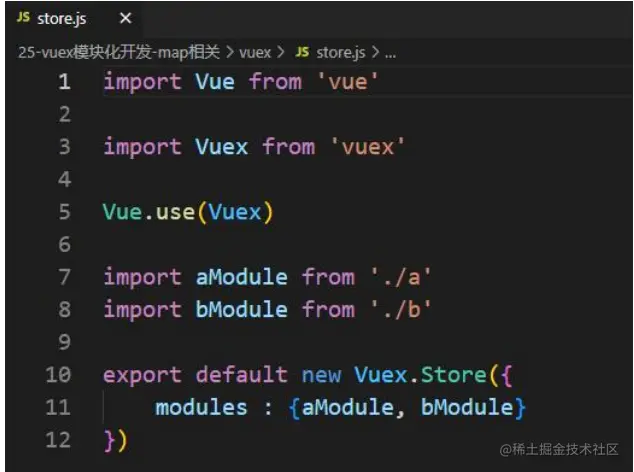
- 在store.js中引入a和b模块
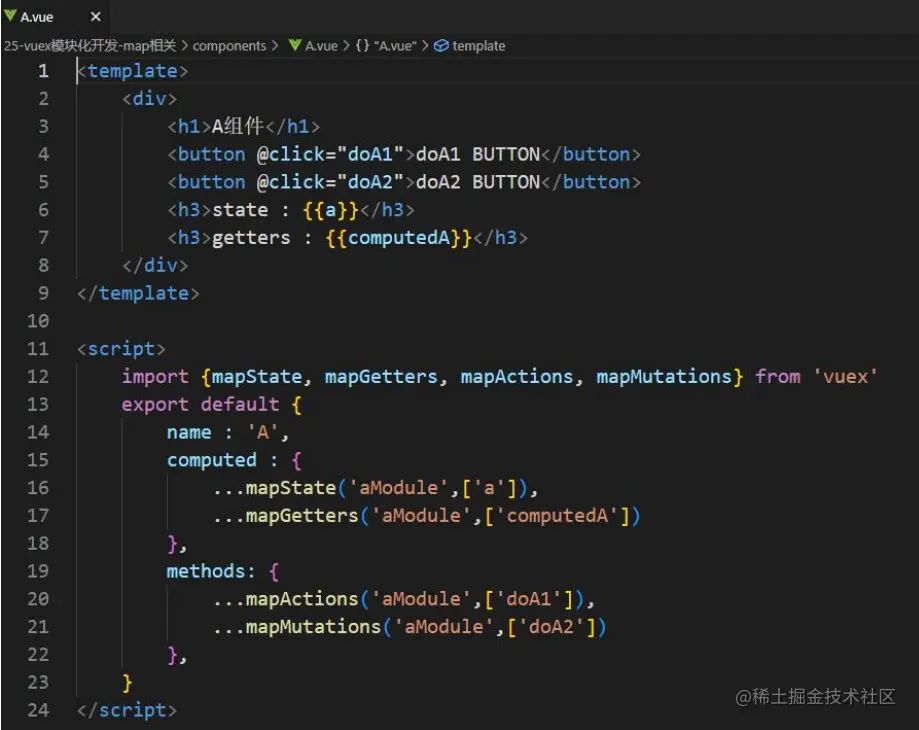
- A组件
- B组件
- 在App组件中注册A组件和B组件
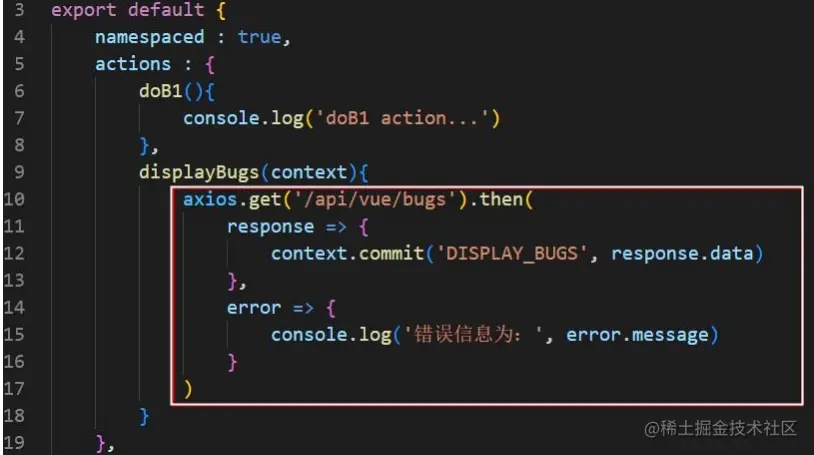
- 在action中发送ajax请求: