缩放方案:给body绑定zoom属性
<template>
<div id="app">
<router-view />
</div>
</template>
<script>
export default {
data() {
return {
...
clientWidth: document.documentElement.clientWidth,
zoomValue: 1
}
},
created() {
...
},
mounted() {
this.initWidow() window.addEventListener('resize', () => {
this.clientWidth = document.documentElement.clientWidth
this.initWidow()
})
},
methods: {
initWidow() {
const baseSize = 1920
if (this.clientWidth < 1900) {
this.zoomValue = (this.clientWidth / baseSize).toFixed(2)
} else {
this.zoomValue = 1
}
document.body.style.zoom = this.zoomValue
document.styleSheets[document.styleSheets.length - 1].insertRule('canvas {zoom: ' + 1 / this.zoomValue + '}')
document.styleSheets[document.styleSheets.length - 1].insertRule( 'canvas {transform: scale(' + this.zoomValue + ')}' )
document.styleSheets[document.styleSheets.length - 1].insertRule('canvas {transform-origin: 0 0}')
}
}
}
</script>
<style>
#app { height: 100%; }
</style>
缩放出现的问题
- 使用zoom属性,在引入echart组件时,会出现鼠标定位异常的问题,导致图表点击、滑动功能不能正常使用,此时可以将canvas同时缩放
- 使用antdv组件库,列表出现两行多余的空白列
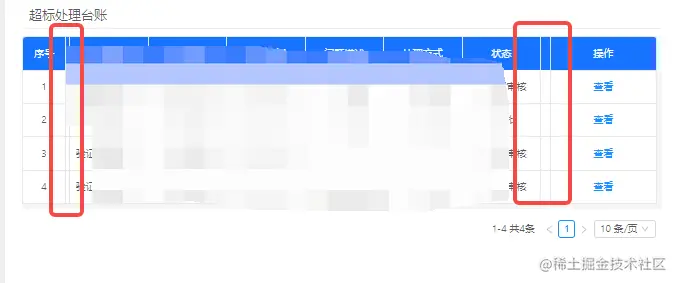
- 原因:配置table表头的时候给每列都设置了固定宽度,且设置了固定列(fixed:true),antd-design在做这个固定列的时候,其实是生成了两个table,固定列的这个table改在另一个表格上,所以缩放时宽度自适应,在视觉上多出一列
- 解决:
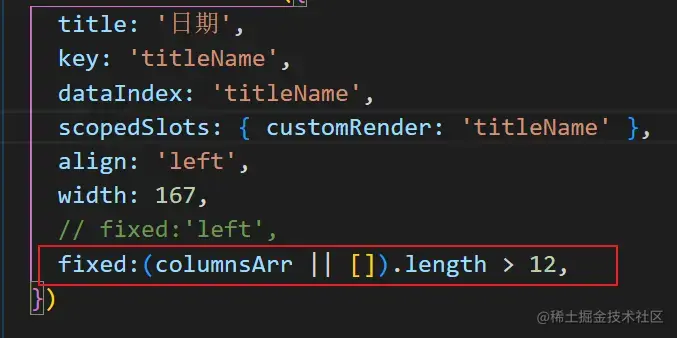
1. 没有规定必须每列必须设置宽度时,给某一列不设置宽度就可以解决;
2. 如果必须要每列固定宽度的话,就动态判断列数大于几条时再设置固定列