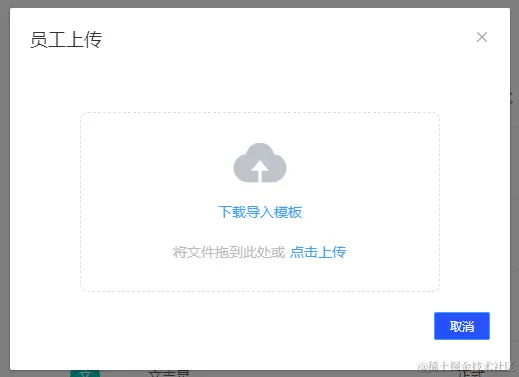
先下载模版表格,再上传表格(element-ui弹窗组件)
<template>
<el-dialog title="员工上传" width="500px" :visible="showExcelDidlog" @close="hClose">
<el-row type="flex" justify="center">
<div class="upload-excel">
<input
ref="excel-upload-input"
class="excel-upload-input"
type="file"
accept=".xlsx"
@change="uploadChange"
>
<div class="drop">
<i class="el-icon-upload" />
<el-button type="text" @click="hDownLoadExcel">下载导入模板</el-button>
<span>将文件拖到此处或
<el-button type="text" @click="handleUpload">点击上传</el-button>
</span>
</div>
</div>
</el-row>
<el-row type="flex" justify="end">
<el-button size="mini" type="primary" @click="hClose">取消</el-button>
</el-row>
</el-dialog>
</template>
<script>
import { getExportTemplate, uploadExcel } from '@/api/employee'
import FileSaver from 'file-saver'
export default {
props: {
showExcelDidlog: {
type: Boolean,
required: true
}
},
methods: {
hClose() {
this.$emit('update:showExcelDidlog', false)
},
async hDownLoadExcel() {
const res = await getExportTemplate()
console.log(res)
FileSaver.saveAs(res, '员工信息表(模版).xlsx')
},
handleUpload() {
this.$refs['excel-upload-input'].click()
},
async uploadChange(e) {
console.log('uploadChange', '上传')
const file = e.target.files[0]
console.log(file)
if (file) {
const fd = new FormData()
fd.append('file', file)
await uploadExcel(fd)
this.$message.success('操作成功')
}
}
}
}
</script>
<style scoped lang="scss">
.upload-excel {
display: flex;
justify-content: center;
margin: 20px;
width: 360px;
height: 180px;
align-items: center;
color: #697086;
.excel-upload-input {
display: none;
z-index: -9999;
}
.btn-upload,
.drop {
border: 1px dashed #dcdfe6;
width: 100%;
height: 100%;
text-align: center;
line-height: 160px;
border-radius: 8px;
display: flex;
flex-direction: column;
justify-content: center;
}
.drop {
line-height: 40px;
color: #bbb;
i {
font-size: 60px;
display: block;
color: #c0c4cc;
}
}
}
</style>