

kotlinx.coroutine
入门
Hello World
fun main() {
GlobalScope.launch {
delay(1000)
println("Kotlin Coroutine: ${Thread.currentThread().name}")
}
println("Hello: ${Thread.currentThread().name}")
Thread.sleep(2000)
println("World: ${Thread.currentThread().name}")
}
执行结果:
Hello: main
Kotlin Coroutine: DefaultDispatcher-worker-1
World: main
代码解释:
如果不调用 Thread.sleep,那么 launch 里的代码不会执行,程序就退出了
至于为什么,先不做解释,读到后面自然就找到答案了
runBlocking
fun main() = runBlocking {
GlobalScope.launch {
delay(1000)
println("Kotlin Coroutines")
}
println("Hello")
delay(2000)
println("World")
}
执行结果:
Hello
Kotlin Coroutines
World
runBlocking 的官方 doc:
1. 运行新的协程并中断阻塞当前线程,直到其完成
2. 不应从协程使用此函数
3. 桥接协程代码和非协程代码,通常用在 main 函数和单元测试
runBlocking 的思考
fun main() = runBlocking {
GlobalScope.launch {
delay(2000)
println("Kotlin Coroutines")
}
println("Hello")
delay(1000)
println("World")
}
执行结果:
Hello
World
原因分析:
GlobalScope 的 launch 函数返回一个 Job 对象
先来阅读一下 Job 的官方 doc
Job
核心作业接口 -- 后台作业
-
后台作业是一个可以取消的东西,其生命周期最终以 completion 为终点
-
后台作业可以被安排到父子层次结构中,其中取消父级会导致立即递归取消其 children 所有作业。
-
另外,产生异常的子协程的失败(CancellationException除外),将立即取消其父协程,从而取消其所有其他子协程。
-
Job 的最基本的实例接口是这样创建的:
- Coroutine job 是通过 CoroutineScope 的 launch 构建器创建的,它运行指定的代码块,并在完成此块时完成
- CompletableJob 是使用 Job() 工厂函数创建的。它通过调用 CompletableJob.complete来完成。
-
Job states
-
State isActive isCompleted isCancelled New (optional initial state) false false false Active (default initial state) true false false Completing (transient state) true false false Cancelling (transient state) false false true Cancelled (final state) false true true Completed (final state) false true false - 通常,Job 是在 Active state 下创建的。
- 然而,如果协程构建器提供了可选的启动参数会使协程在新的状态下,当使用 CoroutineStart.LAZY 的时候。此时可以通过调用 start 或者 join 来激活(active) Job
- 当协程处于工作状态时,Job 是激活状态的,直到其 Completed 或者它失败或者取消
- CompletableJob.complete 会将 Job 转换为 Completing 状态
- Completing 状态是 Job 的内部状态,对于外部观察者来说仍然是 Active 状态,而在内部,他正在等待他的子项

-
-
Job 接口及其所有派生接口对于第三方库中的继承并不稳定,因为将来可能会向此接口添加新方法,但可以使用稳定。
协程作用域 - GlobalScope
-
未绑定到任何 Job 的全局协程作用域
-
全局作用域用于启动顶级协程,这些协程在整个应用程序生命周期内运行,并且不会过早取消
-
它启动的协程不会使进程保持活动状态,类似守护线程
-
这个API被声明为微妙的,因为使用时很容易意外创建资源或内存泄漏
-
在有限的情况下,可以合法且安全地使用它,例如必须在应用程序的整个生命期内保持活跃的任务
-
那么如何解决上述不执行的问题,本质上是因为 runBlocking 和 GlobalScope.launch 是启动了两个独立的协程作用域,可以通过 Job.join 将两个作用域关联
// runBlocking 作用域 fun main() = runBlocking { // GlobalScope.launch 作用域 val job: Job = GlobalScope.launch { delay(1000) println("Kotlin Coroutines") } println("Hello") // 同一作用域下, 所有启动的协程全部完成后才会完成 // 但是, 此处是不同的作用域, 所以一定要 join job.join() println("World") } 执行结果: Hello Kotlin Coroutines World -
每一个协程构建器都会向其代码块作用域中添加一个 CoroutineScope 实例
-
在同一个作用域下无需使用 join 函数。直接使用 launch 函数即可
fun main() = runBlocking { launch { delay(1000) println("Kotlin Coroutines") } println("Hello") } 执行结果: Hello Kotlin Coroutines
coroutineScope 函数
-
创建一个协程作用域,并且调用具有此作用域的挂起代码块
-
此函数设计用于并行分解工作。当此作用域中的任何子协程失败时,此作用域将失败,所有其他子项都将被取消
-
一旦给定块及其所有子协程完成,此函数就会返回
fun main() = runBlocking { println(Thread.currentThread().name) launch { delay(1000) println("my job1 -> ${Thread.currentThread().name}") } println("person -> ${Thread.currentThread().name}") coroutineScope { launch { delay(10 * 1000) println("my job2 -> ${Thread.currentThread().name}") } delay(5 * 1000) println("hello world -> ${Thread.currentThread().name}") } launch { println("block? -> ${Thread.currentThread().name}") } println("welcome -> ${Thread.currentThread().name}") } 执行结果: main person -> main my job1 -> main hello world -> main my job2 -> main welcome -> main block? -> main
协程的取消
fun main() = runBlocking {
val job = GlobalScope.launch {
repeat(200) {
println("hello: $it")
delay(500)
}
}
delay(1100)
println("Hello World")
// job.cancel()
// job.join()
job.cancelAndJoin()
println("welcome")
}
通过 cancelAndJoin 是 cancel 和 join 两个函数的结合
执行 job.cancelAndJoin(),执行结果为:
hello: 0
hello: 1
hello: 2
Hello World
welcome
执行 job.cancel(), 执行结果为:
hello: 0
hello: 1
hello: 2
Hello World
welcome
#执行结果和上述一致,虽然是不同的作用域
执行 job.join(), 执行结果为:
hello: 0
hello: 1
hello: 2
Hello World
hello: 3
hello: 4
hello: 5
···
hello: 199
-
协程在执行挂起函数前会检查当前是否是取消状态,如果是,则抛出 CancellationException,例外:如果协程正在处于某个计算过程中,并且没有检查取消状态,那么他是无法被取消的
-
CancellationException
- 如果协程的作业在挂起时被取消,则由可取消的挂起函数抛出
- 它表示协程的正常取消
- 默认情况下,它不会打印到控制台日志中未捕获的异常处理程序
-
CoroutineExceptionHandler:暂不展开
-
对于上述例外情况的举例
fun main() = runBlocking { val startTime = System.currentTimeMillis() val job = launch(Dispatchers.Default) { var nextPrintTime = startTime var i = 0 while (i < 20) { // 此处就是处于计算过程中,而且没有检查取消状态,无法取消 if (System.currentTimeMillis() >= nextPrintTime) { println("job: I am sleeping ${i++}") nextPrintTime += 500L } } } delay(1300) println("hello wworld") job.cancelAndJoin() println("welcome") } 执行结果: job: I am sleeping 0 job: I am sleeping 1 job: I am sleeping 2 hello wworld job: I am sleeping 3 ··· job: I am sleeping 19 welcome -
有两种方式可以解决上述问题
- 周期性的调用一个挂起函数,该挂起函数会检查取消状态,比如使用 yield 函数
- 显示的检查取消状态
fun main() = runBlocking { val startTime = System.currentTimeMillis() val job = launch(Dispatchers.Default) { var nextPrintTime = startTime var i = 0 /*while (i < 20) { // 方式1 if (System.currentTimeMillis() >= nextPrintTime) { println("job: I am sleeping ${i++}") nextPrintTime += 500L } yield() }*/ while (isActive) { // 方式2 if (System.currentTimeMillis() >= nextPrintTime) { println("job: I am sleeping ${i++}") nextPrintTime += 500L } } } delay(1300) println("hello wworld") job.cancelAndJoin() println("welcome") } 以上两种方式的执行结果: job: I am sleeping 0 job: I am sleeping 1 job: I am sleeping 2 hello wworld welcome
使用 finally 来关闭资源
-
当一个 job 没有执行完,调用了 cancelAndJoin,通常情况下需要有清理动作
-
另外会抛出 CancellationException
-
举例:
fun main() = runBlocking { val job = launch { try { repeat(100) { println("job repeat $it") delay(500) } } catch (e: Exception) { e.printStackTrace() } finally { println("execute finally") } } delay(1300) println("hello") job.cancelAndJoin() println("world") } 输出结果: job repeat 0 job repeat 1 job repeat 2 hello execute finally world kotlinx.coroutines.JobCancellationException: StandaloneCoroutine was cancelled; job=StandaloneCoroutine{Cancelling}@4f8e5cde -
取消协程后,如果依旧调用挂起函数,会抛出异常
- 抛出 CancellationException
- 避免这种情况,可使用 withContext 方法,指定协程上下文
-
fun main() { test() //testNonCancellable() } fun test() = runBlocking { val job = launch { try { repeat(100) { println("job repeat $it") delay(500) } } catch (e: Exception) { e.printStackTrace() } finally { println("execute finally") delay(1000) println("after delay 1000") } } delay(1300) println("hello") job.cancelAndJoin() println("world") } 执行结果 job repeat 0 job repeat 1 job repeat 2 hello execute finally world kotlinx.coroutines.JobCancellationException: StandaloneCoroutine was cancelled; job=StandaloneCoroutine{Cancelling}@4f8e5cde fun testNonCancellable() = runBlocking { val job = launch { try { repeat(100) { println("job repeat $it") delay(500) } } finally { withContext(NonCancellable) { println("execute finally") delay(1000) println("after delay 1000") } } } delay(1300) println("hello") job.cancelAndJoin() println("world") } 执行结果 job repeat 0 job repeat 1 job repeat 2 hello execute finally after delay 1000 world
-
withTimeout 函数:kotlinx.coroutines.TimeoutCancellationException
-
withTimeoutOrNull 函数:返回 null,不抛出异常
挂起函数
函数组合
-
挂起函数可以像普通函数一样在协程中
-
挂起函数可以使用其他的挂起函数
-
挂起函数只能用在协程中或是另一个挂起函数中
fun main() = runBlocking { val elapsedTime = measureTimeMillis { val value1 = intValue1() val value2 = intValue2() println("$value1 + $value2 = ${value1 + value2}") } println("total time: $elapsedTime") } private suspend fun intValue1(): Int { delay(2000) return 15 } private suspend fun intValue2(): Int { delay(3000) return 20 } 输出结果: 15 + 20 = 35 total time: 5010
async 和 await
-
通过这两个函数可以实现并发
-
从概念上讲,async 和 launch 一样,他会开启一个单独的协程
-
区别是,launch 返回的是一个 Job,Job 并不会持有任何结果值;async 会返回一个 Deferred,类似 future 和 promise,持有一个结果值
-
通过在 Deferred 上调用 await 方法获取最终的结果值
-
Deferred 是 Job 的子类,是非阻塞的,可取消的 future
fun main() = runBlocking { val elapsedTime = measureTimeMillis { val s1 = async { intValue1() } val s2 = async { intValue2() } val value1 = s1.await() val value2 = s2.await() println("$value1 + $value2 = ${value1 + value2}") } println("total time: $elapsedTime") } private suspend fun intValue1(): Int { delay(2000) return 15 } private suspend fun intValue2(): Int { delay(3000) return 20 } 执行结果: 15 + 20 = 35 total time: 3018 -
和 Job 一样,Deferred 如果启动参数设置为 CoroutineStart.LAZY,那么同样需要先激活,Deferred 比 Job 多了一个可以激活状态的方法:await
fun main() = runBlocking { val elapsedTime = measureTimeMillis { val s1 = async(start = CoroutineStart.LAZY) { intValue1() } val s2 = async(start = CoroutineStart.LAZY) { intValue2() } println("hello world") Thread.sleep(2500) delay(2500) val value1 = s1.await() val value2 = s2.await() println(value1 + value2) } println("total time: $elapsedTime") } private suspend fun intValue1(): Int { delay(2000) return 15 } private suspend fun intValue2(): Int { delay(3000) return 20 } 执行结果 hello world 35 total time: 10032
-
结构化并发程序开发
fun main() = runBlocking { val elapsedTime = measureTimeMillis { println("intSum: ${intSum()}") } println("total time: $elapsedTime") } private suspend fun intSum(): Int = coroutineScope<Int> { val s1 = async { intValue1() } val s2 = async { intValue2() } s1.await() + s2.await() } private suspend fun intValue1(): Int { delay(2000) return 15 } private suspend fun intValue2(): Int { delay(3000) return 20 } 执行结果 intSum: 35 total time: 3016
协程上下文
- 协程总是会在某个上下文中执行,这个上下文是由 CoroutineContext 类型的实例来表示的
- CoroutineContext 的继承关系如下
-
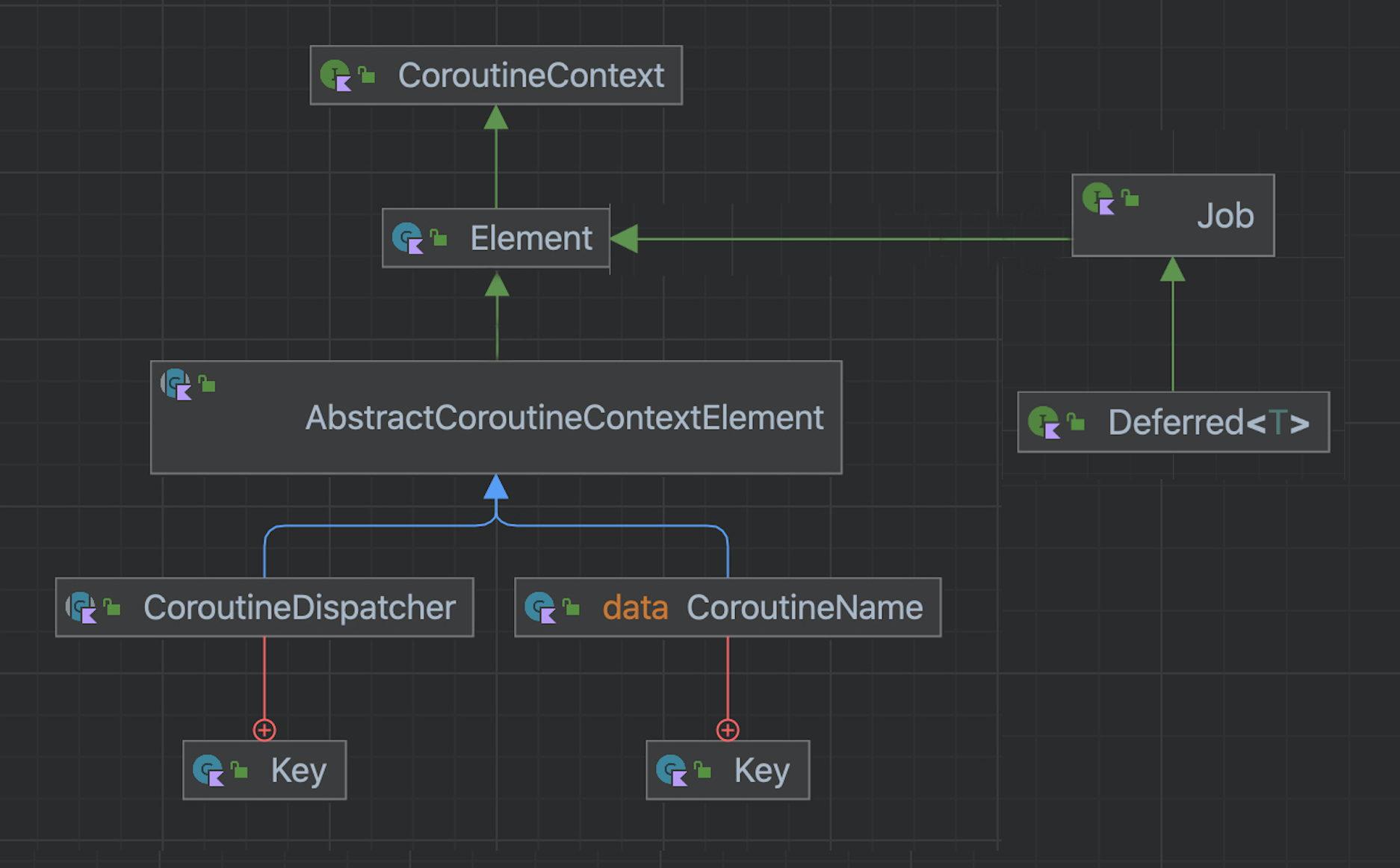
- 协程上下文本质上是各种元素所构成的一个集合,主要元素包括 Job 以及 CoroutineDispatcher
- CoroutineDispatcher 的主要功能是确定协程由哪个线程来执行所指定的代码,可以限制到一个具体的线程,也可以分发到一个线程池中,还可以不加任何限制(这种情况下代码执行的线程是不确定的,开发中不建议使用)
- 所有的协程构建器(如 launch 和 async)的方法可选参数中可以指定一个 CoroutineContext
-
fun main() = runBlocking<Unit> { launch { println("no param, thread: ${Thread.currentThread().name}") } launch(Dispatchers.Unconfined) { println("dispatchers unconfined, thread: ${Thread.currentThread().name}") delay(100) // 加上延迟,就会发现不是运行在main线程了 println("dispatchers unconfined, thread: ${Thread.currentThread().name}") } launch(Dispatchers.Default) { println("dispachers default, thread: ${Thread.currentThread().name}") } val dispatcher = Executors.newSingleThreadExecutor().asCoroutineDispatcher() launch(dispatcher) { println("single thread executor service, thread: ${Thread.currentThread().name}") dispatcher.close() } GlobalScope.launch { println("globle scope launch, thread: ${Thread.currentThread().name}") } } 执行结果: dispatchers unconfined, thread: main dispachers default, thread: DefaultDispatcher-worker-1 single thread executor service, thread: pool-1-thread-1 globle scope launch, thread: DefaultDispatcher-worker-1 no param, thread: main dispatchers unconfined, thread: kotlinx.coroutines.DefaultExecutor - 当通过 launch 来启动协程且不指定协程分发器时,它会继承启动它的那个 CoroutineScope 的上下文与分发器,对该示例来说,它会继承 runBlocking 的上下文,而 runBlocking 则是运行在main线程当中
- Dispatchers.Unconfined 是一种很特殊的协程分发器,它在该示例中一开始是 main 线程,但是后来线程发生变化
- Dispatchers.Default 是默认的分发器,当协程是通多 GlobalScope 来启动的时候,它会使用该默认的分发器来启动协程,它会使用一个后台的共享线程池来运行我们的协程代码。因此,launch(Dispatchers.Default) 等价于(这里只说线程, 作用域是不同的) GlobalScope.launch { }
- asCoroutineDispatcher Kotlin 提供的扩展方法,使得线程池来执行我们所指定的协程代码。在实际开法中,使用专门的线程池来执行协程代码代价是非常高的,因此在协程代码执行完毕后,我们必须要释放相应的资源,这里就需要使用 close 方法来关闭相应的协程分发器,从而释放资源;也可以将该协程分发器存储到一个顶层变量中,以便在程序的其他地方进行复用
- asCoroutineDispatcher 如果指定的线程池是 ScheduledExecutorService,那么 delay、withTimeout、Flow 等所有时间相关的操作会在此线程池上计算;如果指定的线程池是 ScheduledThreadPoolExecutor,那么还会设置 setRemoveOnCancelPolicy 来减小内存压力;如果指定的线程池不是上述类型,时间相关的操作将在其他线程计算,但协程本身仍将在给定的执行器之上执行;如果指定线程池引发 RejectedExecutionException,则会取消受影响的 Job,并提交到 Dispatchers.IO 以便受影响的协程可以清理其资源并迅速完成

