需求
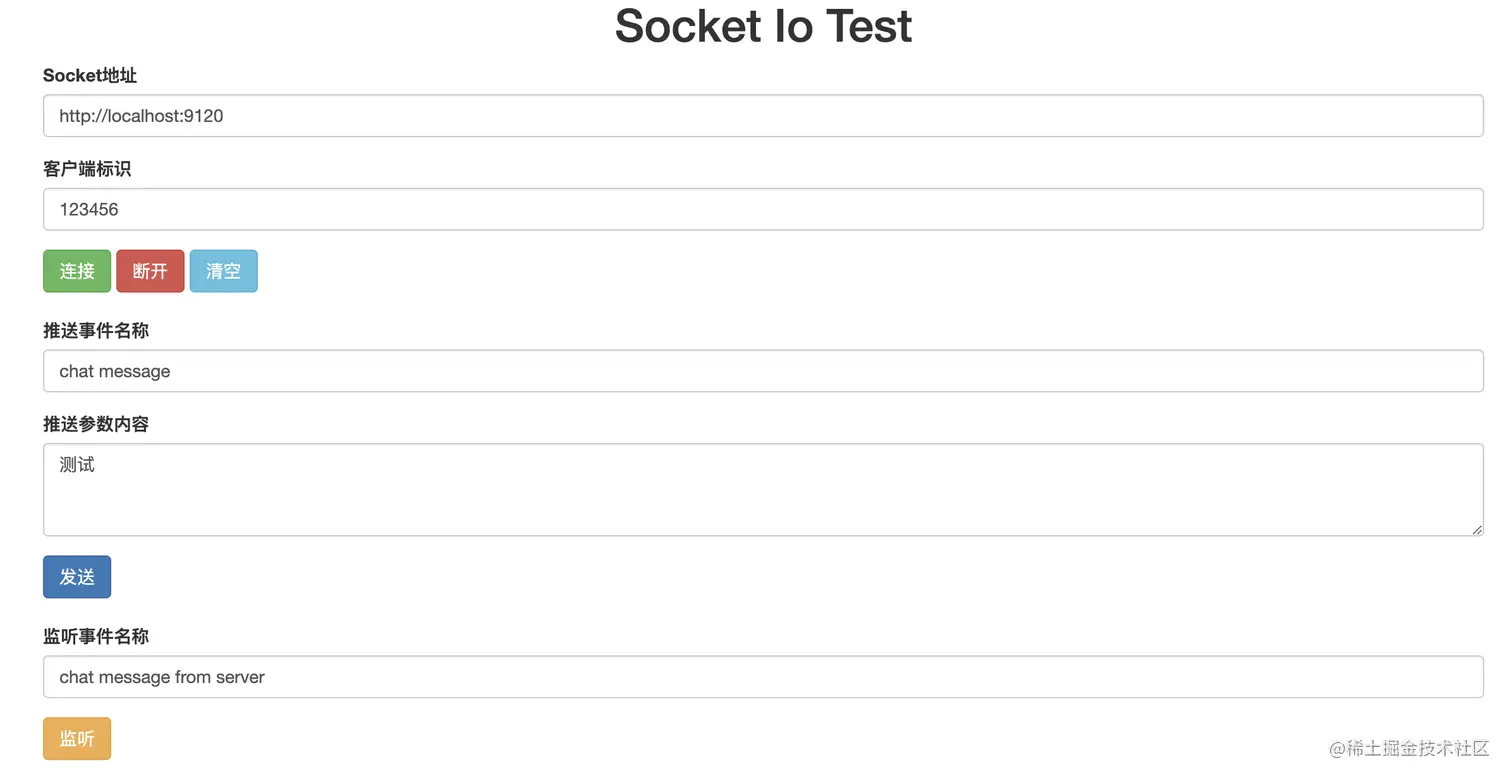
在工作中遇到需求,web中使用socketio进行消息的推送,后端使用workerman/phpsocketio组件创建服务端,在百度以及谷歌搜索SocketIo测试工具,发现大部分不符合要求或者使用不了(可能水平太菜,不会使用)参考其他的文章进行改造,目前简单的功能可以使用,后续有时间使用Koltin来重新完善下,打包成App使用这样就方便了。
解决
代码如下,有兴趣的老铁可以看下,也欢迎大佬进行指导,吸取精华,去其糟粕
<!doctype html>
<html lang="zh-CN">
<head>
<meta charset="utf-8">
<meta http-equiv="X-UA-Compatible" content="IE=edge">
<meta name="viewport" content="width=device-width, initial-scale=1">
<!-- 上述3个meta标签*必须*放在最前面,任何其他内容都*必须*跟随其后! -->
<title>Socket Io Test</title>
<!-- Bootstrap -->
<link rel="stylesheet" href="https://stackpath.bootstrapcdn.com/bootstrap/3.4.1/css/bootstrap.min.css"
integrity="sha384-HSMxcRTRxnN+Bdg0JdbxYKrThecOKuH5zCYotlSAcp1+c8xmyTe9GYg1l9a69psu" crossorigin="anonymous">
<!-- jQuery (Bootstrap 的所有 JavaScript 插件都依赖 jQuery,所以必须放在前边) -->
<script src="https://cdn.jsdelivr.net/npm/jquery@1.12.4/dist/jquery.min.js"
integrity="sha384-nvAa0+6Qg9clwYCGGPpDQLVpLNn0fRaROjHqs13t4Ggj3Ez50XnGQqc/r8MhnRDZ"
crossorigin="anonymous"></script>
<!-- 加载 Bootstrap 的所有 JavaScript 插件。你也可以根据需要只加载单个插件。 -->
<script src="https://stackpath.bootstrapcdn.com/bootstrap/3.4.1/js/bootstrap.min.js"
integrity="sha384-aJ21OjlMXNL5UyIl/XNwTMqvzeRMZH2w8c5cRVpzpU8Y5bApTppSuUkhZXN0VxHd"
crossorigin="anonymous"></script>
<script src='https://cdn.bootcss.com/socket.io/2.0.3/socket.io.js'></script>
<style>
.btn.active.focus,
.btn.active:focus,
.btn.focus,
.btn:active.focus,
.btn:active:focus,
.btn:focus {
outline: none;
}
button {
outline: none;
}
</style>
<!-- HTML5 shim 和 Respond.js 是为了让 IE8 支持 HTML5 元素和媒体查询(media queries)功能 -->
<!-- 警告:通过 file:// 协议(就是直接将 html 页面拖拽到浏览器中)访问页面时 Respond.js 不起作用 -->
<!--[if lt IE 9]>
<script src="https://cdn.jsdelivr.net/npm/html5shiv@3.7.3/dist/html5shiv.min.js"></script>
<script src="https://cdn.jsdelivr.net/npm/respond.js@1.4.2/dest/respond.min.js"></script>
<![endif]-->
</head>
<body>
<div class="container">
<div class="title text-center">
<h1>Socket Io Test</h1>
</div>
<div class="socket-config" style="margin-bottom: 20px;">
<form onsubmit="return false">
<div class="form-group">
<label for="exampleInputEmail1">Socket地址</label>
<input type="text" class="form-control" id="socketAddress" value="http://localhost:9120"
placeholder="Socket地址">
</div>
<div class="form-group">
<label for="exampleInputPassword1">客户端标识</label>
<input type="text" class="form-control" id="clientIdentity" value="123456" placeholder="客户端标识">
</div>
<button type="button" id="connect" class="btn btn-success">连接</button>
<button type="button" id="disconnect" class="btn btn-danger">断开</button>
<button type="button" id="clear" class="btn btn-info">清空</button>
</form>
</div>
<div class="emit-event" style="margin-bottom: 20px;">
<form>
<div class="form-group">
<label for="exampleInputEmail1">推送事件名称</label>
<input type="text" class="form-control" id="emit-event-name" value="chat message"
placeholder="推送事件名称">
</div>
<div class="form-group">
<label for="exampleInputPassword1">推送参数内容</label>
<textarea class="form-control" id="emit-event-parameter" placeholder="推送参数内容" rows="3">测试</textarea>
</div>
<button type="button" id="send" type="submit" class="btn btn-primary">发送</button>
</form>
</div>
<div class="listen-event" style="margin-bottom: 20px;">
<form>
<div class="form-group">
<label for="exampleInputEmail1">监听事件名称</label>
<input type="text" class="form-control" id="listen-event-name" value="chat message from server"
placeholder="监听事件名称">
</div>
<button type="button" id="listen" class="btn btn-warning">监听</button>
</form>
</div>
<div class="content">
<ul id="list-group" class="list-group"></ul>
</div>
</div>
</body>
<script>
var socket = null;
var errorCount = 0;
var isConnected = false;
var maxErrorTimes = 5;
$("#connect").on('click', function () {
var url = $("#socketAddress").val();
connect(url);
});
$("#disconnect").on('click', function () {
if (isConnected) {
socket.disconnect();
} else {
alert('请先进行socket连接');
}
});
$("#clear").on('click', function () {
$("#list-group").html("");
});
$("#send").on('click', function () {
if (isConnected) {
var event = $("#emit-event-name").val();
var content = $("#emit-event-parameter").val();
var element = $('<li class="list-group-item">' + getNowTime() + ' ' + '推送消息:' + content + '</li>');
output(element);
socket.emit(event, content);
} else {
alert('请先进行socket连接');
}
});
$("#listen").on('click', function () {
if (isConnected) {
var event = $("#listen-event-name").val();
var content = $('<li class="list-group-item">' + getNowTime() + ' ' + '开始监听事件:' + event + '</li>')
output(content);
socket.on(event, function (msg) {
var element = $('<li class="list-group-item">' + getNowTime() + ' ' + 'Socket接收消息:' + msg + '</li>');
output(element);
});
} else {
alert('请先进行socket连接');
}
});
function connect(url) {
if (url == '' || url == null || url == undefined) {
url = 'http://localhost:9132';
}
socket = io(url);
socket.on('connect', function () {
isConnected = true;
var element = $('<li class="list-group-item">' + getNowTime() + ' ' + 'Socket连接成功' + '</li>');
output(element);
var client = $("#clientIdentity").val();
socket.emit('login', client);
});
socket.on('disconnect', function () {
isConnected = false;
var element = $('<li class="list-group-item">' + getNowTime() + ' ' + 'Socket断开连接' + '</li>');
output(element);
});
socket.on('connect_error', function (data) {
var content = $('<li class="list-group-item">' + getNowTime() + ' ' + 'Socket连接错误:' + data + '</li>')
errorCount++;
if (errorCount >= maxErrorTimes) {
socket.disconnect();
}
});
socket.on('error', function (data) {
var content = $('<li class="list-group-item">' + getNowTime() + ' ' + '系统错误:' + data + '</li>')
errorCount++;
if (errorCount >= maxErrorTimes) {
socket.disconnect();
}
});
}
function output(data) {
$("#list-group").prepend(data);
}
function getNowTime() {
var date = new Date();
var year = date.getFullYear();
var month = (date.getMonth() + 1) < 10 ? "0" + (date.getMonth() + 1) : (date.getMonth() + 1);
var day = date.getDate() < 10 ? "0" + date.getDate() : date.getDate();
var hour = date.getHours() < 10 ? "0" + date.getHours() : date.getHours();
var minute = date.getMinutes() < 10 ? "0" + date.getMinutes() : date.getMinutes();
var second = date.getSeconds() < 10 ? "0" + date.getSeconds() : date.getSeconds();
var datetime = year + '-' + month + '-' + day + ' ' + hour + ':' + minute + ':' + second;
return datetime;
}
</script>
</html>
思考
我也算个半个新人,半路出家,希望大佬多给些建议和思路,更好的学习。三人行必有我师焉,喜欢这行就会一直做下去,不管将来如何,为热爱,砥砺前行
参考文献