1. pom文件
<dependency>
    <groupId>cn.afterturn</groupId>
    <artifactId>easypoi-base</artifactId>
    <version>4.1.2</version>
</dependency>


<dependency>
    <groupId>cn.afterturn</groupId>
    <artifactId>easypoi-spring-boot-starter</artifactId>
    <version>4.4.0</version>
</dependency>
2.工具类(后面用的上)
import java.io.ByteArrayOutputStream;
import java.io.InputStream;
import java.net.HttpURLConnection;
import java.net.URL;
public class HttpClientUtil {
public static byte[] getImageFromNetByUrl(String strUrl) {
if (!isURL(strUrl)){
return null;
}
try {
URL url = new URL(strUrl);
HttpURLConnection conn = (HttpURLConnection) url.openConnection();
conn.setRequestMethod("GET");
conn.setConnectTimeout(2 * 1000);
InputStream inStream = conn.getInputStream();
byte[] btImg = readInputStream(inStream);
return btImg;
} catch (Exception e) {
e.printStackTrace();
}
return null;
}
public static byte[] readInputStream(InputStream inStream) throws Exception {
ByteArrayOutputStream outStream = new ByteArrayOutputStream();
byte[] buffer = new byte[10240];
int len = 0;
while ((len = inStream.read(buffer)) != -1) {
outStream.write(buffer, 0, len);
}
inStream.close();
return outStream.toByteArray();
}
public static boolean isURL(String str) {
str = str.toLowerCase();
String regex = "^((https|http|ftp|rtsp|mms)?://)"
+ "?(([0-9a-z_!~*'().&=+$%-]+: )?[0-9a-z_!~*'().&=+$%-]+@)?"
+ "(([0-9]{1,3}\.){3}[0-9]{1,3}"
+ "|"
+ "([0-9a-z_!~*'()-]+\.)*"
+ "([0-9a-z][0-9a-z-]{0,61})?[0-9a-z]\."
+ "[a-z]{2,6})"
+ "(:[0-9]{1,5})?"
+ "((/?)|"
+ "(/[0-9a-z_!~*'().;?:@&=+$,%#-]+)+/?)$";
return str.matches(regex);
}
}
3.实现
public void excelDc1(HttpServletResponse response){
TemplateExportParams params = new TemplateExportParams(
"sl.xlsx");
Map<String, Object> map = new HashMap<String, Object>();
map.put("company", "中国");
map.put("contact", "jianren");
map.put("address", "天时科创园");
map.put("phone", "1888888888");
map.put("email", "123@qq.com");
map.put("incoterms", "jianjsdjfj");
map.put("payment", "1879740****");
map.put("remark", "备注备注备注");
List<Map<String, Object>> listMap = new ArrayList<Map<String, Object>>();
for (int i = 0; i < 4; i++) {
Map<String, Object> lm = new HashMap<String, Object>();
lm.put("no", i + 1 + "");
lm.put("n1", i * 10000 + "");
lm.put("n2", "A001");
lm.put("n3", "设计");
lm.put("n4", "EasyPoi " + i + "期");
ImageEntity image = new ImageEntity();
image.setHeight(200);
image.setWidth(500);
image.setRowspan(1);
image.setColspan(1);
byte[] imageFromNetByUrl = HttpClientUtil.getImageFromNetByUrl("http://192.168.60.235:8000/uploadPath/upload/2023/05/05/34dd4b36-709e-4098-b27f-7b2c538bf36d.jpg");
image.setData(imageFromNetByUrl);
lm.put("n5", image);
lm.put("n6", i * 10000 + "");
lm.put("n7", i * 10000 + "");
lm.put("n8", i + 1 + "");
lm.put("n9", i * 10000 + "");
lm.put("n10", "A001");
lm.put("n11", "设计");
lm.put("n12", "EasyPoi " + i + "期");
lm.put("n13", "开源项目");
lm.put("n14", i * 10000 + "");
lm.put("n15", i * 10000 + "");
listMap.add(lm);
}
map.put("maplist", listMap);
Workbook workbook = ExcelExportUtil.exportExcel(params, map);
try {
response.setCharacterEncoding("UTF-8");
response.setHeader("content-Type", "application/vnd.ms-excel");
response.setHeader("Content-Disposition", "attachment;filename=" + URLEncoder.encode(fileName, "UTF-8"));
workbook.write(response.getOutputStream());
} catch (IOException e) {
}
}
4.模板
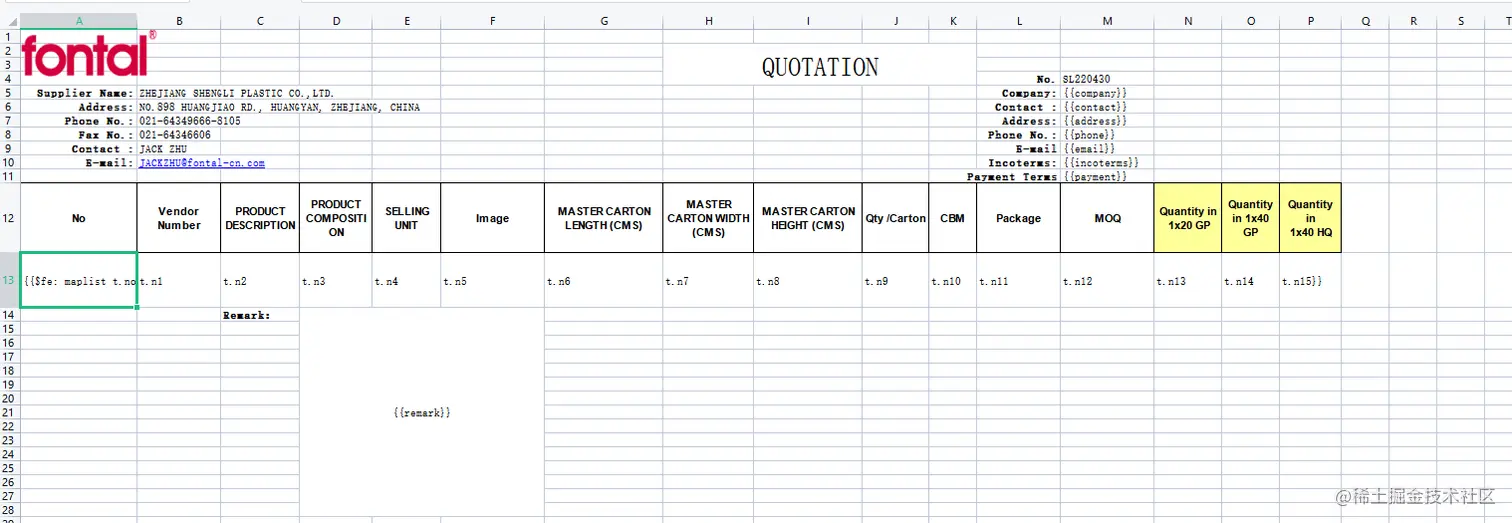
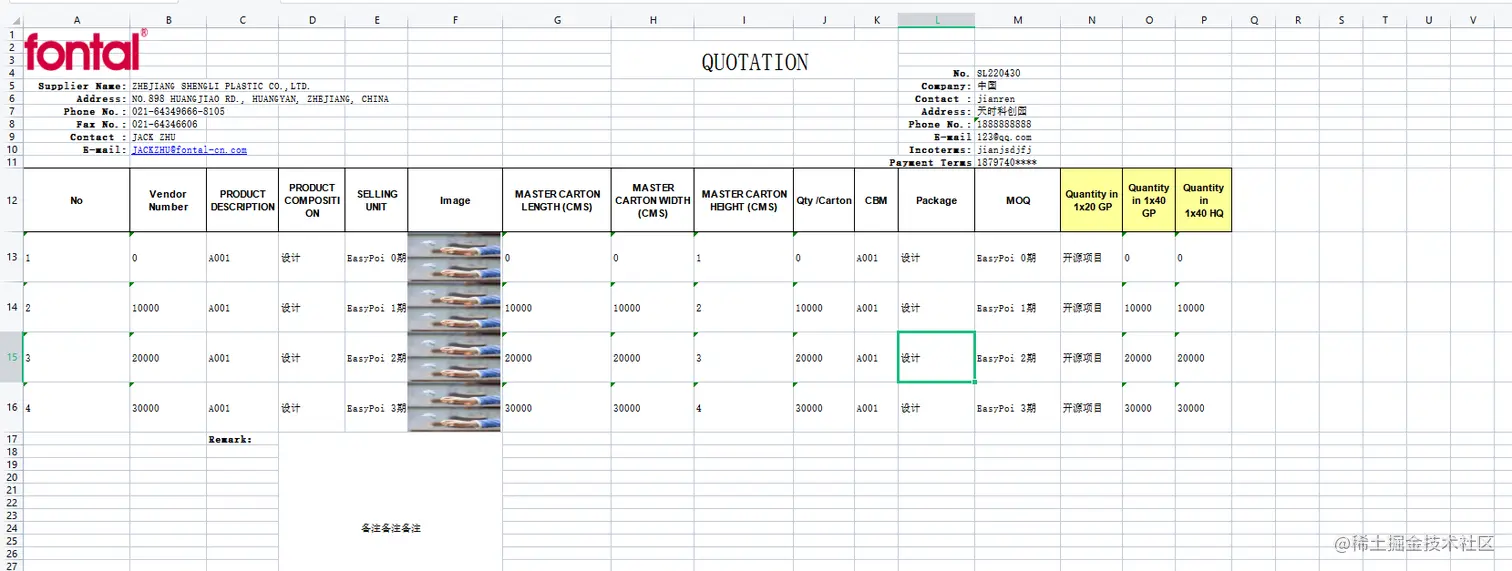
5.效果