用户数据采集平台运维手册
平台架构图
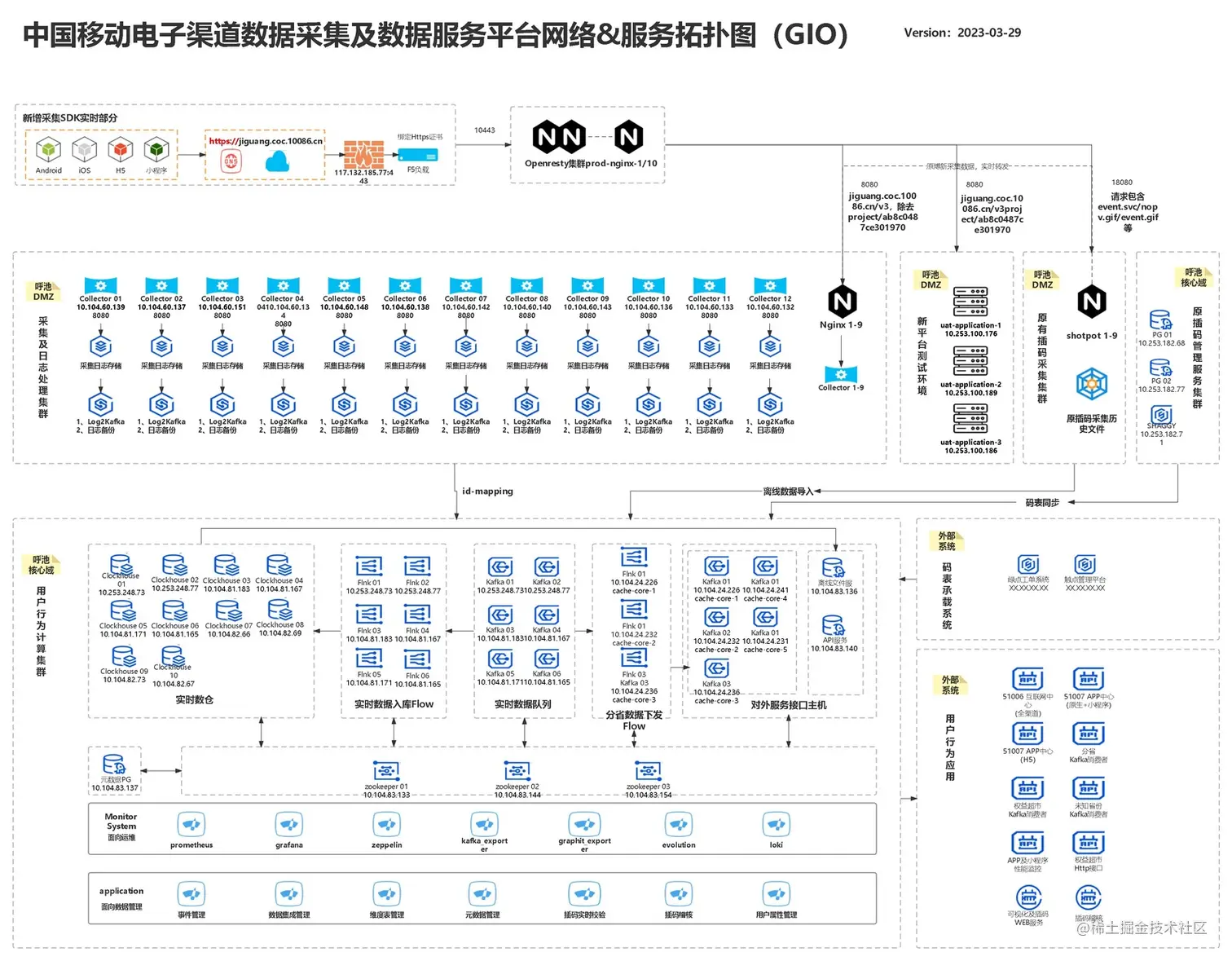
ipv6转发配置
location ~ ^/([vV][0-9]+/|)dcs[a-zA-Z0-9]+_[a-zA-Z0-9]+/(event|events|dcs).(gif|svc)$ {
proxy_http_version 1.1;
proxy_set_header Connection "Keep-Alive";
proxy_set_header X-Forwarded-For $proxy_add_x_forwarded_for;
proxy_read_timeout 10s;
proxy_send_timeout 10s;
proxy_pass http:
}
location ~ ^/v3/projects/\w+/collect.*$ {
proxy_http_version 1.1;
proxy_set_header Connection "Keep-Alive";
proxy_set_header X-Forwarded-For $proxy_add_x_forwarded_for;
proxy_read_timeout 10s;
proxy_send_timeout 10s;
if ( $request_uri ~ ^/v3/projects/ab8c0487ce301970/collect.*$ ){
proxy_pass http:
# sub_filter '204' '200';
break;
}
proxy_pass http:
sub_filter '204' '200';
}
location ~ .* {
return 403 '403 Forbidden
# 403 Forbidden
';
}
ipv4配置
location ~ ^/([vV][0-9]+/|)dcs[a-zA-Z0-9]+_[a-zA-Z0-9]+/(event|events|dcs).(gif|svc)$ {
proxy_http_version 1.1;
proxy_set_header Connection "Keep-Alive";
proxy_set_header X-Forwarded-For $proxy_add_x_forwarded_for;
proxy_read_timeout 10s;
proxy_send_timeout 10s;
proxy_pass http:
}
location ~ ^/v3/projects/\w+/collect.*$ {
proxy_http_version 1.1;
proxy_set_header Connection "Keep-Alive";
proxy_set_header X-Forwarded-For $proxy_add_x_forwarded_for;
proxy_read_timeout 10s;
proxy_send_timeout 10s;
if ( $request_uri ~ ^/v3/projects/ab8c0487ce301970/collect.*$ ){
proxy_pass http:
# sub_filter '204' '200';
break;
}
proxy_pass http:
sub_filter '204' '200';
}
location ~ .* {
return 403 '403 Forbidden
# 403 Forbidden
';
}
软件优化配置
worker_processes  auto;

worker_cpu_affinity auto;

worker_rlimit_nofile 100000;

#启动预编译;

pcre_jit on;

events {

use epoll;

worker_connections  65535;

accept_mutex off;

}
轮询转发配置
# 设置发送接收集群地址

include  upstream.conf;
upstream.conf配置
upstream  boxin_shotpot {

server  10.253.100.163:10080; #shotpot-01

server  10.253.100.164:10080; #shotpot-02

server  10.253.100.180:10080; #shotpot-03

server  10.253.100.188:10080; #shotpot-04

server  10.253.176.218:10080; #shotpot-05

server  10.253.176.219:10080; #shotpot-06

server  10.253.176.220:10080; #shotpot-07

server  10.253.176.211:10080; #shotpot-08

server  10.253.176.213:10080; #shotpot-09

# shotpot for test

#        server  10.104.24.231:10080;

# keepalive 保持长连

keepalive 1024;

#http健康检查相关配置,interval向后端发送健康检查包的间隔,单位毫秒

#rsie,连续成功被认为up,fall,连续失败被认为down

#timeout后端请求超时时间,单位毫秒

#type检查包类型

check interval=3000 rise=2 fall=3 timeout=3000 type=tcp;

check_http_send "HEAD /status HTTP/1.0\r\n\r\n";

check_http_expect_alive http_2xx http_3xx;

}

upstream  uat_gio {

# server  10.253.100.176:8080; #uat_application-1

server  10.253.100.189:8080; #uat_application-2

server  10.253.100.186:8080; #uat_application-3

keepalive 1024;

check interval=3000 rise=2 fall=3 timeout=3000 type=tcp;

check_http_send "HEAD /status HTTP/1.0\r\n\r\n";

check_http_expect_alive http_2xx http_3xx;

}

upstream gio {

server  10.104.60.139:8080; #collector-1

server  10.104.60.137:8080; #collector-2

server  10.104.60.151:8080; #collector-3

server  10.104.60.134:8080; #collector-4

server  10.104.60.148:8080; #collector-5

server  10.104.60.142:8080; #collector-7

server  10.104.60.140:8080; #collector-8

server  10.104.60.143:8080; #collector-9

server  10.104.60.136:8080; #collector-10

server  10.104.60.132:8080; #collector-12

server  10.104.60.138:8080; #collector-6

server  10.104.60.133:8080; #collector-11

keepalive 1024;

check interval=3000 rise=2 fall=3 timeout=3000 type=tcp;

check_http_send "HEAD /status HTTP/1.0\r\n\r\n";

check_http_expect_alive http_2xx http_3xx;

}

upstream boxin_shotpot_ipv6 {

server [2409:8080:3819:606::4]:10080; #shotpot01

server [2409:8080:3819:606::5]:10080; #shotpot02

server [2409:8080:3819:606::18]:10080; #shotpot03

server [2409:8080:3819:606::10]:10080; #shotpot04

server [2409:8080:3819:606::f]:10080; #shotpot05

server [2409:8080:3819:606::e]:10080; #shotpot06

server [2409:8080:3819:606::15]:10080; #shotpot07

server [2409:8080:3819:606::11]:10080; #shotpot08

server [2409:8080:3819:606::c]:10080; #shotpot09

keepalive 1024;

check interval=3000 rise=2 fall=3 timeout=3000 type=tcp;

check_http_send "HEAD /status HTTP/1.0\r\n\r\n";

check_http_expect_alive http_2xx http_3xx;

}

upstream uat_gio_ipv6 {

server [2409:8080:3819:606::2b]:8080; #uat-application2

server [2409:8080:3819:606::1e]:8080; #uat-application3

keepalive 1024;

check interval=3000 rise=2 fall=3 timeout=3000 type=tcp;

check_http_send "HEAD /status HTTP/1.0\r\n\r\n";

check_http_expect_alive http_2xx http_3xx;

}

upstream gio_ipv6 {

server [2409:8080:3819:f608::1:e]:8080; #collector-1

server [2409:8080:3819:f608::1:1e]:8080; #collector-10

server [2409:8080:3819:f608::1:10]:8080; #collector-11

server [2409:8080:3819:f608::1:7]:8080; #collector-12

server [2409:8080:3819:f608::1:19]:8080; #collector-2

server [2409:8080:3819:f608::1:14]:8080; #collector-3

server [2409:8080:3819:f608::1:15]:8080; #collector-4

server [2409:8080:3819:f608::1:d]:8080; #collector-5

server [2409:8080:3819:f608::1:1b]:8080; #collector-6

server [2409:8080:3819:f608::1:4]:8080; #collector-7

server [2409:8080:3819:f608::1:6]:8080; #collector-8

server [2409:8080:3819:f608::1:f]:8080; #collector-9

keepalive 1024;

check interval=3000 rise=2 fall=3 timeout=3000 type=tcp;

check_http_send "HEAD /status HTTP/1.0\r\n\r\n";

check_http_expect_alive http_2xx http_3xx;

}
证书配置
# 证书

ssl_certificate  /usr/local/openresty/cert/cert.cer;

ssl_certificate_key /usr/local/openresty/cert/cert.key;
监控配置
#        #三个监控配置

location ~ ^/status {

  vhost_traffic_status_display;

  vhost_traffic_status_display_format html;

  access_log off;

 }

location ~ ^/nginx_status {

  stub_status on;

  access_log off;

 }

location ~ ^/nstatus {

  check_status;

  access_log off;

 }

       error_page   500 502 503 504  /50x.html;

location = /50x.html {

root   html;

 }

}
主机优化核心数配置
/etc/security/limits.conf

soft nofile 655350

hard nofile 655350

soft nproc 65535

hard nproc 65535
手动配置路由
/etc/sysconfig/network-scripts/route-eth1 #ipv4配置

0.0.0.0/0 via 10.104.60.202 dev eth1

10.253.0.0/16  via 10.104.60.129 dev eth1

10.104.0.0/16  via 10.104.60.129 dev eth1

10.253.100.176/32 via 10.104.60.202 dev eth1

/etc/sysconfig/network-scripts/route6-eth1 #ipv6配置

::0/0 via 2409:8080:3819:f608::1:6668 metric 90 dev eth1

2409:8080:3819:606::b/127 via 2409:8080:3819:f608::1:6668 dev eth1

2409:8080:3819:606::0/112 via 2409:8080:3819:f608::1:1 dev eth1
默认路由配置
/etc/sysconfig/network-scripts/ifcfg-eth1

DEVICE=eth1

TYPE=Ethernet

ONBOOT=yes

BOOTPROTO=static

NM_CONTROLLED=yes

PEERDNS=no

IPV6INIT=yes

DHCPV6C=yes

DHCPV6C_OPTIONS="-D LL"

DEFROUTE=yes

IPADDR="10.104.60.152" # 本机IP

NETMASK="255.255.255.0" # 子网掩码

GATEWAY="10.104.60.202" # 网关地址

DNS1="10.104.60.202" # DNS服务器
日志备份脚本
#!/bin/bash

#安装目录下日志文件

base_log_path='/usr/local/openresty/nginx/logs/access.log'

ext_log_file='/data1/nginx_dir/log-rorate.txt'

#需要保存的目录位置

log_path='/data1/nginx_bak_log'

#获取今天日期

log_hour=$(date -d "1 hours ago" +"%H")

if [ "$log_hour" = "23" ]; then

log_date=$(date -d yesterday +"%Y-%m-%d")

else

log_date=$(date +"%Y-%m-%d")

fi

log_date_path=$log_path"/"$log_date

echo "-----------Begin to rorate nginx's access.lgo------" >> $ext_log_file

echo "---------------------------------------------------" >> $ext_log_file

echo "info: log_date = $log_date  log_hour = $log_hour  log_path = $log_date_path" >> $ext_log_file

#在指定位置创建文件夹

if [ ! -d "$log_date_path" ]; then

mkdir -p "$log_date_path"

fi

#将安装目录下的日志文件,移动到指定存储位置

mv $base_log_path $log_date_path/$log_date-access_$log_hour.log

current_time=$(date  "+%Y-%m-%d %H:%M:%S")

echo "info: new log file $log_date_path/$log_date-access_$log_hour.log at $current_time" >> $ext_log_file

#再使用信号控制切割日志

#USR1 表示nginx信号控制,切割日志

kill -USR1 `cat /usr/local/openresty/nginx/logs/nginx.pid`

#>每天1:00前一天的日志文件

back_log_folder=/data1/nginx_bak_log/`date -d "2 day ago" +%Y-%m-%d`

tar_log_file=/data1/nginx_bak_log/access_`date -d "2 day ago" +%Y-%m-%d`.tar.gz

if [ "$log_hour" = "01" ]; then

current_time=$(date  "+%Y-%m-%d %H:%M:%S")

/bin/tar -zcvf  $tar_log_file $back_log_folder

echo "info: tar log file $tar_log_file at $current_time" >> $ext_log_file

current_time=$(date  "+%Y-%m-%d %H:%M:%S")

rm -rf $back_log_folder

echo "info: rm -rf $back_log_folder at $current_time" >> $ext_log_file

/usr/bin/find /data1/nginx_bak_log -name access_*.tar.gz -mtime +10 -exec rm -rf {} \;

echo "info: tar log file $tar_log_file at $current_time" >> $ext_log_file

fi

echo "---------------------------------------------------" >> $ext_log_file

echo "------------End  of rorate nginx's access.log------" >> $ext_log_file
重要操作命令
# history增加记录数
#说明
export HISTSIZE=1000 #设置历史记录显示1000行
export HISTTIMEFORMAT='%F %T ' #设置历史记录格式 999 2017-08-15 10:58:32
#修改
vim /etc/profile
sed -i "s/\(HISTSIZE=\).*/\11000/" /etc/profile
sed -i "/HISTSIZE=/aexport HISTTIMEFORMAT='%F %T '" /etc/profile
#最后注销重登入,或source立即生效
source /etc/profile
# 设置账户期限
chage -M 99999 app 设置app期限
# IPV6路由固化操作
vi /etc/sysconfig/network-scripts/route6-eth1
ipv4固化
cat /etc/sysconfig/network-scripts/route-eth1
# 解决路由自动获取问题
vi /etc/sysconfig/network-scripts/ifcfg-eth1
#启动NG监控模块
nohup /data1/nginx_dir/nginx-vts-exporter-0.9.1.linux-amd64/nginx-vts-exporter -nginx.scrape_uri http:
启动主机监控模块
nohup /data1/nginx_dir/node_exporter --web.listen-address=:9100 &
#账号添加sudo权限
vi /etc/sudoers
app ALL=(ALL) ALL
#打开句柄数
临时打开:ulimit -SHn 10000
永久打开:
/etc/security/limits.conf
soft nofile 655350
hard nofile 655350
soft nproc 65535
hard nproc 65535
#SSH报错
删除对应账户下的文件:rm -rf /root/.ssh/knownhosts