

应用场景:封装组件时,组件复用,自定义内容时使用
默认插槽
组件:(子组件)
//封装组件:
<template>
  <div>
    <h1 style="font-size:20px">{{ title }}分类</h1>
   <slot>我是默认插槽</slot>  //这里写要自定义的内容
  </div>
</template>
<script>
export default{
  name: 'chaXao',
  props: [ 'title','fenLei']
  }
</script>
<style scoped>

div{
  margin: 0 auto;
  width: 150px;
  height: 300px;
  background-color: rgb(9, 137, 137);
}
h1{
  background-color: rgb(6, 159, 1);
  margin-bottom: 20px;
  margin:  auto;
  height: 30px;
  display: flex;
  justify-content: center;
  align-items: center;

}
ul{
  display: flex;
  justify-content: center;
  align-items: center;
  flex-direction: column;
}
li{
  margin-top: 10px;
}
</style>
父组件:
//在引入组件标签的中间写自定义的内容,子组件用slot接受
<template>
<div class="hello">
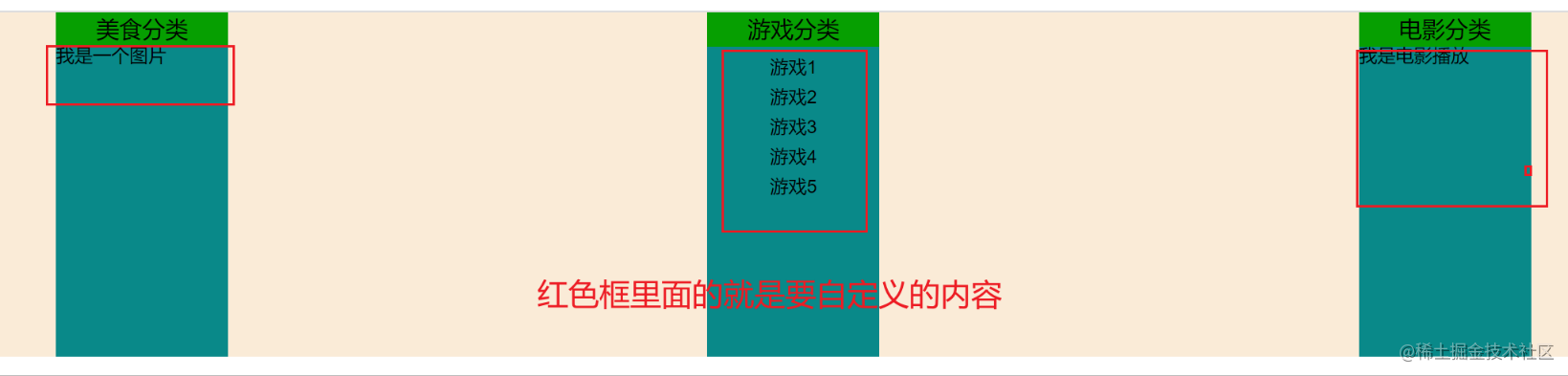
<cha-xao title="美食"><h2>我是一个图片</h2> </cha-xao>
<cha-xao title="游戏">
<ul>
<li v-for="(item,index) in youxi" :key="index">{{ item}}</li>
</ul>
</cha-xao>
<cha-xao title="电影">
<h2>我是电影播放</h2>
</cha-xao>
</div>
</template>
<script>
import chaXao from '../components/chaXao';
export default {
components: { chaXao },
name: 'HelloWorld',
props: {
msg: String
},
data () {
return {
meishi: ['鸡肉', '鸭肉', '鱼肉', '驴肉', '猪肉'],
youxi: ['游戏1', '游戏2', '游戏3', '游戏4', '游戏5'],
dianying: ['电影1', '电影2', '电影3', '电影4', '电影5']
}
}
}
</script>
<style lang="scss" scoped>
.hello {
background-color: antiquewhite;
display: flex;
justify-content: space-between;
}
</style>
如图:
具名插槽
子组件: 在slot里面加名字(name)
<template>
  <div class="divv">
    <h1 style="font-size:20px">{{ title }}分类</h1>
   <slot name="center">我是默认插槽1</slot>   //在这个里面加name
   <slot name="footer">我是默认插槽2</slot>   //在这个里面加name
  </div>
</template>
<script>
export default{
  name: 'chaXao',
  props: [ 'title','fenLei']
  }
</script>
<style scoped>

.divv{
  margin: 0 auto;
  width: 150px;
  height: 300px;
  background-color: rgb(9, 137, 137);
}
h1{
  background-color: rgb(6, 159, 1);
  margin-bottom: 20px;
  margin:  auto;
  height: 30px;
  display: flex;
  justify-content: center;
  align-items: center;

}
ul{
  display: flex;
  justify-content: center;
  align-items: center;
  flex-direction: column;
}
li{
  margin-top: 10px;
}
</style>
父组件:两种写法 (一 、旧)div里面配合slot='自定义的名字'(二新)template里配合v-slot:自定义的名字
<template>
  <div class="hello">

    <cha-xao title="美食">

      <h2 slot="center">我是一个图片</h2>
     <div slot="footer">
      <a href="#">我是红色图片</a>
     </div>

    </cha-xao>

    <cha-xao title="游戏">
    <ul slot="center">
      <li v-for="(item,index) in youxi" :key="index">{{ item}}</li>
   </ul>
   <div slot="footer">
    <a href="#">游戏one <br></a>
    <a href="#">游戏two</a>
     </div>
    </cha-xao>

    <cha-xao title="电影">
      <template v-slot:center>
        <div>
          <h2>我是电影播放</h2>
        </div>
      </template>
      <template v-slot:footer>
        <div>
          <a href="#">电影one</a>
          <a href="#">电影two</a>
          <h2>电影电影电影电影</h2>
        </div>
      </template>

    </cha-xao>

  </div>
</template>

<script>
import chaXao from '../components/chaXao';
export default {
  components: { chaXao },
  name: 'HelloWorld',
  props: {
    msg: String
  },
  data () {
    return {
      meishi: ['鸡肉', '鸭肉', '鱼肉', '驴肉', '猪肉'],
      youxi: ['游戏1', '游戏2', '游戏3', '游戏4', '游戏5'],
      dianying: ['电影1', '电影2', '电影3', '电影4', '电影5']
    }
  }
}
</script>

<style lang="scss" scoped>
.hello {
  background-color: antiquewhite;
  display: flex;
  justify-content: space-between;
}
a{
  color: rgb(181, 0, 0);
}

</style>
如图:
作用域插槽:场景:父组件要用的子组件的数据,相当于子传父
子组件:
<template>
  <div class="divv">
    <h1 style="font-size:20px">{{ title }}分类</h1>
   <slot :gamesList="games">我是默认插槽1</slot>

  </div>
</template>
<script>
export default{
  name: 'chaXao',
  props: ['title', 'fenLei'],
  data () {
    return {
      games: ['游戏1', '游戏2', '游戏3', '游戏4', '游戏5'],
    }
  }
  }
</script>
<style scoped>

.divv{
  margin: 0 auto;
  width: 150px;
  height: 300px;
  background-color: rgb(9, 137, 137);
}
h1{
  background-color: rgb(6, 159, 1);
  margin-bottom: 20px;
  margin:  auto;
  height: 30px;
  display: flex;
  justify-content: center;
  align-items: center;

}
ul{
  display: flex;
  justify-content: center;
  align-items: center;
  flex-direction: column;
}
li{
  margin-top: 10px;
}
</style>
父组件
<template>
  <div class="hello">

    <cha-xao title="游戏">
      <template scope="SuiBianXie">
         <!-- // scope="这个里面随便写,这里写的东西是另外一个组件传过来的全部数据,要用的话就直接点出来" -->
        <ul>
          <li v-for="(item,index) in SuiBianXie.gamesList" :key="index">{{ item}}</li>
        </ul>
      </template>
    </cha-xao>

    <cha-xao title="游戏">
      <template scope="{gamesList}">
         <!-- // scope="这个里面还支持解构赋值" -->
        <ol>
          <li style = 'color:red'  v-for="(item,index) in gamesList" :key="index">{{ item}}</li>
        </ol>
      </template>
    </cha-xao>

  </div>
</template>

<script>
import chaXao from '../components/chaXao';
export default {
  components: { chaXao },
  name: 'HelloWorld',
  props: {
    msg: String
  },
}
</script>

<style lang="scss" scoped>
.hello {
  background-color: antiquewhite;
  display: flex;
  justify-content: space-between;
}
a{
  color: rgb(181, 0, 0);
}

</style>
如图:

