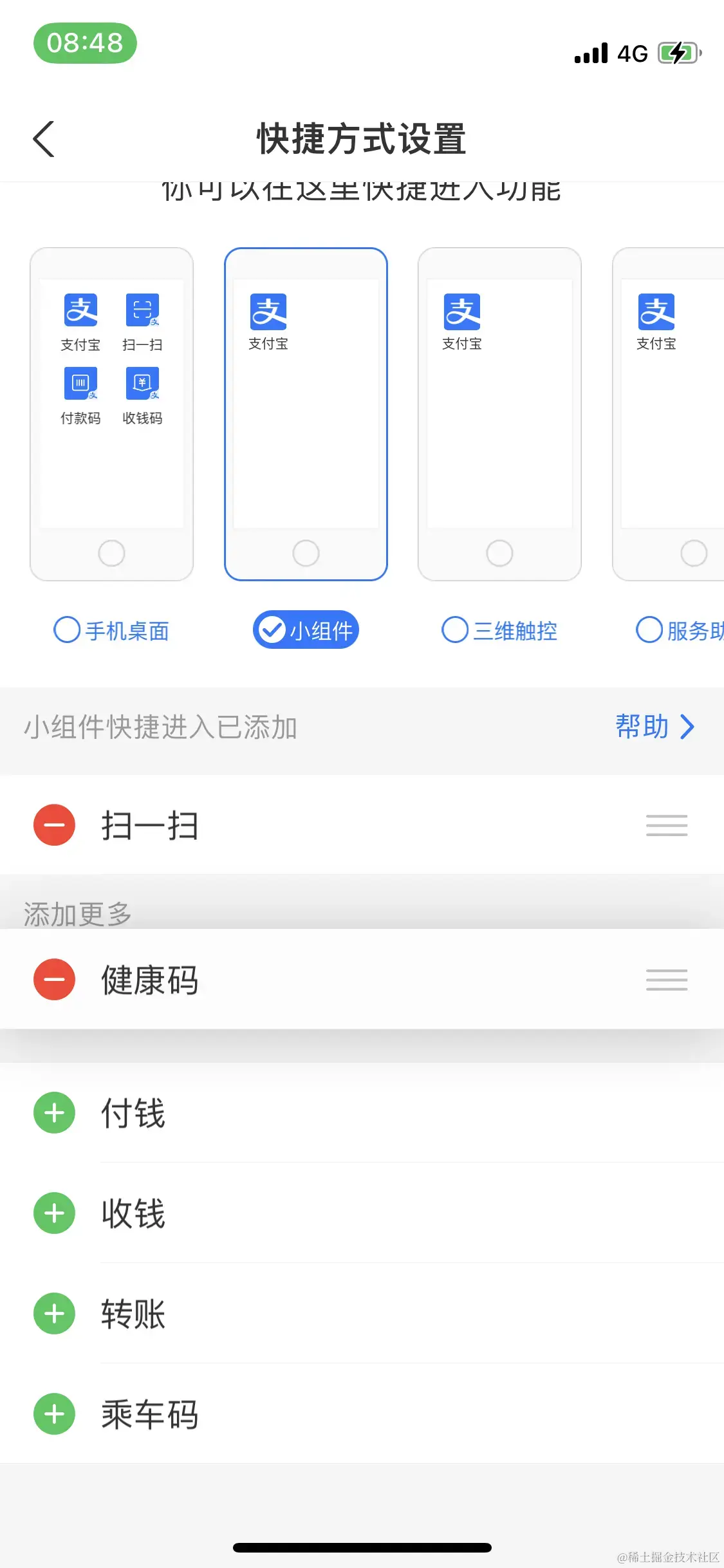
@interface EditingViewController () <UITableViewDelegate, UITableViewDataSource>
@property (nonatomic, strong) UITableView *tableView
@property (nonatomic, strong) NSMutableArray *dataArray1
@property (nonatomic, strong) NSMutableArray *dataArray2
@end
@implementation EditingViewController
- (void)viewDidLoad {
[super viewDidLoad]
self.dataArray1 = [NSMutableArray arrayWithArray:@[@"付钱",@"乘车码",@"健康码"]]
self.dataArray2 = [NSMutableArray arrayWithArray:@[@"扫一扫",@"收钱",@"转账"]]
[self.view addSubview:self.tableView]
}
- (UITableView *)tableView
{
if (!_tableView) {
_tableView = [[UITableView alloc] initWithFrame:CGRectMake(0, 0, ScreenWidth, ScreenHeight) style:UITableViewStyleGrouped]
_tableView.showsVerticalScrollIndicator = NO
_tableView.separatorStyle = UITableViewCellSeparatorStyleNone
_tableView.delegate = self
_tableView.dataSource = self
_tableView.editing = YES
_tableView.backgroundColor = [UIColor colorWithHex:0xf3f3f3]
_tableView.accessibilityIdentifier = @"EditingTableView"
}
return _tableView
}
- (NSInteger)numberOfSectionsInTableView:(UITableView *)tableView
{
return 2
}
- (NSInteger)tableView:(UITableView *)tableView numberOfRowsInSection:(NSInteger)section
{
if (section == 0) {
return self.dataArray1.count
}
return self.dataArray2.count
}
- (UITableViewCell*)tableView:(UITableView *)tableView cellForRowAtIndexPath:(NSIndexPath *)indexPath
{
static NSString *rid = @"XUEditingCellIdentify"
UITableViewCell *cell = [tableView dequeueReusableCellWithIdentifier:rid]
if(cell == nil){
cell = [[UITableViewCell alloc] initWithStyle:UITableViewCellStyleDefault reuseIdentifier:rid]
}
if (indexPath.section == 0) {
cell.textLabel.text = [self.dataArray1 objectAtIndex:indexPath.row]
} else {
cell.textLabel.text = [self.dataArray2 objectAtIndex:indexPath.row]
}
return cell
}
- (CGFloat)tableView:(UITableView *)tableView heightForHeaderInSection:(NSInteger)section
{
if (section == 0) {
return 0.0000001
}
return 40
}
- (UIView *)tableView:(UITableView *)tableView viewForHeaderInSection:(NSInteger)section {
UILabel *headerView = [[UILabel alloc] init]
headerView.backgroundColor = [UIColor colorWithHex:0xf3f3f3]
headerView.text = @"添加更多"
return headerView
}
- (CGFloat)tableView:(UITableView *)tableView heightForFooterInSection:(NSInteger)section {
return 0.000001
}
- (UIView *)tableView:(UITableView *)tableView viewForFooterInSection:(NSInteger)section {
UIView *footerView = [[UIView alloc] init]
footerView.backgroundColor = [UIColor clearColor]
return footerView
}
- (NSString *)tableView:(UITableView *)tableView titleForDeleteConfirmationButtonForRowAtIndexPath:(NSIndexPath *)indexPath{
return @"删除"
}
- (UITableViewCellEditingStyle)tableView:(UITableView *)tableView editingStyleForRowAtIndexPath:(NSIndexPath *)indexPath{
if (indexPath.section == 0) {
//返回删除类型
return UITableViewCellEditingStyleDelete
}
//返回新增元素类型
return UITableViewCellEditingStyleInsert
}
- (void)tableView:(UITableView *)tableView commitEditingStyle:(UITableViewCellEditingStyle)editingStyle forRowAtIndexPath:(NSIndexPath *)indexPath{
//删除元素的方法实现
if (editingStyle == UITableViewCellEditingStyleDelete) {
//解决编辑模式下删除cell,cell底部会有红线闪过的问题
[tableView beginUpdates]
NSString *editStr = [self.dataArray1 objectAtIndex:indexPath.row]
//删除数据源
[_dataArray1 removeObjectAtIndex:indexPath.row]
//删除cell
[_tableView deleteRowsAtIndexPaths:[NSArray arrayWithObjects:indexPath, nil] withRowAnimation:UITableViewRowAnimationRight]
//我一个一个试的,必须是UITableViewRowAnimationRight,否则会有其他闪动问题
NSIndexPath *newIndexPath = [NSIndexPath indexPathForRow:0 inSection:1]
//添加数据源
[_dataArray2 insertObject:editStr atIndex:0]
//添加添加cell
[_tableView insertRowsAtIndexPaths:[NSArray arrayWithObjects:newIndexPath, nil] withRowAnimation:UITableViewRowAnimationTop]
//解决编辑模式下删除cell,cell底部会有红线闪过的问题
[tableView endUpdates]
}
//新增元素的方法实现
if (editingStyle == UITableViewCellEditingStyleInsert) {
NSString *editStr = [self.dataArray2 objectAtIndex:indexPath.row]
//删除数据源
[_dataArray2 removeObjectAtIndex:indexPath.row]
//删除cell
[_tableView deleteRowsAtIndexPaths:[NSArray arrayWithObjects:indexPath, nil] withRowAnimation:UITableViewRowAnimationNone]
NSIndexPath *newIndexPath = [NSIndexPath indexPathForRow:self.dataArray1.count inSection:0]
//添加数据源
[_dataArray1 addObject:editStr]
//添加添加cell
[_tableView insertRowsAtIndexPaths:[NSArray arrayWithObjects:newIndexPath, nil] withRowAnimation:UITableViewRowAnimationBottom]
}
}
// 设置 cell 是否允许移动
- (BOOL)tableView:(UITableView *)tableView canMoveRowAtIndexPath:(NSIndexPath *)indexPath {
if (indexPath.section == 0) {
return YES
}
return NO
}
// 移动 cell 时触发
- (void)tableView:(UITableView *)tableView moveRowAtIndexPath:(NSIndexPath *)sourceIndexPath toIndexPath:(NSIndexPath *)destinationIndexPath {
BOOL sectionSame = sourceIndexPath.section == destinationIndexPath.section
BOOL rowSame = sourceIndexPath.row == destinationIndexPath.row
if (sectionSame && rowSame) { return
if (sourceIndexPath.section == 0) { //第一组的移动
NSString *editStr = [self.dataArray1 objectAtIndex:sourceIndexPath.row]
if (destinationIndexPath.section == 0) { //组内移动
[_dataArray1 removeObjectAtIndex:sourceIndexPath.row]
[_dataArray1 insertObject:editStr atIndex:destinationIndexPath.row]
} else { //第一组 -> 第二组
[_dataArray1 removeObjectAtIndex:sourceIndexPath.row]
[_dataArray2 insertObject:editStr atIndex:destinationIndexPath.row]
}
} else {//第二组的移动
NSString *editStr = [self.dataArray2 objectAtIndex:sourceIndexPath.row]
if (destinationIndexPath.section == 1) { //组内移动
[_dataArray2 removeObjectAtIndex:sourceIndexPath.row]
[_dataArray2 insertObject:editStr atIndex:destinationIndexPath.row]
} else { //第二组 -> 第一组
[_dataArray2 removeObjectAtIndex:sourceIndexPath.row]
[_dataArray1 insertObject:editStr atIndex:destinationIndexPath.row]
}
}
//刷新左边的编辑模式按钮
[_tableView reloadData]
}
@end



