1. 自定义指令的生命周期
created:元素初始化的时候调用
beforeMount:指令绑定到元素后调用,只调用一次
mounted:元素插入父级 DOM 时调用
beforeUpdate:元素被更新之前调用
updated:元素被更新之后调用
beforeUnmount:元素被卸载之前调用
unmounted:元素被卸载之后调用,只调用一次
2. 自定义指令过程
2.1 定义指令
const vMove: Directive = {
created() {
console.log('created')
},
beforeMount() {
console.log('beforeMount')
},
mounted(...args) {
console.log('mounted', args)
},
beforeUpdate() {
console.log('beforeUpdate')
},
updated() {
console.log('updated')
},
beforeUnmount() {
console.log('beforeUnmount')
},
unmounted() {
console.log('unmounted')
},
}
2.2 使用指令
<dire v-move:name.modi="{background: 'skyblue', flag: flag}"></dire>
2.3 生命周期中接收的参数
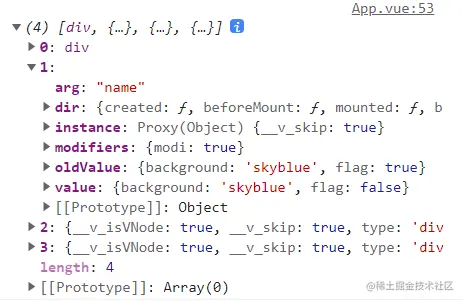
参数 1:真实 DOM 元素
参数 2:自定义指令的相关信息,包括指令周期、属性名、属性新值、属性老值、修饰符
参数 3:更新之后的虚拟 DOM 节点
参数 4:更新之前的虚拟 DOM 节点,没有更新则为 null
2.4 可以在生命周期中做一些事情
mounted(el: HTMLElement, dir: DirectiveBinding<Dir>) {
console.log('mounted')
el.style.background = dir.value.background
},
type Dir = {
background: string
}
3. 完整代码如下
<template>
<button @click="flag = !flag">切换</button>
<br>
<dire v-move:name.modi="{background: 'skyblue', flag: flag}"></dire>
</template>
<script setup lang="ts">
import { Directive, DirectiveBinding, ref } from 'vue';
import Dire from './components/Dire.vue';
let flag = ref<boolean>(true)
type Dir = {
background: string
}
const vMove: Directive = {
created() {
console.log('created')
},
beforeMount() {
console.log('beforeMount')
},
mounted(el: HTMLElement, dir: DirectiveBinding<Dir>) {
console.log('mounted')
el.style.background = dir.value.background
},
beforeUpdate() {
console.log('beforeUpdate')
},
updated(...args) {
console.log(args)
console.log('updated')
},
beforeUnmount() {
console.log('beforeUnmount')
},
unmounted() {
console.log('unmounted')
},
}
</script>



