hi,我是蛋挞,一个初出茅庐的后端开发,希望可以和大家共同努力、共同进步!
开启掘金成长之旅!这是我参与「掘金日新计划 · 4 月更文挑战」的第 6 天,点击查看活动详情
- 起始标记->数据建模(7讲):「53 | Elasticsearch数据建模实例」
- 结尾标记->数据建模(7讲):「53 | Elasticsearch数据建模实例」
Elasticsearch数据建模实例
什么是数据建模?
- 数据建模 (Data modeling),是创建数据模型的过程
- 数据模型是对真实世界进行抽象描述的一种工具和方法,实现对现实世界的映射
- 博客/作者/用户评论
- 数据模型是对真实世界进行抽象描述的一种工具和方法,实现对现实世界的映射
- 三个过程: 概念模型 => 逻辑模型 > 数据模型 (第三范式)
- 确定最终的定义数据模型:结合具体的数据库,,在满足业务读写性能等需求的前提下,
数据建模:功能需求+性能需求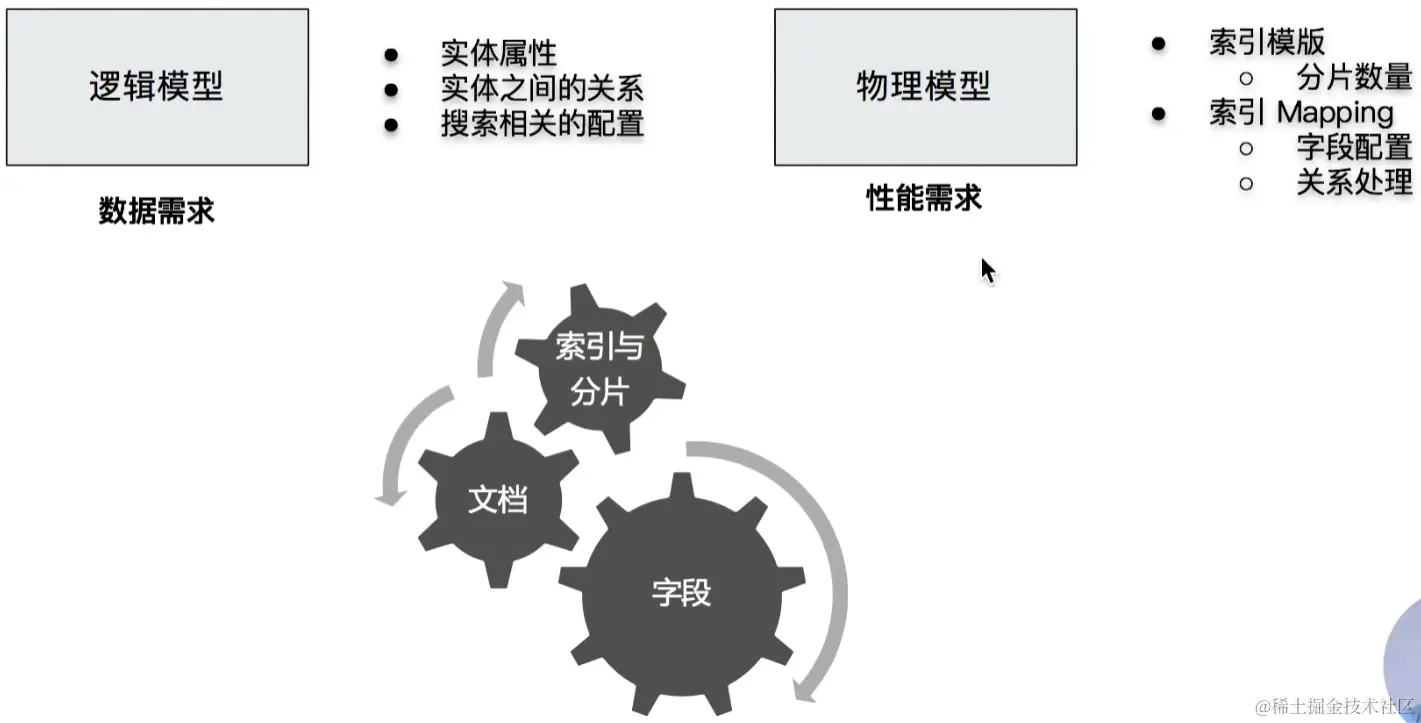
如何对字段进行建模
- 字段类型
- 是否要搜索及分词
- 是否要聚合及排序
- 是否要额外的存储
字段类型: Text v.s Keyword
- Text
- 用于全文本字段,文本会被 Analyzer 分词0
- 默认不支持聚合分析及排序。需要设置 fielddata 为 true
- Keyword
- 用于 id,枚举及不需要分词的文本。例如电话号码,email地址,手机号码,邮政编码,性别等
- 适用于 Filter (精确匹配),Sorting 和Aggregations
- 设置多字段类型
- 默认会为文本类型设置成 text,并且设置一个 keyword 的子字段
- 在处理人类语言时,通过增加“英文”,“拼音”和“标准”分词器,提高搜索结构
字段类型:结构化数据
- 数值类型
- 尽量选择贴近的类型。例如可以用 byte,就不要用 long
- 枚举类型
- 设置为 keyword。即便是数字,也应该设置成 keyword,获取更加好的性能
- 其他
- 日期/布尔/地理信息
检索
- 如不需要检索,排序和聚合分析
- Enable 设置成 false
- 如不需要检索
- Index 设置成 false
- 对需要检索的字段,可以通过如下配置,设定存储粒度
- Indexaptions / Norms : 不需要归一化数据时,可以关闭
聚合及排序
- 如不需要检索,排序和聚合分析
- Enable 设置成 false
- 如不需要排序或者聚合分析功能
- Doc_values / fielddata 设置成 false
- 更新频繁,聚合查询频繁的 keyword 类型的字段
- 推荐将 eager alobal ordinals,设置为 true
额外的存储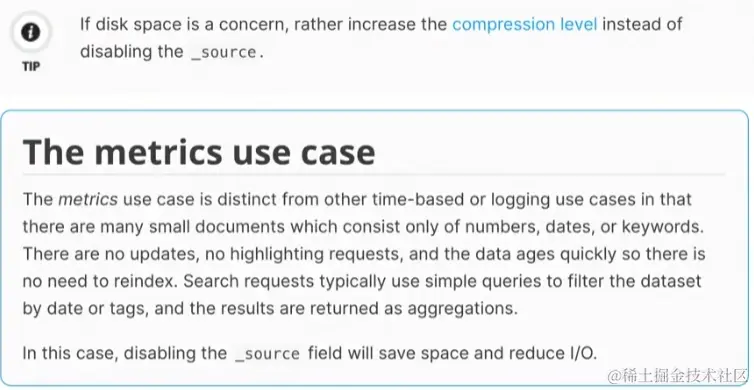
- 是否需要专门存储当前字段数据
- Store 设置成 true,可以存储该字段的原始内容
- 一般结合_source 的 enabled 为 lse 时候使用
- Disable_source: 节约磁盘;适用于指标型数据
- 一般建议先考虑增加压缩比
- 无法看到_source字段,无法做 Relndex,无法做Update
Mapping 字段的相关设置
- www.elastic.co/guide/en/el…
- Enabled - 设置成 false,仅做存储,不支持搜索和聚合分析(数据保存在 source 中)
- Index - 是否构倒排索引。设置成 false,无法被搜索,但还是支持 aggregation,并出现在_source中
- Norms - 如果字段用来过滤和聚合分析,可以关闭,节约存储
- Doc_values - 是否启用 doc_values,用于排序和聚合分析
- Field data -如果要对 text 类型启用排序和聚合分析,fielddata 需要设置成true
- Store一默认不存储,数据默认存储在 source。
- Coerce- 默认开启,是否开启数据类型的自动转换 (例如,字符串转数字)
- Multifields 多字段特性
- Dynamic -true /false / strict 控制 Mapping 的自动更新
一些相关的AP
- Index Template & Dynamic Template
- 根据索引的名字匹配不同的 Mappings 和 Settings
- 可以在一个 Mapping 上动态的设定字段类型
- Index Alias
- 无需停机,无需修改程序,即可进行修改
- Update By Query & Reindex
CodeDemo
###### Data Modeling Example

# Index 一本书的信息
PUT books/_doc/1
{
  "title":"Mastering ElasticSearch 5.0",
  "description":"Master the searching, indexing, and aggregation features in ElasticSearch Improve users’ search experience with Elasticsearch’s functionalities and develop your own Elasticsearch plugins",
  "author":"Bharvi Dixit",
  "public_date":"2017",
  "cover_url":"https://images-na.ssl-images-amazon.com/images/I/51OeaMFxcML.jpg"
}


#查询自动创建的Mapping
GET books/_mapping

DELETE books

#优化字段类型
PUT books
{
      "mappings" : {
      "properties" : {
        "author" : {"type" : "keyword"},
        "cover_url" : {"type" : "keyword","index": false},
        "description" : {"type" : "text"},
        "public_date" : {"type" : "date"},
        "title" : {
          "type" : "text",
          "fields" : {
            "keyword" : {
              "type" : "keyword",
              "ignore_above" : 100
            }
          }
        }
      }
    }
}

#Cover URL index 设置成false,无法对该字段进行搜索
POST books/_search
{
  "query": {
    "term": {
      "cover_url": {
        "value": "https://images-na.ssl-images-amazon.com/images/I/51OeaMFxcML.jpg"
      }
    }
  }
}

#Cover URL index 设置成false,依然支持聚合分析
POST books/_search
{
  "aggs": {
    "cover": {
      "terms": {
        "field": "cover_url",
        "size": 10
      }
    }
  }
}


DELETE books
#新增 Content字段。数据量很大。选择将Source 关闭
PUT books
{
      "mappings" : {
      "_source": {"enabled": false},
      "properties" : {
        "author" : {"type" : "keyword","store": true},
        "cover_url" : {"type" : "keyword","index": false,"store": true},
        "description" : {"type" : "text","store": true},
         "content" : {"type" : "text","store": true},
        "public_date" : {"type" : "date","store": true},
        "title" : {
          "type" : "text",
          "fields" : {
            "keyword" : {
              "type" : "keyword",
              "ignore_above" : 100
            }
          },
          "store": true
        }
      }
    }
}


# Index 一本书的信息,包含Content
PUT books/_doc/1
{
  "title":"Mastering ElasticSearch 5.0",
  "description":"Master the searching, indexing, and aggregation features in ElasticSearch Improve users’ search experience with Elasticsearch’s functionalities and develop your own Elasticsearch plugins",
  "content":"The content of the book......Indexing data, aggregation, searching.    something else. something in the way............",
  "author":"Bharvi Dixit",
  "public_date":"2017",
  "cover_url":"https://images-na.ssl-images-amazon.com/images/I/51OeaMFxcML.jpg"
}

#查询结果中,Source不包含数据
POST books/_search
{}

#搜索,通过store 字段显示数据,同时高亮显示 conent的内容
POST books/_search
{
  "stored_fields": ["title","author","public_date"],
  "query": {
    "match": {
      "content": "searching"
    }
  },

  "highlight": {
    "fields": {
      "content":{}
    }
  }

}
本节知识小节
学习了ES数据建模的重要性,也了解了数据建模时所需要考察的点,通过具体的实例学习了怎么结合实际的需求对数据模型做出合理的建模。
此文章为4月Day6学习笔记,内容来源于极客时间《Elasticsearch 核心技术与实战》