hi,我是蛋挞,一个初出茅庐的后端开发,希望可以和大家共同努力、共同进步!
开启掘金成长之旅!这是我参与「掘金日新计划 · 4 月更文挑战」的第 5 天,点击查看活动详情
- 起始标记->数据建模(7讲):「51 | Update By Query & Reindex API」
- 结尾标记->数据建模(7讲):「52 | Ingest Pipeline & Painless Script」
Update By Query & Reindex API
使用场景
- 一般在以下几种情况时,我们需要重建索引
- 索引的 Mappings 发生变更: 字段类型更改,分词器及字典更新
- 索引的 Settings 发生变更: 索引的主分片数发生改变
- 集群内,集群间需要做数据迁移
- Elasticsearch 的内置提供的 AP
- Update By Query: 在现有索引上重建
- Reindex:在其他索引上重建索引
案例1:为索引增加子字段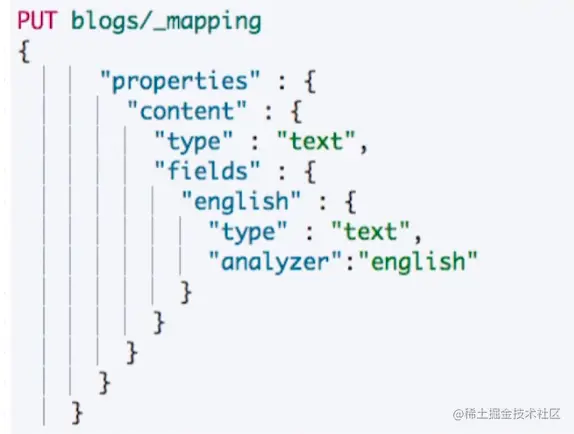
- 改变 Mapping,增加子字段,使用英文分词器
- 此时尝试对子字段进行查询
- 虽然有数据已经存在,但是没有返回结果
案例 2:更改已有字段类型的 Mappings
- ES 不允许在原有 Mapping 上对字段类型进行修改
- 只能创建新的索引,并且设定正确的字段类型,再重新导入数据
Reindex API
- Reindex API支持把文档从一个索引拷贝到另外一个索引
- 使用 Reindex API的一些场景
- 修改索引的主分片数
- 改变字段的 Mapping 中的字段类型
- 集群内数据迁移/跨集群的数据迁移
两个注意点
Reindex API
OP Type
- _reindex 只会创建不存在的文档
- 文档如果已经存在,会导致版本冲突
跨集群 Relndex
- 需要修改 elasticsearch.vml,并且重启节点
查看Task API
- Reindx API支持异步操作,执行只返回Task ld
- POST_reindex?wait for_completion=false
CodeDemo
DELETE blogs/

# 写入文档
PUT blogs/_doc/1
{
  "content":"Hadoop is cool",
  "keyword":"hadoop"
}

# 查看 Mapping
GET blogs/_mapping

# 修改 Mapping,增加子字段,使用英文分词器
PUT blogs/_mapping
{
      "properties" : {
        "content" : {
          "type" : "text",
          "fields" : {
            "english" : {
              "type" : "text",
              "analyzer":"english"
            }
          }
        }
      }
    }


# 写入文档
PUT blogs/_doc/2
{
  "content":"Elasticsearch rocks",
    "keyword":"elasticsearch"
}

# 查询新写入文档
POST blogs/_search
{
  "query": {
    "match": {
      "content.english": "Elasticsearch"
    }
  }

}

# 查询 Mapping 变更前写入的文档
POST blogs/_search
{
  "query": {
    "match": {
      "content.english": "Hadoop"
    }
  }
}


# Update所有文档
POST blogs/_update_by_query
{

}

# 查询之前写入的文档
POST blogs/_search
{
  "query": {
    "match": {
      "content.english": "Hadoop"
    }
  }
}


# 查询
GET blogs/_mapping

PUT blogs/_mapping
{
        "properties" : {
        "content" : {
          "type" : "text",
          "fields" : {
            "english" : {
              "type" : "text",
              "analyzer" : "english"
            }
          }
        },
        "keyword" : {
          "type" : "keyword"
        }
      }
}


DELETE blogs_fix

# 创建新的索引并且设定新的Mapping
PUT blogs_fix/
{
  "mappings": {
        "properties" : {
        "content" : {
          "type" : "text",
          "fields" : {
            "english" : {
              "type" : "text",
              "analyzer" : "english"
            }
          }
        },
        "keyword" : {
          "type" : "keyword"
        }
      }
  }
}

# Reindx API
POST  _reindex
{
  "source": {
    "index": "blogs"
  },
  "dest": {
    "index": "blogs_fix"
  }
}

GET  blogs_fix/_doc/1

# 测试 Term Aggregation
POST blogs_fix/_search
{
  "size": 0,
  "aggs": {
    "blog_keyword": {
      "terms": {
        "field": "keyword",
        "size": 10
      }
    }
  }
}


# Reindx API,version Type Internal
POST  _reindex
{
  "source": {
    "index": "blogs"
  },
  "dest": {
    "index": "blogs_fix",
    "version_type": "internal"
  }
}

# 文档版本号增加
GET  blogs_fix/_doc/1

# Reindx API,version Type Internal
POST  _reindex
{
  "source": {
    "index": "blogs"
  },
  "dest": {
    "index": "blogs_fix",
    "version_type": "external"
  }
}


# Reindx API,version Type Internal
POST  _reindex
{
  "source": {
    "index": "blogs"
  },
  "dest": {
    "index": "blogs_fix",
    "version_type": "external"
  },
  "conflicts": "proceed"
}

# Reindx API,version Type Internal
POST  _reindex
{
  "source": {
    "index": "blogs"
  },
  "dest": {
    "index": "blogs_fix",
    "op_type": "create"
  }
}


GET _tasks?detailed=true&actions=*reindex
相关阅读
本节知识总结
介绍了什么是Update By Query 以及什么是 Reindex,也介绍了这两个API使用的场景,可以根据合适的场景使用这两个API对数据进行重写。
Ingest Pipeline & Painless Script
需求: 修复与增强写入的数据
- Tags 字段中,逗号分隔的文本应该是数组,而不是一个字符串
- 需求:后期需要对 Tags 进行 Aggregation 统计
Ingest Node
- Elasticsearch 5.0 后,引入的一种新的节点类型。默认配置下,每个节点都是 ngest Node
- 具有预处理数据的能力,可拦截 index 或 Bulk API的请求
- 对数据进行转换,并重新返回给 Index 或 Bulk API
- 无需 Logstash,就可以进行数据的预处理,例如
- 为某个字段设置默认值;重命名某个字段的字段名;对字段值进行 Split 操作
- 支持设置 Painless 脚本,对数据进行更加复杂的加工
Pipeline & Processor
- Pipeline- 管道会对通过的数据(文档),按照顺序进行加工
- Processor - Elasticsearcht对一些加工的行为进行了抽象包装
- Elasticsearch 有很多内置的 Processors。也支持通过插件的方式,实现自己的 Processor
使用 Pipeline 切分字符串
- Simulate APl,模拟 Pipeline
- 在数组中定义 Processors
- 使用不同的测试文档
一些内置 Processors
- www.elastic.co/guide/en/el…
- Split Processor (例: 将给定字段值分成一个数组) [
- Remove / Rename Processor (例: 移除一个重命名字段)
- Append (例:为商品增加一个新的标签)
- Convert (例:将商品价格,从字符串转换成 float 类型)
- Date /JSON (例:日期格式转换,字符串转 JSON 对象)
- Date IndexName (例:将通过该外理器的文档,分配到指定时间格式的索引中)
一些内置 Processors(续)
- www.elastic.co/guide/en/el…
- Fail Processor (一旦出现异常,该 Pipeline 指定的错误信息能返回给用户)
- Foreach Process (数组字段,数组的每个元素会使用到一个相同的处理器)
- Grok Processor (日志的日期格式切割)
- Gsub / Jin / Split (字符串替换 /数组转字符串/ 字符串转数组)
- Lowercase /Upcase (大小写转换)
Ingest Node v.s Logstash
Painless 简介
- 自 Elasticsearch 5.x 后引入,专门为 Elasticsearch 设计,扩展了 Java 的语法
- 6.0 开始,ES 只支持 Painless。Groovy, JavaScript 和 Python 都不再支持
- Painless 支持所有 Java 的数据类型及 Java API 子集
- Painless Script 具备以下特性
- 高性能 /安全
- 支持显示类型或者动态定义类型
Painless 的用途
- 可以对文档字段进行加工处理
- 更新或删除字段,处理数据聚合操作
- Script Field: 对返回的字段提前进行计算
- Function Score:对文档的算分进行处理
- 在 Ingest Pipeline 中执行脚本
- 在 Reindex APl,Update By Query 时,对数据进行处理
通过 Painless 脚本访问字段
脚本缓存
- 编译的开销相较大
- Elasticsearch 会将脚本编译后缓存在Cache 中
- Inline scripts 和 Stored Scripts 都会被缓存
- 默认缓存100个脚本
CodeDemo
#########Demo for Pipeline###############

DELETE tech_blogs

#Blog数据,包含3个字段,tags用逗号间隔
PUT tech_blogs/_doc/1
{
  "title":"Introducing big data......",
  "tags":"hadoop,elasticsearch,spark",
  "content":"You konw, for big data"
}


# 测试split tags
POST _ingest/pipeline/_simulate
{
  "pipeline": {
    "description": "to split blog tags",
    "processors": [
      {
        "split": {
          "field": "tags",
          "separator": ","
        }
      }
    ]
  },
  "docs": [
    {
      "_index": "index",
      "_id": "id",
      "_source": {
        "title": "Introducing big data......",
        "tags": "hadoop,elasticsearch,spark",
        "content": "You konw, for big data"
      }
    },
    {
      "_index": "index",
      "_id": "idxx",
      "_source": {
        "title": "Introducing cloud computering",
        "tags": "openstack,k8s",
        "content": "You konw, for cloud"
      }
    }
  ]
}


#同时为文档,增加一个字段。blog查看量
POST _ingest/pipeline/_simulate
{
  "pipeline": {
    "description": "to split blog tags",
    "processors": [
      {
        "split": {
          "field": "tags",
          "separator": ","
        }
      },

      {
        "set":{
          "field": "views",
          "value": 0
        }
      }
    ]
  },

  "docs": [
    {
      "_index":"index",
      "_id":"id",
      "_source":{
        "title":"Introducing big data......",
  "tags":"hadoop,elasticsearch,spark",
  "content":"You konw, for big data"
      }
    },


    {
      "_index":"index",
      "_id":"idxx",
      "_source":{
        "title":"Introducing cloud computering",
  "tags":"openstack,k8s",
  "content":"You konw, for cloud"
      }
    }

    ]
}


# 为ES添加一个 Pipeline
PUT _ingest/pipeline/blog_pipeline
{
  "description": "a blog pipeline",
  "processors": [
      {
        "split": {
          "field": "tags",
          "separator": ","
        }
      },

      {
        "set":{
          "field": "views",
          "value": 0
        }
      }
    ]
}

#查看Pipleline
GET _ingest/pipeline/blog_pipeline


#测试pipeline
POST _ingest/pipeline/blog_pipeline/_simulate
{
  "docs": [
    {
      "_source": {
        "title": "Introducing cloud computering",
        "tags": "openstack,k8s",
        "content": "You konw, for cloud"
      }
    }
  ]
}

#不使用pipeline更新数据
PUT tech_blogs/_doc/1
{
  "title":"Introducing big data......",
  "tags":"hadoop,elasticsearch,spark",
  "content":"You konw, for big data"
}

#使用pipeline更新数据
PUT tech_blogs/_doc/2?pipeline=blog_pipeline
{
  "title": "Introducing cloud computering",
  "tags": "openstack,k8s",
  "content": "You konw, for cloud"
}


#查看两条数据,一条被处理,一条未被处理
POST tech_blogs/_search
{}

#update_by_query 会导致错误
POST tech_blogs/_update_by_query?pipeline=blog_pipeline
{
}

#增加update_by_query的条件
POST tech_blogs/_update_by_query?pipeline=blog_pipeline
{
    "query": {
        "bool": {
            "must_not": {
                "exists": {
                    "field": "views"
                }
            }
        }
    }
}


#########Demo for Painless###############

# 增加一个 Script Prcessor
POST _ingest/pipeline/_simulate
{
  "pipeline": {
    "description": "to split blog tags",
    "processors": [
      {
        "split": {
          "field": "tags",
          "separator": ","
        }
      },
      {
        "script": {
          "source": """
          if(ctx.containsKey("content")){
            ctx.content_length = ctx.content.length();
          }else{
            ctx.content_length=0;
          }


          """
        }
      },

      {
        "set":{
          "field": "views",
          "value": 0
        }
      }
    ]
  },

  "docs": [
    {
      "_index":"index",
      "_id":"id",
      "_source":{
        "title":"Introducing big data......",
  "tags":"hadoop,elasticsearch,spark",
  "content":"You konw, for big data"
      }
    },


    {
      "_index":"index",
      "_id":"idxx",
      "_source":{
        "title":"Introducing cloud computering",
  "tags":"openstack,k8s",
  "content":"You konw, for cloud"
      }
    }

    ]
}


DELETE tech_blogs
PUT tech_blogs/_doc/1
{
  "title":"Introducing big data......",
  "tags":"hadoop,elasticsearch,spark",
  "content":"You konw, for big data",
  "views":0
}

POST tech_blogs/_update/1
{
  "script": {
    "source": "ctx._source.views += params.new_views",
    "params": {
      "new_views":100
    }
  }
}

# 查看views计数
POST tech_blogs/_search
{

}

#保存脚本在 Cluster State
POST _scripts/update_views
{
  "script":{
    "lang": "painless",
    "source": "ctx._source.views += params.new_views"
  }
}

POST tech_blogs/_update/1
{
  "script": {
    "id": "update_views",
    "params": {
      "new_views":1000
    }
  }
}


GET tech_blogs/_search
{
  "script_fields": {
    "rnd_views": {
      "script": {
        "lang": "painless",
        "source": """
          java.util.Random rnd = new Random();
          doc['views'].value+rnd.nextInt(1000);
        """
      }
    }
  },
  "query": {
    "match_all": {}
  }
}
相关阅读
- www.elastic.co/cn/blog/sho…
- www.elastic.co/guide/en/el…
- www.elastic.co/guide/en/el…
- www.elastic.co/guide/en/el…
- www.elastic.co/guide/en/el…
本节知识总结
学习了Ingest Node和相应的Pipeline,比较了elasticsearch的Pipeline和Logstash各自的优缺点。简单的介绍了elasticsearch的Painless脚本的使用,它不仅可以使用在数据的搜索也可以使用在updataByQuery、Reindex以及使用在Ingest Node上。
此文章为4月Day5学习笔记,内容来源于极客时间《Elasticsearch 核心技术与实战》