之前我们已经对 Express 进行了学习,今天要介绍的 Koa 同样出自于 Express 团队之手,但其定位,按照官方文档的说发,是下一代的 web 服务器框架 :
next generation web framework for node.js
相比于内置了许多功能的 express,koa 更加简洁,想实现某些功能,需要另外安装一些库。下面就开始介绍如何使用 koa 来快速搭建服务器。
快速搭建
首先是安装 koa:
npm i koa
之后在文件中导入,并使用 new 的方式创建 app,而不是像 express 那样直接调用 express():
// src\main.js 代码片段 1.1
const Koa = require('koa')
const app = new Koa()
使用 app.listen() 启动服务器,传入要监听的端口号,这与 express 一样:
// src\main.js 代码片段 1.2
app.listen(4396, () => {
  console.log('服务器启动成功')
})
常量配置与 .env 文件的使用
为了方便修改代码片段 1.2 中的端口号,我们其实可以在项目根目录下新建个 .env 文件,然后在其中配置:
# .env
SERVER_PORT = 4396
然后可以新建个 src\config\server.config.js 文件将常量统一管理:
const dotenv = require('dotenv')
dotenv.config()
const SERVER_PORT = process.env.SERVER_PORT
module.exports = {
  SERVER_PORT
}
dotenv 需要先进行安装 :
npm i dotenv
然后调用 dotenv.config() 后,就可以通过 process.env 拿到项目根目录下 .env 文件中定义的 SERVER_PORT 了。最后,在 main.js 中就可以使用 server.config.js 导出的 SERVER_PORT 来替换原本代码片段 1.2 中的 4396:
// src\main.js
const { SERVER_PORT } = require('./config/server.config')
app.listen(SERVER_PORT, () => {
  console.log('服务器启动成功')
})
如果使用 esm 模块化方案,可以直接 import 'dotenv/config' 替代 const dotenv = require('dotenv') 和 dotenv.config()。它是 dotenv 提供的一种即时执行的简写方式。它的底层逻辑是:
- 读取项目根目录下的 .env 文件;
- 按行解析 KEY=VALUE 格式的键值对;
- 将解析结果注入到 Node.js 的
process.env对象中。
所以执行完这行代码后,process.env 上就挂载了.env 文件中定义的所有变量。注意,在 Node.js 中,process.env 这个全局对象本身的设计规范就是所有的键和值都必须是字符串。所以,哪怕在 .env 文件里写 PORT=3000,process.env.PORT 的值也会自动被转为字符串 "123"。
部分源码探究
new Koa()
如果在去代码片段 1.1 的 const app = new Koa() 处打上断点,通过调试去查看 koa 的源码,可以看到实际上是执行了 new Application(),也就是去执行了 Application 类的构造方法 :
// node_modules\koa\lib\application.js
module.exports = class Application extends Emitter {
  constructor(options) {
    // ...
    this.middleware = [];
    this.context = Object.create(context); // 上下文对象
    this.request = Object.create(request); // 请求对象
    this.response = Object.create(response); // 响应对象
  }
}
这里提前说明下,middleware 用于收集传入 app.use() 的中间件函数;context 为中间函数的第 1 个参数 ctx,具体后文还会介绍。
app.listen()
查看 listen 方法,可以看到其本质上还是使用了 node 的 http 模块创建的服务:
// node_modules\koa\lib\application.js
const http = require('http');
listen(...args) {
  debug('listen');
  const server = http.createServer(this.callback());
  return server.listen(...args);
}
当请求发生时,就会调用传入 http.createServer() 的回调,也就是 this.callback() 的返回值,所以我们得去看看 callback 方法:
// node_modules\koa\lib\application.js
callback() {
  const fn = compose(this.middleware);
  if (!this.listenerCount('error')) this.on('error', this.onerror);
  const handleRequest = (req, res) => {
    const ctx = this.createContext(req, res);
    return this.handleRequest(ctx, fn);
  };
  return handleRequest;
}
可以看到,当请求发生时,实际上执行的是 handleRequest,在其内部会创建 ctx,并且还会去调用 app 的 handleRequest 方法,我们会在后文探究其具体定义。
中间件
koa 中也有中间件,并且不像 express 那样可以使用什么 app.post() 等方法,而是只能使用 app.use() 的方式来传入中间件函数,中间件函数会被传入 2 个参数,ctx 和 next,express 中的 req 和 res 在 koa 中都被上下文对象 ctx 替代。响应数据的方式则是通过给 ctx.body 赋值,如果想使用 end 方法,则需要通过 ctx.res.end('Hello Juejin'):
app.use((ctx, next) => {
  ctx.body = 'Hello Juejin'
})
ctx
通过前面对源码的查看,我们知道每次请求时,都会通过 const ctx = this.createContext(req, res) 创建一个 ctx 对象,可以通过 ctx.request 和 ctx.response 来获取 koa 封装的请求对象和响应对象,比如打印一个 GET 请求的 ctx.request 结果如下:
{
  method: 'GET',
  url: '/search?name=Jay&age=20',
  header: {
    'user-agent': 'Apifox/1.0.0 (https://www.apifox.cn)',
    accept: '* / *',
    host: 'localhost:4396',
    'accept-encoding': 'gzip, deflate, br',
    connection: 'keep-alive',
    'content-type': 'multipart/form-data; boundary=--------------------------092047209466522747437726',
    'content-length': '904762'
  }
}
可以看到里面有请求的 method 、url 和 header 信息,但其实直接打印 ctx.request.path,也能获取到值为 /search,并且大部分在 ctx.request 或 ctx.response 属性,都能直接在 ctx 上获取到,比如可以获取 ctx.path、ctx.method。
而通过 ctx.req和 ctx.res 则可以分别获取 node 的请求和响应对象,也就是使用 http.createServer((req, res) => {}) 来创建服务时,传入的回调里的 req 和 res, 其中包含的属性相对较多,这也是为何前面说想使用 end 方法返回数据需要通过 ctx.res 调用的原因。
next
同 express 一样,next 用于调用栈中的下一个中间件函数。比如有如下例子,我们将响应 ctx.body = 'hello' 写在于第 1 个中间件函数内,并放置于 next() 之后:
// 代码片段 2.1
app.use((ctx, next) => {
  console.log(1)
  next()
  console.log(5)
  ctx.body = 'hello'
})
app.use((ctx, next) => {
  console.log(2)
  next()
  console.log(4)
})
app.use((ctx, next) => {
  console.log(3)
})
当接收到请求时,打印的顺序会是 1 -2 - 3 - 4 - 5,这种执行顺序就是所谓的“洋葱模型”:
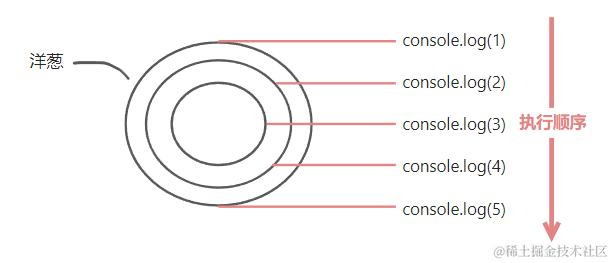
异步代码执行顺序(洋葱模型)
如果其中有异步代码,比如最后一个中间件函数内有一个定时器:
// 代码片段 2.2
app.use((ctx, next) => {
  console.log(1)
  next()
  console.log(5)
  ctx.body = 'hello'
})
app.use((ctx, next) => {
  console.log(2)
  next()
  console.log(4)
})
app.use((ctx, next) => {
  setTimeout(() => {
    console.log(3)
  }, 1000)
})
那么接收到请求后的打印顺序将是 1 - 2 - 4 - 5 - 3,4 和 5 的打印并不会等待异步代码执行完毕。如果仍旧想让打印顺序为 1 -2 - 3 - 4 - 5,也就是想符合洋葱模型,可以借助 async/await 改成下面这样:
// 代码片段 2.3
app.use(async (ctx, next) => {
  console.log(1)
  await next()
  console.log(5)
  ctx.body = 'hello'
})
app.use(async (ctx, next) => {
  console.log(2)
  await next()
  console.log(4)
})
app.use(async (ctx, next) => {
  await new Promise((resolve, reject) => {
    setTimeout(() => {
      console.log(3)
      resolve()
    }, 1000)
  })
})
app.use() 源码探究
其原因可通过直接在代码片段 2.3 的第 1 个 app.use 处打上断点,去查看 koa 的源码来一探究竟:
// node_modules\koa\lib\application.js
use(fn) {
  if (typeof fn !== 'function') throw new TypeError('middleware must be a function!');
  if (isGeneratorFunction(fn)) {
    deprecate('Support for generators will be removed in v3. ' +
              'See the documentation for examples of how to convert old middleware ' +
              'https://github.com/koajs/koa/blob/master/docs/migration.md');
    fn = convert(fn);
  }
  debug('use %s', fn._name || fn.name || '-');
  this.middleware.push(fn);
  return this;
}
可以看到在 use 方法中,主要是在第 11 行执行的 this.middleware.push(fn),将我们传入 app.use() 的回调函数 fn,也就是
async (ctx, next) => {
  console.log(1)
  await next()
  console.log(5)
  ctx.body = 'hello'
}
加入到 middleware 数组中,之后会依次执行我们定义的下一个 app.use(),最终将第 2、 3 个回调函数也加入到 middleware 中:
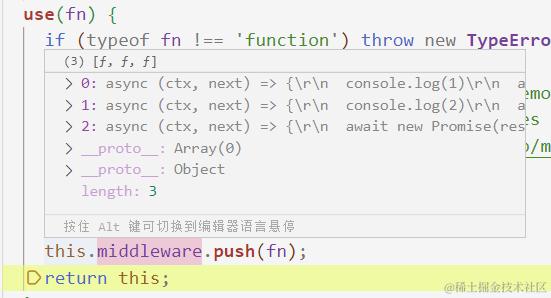
那么加入到 middleware 中的这些回调什么时候执行呢?前文在查看源码中的 callback 方法时提到,当每次请求发生时,会执行的其实是 handleRequest,并且会返回 this.handleRequest(ctx, fn),也就是 app 的 handleRequest:
// 代码片段 3.1
// node_modules\koa\lib\application.js
handleRequest(ctx, fnMiddleware) {
  const res = ctx.res;
  res.statusCode = 404;
  const onerror = err => ctx.onerror(err);
  const handleResponse = () => respond(ctx);
  onFinished(res, onerror);
  return fnMiddleware(ctx).then(handleResponse).catch(onerror);
}
fnMiddleware 就是前面 callback 里定义的 fn,其值为 compose(this.middleware) 的返回值,也是一个函数,这个函数的返回值为 dispatch 的执行,执行的返回值为 Promise.resolve() 或 Promise.reject():
// node_modules\koa-compose\index.js
function compose (middleware) {
  // ...
  return function (context, next) {
    // last called middleware #
    let index = -1
    return dispatch(0)
    function dispatch (i) {
      if (i <= index) return Promise.reject(new Error('next() called multiple times'))
      index = i
      let fn = middleware[i]
      if (i === middleware.length) fn = next
      if (!fn) return Promise.resolve()
      try {
        return Promise.resolve(fn(context, dispatch.bind(null, i + 1)));
      } catch (err) {
        return Promise.reject(err)
      }
    }
  }
}
可以看到,当请求发生时,传入第 1 个 app.use() 的回调是在执行 dispatch(0) 时,从 middleware 内获取赋值给 fn,然后通过 Promise.resolve(fn(context, dispatch.bind(null, i + 1))) 执行的,fn() 在执行时传入了 context 与 dispatch.bind(null, i + 1),所以这个 dispatch 其实就是传入 app.use() 的回调的第 2 个参数 next。
当我们在第 1 个 app.use 的中间件函数中执行完 console.log(1),调用了 await next(),即执行了 await dispatch(1), 就会从 middleware 中取出第 2 个回调执行,打印了 console.log(2),然后也调用了 await next(),于是就会执行 await dispatch(2),取出我们定义的最后一个中间件函数执行:
async (ctx, next) => {
  await new Promise(resolve => {
    setTimeout(() => {
      console.log(3)
      resolve()
    }, 1000)
  })
}
因为使用了 async/await 与 promise,所以会等待 console.log(3) 执行完,即 dispatch(2) 的返回值 Promise.resolve() 内的 fn() 执行完毕,第 2 个中间件回调的 await next() 有了结果,继续执行 console.log(4)。然后 dispatch(1) 执行完毕,第 1 个中间件回调的 await next() 也有了结果,最后执行 console.log(5) 和 ctx.body = 'hello3'。至此,赋值为第 1 个中间函数的 fn() 执行完毕,Promise.resolve(fn()) 返回,作为 dispatch(0) 的执行结果返回,作为代码片段 3.1 的 fnMiddleware(ctx) 的执行结果,然后才会执行之后的 then() 方法里的回调 handleResponse,最终通过 res.end(body) 发送响应数据:
// node_modules\koa\lib\application.js
function respond(ctx) {
  // ...
  if ('string' === typeof body) return res.end(body);
}
通过对源码的探究,我们明白了如何让 koa 的中间件函数在执行异步操作时也能符合洋葱模型,而这点正是 koa 与 express 的区别之一,express 的中间件函数在执行同步代码时也符合洋葱模型,但在执行异步代码的时候则不符合。
路由的安装与使用
如果想让中间件针对某个特定的请求方法或路径,比如请求方法为 GET,路径为 '/article/list' 的请求,在 koa 中我们需要自己安装第三方的路由库,比如由官方团队提供的 @koa/router:
npm install @koa/router
安装完成后我们可以在项目新建 src\router\article.router.js 文件,导入 @koa/router 并通过 new 得到路由对象 articleRouter,下例中我们还传入了配置对象让路径的前缀 prefix 为 '/article':
// src\router\article.router.js
const KoaRouter = require('@koa/router')
const articleRouter = new KoaRouter({ prefix: '/article' })
之后就能像在 express 那样定义匹配方法和路径的中间件了(定义接口):
// src\router\article.router.js
articleRouter.get('/list', (ctx, next) => {
  ctx.body = 'Hello Juejin'
})
module.exports = articleRouter
在 src\main.js 我们还需要使 KoaRouter 生效,其方法为向 app.use() 传入 articleRouter.routes():
// src\main.js
const Koa = require('koa')
const articleRouter = require('./router/article.router')
const { SERVER_PORT } = require('./config/server.config')

const app = new Koa()
app.use(articleRouter.routes())
app.use(articleRouter.allowedMethods())

app.listen(SERVER_PORT, () => {
  console.log('服务器启动成功')
})
我们还可以通过执行 app.use(articleRouter.allowedMethods()),在请求方法不匹配我们的定义时,返回稍为具体的错误信息,比如当请求方法为 POST 时,就会返回 'Method Not Allowed' 而不是默认的 'Not Found':
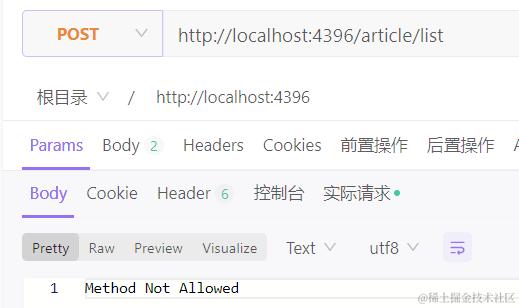
请求参数的获取
接下来看看 koa 中如何获取请求携带的参数。
query 参数
假设现有 url 为 localhost:4396/article?name=Jay 的 GET 请求,我们可以直接从 ctx 或 ctx.request 中获取 query 对象:
// src\router\article.router.js
articleRouter.get('/', (ctx, next) => {
  console.log(ctx.request.query) // [Object: null prototype] { name: 'Jay' }
  console.log(ctx.query) // [Object: null prototype] { name: 'Jay' }
  ctx.body = 'Hello Juejin'
})
在实际项目中,如果在中间件函数中处理的逻辑比较复杂,可以把它抽离到 controller 文件中:
// src\controller\article.controller.js
class ArticleController {
  create(ctx, next) {
    console.log(ctx.request.query)
    console.log(ctx.query)
    ctx.body = 'Hello Juejin'
  }
}

module.exports = new ArticleController()
在 src\router\article.router.js 中仅需专注于处理路径和处理函数 controller 的映射关系:
// src\router\article.router.js
const { create } = require('../controller/article.controller')
articleRouter.get('/', create)
如果还需要做一些额外的处理,比如用户的身份验证等,可以另外定义中间件,将它们定义在 middlewar 目录下。
params 参数
假设现有 url 为 localhost:4396/article/123 的 GET 请求,其中 123 是 id 值,为 params 参数,我们也可以直接从 ctx 或 ctx.request 中获取 params 对象:
articleRouter.get('/:id', (ctx, next) => {
  console.log(ctx.request.params.id) // 123
  console.log(ctx.params.id) // 123
  ctx.body = 'Hello Juejin'
})
body 内的参数
对于放在 body 里携带的 json 和 x-www-form-urlencoded 类型的参数,我们可以使用 koa 团队出品的 koa-bodyparser 来帮助解析。首先是安装:
npm i koa-bodyparser
然后进行导入并使用:
const bodyParser = require('koa-bodyparser')
app.use(bodyParser())
可以看到对 app 的处理越来越多,我们可以将 app 相关的代码抽离到一个单独的文件 src\app\index.js
// src\app\index.js
const koa = require('koa')
const bodyParser = require('koa-bodyparser')
const articleRouter = require('./router/articleRouter')

const app = new koa()

app.use(bodyParser())
app.use(articleRouter.routes())
app.use(articleRouter.allowedMethods())

module.exports = app
然后在 src\main.js 中只是引入 app 然后启动服务器:
const app = require('./app')
const { SERVER_PORT } = require('./config/server.config')

app.listen(SERVER_PORT, () => console.log('服务器启动成功'))
现在,body 里携带的参数就会被解析,然后存放到 ctx.request.body 内了:
json 类型
比如 body 内参数为 json 格式:
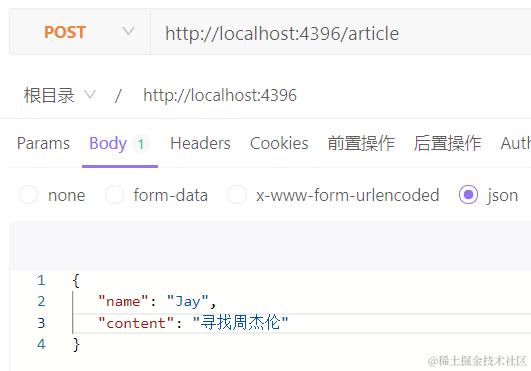
则直接通过 ctx.request.body 获取:
articleRouter.post('/', (ctx, next) => {
  console.log(ctx.request.body) // { name: 'Jay', content: '寻找周杰伦' }
  ctx.body = 'Hello Juejin'
})
注意,这里就不能通过 ctx.body 获取了,因为 ctx.body 是用来返回数据的,默认值为 undefined。
x-www-form-urlencoded 类型
同 json 类型的数据一样,也会被解析放到 ctx.request.body 中。
form-data 类型与文件上传
一般情况下只有涉及到文件上传我们才会使用 form-data 类型的参数,对其的解析需要使用另一个也是 koa 团队出品的 @koa/multer。使用方式与 express 解析 form-data 时用到的 multer 基本一样,因为 @koa/multer 就是基于 multer 的,所以这里也需要安装上 multer:
npm install --save @koa/multer multer
当请求上传多文件时:
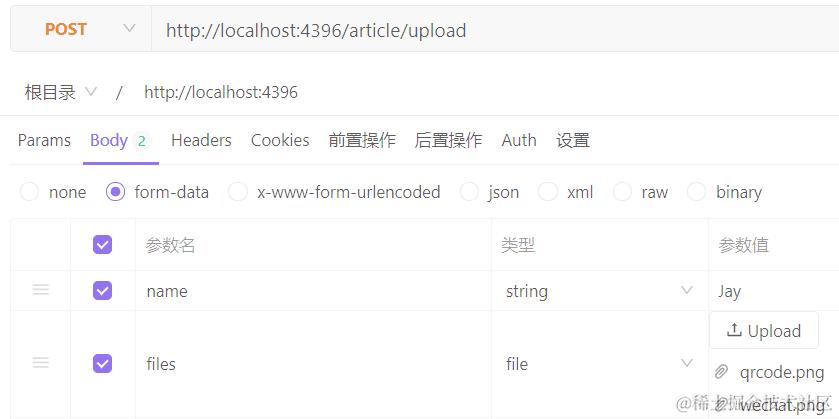
解析方式如下:
const multer = require('@koa/multer')
const upload = multer({ dest: 'uploads' })

articleRouter.post('/upload', upload.array('files'), (ctx, next) => {
  console.log(ctx.request.body) // [Object: null prototype] { name: 'Jay' }
  ctx.body = 'Hello Juejin'
})
上传的多文件信息可以通过 ctx.request.files 获取。至于上传单文件或仅上传文本字段的处理,同 express 对 multer 使用一致,不再赘述。需要注意的是,即使是在 router\articleRouter.js 文件定义的 const upload = multer({ dest: 'uploads' }), dest 的值也只需要直接写 'uploads',而不是 '../uploads',就可以将上传得到的文件存放在项目根目录下的 uploads 文件夹内,这与执行 node 命令的文件所处的位置有关系 。
部署静态资源
为了方便客户端查看上传的文件,我们可以将 uploads 目录设置为静态资源,不同于 express 可以直接使用内置的 express.static() 中间件函数,koa 需要安装 koa-static 来实现,它也是 koa 团队出品的:
npm install koa-static
使用起来就和 express.static() 差不多了:
const serve = require('koa-static')
app.use(serve('./uploads'))
将要设置为静态资源的目录传给 serve() 再传给 app.use() 即可。
响应数据的格式
koa 里使用给 ctx.body 赋值的形式向客户端返回数据,赋值的类型比较灵活,除了可以是字符串、对象、数组、null 外,还可以是 buffer 或 stream:
articleRouter.get('/', (ctx, next) => {
  ctx.body = Buffer.from('Hello Juejin')
})
返回流时,为了客户端正确地展示数据,最好通过 ctx.type 设置下数据的类型,比如返回的是 png 图片:
articleRouter.get('/', (ctx, next) => {
  ctx.type = 'image/png'
  ctx.body = fs.createReadStream('./uploads/5fe9f46825383d74531ffc6b45aee423')
})
默认情况下,当返回 null 时,状态码为 204,返回其它格式的数据时状态码为 200。如果想指定状态码,可以通过 ctx.status 或 ctx.response.status 设置:
ctx.status = 201
ctx.response.status = 201
错误处理
在 koa 中,无法像在 express 里那样将错误信息传给 next(),然后统一在 app.use((err, req, res, next) => {}) 处理。而是使用发射错误事件的方式 —— koa 会将 app 对象加到 ctx 对象上,而 app 对象前面通过查看源码也看到了,它是 Application 类的实例对象,并且继承自 Emitter:
// node_modules\koa\lib\application.js
const Emitter = require('events');
所以当需要返回错误信息时,就可以通过 ctx.app 发射一个 err 事件,并携带上错误信息和 ctx:
articleRouter.get('/:id', (ctx, next) => {
  if (ctx.params.id !== '123') {
    ctx.app.emit('err', 1000, ctx)
  } else {
    ctx.body = 'Hello Juejin'
  }
})
传入 ctx 是为了在统一处理错误,也就是监听 err 事件的地方(比如新建 src\utils\process-errors.js),最终能够通过 ctx.body 将信息响应给客户端:
// src\utils\process-errors.js
const app = require('../app')
app.on('err', (code, ctx) => {
  let msg = ''
  switch (code) {
    case 1000:
      msg = 'id 不存在'
      break
  	// 其它情况
    default:
      break
  }
  ctx.body = {
    code,
    msg
  }
})
其中错误码 1000 也可以进一步优化,抽取为常量。