子组件
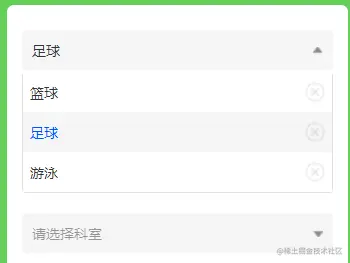
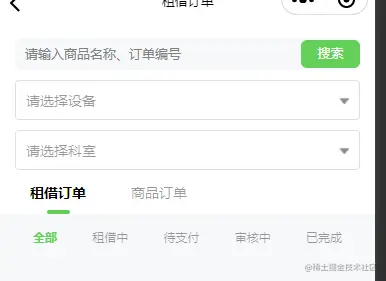
<template>
<view class="select-y" >
<view class="placeholder" :style="style" @click="check()">
<text :style="title?'':'opacity: 0.5;'">{{title?title:data.placeholder}}</text>
<image :class="!options?'triangle':''" :src="data.icon"></image>
</view>
<view class="options select-y" v-show="options" >
<view class="option placeholder"
:class="value==item.value?'OnActive':''"
v-for="(item,index) in data.list"
:key="index"
@click="change(item)">
<text>{{item.title}}</text>
<image @click.stop="clear"
src="/static/images/close.png"
class="close" ></image>
</view>
</view>
</view>
</template>
<script>
export default{
data(){
return{
options:false,
data:{
placeholder:'请选择...',
icon:'/static/images/triangle.png',
list:[],
},
value:-1,
title:'',
style:'',
characteristic:''
}
},
methods:{
change(e) {
this.title=e.title
this.value=e.value
this.$parent.change(e)
},
check(){
this.options=!this.options
this.$parent.checkSx(this.characteristic)
},
clear(){
if(this.title) this.options=false
this.value=-1
this.title=''
}
},
}
</script>
<style lang="less" scoped>
.select-y{
width: 100%;
background-color: #fff;
image{
width: 20rpx;height: 15rpx;
}
.options{
border: 1rpx solid rgba(216, 216, 216, 0.8);
border-radius: 8rpx;
border-top: unset;
margin-top: 5rpx;
.option{
padding:0 15rpx;
background-color: #FFF;
border-radius: unset;
position: relative;
z-index: 1;
image{
width: 40rpx;
height: 40rpx;
position: relative;
z-index: 999;
}
}
.OnActive{
color: #0055ff;
background-color: rgba(236, 236, 236, 0.5);
}
}
.placeholder{
background-color: rgba(236, 236, 236, 0.5);
width: 100%;
height: 80rpx;
border-radius: 8rpx;
display: flex;
justify-content: space-between;
align-items: center;
padding:1rpx 20rpx;
.triangle{
transform: rotate(180deg);
}
}
}
</style>
父组件调用
<template>
    <view class="main">
         <sx class="sx" ref="sx1"></sx>
    </view>
</template>
<script>
import sx from '@/components/select-cy/select-y.vue'
export default{
data(){
return{
range: [
{ value: 0, title: "篮球" },
{ value: 1, title: "足球" },
{ value: 2, title: "游泳" },
],
}
},
components:{
sx
},
mounted(){
this.$refs.sx1.data.placeholder='请选择...'
this.$refs.sx1.data.list=this.range
this.$refs.sx1.data.icon='/static/images/triangle.png'
},
methods:{
change(e) {
console.log("e:", e);
},
},
}
</script>