依赖
"dependencies": {

"react": "18.2.0",

"react-dom": "18.2.0",

}
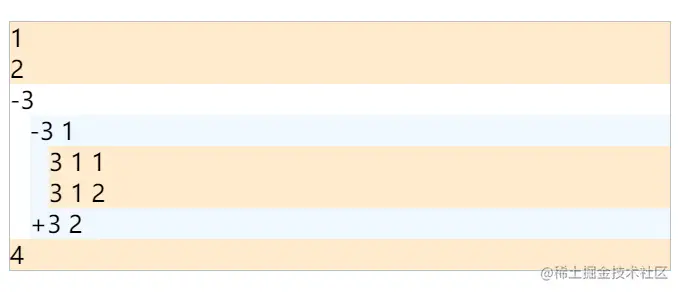
实现功能:
效果图:
源码
import React, { useState } from "react";

const renderMenuItem = (props) => {

const { label, index } = props;

return (

<>

<div key={index} className="menu_item">

{label}

</div>

</>

);

};

const renderSubmenu = (items, index, expand = true) => {

const { label, children } = items;

const [isexpand, setExpand] = useState(expand);

const classes = `submenu ${isexpand ? "hidden" : "show"}`;

return (

<div

key={index}

onClick={(e) => {

e.stopPropagation();

setExpand((i) => !i);

}}

>

<span>{isexpand ? "+" : "-"}</span>

<span>{label}</span>

<div className={classes}>

{children?.map((item, i) => {

if (item.children) {

return renderSubmenu(item, index + "-" + i, isexpand);

} else {

return renderMenuItem(item, index + "-" + i);

}

})}

</div>

</div>

);

};


export const Tree = (props) => {

const { data } = props;

return (

<div className="menu">

{data.map((item, index) => {

if (item.children) {

return renderSubmenu(item, index);

} else {

return renderMenuItem(item, index);

}

})}

</div>

);

};
.menu {

border: 1px solid silver;

text-align: left;

}

.submenu {

margin-left: 13px;

background-color: aliceblue;

}

.menu_item {

background: blanchedalmond;

}

.hidden {

display: none;

}

.show {

display: block;

}
import "./styles.css";

import { Tree } from "./components/Tree";

const data = [

{

label: "1"

},

{

label: "2"

},

{

label: "3",

children: [

{

type: "group",

label: "3 1",

children: [

{

label: "3 1 1",

key: "setting:1"

},

{

label: "3 1 2",

key: "setting:2"

}

]

},

{

type: "group",

label: "3 2",

children: [

{

label: "3 2 3",

key: "setting:3"

},

{

label: "3 2 4",

key: "setting:4"

}

]

}

]

},

{

label: "4",

key: "alipay"

}

];

export default function App() {

return (

<div className="App">

<Tree data={data} />

</div>

);

}