1.bolb
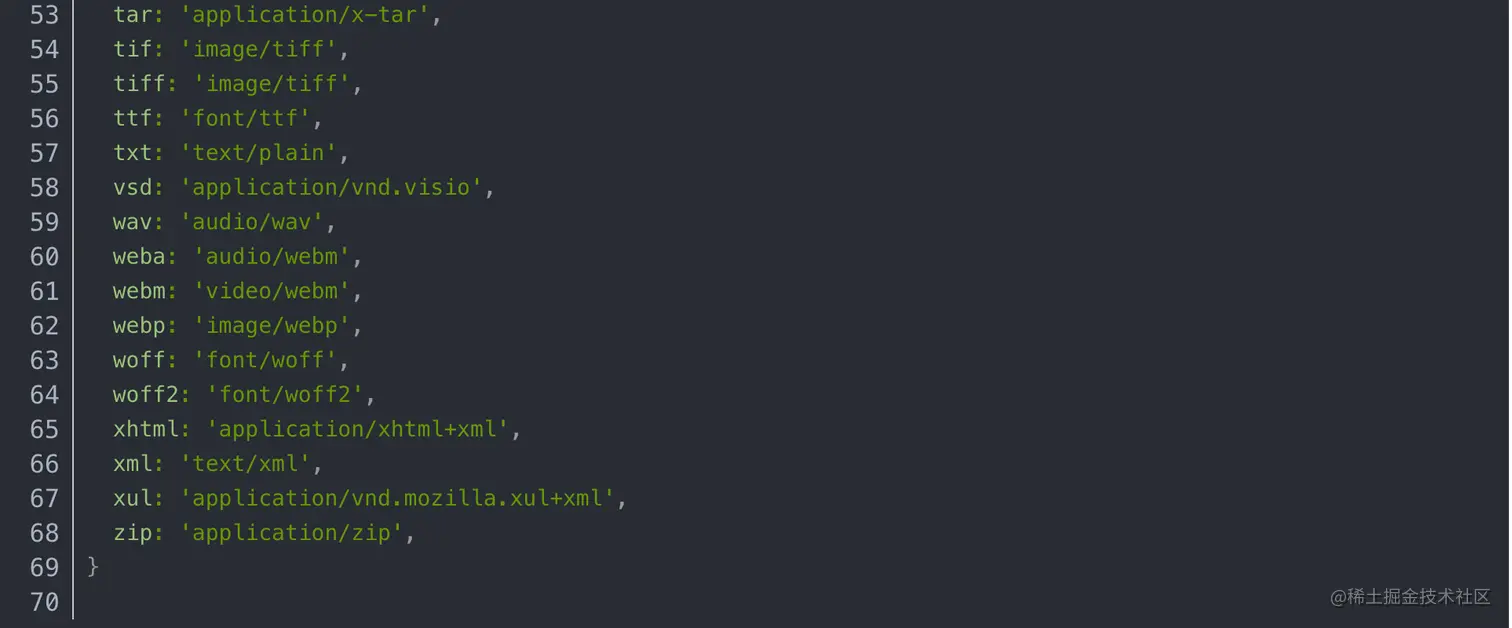
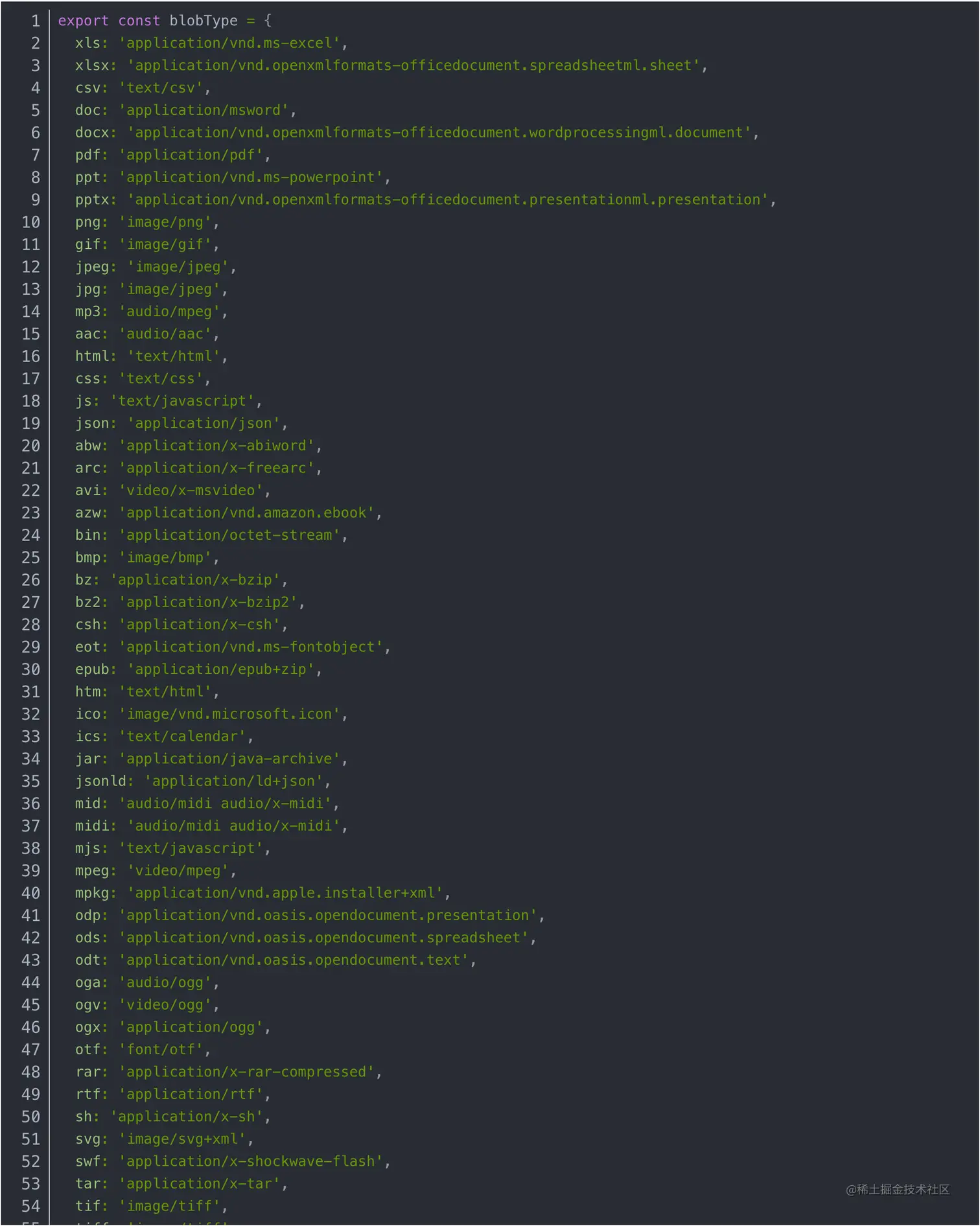
let blod = new Blob([b]
var link = document.createElement("a");
link.href = URL.createObjectURL(blod);
link.download = "二维码导出";
link.click();
2.vue上传图片到oss
- 先试选图片chnege事件有方法判断,调后端给你的verify方法就是上传阿里云的参数,在上传到阿里云如果有上传方法没有下载一个上传阿里云的插件,上传完成之后成功的方法拼起来就可以了,在上传给后端。
            <el-upload
              class="avatar-uploader-text"
              ref="upload"  //实力对象
              :action="action"  //上传阿里云地址
              :data="uploadData"  //上传阿里云时候的host什么的
              :show-file-list="false"
              :before-upload="beforeAvatarUpload" //上传前他的类型
              :on-success="successUpload"  //成功之后他的
              :on-error="errorUpload"  //失败
              :auto-upload="false"  //关闭自动上传必须写
              :on-change="changeUpload"  //失败成功都执行
            >
              <img
                @click="craVerify()"
                v-if="infoForm.picUrl"
                :src="infoForm.picUrl"
                class="avatar"
              />
              <i v-else class="el-icon-plus avatar-uploader-icon"></i>
            </el-upload>
data:{
action:"",
uploadData:"",
}
方法
changeUpload(file) {
this.bookImg = file;
if (file.status == "ready") {
this.loading = this.$loading({
lock: true,
text: "正在上传请稍等",
spinner: "el-icon-loading",
background: "rgba(0, 0, 0, 0.7)",
});
this.getverify();
}
},
async getverify() {
const suffix = this.bookImg.name.slice(
this.bookImg.name.lastIndexOf(".")
);
console.log(suffix);
let res = await verify({
resourceType: 1,
});
if (res.rspCode == 200) {
let a = res.data;
this.uploadData.OSSAccessKeyId = a.accessid;
this.uploadData.key = a.dir + a.fileRemoteName + suffix;
this.uploadData.name = this.bookImg.name;
this.uploadData.policy = a.policy;
this.uploadData.accessid = a.accessid;
this.uploadData.signature = a.signature;
this.uploadData.dir = a.dir;
this.uploadData.fileRemoteName = a.fileRemoteName;
this.uploadData.fileNativeDir = a.fileNativeDir;
this.$refs.upload.submit();
}
console.log(res);
},
beforeAvatarUpload(file) {
const { size, type } = file;
const fileType = ["image/png", "image/jpeg", "image/gif"];
const maxSize = 1 * 1024 * 1000;
if (fileType.indexOf(type) < 0) {
this.$message.warning("只支持'jpg', 'png', 'jpeg', 'gif'结尾的图片!");
return false;
}
if (size > maxSize) {
this.$message.warning("请选择不大于1M的图片!");
return false;
}
},
successUpload(e) {
console.log(e);
const suffix = this.bookImg.name.slice(
this.bookImg.name.lastIndexOf(".")
);
console.log(suffix);
this.infoForm.picUrl =
this.action +
"/" +
this.uploadData.dir +
this.uploadData.fileRemoteName +
suffix;
this.loading.close();
console.log(this.infoForm.picUrl);
this.$message.success("上传图片成功");
},
富文本编辑框
- 首先下载一个npm install vue-quill-editor -S 安装富文本编辑框安装完成;导入完成之后用
1.全局导入在main.js里面
import VueQuillEditor from 'vue-quill-editor'
// 引入样式
import 'quill/dist/quill.core.css'
import 'quill/dist/quill.snow.css'
import 'quill/dist/quill.bubble.css'
Vue.use(VueQuillEditor, /* { 默认全局 } */)
2.页面导入
import { quillEditor } from 'vue-quill-editor'
import 'quill/dist/quill.core.css'
import 'quill/dist/quill.snow.css'
import 'quill/dist/quill.bubble.css'
export default {
//vue组件注册都在components里面
  components: {
    quillEditor
  }
}
编辑框
<quill-editor
class="ql-editor"
v-model="infoForm.htmlContent" //内容
ref="myQuillEditor"
:options="editorOption"
@blur="onEditorBlur($event)" //失去焦点
@focus="onEditorFocus($event)" //获得焦点
@change="onEditorChange($event)" // 内容改变的事件>
</quill-editor>
<el-upload
v-show="false"
ref="uploads"
:action="action"
class="avatar-uploader"
:data="uploadData"
:show-file-list="false"
:on-success="successUploads"
:on-error="errorUploads"
:auto-upload="false"
:on-change="changeUploads"
:before-upload="beforeAvatarUploads"
>
</el-upload>
const toolbarOptions = [
[{ indent: "-1" }, { indent: "+1" }],
[{ header: [1, 2, 3, 4, 5, 6, true] }],
[{ color: [] }, { background: [] }],
[{ align: [] }],
["image", "video"],
];
export default {
data(){
return {
editorOption: {
modules: {
toolbar: {
container: toolbarOptions,
handlers: {
image: function (value) {
if (value) {
document.querySelector(".avatar-uploader input").click();
} else {
this.quill.format("image", false);
}
},
video: function (value) {
if (value) {
document.querySelector(".video-uploader input").click();
} else {
this.quill.format("video", false);
}
},
},
},
},
placeholder: "请输入正文",
},
}
}
}
changeUploads(file) {
console.log(file);
this.bookImg = file;
if (file.status == "ready") {
this.loading = this.$loading({
lock: true,
text: "正在上传请稍等",
spinner: "el-icon-loading",
background: "rgba(0, 0, 0, 0.7)",
});
this.getverifys();
}
},
async getverifys() {
const suffix = this.bookImg.name.slice(
this.bookImg.name.lastIndexOf(".")
);
console.log(suffix);
let res = await verify({
resourceType: 1,
});
if (res.rspCode == 200) {
let a = res.data;
this.uploadData.OSSAccessKeyId = a.accessid;
this.uploadData.key = a.dir + a.fileRemoteName + suffix;
this.uploadData.name = this.bookImg.name;
this.uploadData.policy = a.policy;
this.uploadData.accessid = a.accessid;
this.uploadData.signature = a.signature;
this.uploadData.dir = a.dir;
this.uploadData.fileRemoteName = a.fileRemoteName;
this.uploadData.fileNativeDir = a.fileNativeDir;
this.$refs.uploads.submit();
}
console.log(res);
},
beforeAvatarUploads(file) {
const { size, type } = file;
const fileType = ["image/png", "image/jpeg", "image/gif"];
const maxSize = 3* 1024 * 1000;
if (fileType.indexOf(type) < 0) {
this.$message.warning("只支持'jpg', 'png', 'jpeg', 'gif'结尾的图片!");
return false;
}
if (size > maxSize) {
this.$message.warning("请选择不大于3M的图片!");
return false;
}
},
successUploads(e) {
console.log(e);
const suffix = this.bookImg.name.slice(
this.bookImg.name.lastIndexOf(".")
);
let picUrl =
this.action +
"/" +
this.uploadData.dir +
this.uploadData.fileRemoteName +
suffix;
let quill = this.$refs.myQuillEditor.quill;
let length = quill.getSelection().index;
quill.insertEmbed(length, "image", picUrl);
quill.setSelection(length + 1);
this.loading.close();
},
errorUploads(e) {
this.$message.error("上传图片失败");
},
2.编辑框上传视频
<el-upload
v-show="false"
ref="videouploader"
:action="actionVideo"
class="video-uploader"
:data="videoUploadData"
:show-file-list="false"
:on-success="successVideo"
:on-error="errorVideo"
:auto-upload="false"
:on-change="chengeVideo"
>
</el-upload>
chengeVideo(file) {
this.videoVerify();
console.log(file);
this.videoItem = file;
if (file.status == "ready") {
this.loading = this.$loading({
lock: true,
text: "正在上传请稍等",
spinner: "el-icon-loading",
background: "rgba(0, 0, 0, 0.7)",
});
this.videoVerifys();
}
},
async videoVerifys() {
const suffix = this.videoItem.name.slice(
this.videoItem.name.lastIndexOf(".")
);
let res = await verify({
resourceType: 2,
});
if (res.rspCode == 200) {
let a = res.data;
this.videoUploadData.OSSAccessKeyId = a.accessid;
this.videoUploadData.key = a.dir + a.fileRemoteName + suffix;
this.videoUploadData.name = this.videoItem.name;
this.videoUploadData.policy = a.policy;
this.videoUploadData.accessid = a.accessid;
this.videoUploadData.signature = a.signature;
this.videoUploadData.dir = a.dir;
this.videoUploadData.fileRemoteName = a.fileRemoteName;
this.videoUploadData.fileNativeDir = a.fileNativeDir;
this.$refs.videouploader.submit();
}
},
successVideo(e) {
const suffix = this.videoItem.name.slice(
this.videoItem.name.lastIndexOf(".")
);
let videoPicurl =
this.actionVideo +
"/" +
this.videoUploadData.dir +
this.videoUploadData.fileRemoteName +
suffix;
let quill = this.$refs.myQuillEditor.quill;
let length = quill.getSelection().index;
quill.insertEmbed(length, "video", videoPicurl);
quill.setSelection(length + 1);
this.loading.close();
},
errorVideo(e) {
console.log(e);
this.loading.close();
},
axios 不封装请求
axios.defaults.headers.post["Authorization"] = `${a}`;
const QeList = this.selectedList.map((item) => item.pkArticleId);
axios
.post(
"http://172.18.1.175:8081/article/downLoadPic",
{
ids: QeList,
},
{ responseType: "blob" }
)
.then(function (response) {
console.log(response);
let b = response.data;
let blod = new Blob([b], { type: "application/zip" });
var link = document.createElement("a");
link.href = URL.createObjectURL(blod);
link.download = "二维码导出";
link.click();
this.$message.success("导出完成");
})
.catch(function (error) {
console.log(error);
});
计算精度失调
npm i decimal.js --save //安装一个js库
import Decimal from "decimal.js"
let a = 1
let b = 6
//加
let res = new Decimal(a).add(new Decimal(b))  //得到的值是一个Decimal对象 需要转换
let res1 = new Decimal(a).add(new Decimal(b)).toNumber() //结果转换成number
let res2 = new Decimal(a).add(new Decimal(b)).toString() //结果转换成string
//下面同上操作
//减
let res = new Decimal(a).sub(new Decimal(b))
//乘
let res = new Decimal(a).mul(new Decimal(b))
//除
let res = new Decimal(a).div(new Decimal(b))

这就相当于+=
 volumeupTaxPrice = new Decimal(volumeupTaxPrice).add(new Decimal(item.volumeupTaxPrice*1)).add(new Decimal(item.additionalTaxPrice*1)).add(new Decimal(item.stampDutyPrice*1)).toNumber()
 加多个数字
 TaxPrices = new Decimal(item.volumeupTaxPrice/100).add(new Decimal(item.additionalTaxPrice/100)).add(new Decimal(item.stampDutyPrice/100)).toNumber()