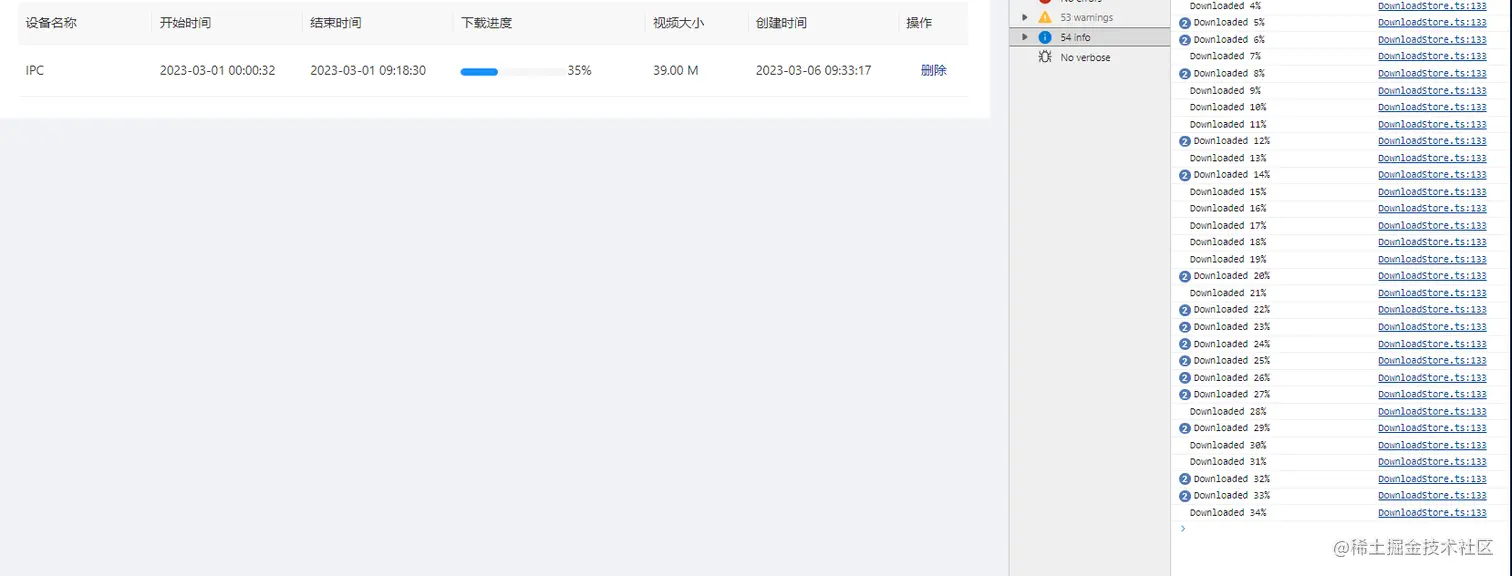
效果
方法参数类型
export interface DownloadOptions {
  url: string;
  filename?: string | null;
  timeout?: number;
  onProgress?: (progressEvent: ProgressEvent) => void;
  onError?: (error: Error) => void;
}
下载方法
export const downloadFile = async (options: DownloadOptions): Promise<void> => {
const { url, filename, onProgress, onError } = options;
return new Promise((resolve, reject) => {
const xhr = new XMLHttpRequest();
xhr.open('GET', url, true);
xhr.responseType = 'blob';
xhr.onload = () => {
if (xhr.status >= 200 && xhr.status < 300) {
const blob = new Blob([xhr.response], { type: xhr.response.type });
const objectUrl = window.URL.createObjectURL(blob);
const link = document.createElement('a');
link.href = objectUrl;
if (filename) {
link.download = filename;
}
document.body.appendChild(link);
link.click();
window.URL.revokeObjectURL(objectUrl);
document.body.removeChild(link);
resolve();
} else {
reject(new Error('Failed to download file'));
}
};
xhr.onerror = () => {
onError?.(new Error('Failed to download file'));
reject(new Error('Failed to download file'));
};
xhr.ontimeout = () => {
reject(new Error('Download timed out'));
};
xhr.onprogress = (event) => {
if (event.lengthComputable) {
onProgress?.(event);
}
};
xhr.send();
});
};
使用
downloadFile({
      url: 'https://xxxx',
      filename: `xxxx`,
      onProgress: (progressEvent: ProgressEvent) => {
        const { loaded, total } = progressEvent;
        const progress = Math.round((loaded / total) * 100);
        console.log(`Downloaded ${progress}%`);
      },
      onError: (error: Error) => {
        console.error(error);
      },
    });



