焦点:
焦点(Focus)可以理解为选中态,在Android TV上起很重要的作用。一个视图控件只有在获得焦点的状态下,才能响应按键的Click事件。
上图中,外面有一个绿色光圈的视图,就是当前有焦点的视图。
相对于手机上用手指点击屏幕产生的Click事件, 在使用Android TV的过程中,遥控器是一个主流的操作工具,通过点击遥控器的方向键来控制焦点的移动。当焦点移动到目标控件上之后,按下遥控器的确定键,才会触发一个Click事件,进而去做下一步的处理。焦点的移动如下图所示。
基础的用法:
在处理焦点的时候,有一些基础的用法需要知道。 首先,isFocusable()需要为true,一个控件才有资格可以获取到焦点,可以通过setFocusable(boolean)方法来设置。如果想要在触摸模式下获取焦点(在我们用手机开发的过程中),需要isFocusableInTouchMode()为true,可以通过setFocusableInTouchMode(boolean)来设置。也可以直接在xml布局文件中指定:
<Button
    ...
    android:focusable="true"
    android:focusableInTouchMode="true"/>
然后,就是控制焦点的移动了。在谷歌官方文档中提到: 焦点移动的时候(默认的情况下),会按照一种算法去找在指定移动方向上最近的邻居。在一些情况下,焦点的移动可能跟开发者的意图不符,这时开发者可以在布局文件中使用下面这些XML属性来指定下一个焦点对象:
nextFocusDown
nextFocusLeft
nextFocusRight
nextFocusUp
在Java代码中,让一个指定的View获取焦点,可以调用它的requestFocus()方法。
遇到的问题:
尽管有了官方文档中提到的基础用法,但是在进行Android TV开发的过程中,还是经常会遇到一些焦点方面的问题或者疑问,如
“明明指定了焦点id,焦点却跑丢了” “onKeyDown里居然截获不到按键事件” “我没有做任何焦点处理,焦点是怎么自己跑到那个View上的” 接下来,带着这些问题,我们就从源码的角度出发,简单分析一下焦点的移动原理。本文以API 23作为参考。
KeyEvent
在手机上,当手指触摸屏幕时,会产生一个的触摸事件,MotionEvent,进而完成点击,长按,滑动等行为。 而当按下遥控器的按键时,会产生一个按键事件,就是KeyEvent,包含“上”,“下”,“左”,“右”,“返回”,“确定”等指令。焦点的处理就在KeyEvent的分发当中完成。 首先,KeyEvent会流转到ViewRootImpl中开始进行处理,具体方法是内部类ViewPostImeInputStage中的processKeyEvent。(在API 17之前,是deliverKeyEventPostIme这个方法,逻辑大体一致,本文仅以processKeyEvent作为参考)
private int processKeyEvent(QueuedInputEvent q) {
        final KeyEvent event = (KeyEvent)q.mEvent;
        ...
        // Deliver the key to the view hierarchy.
        // 1. 先去执行mView的dispatchKeyEvent
        if (mView.dispatchKeyEvent(event)) {
            return FINISH_HANDLED;
        }
        ...
        // Handle automatic focus changes.
        if (event.getAction() == KeyEvent.ACTION_DOWN) {
            int direction = 0;
            ...
            if (direction != 0) {
                View focused = mView.findFocus();
                if (focused != null) {
                    // 2. 之后会通过focusSearch去找下一个焦点视图
                    View v = focused.focusSearch(direction);
                    if (v != null && v != focused) {
                        ...
                        if (v.requestFocus(direction, mTempRect)) {
                            ...
                            return FINISH_HANDLED;
                        }
                    }

                    // Give the focused view a last chance to handle the dpad key.
                    if (mView.dispatchUnhandledMove(focused, direction)) {
                        return FINISH_HANDLED;
                    }
                } else {
                    // find the best view to give focus to in this non-touch-mode with no-focus
                    // 3. 如果当前本来就没有焦点视图,也会通过focusSearch找一个视图
                    View v = focusSearch(null, direction);
                    if (v != null && v.requestFocus(direction)) {
                        return FINISH_HANDLED;
                    }
                }
            }
        }
        return FORWARD;
    }
从几处关键的代码,可以看到这里的逻辑是:
- 先去执行mView的dispatchKeyEvent
- 之后会通过focusSearch去找下一个焦点视图
- 如果当前本来就没有焦点View,也会通过focusSearch找一个视图
ViewRootImpl就是ViewRoot,继承了ViewParent,但本身并不是一个View,可以看作是View树的管理者。而这里的成员变量mView就是DecorView,它指向的对象跟Window和Activity的mDecor指向的对象是同一个对象。所有的View组成了一个View树,每一个View都是树中的一个节点,如下图所示:
最上层的根是DecorView,中间是各ViewGroup,最下层是View。 本文的分析都是基于View树的。
在processKeyEvent中,首先走了mView的dispatchKeyEvent,也就是从DecorView开始进行KeyEvent的分发。
- dispatchKeyEvent
首先走DecorView的dispatchKeyEvent,之后会依次从Activity->ViewGroup->View的方向分发KeyEvent。
有兴趣的话可以通过trace看一下KeyEvent的流转方向:
对于KeyEvent的分发,之后会另开一篇细讲,包括KeyEvent的处理优先级,长按的识别等,这里只简单看一下ViewGroup和View的dispatchKeyEvent。
首先看ViewGroup的dispatchKeyEvent。
@Override
public boolean dispatchKeyEvent(KeyEvent event) {
    if ((mPrivateFlags & (PFLAG_FOCUSED | PFLAG_HAS_BOUNDS))
            == (PFLAG_FOCUSED | PFLAG_HAS_BOUNDS)) {
        // 1.1 以View的身份处理KeyEvent
        if (super.dispatchKeyEvent(event)) {
            return true;
        }
    } else if (mFocused != null && (mFocused.mPrivateFlags & PFLAG_HAS_BOUNDS)
            == PFLAG_HAS_BOUNDS) {
        // 1.2 以ViewGroup的身份把KeyEvent交给mFocused处理
        if (mFocused.dispatchKeyEvent(event)) {
            return true;
        }
    }
    return false;
}

通过flag的判断,有两个处理路径,也可以看到在处理keyEvent时,ViewGroup扮演两个角色:
1. View的角色,也就是此时keyEvent需要在自己与其他View之间流转
2. ViewGroup的角色,此时keyEvent需要在自己的子View之间流转

当作View的时候,会调用自己View的dispatchKeyEvent。
当作ViewGroup的时候,会调用当前焦点View的dispatchKeyEvent。
其实,从概念上来看,都是调用当前有焦点View的dispatchKeyEvent,只不过有时是自己本身,有时是他的子View。

再看看View的dispatchKeyEvent
public boolean dispatchKeyEvent(KeyEvent event) { ListenerInfo li = mListenerInfo; // 1.3 如果设置了mOnKeyListener,则优先走onKey方法 if (li != null && li.mOnKeyListener != null && (mViewFlags & ENABLED_MASK) == ENABLED && li.mOnKeyListener.onKey(this, event.getKeyCode(), event)) { return true; } // 1.4 把View自己当作参数传入,调用KeyEvent的dispatch方法 if (event.dispatch(this, mAttachInfo != null ? mAttachInfo.mKeyDispatchState : null, this)) { return true; } return false; }
View这里,会优先处理OnKeyListener的onKey回调。
然后才可能会走KeyEvent的dispatch,最终走到View的OnKeyDown或者OnKeyUp。
将大体的流转顺序总结如下图
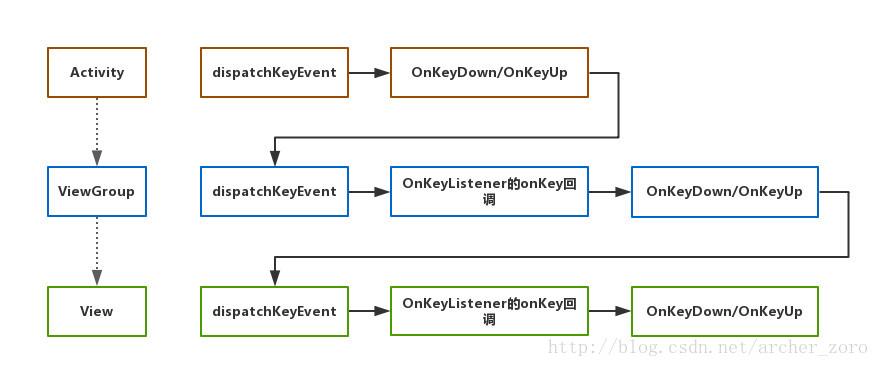
其中任何一步都可以通过return true的方式来消费掉这个KeyEvent,结束这个分发过程。
2. focusSearch
如果dispatchKeyEvent没有消费掉这个KeyEvent,会由系统来处理焦点的移动。
通过View的focusSearch方法找到下一个获取焦点的View,然后调用requestFocus
那focusSearch是如何找到下一个焦点视图的呢?
// View.java public View focusSearch(@FocusRealDirection int direction) { if (mParent != null) { return mParent.focusSearch(this, direction); } else { return null; } }
View并不会直接去找,而是交给它的parent去找。
// ViewGroup.java public View focusSearch(View focused, int direction) { if (isRootNamespace()) { // root namespace means we should consider ourselves the top of the // tree for focus searching; otherwise we could be focus searching // into other tabs. see LocalActivityManager and TabHost for more info return FocusFinder.getInstance().findNextFocus(this, focused, direction); } else if (mParent != null) { return mParent.focusSearch(focused, direction); } return null; }
判断是否为顶层布局,若是则执行对应方法,若不是则继续向上寻找,说明会从内到外的一层层进行判断,直到最外层的布局为止。
有意思的是,Android提供了设置isRootNamespace的方法,但又hide了起来不让使用,看来这个逻辑还有待优化。
/**
- {@hide}
- @param isRoot true if the view belongs to the root namespace, false
-
otherwise
*/ public void setIsRootNamespace(boolean isRoot) { if (isRoot) { mPrivateFlags |= PFLAG_IS_ROOT_NAMESPACE; } else { mPrivateFlags &= ~PFLAG_IS_ROOT_NAMESPACE; } }
最后的算法交给了FocusFinder
FocusFinder.getInstance().findNextFocus(this, focused, direction); 1 isRootNamespace()的ViewGroup把自己和当前焦点(View)以及方向传入。
// FocusFinder.java
public final View findNextFocus(ViewGroup root, View focused, int direction) { return findNextFocus(root, focused, null, direction); }
private View findNextFocus(ViewGroup root, View focused, Rect focusedRect, int direction) { View next = null; if (focused != null) { // 2.1 优先从xml或者代码中指定focusid的View中找 next = findNextUserSpecifiedFocus(root, focused, direction); } if (next != null) { return next; } ArrayList focusables = mTempList; try { focusables.clear(); root.addFocusables(focusables, direction); if (!focusables.isEmpty()) { // 2.2 其次,根据算法去找,原理就是找在方向上最近的View next = findNextFocus(root, focused, focusedRect, direction, focusables); } } finally { focusables.clear(); } return next; }
这里root是上面isRootNamespace()为true的ViewGroup,focused是当前焦点视图
1. 优先找开发者指定的下一个focus的视图 ,就是在xml或者代码中指定NextFocusDirection Id的视图
2. 其次,根据算法去找,原理就是找在方向上最近的视图

2.1 findNextUserSpecifiedFocus
// FocusFinder.java private View findNextUserSpecifiedFocus(ViewGroup root, View focused, int direction) { // check for user specified next focus View userSetNextFocus = focused.findUserSetNextFocus(root, direction); if (userSetNextFocus != null && userSetNextFocus.isFocusable() && (!userSetNextFocus.isInTouchMode() || userSetNextFocus.isFocusableInTouchMode())) { return userSetNextFocus; } return null;
首先执行View的findUserSetNextFocus方法
// View.java View findUserSetNextFocus(View root, @FocusDirection int direction) { switch (direction) { case FOCUS_LEFT: if (mNextFocusLeftId == View.NO_ID) return null; return findViewInsideOutShouldExist(root, mNextFocusLeftId); } } return null; }
比如,按了“左”方向键,如果设置了mNextFocusLeftId,则会通过findViewInsideOutShouldExist去找这个View。
mNextFocusLeftId一般是在xml里面设置的,比如
<Button android:id="@+id/btn_1" android:nextFocusLeft="@+id/btn_2" ... />
也可以在java代码里设置

mBtn1.setNextFocusLeftId(R.id.btn_2);
1
来看看findViewInsideOutShouldExist做了什么。
private View findViewInsideOutShouldExist(View root, int id) { if (mMatchIdPredicate == null) { // 可以理解为一个判定器,如果id匹配则判定成功 mMatchIdPredicate = new MatchIdPredicate(); } mMatchIdPredicate.mId = id; View result = root.findViewByPredicateInsideOut(this, mMatchIdPredicate); return result; } public final View findViewByPredicateInsideOut(View start, Predicate predicate) { View childToSkip = null; for (;;) { // 从当前起始节点开始寻找(ViewGroup是遍历自己的child),寻找id匹配的View,跳过childToSkip,具体可去看View和ViewGroup中该方法的具体实现 View view = start.findViewByPredicateTraversal(predicate, childToSkip); if (view != null || start == this) { return view; }
    ViewParent parent = start.getParent();
    if (parent == null || !(parent instanceof View)) {
        return null;
    }

    // 如果如果当前节点没有,则往上一级,从自己的parent中查找,并跳过自己
    childToSkip = start;
    start = (View) parent;
}
}
protected View findViewByPredicateTraversal(Predicate predicate, View childToSkip) { if (predicate.apply(this)) { return this; } return null; }
ViewGroup的findViewByPredicateTraversal
// ViewGroup @Override protected View findViewByPredicateTraversal(Predicate predicate, View childToSkip) { if (predicate.apply(this)) { return this; }
final View[] where = mChildren;
final int len = mChildrenCount;

for (int i = 0; i < len; i++) {
    View v = where[i];

    if (v != childToSkip && (v.mPrivateFlags & PFLAG_IS_ROOT_NAMESPACE) == 0) {
        v = v.findViewByPredicate(predicate);

        if (v != null) {
            return v;
        }
    }
}

return null;
}
可以看到,findViewInsideOutShouldExist这个方法从当前指定视图去寻找指定id的视图。首先从自己开始向下遍历,如果没找到则从自己的parent开始向下遍历,直到找到id匹配的视图为止。
这里要注意的是,也许存在多个相同id的视图(比如ListView,RecyclerView,ViewPager等场景),但是这个方法只会返回在View树中节点范围最近的一个视图,这就是为什么有时候看似指定了focusId,但实际上焦点却丢失的原因,因为焦点跑到了另一个“意想不到”的相同id的视图上。

2.2 findNextFocus

如果开发者没有指定nextFocusId,则用findNextFocus找指定方向上最近的视图
看一下这里的用法
focusables.clear(); // 2.2.1 找到所有isFocusable的View root.addFocusables(focusables, direction); if (!focusables.isEmpty()) { // 2.2.2 从focusables中找到最近的一个 next = findNextFocus(root, focused, focusedRect, direction, focusables); }
2.2.1 View.addFocusables,从root开始找所有isFocusable的视图
public void addFocusables(ArrayList views, @FocusDirection int direction) { addFocusables(views, direction, FOCUSABLES_TOUCH_MODE); }
public void addFocusables(ArrayList views, @FocusDirection int direction, @FocusableMode int focusableMode) { views.add(this); }
如果root是一个单纯View,则添加自己,但这种情况很少见,大部分的root都是ViewGroup
// ViewGroup.java public void addFocusables(ArrayList views, int direction, int focusableMode) { final int focusableCount = views.size();
final int descendantFocusability = getDescendantFocusability();

if (descendantFocusability != FOCUS_BLOCK_DESCENDANTS) {
    ...
    final int count = mChildrenCount;
    final View[] children = mChildren;

    for (int i = 0; i < count; i++) {
        final View child = children[i];
        if ((child.mViewFlags & VISIBILITY_MASK) == VISIBLE) {
            child.addFocusables(views, direction, focusableMode);
        }
    }
}

if ((descendantFocusability != FOCUS_AFTER_DESCENDANTS
        // No focusable descendants
        || (focusableCount == views.size())) &&
        (isFocusableInTouchMode() || !shouldBlockFocusForTouchscreen())) {
    super.addFocusables(views, direction, focusableMode);
}
}
对于ViewGroup来说,遍历并添加自己的所有isFocusable的child
这里有个descendantFocusability变量,有三个取值

FOCUS_BEFORE_DESCENDANTS:在所有子视图之前获取焦点
FOCUS_AFTER_DESCENDANTS: 在所有子视图之后获取焦点
FOCUS_BLOCK_DESCENDANTS: 阻止所有子视图获取焦点,即使他们是focusable的
2.2.2 FocusFinder.findNextFocus
private View findNextFocus(ViewGroup root, View focused, Rect focusedRect, int direction, ArrayList focusables) { if (focused != null) { if (focusedRect == null) { focusedRect = mFocusedRect; } // 2.2.2.1 取得考虑scroll之后的焦点Rect,该Rect是相对focused视图本身的 // fill in interesting rect from focused focused.getFocusedRect(focusedRect); // 2.2.2.2 将当前focused视图的坐标系,转换到root的坐标系中,统一坐标,以便进行下一步的计算 root.offsetDescendantRectToMyCoords(focused, focusedRect); } else {
}

switch (direction) {

    case View.FOCUS_UP:
    case View.FOCUS_DOWN:
    case View.FOCUS_LEFT:
    case View.FOCUS_RIGHT:
        2.2.2.3 找出指定方向上的下一个focus视图
        return findNextFocusInAbsoluteDirection(focusables, root, focused,
                focusedRect, direction);
    default:
        throw new IllegalArgumentException("Unknown direction: " + direction);
}
}
2.2.2.1 focused.getFocusedRect(focusedRect);
public void getFocusedRect(Rect r) { getDrawingRect(r); }
public void getDrawingRect(Rect outRect) { outRect.left = mScrollX; outRect.top = mScrollY; outRect.right = mScrollX + (mRight - mLeft); outRect.bottom = mScrollY + (mBottom - mTop); }
这里是取得考虑scroll之后的焦点Rect,该Rect是相对focused视图本身的

2.2.2.2 root.offsetDescendantRectToMyCoords(focused, focusedRect);
public final void offsetDescendantRectToMyCoords(View descendant, Rect rect) { offsetRectBetweenParentAndChild(descendant, rect, true, false); }
/**
-
Helper method that offsets a rect either from parent to descendant or
-
descendant to parent. */ void offsetRectBetweenParentAndChild(View descendant, Rect rect, boolean offsetFromChildToParent, boolean clipToBounds) {
// already in the same coord system :) if (descendant == this) { return; }
ViewParent theParent = descendant.mParent;
// search and offset up to the parent // 在View树上往上层层遍历,直到root为止 while ((theParent != null) && (theParent instanceof View) && (theParent != this)) {
 if (offsetFromChildToParent) {
     // 把focusedRect转换到当前当前parent的坐标系中去
     rect.offset(descendant.mLeft - descendant.mScrollX,
             descendant.mTop - descendant.mScrollY);
 } else {
     rect.offset(descendant.mScrollX - descendant.mLeft,
             descendant.mScrollY - descendant.mTop);
 }

 // 继续往上找
 descendant = (View) theParent;
 theParent = descendant.mParent;
}
// now that we are up to this view, need to offset one more time // to get into our coordinate space if (theParent == this) { if (offsetFromChildToParent) { // 最后再转换一次,终于把focusedRect的坐标转换到了root的坐标中 rect.offset(descendant.mLeft - descendant.mScrollX, descendant.mTop - descendant.mScrollY); } else { rect.offset(descendant.mScrollX - descendant.mLeft, descendant.mScrollY - descendant.mTop); } } else { throw new IllegalArgumentException("parameter must be a descendant of this view"); } }
经过层层转换,最终把focused视图的坐标,转换到了root坐标系中。这样就统一了坐标,以便进行下一步的计算。

2.2.2.3 找出指定方向上的下一个focus视图

findNextFocusInAbsoluteDirection(focusables, root, focused, focusedRect, direction);
View findNextFocusInAbsoluteDirection(ArrayList focusables, ViewGroup root, View focused, Rect focusedRect, int direction) { // initialize the best candidate to something impossible // (so the first plausible view will become the best choice) mBestCandidateRect.set(focusedRect); switch(direction) { case View.FOCUS_LEFT: // 先虚构出一个默认候选Rect,就是把focusedRect向右移一个"身位",按键向左,那么他肯定就是优先级最低的了 mBestCandidateRect.offset(focusedRect.width() + 1, 0); break;
}

View closest = null;

int numFocusables = focusables.size();
// 遍历所有focusable的视图
for (int i = 0; i < numFocusables; i++) {
    View focusable = focusables.get(i);

    // only interested in other non-root views
    if (focusable == focused || focusable == root) continue;

    // get focus bounds of other view in same coordinate system
    focusable.getFocusedRect(mOtherRect);
    // 将focusable的坐标转换到root的坐标系中,统一坐标
    root.offsetDescendantRectToMyCoords(focusable, mOtherRect);

    // 进行比较,选出较好的那一个,如果都是默认候选的Rect差,则closest为null
    if (isBetterCandidate(direction, focusedRect, mOtherRect, mBestCandidateRect)) {
        mBestCandidateRect.set(mOtherRect);
        closest = focusable;
    }
}
return closest;
}
在统一坐标之后,对于所有focusable的视图,进行一次遍历比较,得到最“近”的视图作为下一个焦点视图。这里用到了一个方法isBetterCandidate,从两个候选Rect中找到在指定方向上离当前Rect最近的一个,具体算法这里不细讲了。

至此,就找到了下一个焦点视图,然后调用requestFocus方法,让其获得焦点。

小结

经过对源码的分析,系统本身寻找下一个焦点视图的过程是:
1. 首先寻找用户指定了id的视图,从当前焦点视图的节点开始遍历,直到找到匹配该id的视图。也许存在多个相同id的视图,但是只会找到视图节点树中最近的一个。
2. 如果没有指定id,则遍历找出所有isFocusable的视图,统一坐标系,然后计算出指定方向上离当前焦点视图最近的一个视图。

结合KeyEvent事件的流转,处理焦点的时机,按照优先级(顺序)依次是:
1. dispatchKeyEvent
2. mOnKeyListener.onKey回调
3. onKeyDown/onKeyUp
4. focusSearch
5. 指定nextFocusId
6. 系统自动从所有isFocusable的视图中找下一个焦点视图

以上任一处都可以指定焦点,一旦使用了就不再往下走。

很多视图控件就重写了其中一些方法。
比如ScrollView,它会在dispatchKeyEvent的时候,自己去处理,用来进行内部的焦点移动或者整体滑动。
// ScrollView.java @Override public boolean dispatchKeyEvent(KeyEvent event) { // Let the focused view and/or our descendants get the key first return super.dispatchKeyEvent(event) || executeKeyEvent(event); }
public boolean executeKeyEvent(KeyEvent event) { mTempRect.setEmpty();
if (!canScroll()) {
    if (isFocused() && event.getKeyCode() != KeyEvent.KEYCODE_BACK) {
        View currentFocused = findFocus();
        if (currentFocused == this) currentFocused = null;
        View nextFocused = FocusFinder.getInstance().findNextFocus(this,
                currentFocused, View.FOCUS_DOWN);
        // 如果不能滑动,则直接让下一个Focus视图获取焦点
        return nextFocused != null
                && nextFocused != this
                && nextFocused.requestFocus(View.FOCUS_DOWN);
    }
    return false;
}

boolean handled = false;
// 如果可以滑动,则进行ScrollView本身的滑动
if (event.getAction() == KeyEvent.ACTION_DOWN) {
    switch (event.getKeyCode()) {
        case KeyEvent.KEYCODE_DPAD_UP:
            if (!event.isAltPressed()) {
                handled = arrowScroll(View.FOCUS_UP);
            } else {
                handled = fullScroll(View.FOCUS_UP);
            }
            break;
        case KeyEvent.KEYCODE_DPAD_DOWN:
            if (!event.isAltPressed()) {
                handled = arrowScroll(View.FOCUS_DOWN);
            } else {
                handled = fullScroll(View.FOCUS_DOWN);
            }
            break;
        case KeyEvent.KEYCODE_SPACE:
            pageScroll(event.isShiftPressed() ? View.FOCUS_UP : View.FOCUS_DOWN);
            break;
    }
}

return handled;
}
由于在dispatchKeyEvent里优先处理的,因此对于滑动方向的KeyEvent,onKeyDown就监听不到了。这也就是为什么onKeyDown里居然截获不到按键事件的原因。