pub安装 ota_update
dependencies:
  ota_update: ^4.0.2
进行安卓相关配置
- 在android/src/main/res目录下新增xml文件夹
- 在xml文件夹下新增filepaths.xml以及network_config.xml文件
<?xml version="1.0" encoding="utf-8"?>
<paths xmlns:android="http://schemas.android.com/apk/res/android">
    <files-path name="internal_apk_storage" path="ota_update/"/>
</paths>
- network_config.xml(允许使用http的设置,如果是https就不需要进行这个配置)
<?xml version="1.0" encoding="utf-8"?>
<network-security-config>
    <base-config cleartextTrafficPermitted="true"/>
</network-security-config>
- 在AndroidManifest.xml使用上述添加的两个文件
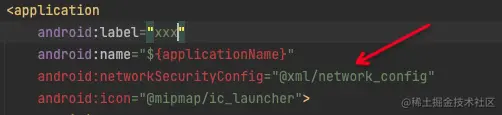
android:networkSecurityConfig="@xml/network_config"
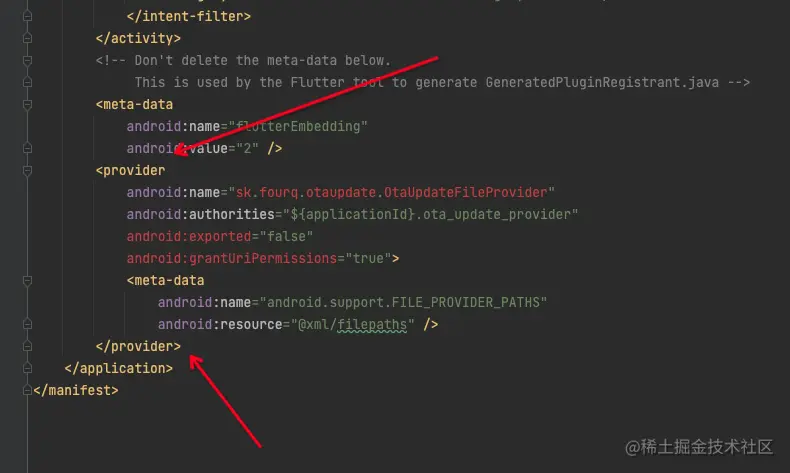
<provider
    android:name="sk.fourq.otaupdate.OtaUpdateFileProvider"
    android:authorities="${applicationId}.ota_update_provider"
    android:exported="false"
    android:grantUriPermissions="true">
    <meta-data
        android:name="android.support.FILE_PROVIDER_PATHS"
        android:resource="@xml/filepaths" />
</provider>
- 在AndroidManifest.xml中添加相关权限
<uses-permission android:name="android.permission.WRITE_EXTERNAL_STORAGE"/>
<uses-permission android:name="android.permission.REQUEST_INSTALL_PACKAGES"/>
以上在flutter实现安卓apk自动下载更新的相关配置完毕,剩下的就是具体APP页面上的相关逻辑提示下载实现了
import 'package:ota_update/ota_update.dart';
try {
OtaUpdate()
.execute(
'https://internal1.4q.sk/flutter_hello_world.apk',
destinationFilename: 'flutter_hello_world.apk',
sha256checksum: "d6da28451a1e15cf7a75f2c3f151befad3b80ad0bb232ab15c20897e54f21478",
).listen(
(OtaEvent event) {
setState(() => currentEvent = event);
},
);
} catch (e) {
print('Failed to make OTA update. Details: $e');
}