参考
永恒之柱的工作流:
eternity.obsidian.net/eternity/ne…
一开始我以为永恒之柱的效果是视差
但是其实不是,是普通地使用了法向贴图
他们用的深度图估计是为了处理遮挡吧
Blender
生成深度贴图
生成深度贴图所需要的节点
www.saifkhichi.com/blog/blende…
有听说过生成深度图要用 exr 格式,但是这似乎是因为他想输出一个绝对距离而已
blender.stackexchange.com/questions/5…
如果我不想生成绝对距离,我就只是想要标准化的,那似乎用我这样写也没错
但是按照这个帖子来说,标准化深度图的对比度会很小,因为距离相机最近的地方在我们能够看到的正面,最远的地方在我们能够看到的背面
假设视线能够看到的正面最近的地方 A 的深度是 1,正面最远的地方 B 的深度是 2,背面最远的地方 C 的深度是 3,那么本来期望在深度图中,A 的值是 1,B 的值是 0(反转过),实际上得到的是 A 的值是 1,B 的值是 0.5
要解决这个问题,或许应该有一个方法获取到相机能够看到的该对象的所有面,然后再对这个面的集合的深度标准化,而不是对整个对象的所有面的深度做标准化
但是我现在得到的深度图就已经有接近黑色的部分,这就说明是存在值趋近 0 的部位,这或许说明了这个深度图并不是我想象的那样出错了……所以我懒得考虑了
一般来说使用深度图只是用于处理它跟 3d 物体的交互,类似:
quincytdrake.blogspot.com/2020/12/ble…
这样说的话,如果用 openexr,那么 blender 中的相机和 godot 中的相机必须保持一致
生成法向贴图
一般生成法向贴图所需要的节点
andyp123.blogspot.com/2014/09/ren…

对于 Godot 来说,它需要的法向贴图比较特殊
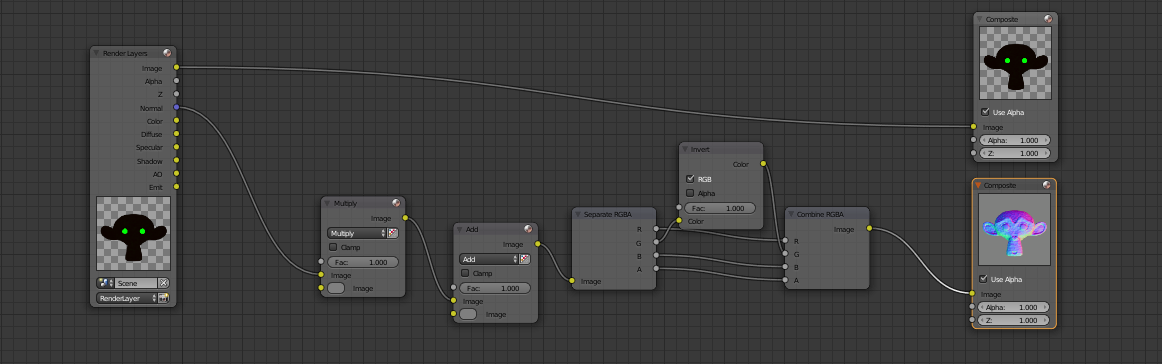
原来的法向,XYZ 都是属于 (-1,1) 的,乘 0.5 再加 0.5 就把区间映射到 (0,1) 了,方便输出法向贴图
这里给法向贴图加了一个
Godot 中使用法向贴图的教程
脚本
摄像机朝向正下方,默认的旋转应该是 (0,0,0)
根据以上介绍,可以用脚本来自动生成
import bpy

# abbreviation
scn = bpy.context.scene
view = bpy.context.view_layer

# use nodes to render
scn.use_nodes = True

tree = bpy.context.scene.node_tree
links = tree.links

# setting

# export setting
scn.render.filepath = r"D:\Work\BlenderRenderOutput\\"
scn.render.image_settings.file_format = "PNG"
scn.render.image_settings.color_mode = 'RGB'
scn.render.image_settings.color_depth = '16'
scn.render.image_settings.compression = 100

scn.display_settings.display_device = "None"
scn.sequencer_colorspace_settings.name = "Raw"

# set transparent background
scn.render.film_transparent = True

# pass channel setting
view.use_pass_z = True
view.use_pass_normal = True

# resolution setting
#scn.render.resolution_x = 512
#scn.render.resolution_y = 512
#scn.render.resolution_percentage = 100

# clear default nodes
for n in tree.nodes:
    tree.nodes.remove(n)

# create depth map node
render_layers = tree.nodes.new('CompositorNodeRLayers')

# create and link albeo map nodes

albedo_file_output = tree.nodes.new(type="CompositorNodeOutputFile")
albedo_file_output.label = 'Albedo Output'
albedo_file_output.format.color_mode = 'RGBA'
albedo_file_output.location = (300, 100)
links.new(render_layers.outputs['Image'], albedo_file_output.inputs[0])

# create and link depth map nodes

normalized_depth = tree.nodes.new(type="CompositorNodeNormalize")
normalized_depth.location = (300, -100)
links.new(render_layers.outputs['Depth'], normalized_depth.inputs[0])

normalized_inverted_depth = tree.nodes.new(type="CompositorNodeInvert")
normalized_inverted_depth.location = (500, -100)
links.new(normalized_depth.outputs[0], normalized_inverted_depth.inputs['Color'])

depth_file_output = tree.nodes.new(type="CompositorNodeOutputFile")
depth_file_output.label = 'Depth Output'
depth_file_output.location = (700, -100)
links.new(normalized_inverted_depth.outputs[0], depth_file_output.inputs[0])

# create and link normal map nodes

scale_normal = tree.nodes.new(type="CompositorNodeMixRGB")
scale_normal.blend_type = 'MULTIPLY'
scale_normal.inputs[2].default_value = (0.5, 0.5, 0.5, 1)
scale_normal.location = (300, -300)
links.new(render_layers.outputs['Normal'], scale_normal.inputs['Image'])

bias_normal = tree.nodes.new(type="CompositorNodeMixRGB")
bias_normal.blend_type = 'ADD'
bias_normal.inputs[2].default_value = (0.5, 0.5, 0.5, 1)
bias_normal.location = (500, -300)
links.new(scale_normal.outputs[0], bias_normal.inputs['Image'])

separate_normal = tree.nodes.new(type="CompositorNodeSeparateColor")
separate_normal.location = (700, -300)
links.new(bias_normal.outputs[0], separate_normal.inputs[0])

inverted_G = tree.nodes.new(type="CompositorNodeInvert")
inverted_G.location = (900, -200)
links.new(separate_normal.outputs[1], inverted_G.inputs['Color'])

combined_normal = tree.nodes.new(type="CompositorNodeCombineColor")
combined_normal.location = (1100, -300)
links.new(separate_normal.outputs[0], combined_normal.inputs[0])
links.new(inverted_G.outputs[0], combined_normal.inputs[1])
links.new(separate_normal.outputs[2], combined_normal.inputs[2])
links.new(separate_normal.outputs[3], combined_normal.inputs[3])

normal_file_output = tree.nodes.new(type="CompositorNodeOutputFile")
normal_file_output.label = 'Normal Output'
normal_file_output.location = (1300, -300)
links.new(combined_normal.outputs[0], normal_file_output.inputs[0])

# path setting
for output_node in [albedo_file_output, depth_file_output, normal_file_output]:
    output_node.base_path = ''

# file name setting
albedo_file_output.file_slots[0].path = scn.render.filepath + 'albedo_'
depth_file_output.file_slots[0].path = scn.render.filepath + 'depth_'
normal_file_output.file_slots[0].path = scn.render.filepath + 'normal_'

# call render and get result files
bpy.ops.render.render()
其中 scn.render.filepath 要自己定义
生成的结果