nginx安装
```txt
1. 拉取镜像
docker pull nginx:xxx 下载指定版本的Nginx镜像 (xxx指具体版本号)
2. 创建挂载目录
mkdir -p /mydata/nginx/conf
mkdir -p /mydata/nginx/log
mkdir -p /mydata/nginx/html
3. 生成容器
docker run --name nginx -p 9001:80 -d nginx
docker cp nginx:/etc/nginx/nginx.conf /mydata/nginx/conf/nginx.conf
docker cp nginx:/etc/nginx/conf.d /mydata/nginx/conf/conf.d
docker cp nginx:/usr/share/nginx/html /mydata/nginx/html
4. 创建nginx容器并运行
docker ps -a
docker stop nginx
docker rm nginx
docker rm -f nginx
5. 创建容器
docker run \
-p 9002:80 \
--name nginx \
-v /mydata/nginx/conf/nginx.conf:/etc/nginx/nginx.conf \
-v /mydata/nginx/conf/conf.d:/etc/nginx/conf.d \
-v /mydata/nginx/log:/var/log/nginx \
-v /mydata/nginx/html:/usr/share/nginx/html \
-d nginx:latest
6. 设置自动启动
docker update nginx --restart=always
```
反向代理配置
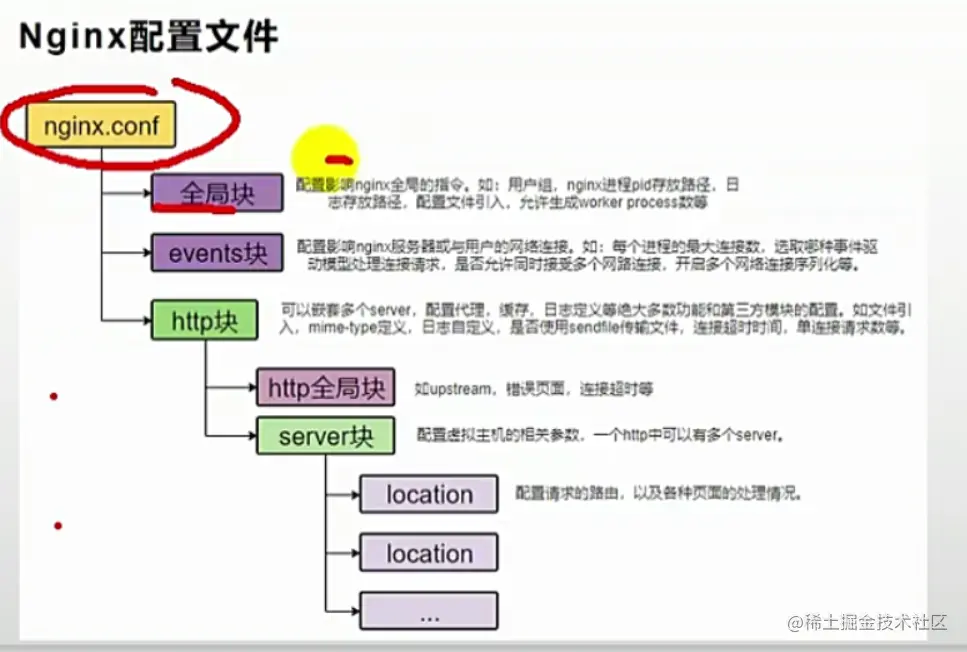
 ```txt
 1. 在hosts文件中配置
     192.168.56.10 gulimall.com
 2. 配置文件修改cp conf.d/defalut.conf conf.d/my.conf
     1. 将server_name修改为自己服务的名字:my_server
     2. 修改location
         location / {
             proxy_pass http://192.168.56.1:10000;

         }

 ```
负载均衡
```txt
1. 修改nginx.conf
在 include 其他配置文件前添加
upstream myserver{
server 192.168.56.1:88
}
2. 修改my.conf
修改location
location / {
proxy_set_header Host $host
proxy_pass http://myserver
}
```
动静分离
```txt
1. 资源上传
    /mydata/nginx/html下mkdir static
    上传静态资源到static目录下
2. 修改配置文件my.conf
    在location /前添加
    location /static/ {
        root   /usr/share/nginx/html;
    }
```



