微软官方公告,IE 浏览器将在2023年 2 月 14 日之后永久停用。
在此之前,IE浏览器要驱动外设读写RFID,可以调用外设厂商的Active控件来完成RFID的读、写操作,随着IE的停止服务意味着WEB使用ocx控件的方式也将终结,浏览器如何驱动外部设备来完成所需的工作是各外设厂商刻不容缓要解决的问题。
广州荣士电子开发的RFIDWebServer插件解决了这个问题,只要在客户端运行这个插件,RFID读写器就可以轻松接入360、搜狗、QQ、UC、猎豹、IE、Microsoft Edge、Google Chrome、Firefox火狐等主流浏览器。
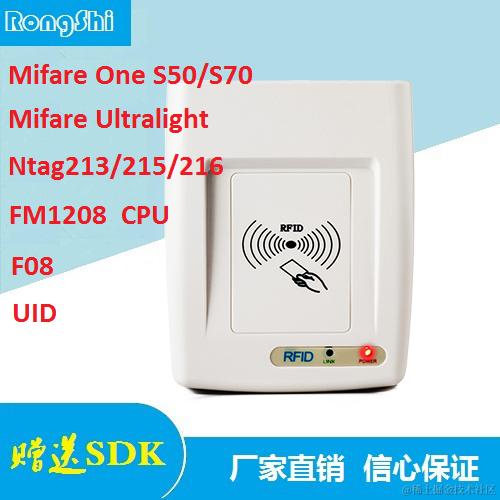
RFID读写器介绍:item.taobao.com/item.htm?sp…
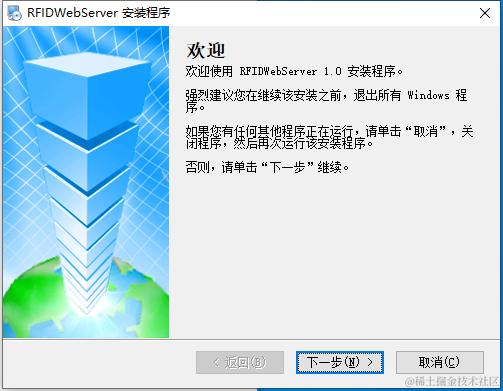
1、客户端安装RFIDWebServer插件
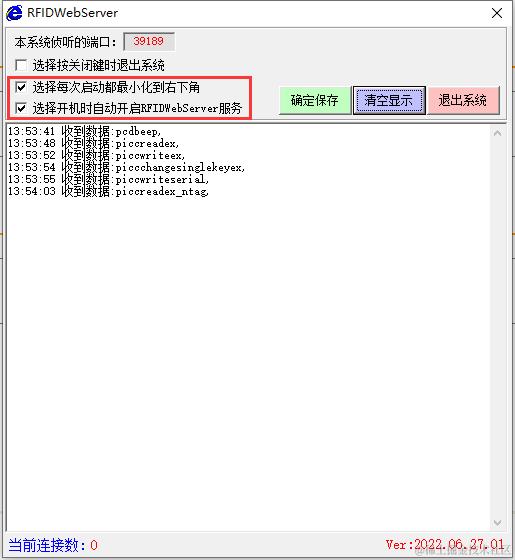
2、将RFIDWebServer设置为开机自启动并最小化到右下角托盘图标,JavaScript的WEB网页即可连接上我们的读写器完成读卡、写卡操作。
3、网页示例
4、JavaScript脚本
<!DOCTYPE html PUBLIC "-//W3C//DTD XHTML 1.0 Transitional//EN" "http://www.w3.org/TR/xhtml1/DTD/xhtml1-transitional.dtd">
<html xmlns="http://www.w3.org/1999/xhtml">
<head>
<meta http-equiv="Content-Type" content="text/html; charset=utf-8" />
<title>MifareClassIC卡读写DEMO</title>
<script language="javascript">
var BLOCK0_EN = 0x01;//读第一块的(16个字节)
var BLOCK1_EN = 0x02;//读第二块的(16个字节)
var BLOCK2_EN = 0x04;//读第三块的(16个字节)
var NEEDSERIAL = 0x08;//仅读指定序列号的卡
var EXTERNKEY = 0x10;//用明码认证密码,产品开发完成后,建议把密码放到设备的只写区,然后用该区的密码后台认证,这样谁都不知道密码是多少,需要这方面支持请联系
var NEEDHALT = 0x20; //读/写完卡后立即休眠该卡,相当于这张卡不在感应区。要相重新操作该卡必要拿开卡再放上去
var iswsrun = false;
var ws;
var received_msg = "";
var mytimer;
var strls = "";
var errorno = "";
var readcarnow = false;
var time1;
var wsUri = "ws://127.0.0.1:39189"; //端口号必须与RFIDWebServer端口一致
function isUIntNum(val) {
var testval = /^\d+$/; // 非负整数
return (testval.test(val));
}
function isHex(val) {
var testval = /^(\d|[A-F]|[a-f])+$/; // 十六进制数判断
return (testval.test(val));
}
function ButtonDisable() { //删除按键的 onclick 事件,防止重复执行指令
document.getElementById("butt_beep").setAttribute("onclick", null);
document.getElementById("butt_getdevnum").setAttribute("onclick", null);
document.getElementById("butt_piccrequest").setAttribute("onclick", null);
document.getElementById("butt_readcard").setAttribute("onclick", null);
document.getElementById("butt_writecard").setAttribute("onclick", null);
document.getElementById("butt_changecardkeyex").setAttribute("onclick", null);
document.getElementById("butt_writecarduid").setAttribute("onclick", null);
document.getElementById("butt_readloop").setAttribute("onclick", null);
document.getElementById("butt_readblock").setAttribute("onclick", null);
document.getElementById("butt_writeblock").setAttribute("onclick", null);
}
function beep() { //驱动发卡器响声令
ButtonDisable(); //删除按键的 onclick 事件,防止重复执行指令
textarea.value = "";
WebSocketRun("pcdbeep,30");
}
function getdevicenumber() { //读取发卡器唯一出厂序号,可以当加密狗使用
ButtonDisable(); //删除按键的 onclick 事件,防止重复执行指令
textarea.value = "";
serialnumber.value="";
WebSocketRun("pcdgetdevicenumber");
}
function piccrequest() {
ButtonDisable(); //删除按键的 onclick 事件,防止重复执行指令
carduid.value = "";
card8h10dz.value = "";
card8h10df.value = "";
textarea.value = "";
var RequestCardComm = "piccrequest,";
WebSocketRun(RequestCardComm);
}
function request_loop() {
if (!readcarnow) {
ButtonDisable();
time1 = setInterval("piccrequest()", 1000); //开启间隔1秒寻一次卡
readcarnow = true;
}
}
function request_stop() {
if (readcarnow=true){
clearInterval(time1);
readcarnow = false;
ButtonEnabled();
}
}
function readcard() {
ButtonDisable(); //删除按键的 onclick 事件,防止重复执行指令
textarea.value = "";
block0.value= "";
block1.value= "";
block2.value = "";
block3.value = "";
if (selinoutkey.selectedIndex==1){
myctrlword = BLOCK0_EN + BLOCK1_EN + BLOCK2_EN + EXTERNKEY; //外部密钥认证
}else {myctrlword = BLOCK0_EN + BLOCK1_EN + BLOCK2_EN;} //已装载到发卡器内部密钥认证
myareano = selareano.selectedIndex; //指定为本次读取第8区,十进制
authmode = selauthmode.selectedIndex; //指定密码模式,十进制,大于0表示用A密码认证,推荐用A密码认证
mypiccserial = "00000000"; //指定本次操作的卡序列号,十六进制,未知时可指定为8个0
mypicckey = authkey0.value.trim(); //指定卡片密码,十六进制,FFFFFFFFFFFF为卡片厂家出厂密码
if (!isHex(mypicckey) || mypicckey.length!=12) {
textarea.value = "认证密钥输入错误,请输入正确的12位16进制认证密钥!";
authkey0.focus();
authkey0.select();
ButtonEnabled();
return;
}
var ReadCardComm = "piccreadex," + myctrlword + "," + mypiccserial + "," + myareano + "," + authmode + "," + mypicckey;
WebSocketRun(ReadCardComm);
}
function writecard() {
ButtonDisable(); //删除按键的 onclick 事件,防止重复执行指令
textarea.value = "";
if (selinoutkey.selectedIndex==1){
myctrlword = BLOCK0_EN + BLOCK1_EN + BLOCK2_EN + EXTERNKEY; //外部密钥认证
}else {myctrlword = BLOCK0_EN + BLOCK1_EN + BLOCK2_EN;} //已装载到发卡器内部密钥认证
myareano = selareano.selectedIndex; //指定为本次读取第8区,十进制
authmode = selauthmode.selectedIndex; //指定密码模式,十进制,大于0表示用A密码认证,推荐用A密码认证
mypiccserial = "00000000"; //指定本次操作的卡序列号,十六进制,未知时可指定为8个0
mypicckey = authkey0.value.trim(); //指定卡片密码,十六进制,FFFFFFFFFFFF为卡片厂家出厂密码
if (!isHex(mypicckey) || mypicckey.length!=12) {
textarea.value = "认证密钥输入错误,请输入正确的12位16进制认证密钥!";
authkey0.focus();
authkey0.select();
ButtonEnabled();
return;
}
block0data = block0.value.trim(); //第0块写卡数据
if (!isHex(block0data) || block0data.length!=32) {
textarea.value = "第0块数据输入错误,请输入正确的32位16进制写卡数据!";
block0.focus();
block0.select();
ButtonEnabled();
return;
}
block1data = block1.value.trim(); //第1块写卡数据
if (!isHex(block1data) || block1data.length!=32) {
textarea.value = "第1块数据输入错误,请输入正确的32位16进制写卡数据!";
block1.focus();
block1.select();
ButtonEnabled();
return;
}
block2data = block2.value.trim(); //第2块写卡数据
if (!isHex(block2data) || block2data.length!=32) {
textarea.value = "第2块数据输入错误,请输入正确的32位16进制写卡数据!";
block2.focus();
block2.select();
ButtonEnabled();
return;
}
piccdata=block0data+block1data+block2data
var WriteCardComm = "piccwriteex," + myctrlword + "," + mypiccserial + "," + myareano + "," + authmode + "," + mypicckey + "," + piccdata;
WebSocketRun(WriteCardComm);
}
function piccread() {
ButtonDisable(); //删除按键的 onclick 事件,防止重复执行指令
textarea.value = "";
blockdata.value = "";
myblock = selectblock.value.trim(); //读写绝对块地址
if (!isUIntNum(myblock)) {
alert("读写块号输入错误!");
selectblock.focus();
selectblock.select();
ButtonEnabled();
return;
}else if (parseInt(myblock) > 63) {
alert("读写块号不可以大于63!");
selectblock.focus();
selectblock.select();
ButtonEnabled();
return;
}
mypiccserial = "00000000"; //指定本次操作的卡序列号,十六进制,未知时可指定为8个0
authmode = selauthmode.selectedIndex; //指定密码模式,十进制,大于0表示用A密码认证,推荐用A密码认证
mypicckey = authkey1.value.trim(); //指定卡片密码,十六进制,FFFFFFFFFFFF为卡片厂家出厂密码
if (!isHex(mypicckey) || mypicckey.length != 12) {
textarea.value = "认证密钥输入错误,请输入正确的12位16进制认证密钥!";
authkey1.focus();
authkey1.select();
ButtonEnabled();
return;
}
var ReadCardComm = "piccread," + mypiccserial + "," + myblock + "," + authmode + "," + mypicckey;
WebSocketRun(ReadCardComm);
}
function piccwrite() {
ButtonDisable(); //删除按键的 onclick 事件,防止重复执行指令
textarea.value = "";
myblock = selectblock.value.trim(); //读写绝对块地址
if (!isUIntNum(myblock)) {
alert("读写块号输入错误!");
selectblock.focus();
selectblock.select();
ButtonEnabled();
return;
} else if (parseInt(myblock) > 63) {
alert("读写块号不可以大于63!");
selectblock.focus();
selectblock.select();
ButtonEnabled();
return;
}
if (myblock % 4 == 3) {
var answer = confirm("此块是密钥块,如果写入错误的数据,第" + Math.floor(myblock / 4).toString() + " 扇区将会报废!确定要继续写入吗?");
if (answer) { }
else {
selectblock.focus();
selectblock.select();
ButtonEnabled();
return;
}
}
mypiccserial = "00000000"; //指定本次操作的卡序列号,十六进制,未知时可指定为8个0
authmode = selauthmode.selectedIndex; //指定密码模式,十进制,大于0表示用A密码认证,推荐用A密码认证
mypicckey = authkey1.value.trim(); //指定卡片密码,十六进制,FFFFFFFFFFFF为卡片厂家出厂密码
if (!isHex(mypicckey) || mypicckey.length != 12) {
textarea.value = "认证密钥输入错误,请输入正确的12位16进制认证密钥!";
authkey1.focus();
authkey1.select();
ButtonEnabled();
return;
}
myblockdata = blockdata.value.trim(); //块写卡数据
if (!isHex(myblockdata) || myblockdata.length != 32) {
textarea.value = "写块数据输入错误,请输入正确的32位16进制写卡数据!";
blockdata.focus();
blockdata.select();
ButtonEnabled();
return;
}
WebSocketRun("piccwrite," + mypiccserial + "," + myblock + "," + authmode + "," + mypicckey + "," + myblockdata);
}
function ButtonEnabled() { //恢复各button 的onclick事件
document.getElementById("butt_beep").setAttribute("onclick", "beep()");
document.getElementById("butt_getdevnum").setAttribute("onclick", "getdevicenumber()");
document.getElementById("butt_piccrequest").setAttribute("onclick", "piccrequest()");
document.getElementById("butt_readcard").setAttribute("onclick", "readcard()");
document.getElementById("butt_writecard").setAttribute("onclick", "writecard()");
document.getElementById("butt_changecardkeyex").setAttribute("onclick", "changecardkeyex()");
document.getElementById("butt_writecarduid").setAttribute("onclick", "writecarduid()");
document.getElementById("butt_readloop").setAttribute("onclick", "request_loop()");
document.getElementById("butt_readblock").setAttribute("onclick", "piccread()");
document.getElementById("butt_writeblock").setAttribute("onclick", "piccwrite()");
}
function DispErrInfo(errcode){
var errstr = "";
switch (errcode) {
case "ReturnCode:001":
errstr = ",读写扇区数据失败!";
break;
case "ReturnCode:002":
errstr = ",读写1、2块数据失败!";
break;
case "ReturnCode:003":
errstr = ",读写第2块数据失败!";
break;
case "ReturnCode:008":
errstr = ",未寻到卡,请将卡放到发卡器的感应区!";
break;
case "ReturnCode:009":
errstr = ",有多张卡在感应区,寻卡过程中防冲突失败,读卡失败!";
break;
case "ReturnCode:010":
errstr = ",该卡可能已被休眠,无法选中卡片!";
break;
case "ReturnCode:011":
errstr = ",密码装载失败!";
break;
case "ReturnCode:012":
errstr = ",卡密码认证失败!";
break;
case "ReturnCode:013":
errstr = ",读块操作失败,原因是刷卡太快或本块所对应的区还没通过密码认证!";
break;
case "ReturnCode:014":
errstr = ",写块操作失败,原因是刷卡太快或本块所对应的区还没通过密码认证!";
break;
case "ReturnCode:018":
errstr = ",写块操作失败!";
break;
case "ReturnCode:021":
errstr = ",没有动态库!";
break;
case "ReturnCode:022":
errstr = ",动态库或驱动程序异常!";
break;
case "ReturnCode:023":
errstr = ",驱动程序错误或发卡器未连接!";
break;
default:
errstr = ",未知的错误!";
}
return errstr;
}
window.onerror = function (e) {
ButtonEnabled(); //恢复按键的onclick事件
clearInterval(time1);
alert("不好意思,出错了!");
return true;//屏蔽系统事件
}
function timeoutevent() {
ws.close();
textarea.value = "websockket返回超时";
ButtonEnabled(); //恢复按键的onclick事件
clearInterval(time1);
}
//websockket数据处理
function WebSocketRev(evt) {
clearTimeout(mytimer);
received_msg = evt.data;
ws.close();
//在这里解析返回数据
var strlist = received_msg.split(",");
if (strlist.length > 1) {
var dispstr = "";
switch (strlist[0]) {
case "pcdbeep":
dispstr = "函数名称:" + strlist[0] + "\r\n";
if (strlist[1] == "ReturnCode:000") {
dispstr = dispstr + "操作结果:" + strlist[1];
dispstr = dispstr + ",已执行蜂鸣响声操作!\r\n";
} else {
dispstr = dispstr + "操作结果:" + strlist[1];
dispstr = dispstr + DispErrInfo(strlist[1]);
}
textarea.value = dispstr;
break;
case "pcdgetdevicenumber":
dispstr = "函数名称:" + strlist[0] + "\r\n";
if (strlist[1] == "ReturnCode:000") {
dispstr = dispstr + "操作结果:" + strlist[1];
dispstr = dispstr + ",已读取设备编号!\r\n";
} else {
dispstr = dispstr + "操作结果:" + strlist[1];
dispstr = dispstr + DispErrInfo(strlist[1]);
}
if (strlist.length > 2) {
dispstr = dispstr + "设备编号:" + strlist[2] + "\r\n";
serialnumber.value=strlist[2];
}
textarea.value = dispstr;
break;
case "piccrequest":
dispstr = "函数名称:" + strlist[0] + "\r\n";
if (strlist[1] == "ReturnCode:000") {
dispstr = dispstr + "操作结果:" + strlist[1];
dispstr = dispstr + ",已读取Mifare卡卡号!\r\n";
carduid.value=strlist[2];
card8h10dz.value=parseInt("0x"+strlist[2]).toString().padStart(10, '0');
card8h10df.value=strlist[3];
} else {
dispstr = dispstr + "操作结果:" + strlist[1];
dispstr = dispstr + DispErrInfo(strlist[1]);
}
textarea.value = dispstr;
break;
case "piccread":
dispstr = "函数名称:" + strlist[0] + "\r\n";
if (strlist[1] == "ReturnCode:000") {
dispstr = dispstr + "操作结果:" + strlist[1];
dispstr = dispstr + ",已读取卡内数据!\r\n";
} else {
dispstr = dispstr + "操作结果:" + strlist[1];
dispstr = dispstr + DispErrInfo(strlist[1]);
}
if (strlist.length > 2) {
carduid.value = strlist[2];
HLCode = strlist[2].substring(0, 2) + strlist[2].substring(2, 4) + strlist[2].substring(4, 6) + strlist[2].substring(6, 8);
card8h10dz.value = parseInt("0x" + HLCode).toString().padStart(10, '0');
LHCode = strlist[2].substring(6, 8) + strlist[2].substring(4, 6) + strlist[2].substring(2, 4) + strlist[2].substring(0, 2);
card8h10df.value = parseInt("0x" + LHCode).toString().padStart(10, '0');
}
if (strlist.length > 3) {
blockdata.value = strlist[3].substring(0, 32);
}
textarea.value = dispstr;
break;
case "piccreadex":
dispstr = "函数名称:" + strlist[0] + "\r\n";
if (strlist[1] == "ReturnCode:000") {
dispstr = dispstr + "操作结果:" + strlist[1];
dispstr = dispstr + ",已读取卡内数据!\r\n";
} else {
dispstr = dispstr + "操作结果:" + strlist[1];
dispstr = dispstr + DispErrInfo(strlist[1]);
}
if (strlist.length > 2) {
carduid.value= strlist[2] ;
HLCode=strlist[2].substring(0,2)+strlist[2].substring(2,4)+strlist[2].substring(4,6)+strlist[2].substring(6,8);
card8h10dz.value=parseInt("0x"+HLCode).toString().padStart(10, '0');
LHCode=strlist[2].substring(6,8)+strlist[2].substring(4,6)+strlist[2].substring(2,4)+strlist[2].substring(0,2);
card8h10df.value=parseInt("0x"+LHCode).toString().padStart(10, '0');
}
if (strlist.length > 3) {
block0.value= strlist[3].substring(0,32);
block1.value= strlist[3].substring(32,64);
block2.value = strlist[3].substring(64, 96);
if (strlist[3].length==128) {
block3.value = strlist[3].substring(96, 128);
}
}
textarea.value = dispstr;
break;
case "piccwrite":
case "piccwriteex":
case "piccwriteserial":
dispstr = "函数名称:" + strlist[0] + "\r\n";
if (strlist[1] == "ReturnCode:000") {
dispstr = dispstr + "操作结果:" + strlist[1];
dispstr = dispstr + ",写卡成功!\r\n";
} else {
dispstr = dispstr + "操作结果:" + strlist[1];
dispstr = dispstr + DispErrInfo(strlist[1]);
}
if (strlist.length > 2) {
carduid.value= strlist[2] ;
HLCode=strlist[2].substring(0,2)+strlist[2].substring(2,4)+strlist[2].substring(4,6)+strlist[2].substring(6,8);
card8h10dz.value=parseInt("0x"+HLCode).toString().padStart(10, '0');
LHCode=strlist[2].substring(6,8)+strlist[2].substring(4,6)+strlist[2].substring(2,4)+strlist[2].substring(0,2);
card8h10df.value=parseInt("0x"+LHCode).toString().padStart(10, '0');
}
textarea.value = dispstr;
break;
case "piccchangesinglekeyex":
dispstr = "函数名称:" + strlist[0] + "\r\n";
if (strlist[1] == "ReturnCode:000") {
dispstr = dispstr + "操作结果:" + strlist[1];
dispstr = dispstr + ",更改卡片密钥成功!\r\n";
} else {
dispstr = dispstr + "操作结果:" + strlist[1];
dispstr = dispstr + DispErrInfo(strlist[1]);
}
if (strlist.length > 2) {
carduid.value= strlist[2] ;
HLCode=strlist[2].substring(0,2)+strlist[2].substring(2,4)+strlist[2].substring(4,6)+strlist[2].substring(6,8);
card8h10dz.value=parseInt("0x"+HLCode).toString().padStart(10, '0');
LHCode=strlist[2].substring(6,8)+strlist[2].substring(4,6)+strlist[2].substring(2,4)+strlist[2].substring(0,2);
card8h10df.value=parseInt("0x"+LHCode).toString().padStart(10, '0');
}
textarea.value = dispstr;
break;
}
}
ButtonEnabled(); //恢复按键的onclick事件
}
function WebSocketRun(sendinfo) {
iswsrun = false;
try {
if ("WebSocket" in window) {
ws = new WebSocket(wsUri);
}
else if ("MozWebSocket" in window) {
ws = new MozWebSocket(wsUri);
}
else {
received_msg = "您的浏览器不支持WebSocket,请选用支持WebSocket的浏览器!";
ButtonEnabled(); //恢复按键的onclick事件
return;
}
clearTimeout(mytimer);
ws.onopen = function (evt) {
ws.send(sendinfo);
iswsrun = true;
mytimer = setTimeout("timeoutevent()", 2000);
};
ws.onmessage = WebSocketRev;
ws.onerror = function (e) {
if (iswsrun != true) {
received_msg = "请先在当前电脑下载>安装>运行我们的服务程序......";
window.open("http://www.bossknow.cn:90/RongShiWebReaderTest/RFIDWebServerSetup_Windows.rar", "top");//打开新窗口
ButtonEnabled(); //恢复按键的onclick事件
clearInterval(time1);
alert("请先下载>安装>运行我们的服务程序,再刷新本页面......");
}
};
}
catch (ex) {
if (iswsrun != true) {
received_msg = "请先在当前电脑下载>安装>运行我们的服务程序......";
window.open("http://www.bossknow.cn:90/RongShiWebReaderTest/RFIDWebServerSetup_Windows.rar", "top");//打开新窗口
ButtonEnabled(); //恢复按键的onclick事件
clearInterval(time1);
alert("请先下载>安装>运行我们的服务程序,再刷新本页面......");
}
}
}
</script>
<style>
th {
background-color:#F6FAFF;
color: blue;
font-family:楷体;
}
td {
background-color:#F6FAFF;
font-family:楷体;
}
</style>
</head>
<body>
<table width="866" height="484" align="center">
<tr>
<th width="124" height="45" scope="row"><input style="width:120px" name="butt_beep" type="submit" id="butt_beep" onclick="beep()" value="驱动发卡器响声" /></th>
<td width="716"><input name="butt_getdevnum" type="submit" id="butt_getdevnum" onclick="getdevicenumber()" value="读取发卡器唯一出厂序列号" />
设备编号:
<input style="color:red;text-align:center;" name="serialnumber" type="text" id="serialnumber" size="8" maxlength="8" /></td>
</tr>
<tr>
<th height="79" scope="row">
<input style="width:120px" name="butt_piccrequest" type="submit" id="butt_piccrequest" onclick="piccrequest()" value="寻M1卡获取卡号" />
<br /><br />
<input name="button" type="submit" id="butt_readloop" style="width:120px" onclick="request_loop()" value="轮询读取IC卡卡号" />
<br /><br />
<input name="button2" type="submit" id="butt_requeststop" style="width:120px" onclick="request_stop()" value="停止轮询读卡" />
</th>
<td>原始16进制卡号:
<input style="color:red;text-align:center;" name="carduid" type="text" id="carduid" size="8" maxlength="8" />
,转8H10D正码:
<input style="color:red;text-align:center;" name="card8h10dz" type="text" id="card8h10dz" size="10" maxlength="10" />
,8H10D反码:
<input style="color:red;text-align:center;" name="card8h10df" type="text" id="card8h10df" size="10" maxlength="10" /></td>
</tr>
<tr>
<th height="25" scope="row">
</th>
<td><p>扇区号:
<select style="color:blue;" name="selareano" id="selareano">
<option selected="selected">第0扇区</option>
<option>第1扇区</option>
<option>第2扇区</option>
<option>第3扇区</option>
<option>第4扇区</option>
<option>第5扇区</option>
<option>第6扇区</option>
<option>第7扇区</option>
<option>第8扇区</option>
<option>第9扇区</option>
<option>第10扇区</option>
<option>第11扇区</option>
<option>第12扇区</option>
<option>第13扇区</option>
<option>第14扇区</option>
<option>第15扇区</option>
</select>
<label for="changeauthkey"></label>
<select style="color:blue;" name="selinoutkey" id="selinoutkey">
<option>内部密钥认证</option>
<option selected="selected">外部密钥认证</option>
</select>
<label for="newkey"></label>
<select style="color:blue;" name="selauthmode" id="selauthmode">
<option>B密钥认证</option>
<option selected="selected">A密钥认证</option>
</select>
,认证密钥:
<input style="color:blue;text-align:center;" name="authkey0" type="text" id="authkey0" value="FFFFFFFFFFFF" size="12" maxlength="12" onkeyup="this.value=this.value.replace(/[^0-9a-fA-F]/g,'')"/>
</p></td>
</tr>
<tr>
<th height="45" scope="row">
<p>
<input style="width:120px" name="butt_readcard" type="submit" id="butt_readcard" onclick="readcard()" value="轻松读取扇区数据" />
<br /><br />
<input style="width:120px" name="butt_writecard" type="submit" id="butt_writecard" onclick="writecard()" value="轻松写入扇区数据" />
</p>
</th>
<td>
<p>
第0块:
<input style="color:red;font-family:楷体;" name="block0" type="text" id="block0" size="32" maxlength="32" onkeyup="this.value=this.value.replace(/[^0-9a-fA-F]/g,'')"/>
第1块:
<input style="color:red;font-family:楷体;" name="block1" type="text" id="block1" size="32" maxlength="32" onkeyup="this.value=this.value.replace(/[^0-9a-fA-F]/g,'')"/>
</p>
<p>
第2块:
<input style="color:red;font-family:楷体;" name="block2" type="text" id="block2" size="32" maxlength="32" onkeyup="this.value=this.value.replace(/[^0-9a-fA-F]/g,'')"/>
第3块:
<input style="color:blue;font-family:楷体;" name="block3" type="text" id="block3" size="32" maxlength="32" onkeyup="this.value=this.value.replace(/[^0-9a-fA-F]/g,'')" />密钥块(只读)
</p>
</td>
</tr>
<tr>
<th height="45" scope="row"><input style="width:120px" name="butt_changecardkeyex" type="submit" id="butt_changecardkeyex" onclick="changecardkeyex()" value="修改扇区密钥" /></th>
<td><select style="color:blue;" name="selchangekey" id="selchangekey">
<option>只修改A密钥</option>
<option>只修改AB密钥</option>
<option selected="selected">修改AB密钥及控制位</option>
</select>
,新A密钥
<input style="color:red;text-align:center;" name="newkeya" type="text" id="newkeya" value="FFFFFFFFFFFF" size="12" maxlength="12" onkeyup="this.value=this.value.replace(/[^0-9a-fA-F]/g,'')"/>
,控制位
<input style="color:red;text-align:center;" name="cardctr" type="text" id="cardctr" value="FF078069" size="8" maxlength="8" onkeyup="this.value=this.value.replace(/[^0-9a-fA-F]/g,'')"/>
,B密钥
<input style="color:red;text-align:center;" name="newkeyb" type="text" id="newkeyb" value="FFFFFFFFFFFF" size="12" maxlength="12" onkeyup="this.value=this.value.replace(/[^0-9a-fA-F]/g,'')"/></td>
</tr>
<tr>
<th height="25" scope="row">
<input style="width:120px" name="butt_readblock" type="submit" id="butt_readblock" onclick="piccread()" value="读取指定块数据" />
<br /><br />
<input style="width:120px" name="butt_writeblock" type="submit" id="butt_writeblock" onclick="piccwrite()" value="写数据到指定块" />
</th>
<td>
读写块号:
<input name="selectblock" type="text" id="selectblock" style="color:red;text-align:center;" value="1" size="3" maxlength="3" />
认证密钥:
<input style="color:blue;text-align:center;" name="authkey1" type="text" id="authkey1" value="FFFFFFFFFFFF" size="12" maxlength="12" onkeyup="this.value=this.value.replace(/[^0-9a-fA-F]/g,'')" />
块内数据: <input style="color:red;font-family:楷体;" name="blockdata" type="text" id="blockdata" size="32" maxlength="32" onkeyup="this.value=this.value.replace(/[^0-9a-fA-F]/g,'')" />
</td>
</tr>
<tr>
<th height="45" scope="row"><input style="width:120px" name="butt_writecarduid" type="submit" id="butt_writecarduid" onclick="writecarduid()" value="写入UID卡号" /></th>
<td>输入要写入的8H10D正码UID:
<input style="color:blue;text-align:center;" name="newuid" type="text" id="newuid" size="10" maxlength="10" onkeyup="this.value=this.value.replace(/\D/g,'')"/></td>
</tr>
<tr>
<th height="100" scope="row"><p>操作提示</p>
<p> </p>
<p> </p></th>
<td><textarea style="color:blue;" name="textarea" id="textarea" cols="100" rows="8" ></textarea></td>
</tr>
</table>
</body>
</html>