值类型与引用类型有什么区别
那些类型是值类型?那些类型是引用类型
- 值类型 string number Boolean Symbol
- 引用类型 JSON Array nll
演示值类型与引用类型的堆栈模式
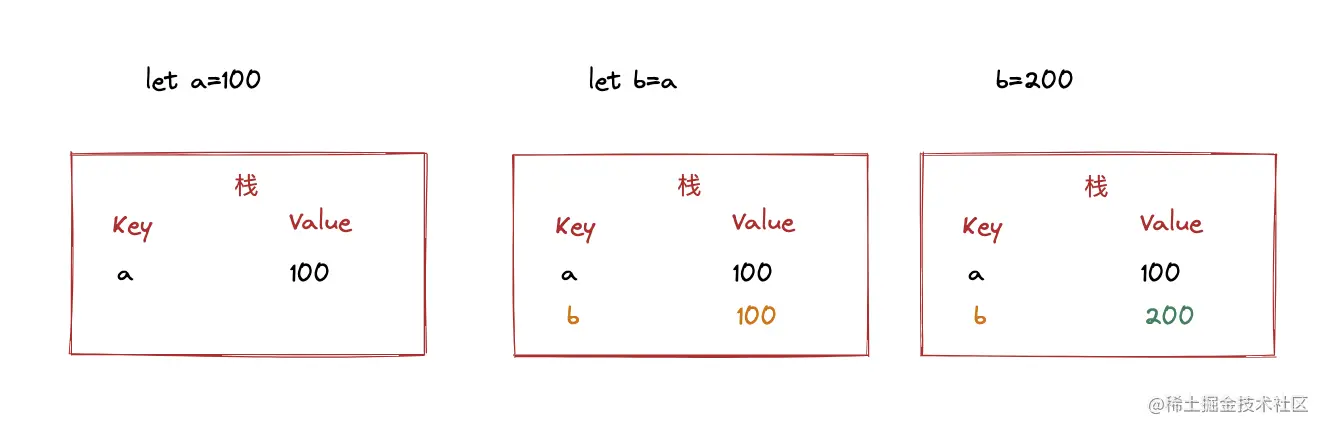
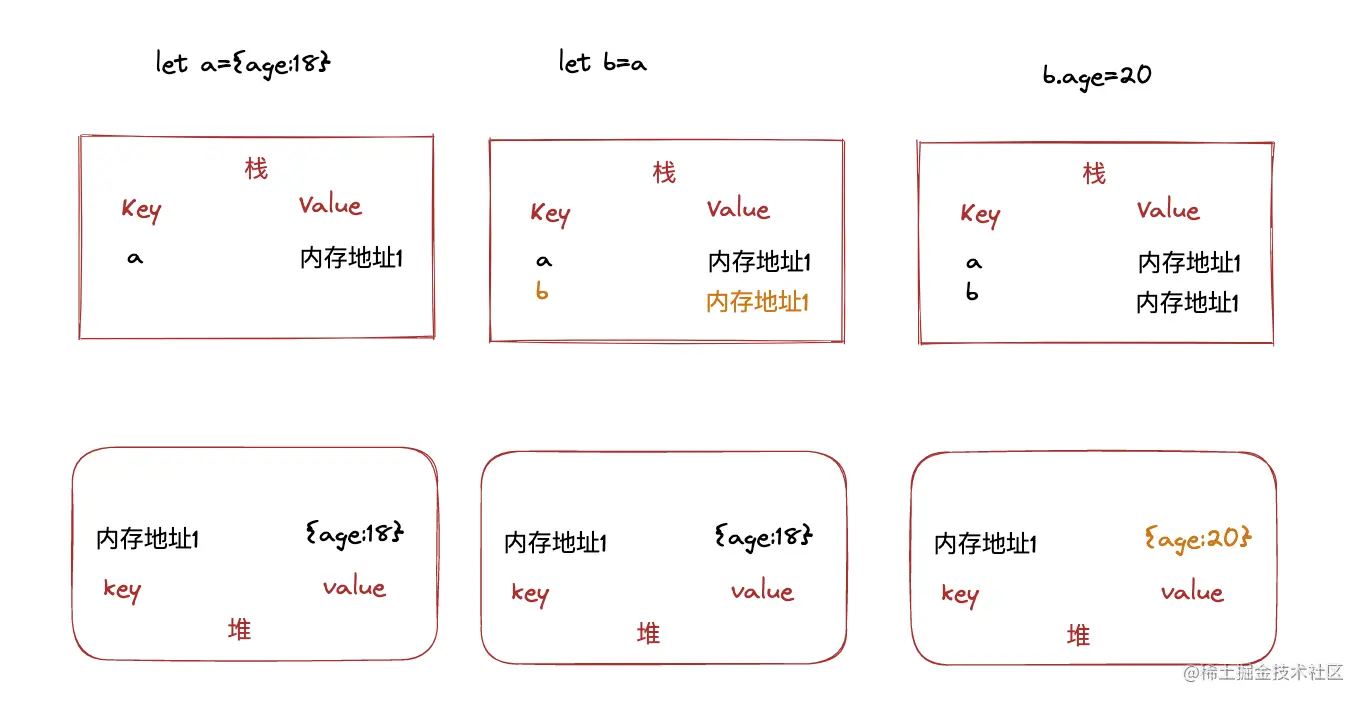
变种提问
const a={x:100, y:200}
const b=a
let c=a.x
b.x=300
console.log(a)
演示代码
<!DOCTYPE html>
<html>
<head>
<meta charset="UTF-8" />
<meta http-equiv="X-UA-Compatible" content="IE=edge" />
<meta name="viewport" content="width=device-width, initial-scale=1.0" />
<title>@说人话的前端 - bilibili</title>
</head>
<body></body>
<script>
let a1 = 100;
let b1 = a1;
b1 = 200;
console.log(a1);
let a2 = { age: 18 };
let b2 = a2;
b2.age = 20;
console.log(a2);
</script>
</html>
手写深拷贝
如何实现深拷贝
- JSON.parse(JOSN.stringify(obj))
- 不能存放函数,时间对象,正则...
- 递归
- 没有考虑循环引用
- lodash.choneDeep 查询网址
演示代码
<!DOCTYPE html>
<html>
<head>
<meta charset="UTF-8" />
<meta http-equiv="X-UA-Compatible" content="IE=edge" />
<meta name="viewport" content="width=device-width, initial-scale=1.0" />
<title>@说人话的前端 - bilibili</title>
</head>
<body></body>
<script>
const obj1 = {
name: "张三",
age: 18,
address: {
city: "北京",
},
hobby: ["台球", "篮球"],
fn: function () {
console.log(123);
},
};
const obj2 = deepClone(obj1);
obj2.age = 20;
obj2.address.city = "上海";
console.log(obj1);
console.log(obj2);
function deepClone(obj) {
if (typeof obj !== "object" || obj == null) {
return obj;
}
let res = obj instanceof Array ? [] : {};
for (let key in obj) {
if (obj.hasOwnProperty(key)) {
res[key] = deepClone(obj[key]);
}
}
return res;
}
</script>
</html>
何时使用==何时使用===
== 隐式类型转换
    100 == '100'
0 == ''
0 == false
false == ''
null == undefined
只有 obj == null 使用双等
if (obj === null || obj === undefined) {

}
演示代码
<html>
  <head>
    <meta charset="UTF-8" />
    <meta http-equiv="X-UA-Compatible" content="IE=edge" />
    <meta name="viewport" content="width=device-width, initial-scale=1.0" />
    <title>@说人话的前端 - bilibili</title>
  </head>
  <body></body>
  <script>
    console.log(100 == "100");
    console.log(0 == "");
    console.log(0 == false);
    console.log("" == false);
    console.log(null == undefined);

    let obj = { age: 18 };
    if (obj == null) {
    }
    if (obj === null || obj === undefined) {
    }
  </script>
</html>
<!DOCTYPE html>
<html>
  <head>
    <meta charset="UTF-8" />
    <meta http-equiv="X-UA-Compatible" content="IE=edge" />
    <meta name="viewport" content="width=device-width, initial-scale=1.0" />
    <title>@说人话的前端 - bilibili</title>
  </head>
  <body></body>
  <script>
    console.log(100 == "100");
    console.log(0 == "");
    console.log(0 == false);
    console.log("" == false);
    console.log(null == undefined);

    let obj = { age: 18 };
    if (obj == null) {
    }
    if (obj === null || obj === undefined) {
    }
  </script>
</html>
那些是truly变量?那些是falsely变量?
什么是truly变量? 什么是falsely变量?
- truly变量 !!val = true
- falsely变量 !!val = false
除了falsly变量,都是truly变量
- 数字0
- NaN
- 空字符串
- null
- undefined
演示代码
<!DOCTYPE html>
<html>
  <head>
    <meta charset="UTF-8" />
    <meta http-equiv="X-UA-Compatible" content="IE=edge" />
    <meta name="viewport" content="width=device-width, initial-scale=1.0" />
    <title>@说人话的前端 - bilibili</title>
  </head>
  <body></body>
  <script>
    console.log(!!"" === false);
    console.log(!!NaN === false);
    console.log(!!0 === false);
    console.log(!!null === false);
    console.log(!!undefined === false);
  </script>
</html>
说说原型和原型链是怎么回事
复习class基础语法
- class
- censtruct
- extends
- super
- instanceof
什么是原型
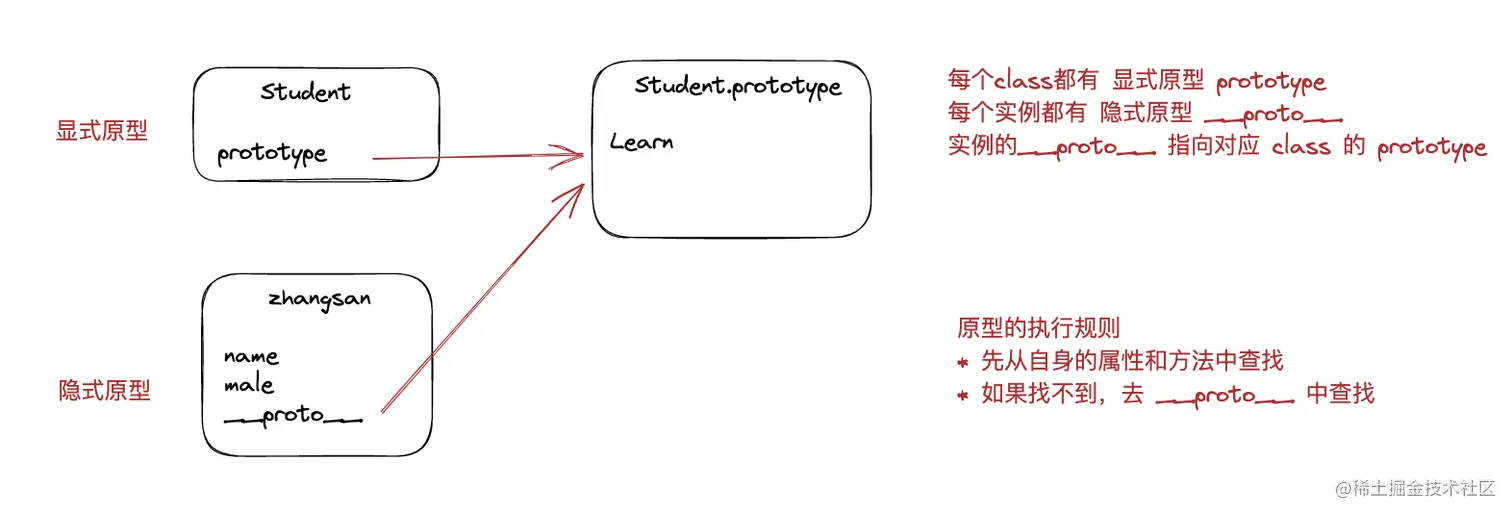
什么是原型链
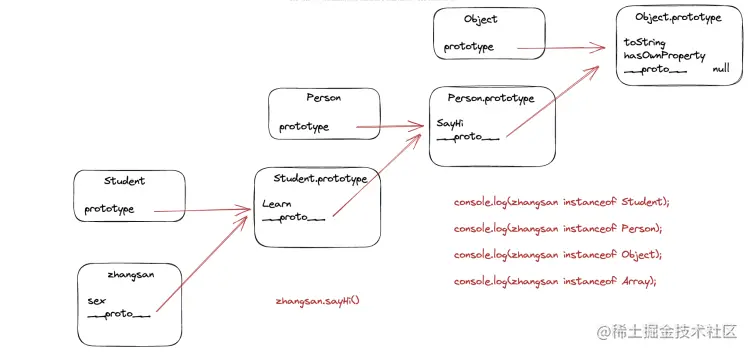
演示代码
<!DOCTYPE html>
<html>
<head>
<meta charset="UTF-8" />
<meta http-equiv="X-UA-Compatible" content="IE=edge" />
<meta name="viewport" content="width=device-width, initial-scale=1.0" />
<title>@说人话的前端 - bilibili</title>
</head>
<body></body>
<script>
class Person {
constructor(name) {
this.name = name;
}
sayHi() {
console.log(`${this.name} say hi`);
}
}
let zhangsan = new Person("张三");
console.log(zhangsan instanceof Object);
console.log(Person instanceof Object);
</script>
</html>



