1. this指向 (this是js中的关键字)
1. 普通调用
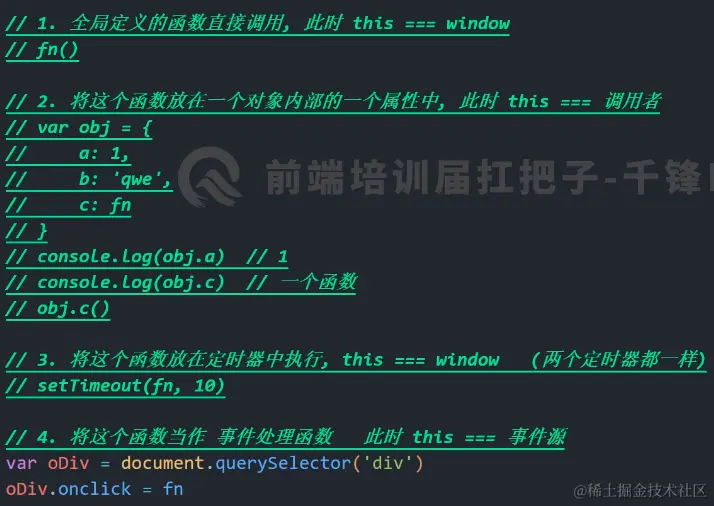
- 函数名()
- 函数内的this 指向window
<script>
console.log( this )
function fn() {
console.log( this )
return this;
}
console.log( fn()===window );
const obj = {
ff:function(){
console.log( this )
return this;
}
let f = obj.ff ;
console.log( f()===window )
let arr = [function () {
console.log(this)
console.log( this===arr )
}]
arr[0]();
</script>
2. 对象调用
- 对象.函数名()
- 函数内的 this 指向 调用函数的对象
const obj1 = {
ff: function () {
console.log(this)
return this;
}
}
console.log( obj1.ff() === obj1 )
function fn() {
console.log(this)
return this;
}
var o = {};
o.f = fn;
console.log( o.f()===o );
3. 事件处理函数
- 事件源.on事件类型 = 函数
- 事件源.addEventListener('事件类型',函数)
- 事件触发的时候,执行的函数中 this指向事件源(事件绑定在哪个身上 )
<div style="width: 200px;"></div>
document.onclick = function () {
console.log( this )
console.log( this === document )
}
const dv = document.querySelector('div');
const obj = {
ff: function () {
console.log(this)
console.log( this === dv )
}
}
dv.addEventListener('click',obj.ff);
const dv = document.querySelector('div');
dv.addEventListener('mouseup',function () {
console.log( this )
console.log( this === dv );
})
4. 定时器调用
- setTimeout(函数,毫秒)
- setInterval(函数,毫秒)
- 函数中的 this 指向 window
setTimeout(function(){
console.log( this )
console.log( this === window)
},10)
setInterval(function(){
console.log( this )
console.log( this === window)
},10)
const obj = {
ff: function () {
console.log(this)
console.log(this === window)
}
}
setTimeout(obj.ff, 10)
5. 自调用函数
- ;(函数)()
- 函数中的this指向 window
- 调用函数的语法
+ ;(函数)()
+ !(函数)()
+ ~(函数)()
+ 特点: 函数定义好之后立即执行
;(function(){
console.log( this )
console.log( this===window )
})()
~(function fn() {
console.log( this )
console.log( this === window )
})();
6. 箭头函数
- 唯一一个不看调用方式,只看 **函数定义位置** 决定this指向,
- 箭头函数的this 指向的是 定义(书写)箭头函数 所在作用域中 this的指向
-不停往上一级查找谁是this
const obj = {
ff: function () {
console.log(this)
},
fn: () => {
console.log(this)
console.log(this === window)
}
}
obj.fn()
document.onclick = function () {
const obj = {
fn: () => {
console.log(this)
console.log(this === document)
}
}
obj.fn()
let ff = obj.fn;
ff();
}
2. 强行改变this的指向