

上篇文章我们了解了用yeoman构建脚手架的大概流程,这篇文章我们一起来学习下如何写一个简单的脚手架。
1.方法
我们可以通过新建方法来完成我们的需求, 每个方法就是一个任务 ,会自动按顺序运行。如果想定义不自动调用的辅助方法或私有方法,可以通过以下三种方法实现。
(1)方法名称前加下划线(例如_private_method)
 class extends Generator {
     method1() {
       console.log('hey 1');
     }

     _private_method() {
       console.log('private hey');
     }
   }
(2)使用实例方法
 class extends Generator {
     constructor(args, opts) {
       // Calling the super constructor is important so our generator is correctly set up
       super(args, opts)

       this.helperMethod = function () {
         console.log('won\'t be called automatically');
       };
     }
   }
(3)扩展父脚手架
  class MyBase extends Generator {
     helper() {
       console.log('methods on the parent generator won\'t be called automatically');
     }
   }

   module.exports = class extends MyBase {
     exec() {
       this.helper();
     }
   };
当然除了自己定义的方法外,yeoman 也提供了一些方法,在特定的时间点执行,类似于生命周期。
- initializing:初始化方法(检查当前项目状态、获取配置等)
- prompting: 用户交互的地方(调用this.prompt(),将用户选择的值存在this.prompts)
- configuring: 保存配置和配置项目(创建.editorconfig文件和其他元数据文件)
- default:如果方法名称与提供的方法不匹配,则将其推送到该组。
- writing: 编写脚手架特定文件的地方(路由、控制器等)
- conflicts: 处理冲突的地方(内部使用)
- install: 运行安装的位置(npm、yarn、bower)
- end:最后调用,用于清理
2.交互
Prompts 是脚手架与用户交互的主要方式,主要由inquirer.js来完成。我们可以通过它来向用户提问,获得用户的反馈。
可以通过default设置默认值,然后 store:true,将上次用户的答案作为新的default 值,这样可以记住用户偏好。
prompting() {
  const prompts = [
      {
        type: 'input',
        name: 'projectName',
        message: 'please input the project name.',
        default: process.name
      },
      {
        type: 'confirm',
        name: 'use',
        message: 'Would you like to enable this option?',
        default: true,
        store: true
      }, {
        type: 'list',
        name: 'framework',
        message: 'choose framework',
        choices: ['react', 'vue', 'typescript'],
        default: 'vue',
        store: true
      }
    ];

    return this.prompt(prompts).then(props => {
      // To access props later use this.props.someAnswer;
      this.props = props;
      this.log(`name: ${this.props.projectName}, use: ${this.props.use}, framework: ${this.props.framework}`)
    });
  }
命令行参数与选项
yeoman 也接受从命令行中传过来的参数。
(1)参数
yo create-custom dev
如果我在运行命令时,某个参数是必须的,则我们可以通过this.argument(name, options?) 来设置。
options 以下可选参数:
-
desc?: string; // 描述
-
required?: boolean; // 是否需要
-
type?: string | number| Array // 类型
-
default?: string | number| Array // 参数默认值
constructor(args, opts) { super(args, opts); this.argument("environment", { type: String, required: true, desc: '运行环境' }); this.log(this.options.environment); }
该方法必须在constructor中调用,方便 yo create-custom --help 输出相关帮助信息。
(2)选项
yo create-custom --public=./
看起来像参数,但他被写成了命令行标志。我们通过this.option(name,options?)来设置。
options 以下可选参数:
-
desc?: string; // 描述
-
alias?: string; // 项目简称
-
type?: string | number| Array // 类型
-
default?: string | number| Array // 参数默认值
-
hide?: boolean // 是否隐藏帮助
module.exports = class extends Generator { constructor(args, opts) { super(args, opts); this.option("public", { type: String, desc: '公共路径' }); this.log(this.options.public); } };
3.组合多个脚手架
通过 this.composeWith() 允许和另一个脚手架(或子脚手架)并行运行。这样它可以使用其他脚手架的功能,而不必自己完成所有操作。
// 方式一
this.composeWith(
    require.resolve('generator-bootstrap/generators/app'),  // 你想要组合的脚手架的完整路径
    {preprocessor: 'sass'} // 选项对象,一旦组合脚手架运行,它就会传递给它
);
// 方式二
// 允许您使用在项目中定义或从其他模块导入的脚手架类进行组合
// Import generator-node's main generator
const NodeGenerator = require('generator-node/generators/app/index.js');
this.composeWith({
  Generator: NodeGenerator, // 组合的脚手架类
  path: require.resolve('generator-node/generators/app') // 脚手架文件的路径
});
4.依赖项管理
运行脚手架,构建新项目后,可以通过设置默认安装依赖。可以设置通过npm, yarn, bower 来安装。但是从5.0.0 版开始,已弃用,默认情况不包括在内,要使用的话可以如下设置。
const Generator = require('yeoman-generator');
_.extend(Generator.prototype, require('yeoman-generator/lib/actions/install'));

class extends Generator {
  installingLodash() {
    this.npmInstall(['lodash'], { 'save-dev': true });
    this.yarnInstall(['lodash'], { 'dev': true });
    this.bowerInstall(['loadsh', { 'dev': true }])
  }
}
但是我们一般不会这样单独安装依赖,而是通过扩展已有的pagkage.json 配置来安装依赖。而且我们也不知道用户希望用哪个包管理工具来安装。所以一般我们都如下写,用户可选择用npm 或是yarn 安装。
class extends Generator {
  writing() {
    const pkgJson = {
      devDependencies: {
        eslint: '^3.15.0'
      },
      dependencies: {
        react: '^16.2.0'
      }
    };

    // Extend or create package.json file in destination path
    this.fs.extendJSON(this.destinationPath('package.json'), pkgJson);
  }

  install() {
    this.installDependencies({
      npm: true,
      bower: false,
      yarn: true
    });
  }
};
5. 文件系统
yeoman 主要有2个上下文,一个是目标上下文,一个是模板上下文。
目标上下文:构建新项目的文件夹。为当前工作目录或是最近包含.yo-rc.json文件的父文件夹。(.yo-rc.json 文件定义了Yeoman 项目的根目录,它允许用户在子目录中运行命令并让项目工作)
this.destinationRoot();
// returns '~/projects'

this.destinationPath('index.js');
// returns '~/projects/index.js'

this.contextRoot(); // 用户运行yo的文件夹路径
**模板上下文:存储模板文件的文件夹。**默认为: ./templates/。可以使用this.sourceRoot('new/template/path')来覆盖默认值。
this.sourceRoot();
 // returns './templates'

 this.templatePath('index.js');
 // returns './templates/index.js'
比如我们要复制模板到目标文件, 我们可以用以下代码,将用户的选择传给模板用于判断。
class extends Generator {
  writing() {
    this.fs.copyTpl(
      this.templatePath('index.html'),
      this.destinationPath(`${this.props.projectName}/index.html`),
      {
        title: this.props.projectName,
        evn: this.options.environment,
        public: this.options.public,
        framework: this.props.framework
       }
    );
  }
}
6.配置管理
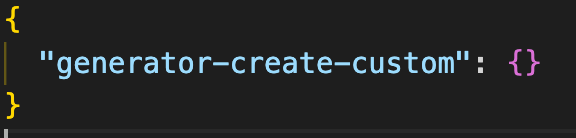
yeoman 可以在.yo-rc.json中存储配置选项,供子脚手架之间共享。
this.config.save() 将配置写入.yo-rc.json 文件,如果文件不存在,则创建一个。
this.config.set() 键值 或是键值对象,值必须是可序列化的JSON , 默认会调用save 方法。
this.config.get() 获取配置值
this.config.getAll() 获取完整可用配置对象
this.config.delete() 删除一个建
7. 整合yeoman
每次运行脚手架时,实际上都在使用yeoman-environment。它提供检索已安装脚手架,注册和运行脚手架的方法。它还提供正在使用的用户界面适配器。可以根据需要创建任意数量的脚手架,但只是在整个环境中可用。
npm install --save yeoman-environment
我们将以下代码放在一个bin 可运行的文件,就可以直接执行create-custom 无需使用yo。
#!/usr/bin/env node
// 1.实例化环境实例
const yeoman = require('yeoman-environment');
const yParser = require('yargs-parser');

// 命令行传过来的参数建议用yargs-parser 处理,从第3个值开始
let args = yParser(process.argv.slice(2));
const env = yeomna.createEnv({ environment: args._[0], public: args.public })

// 2.注册我们的脚手架(2中方法)
//1>第一个参数为脚手架路径,第二个为脚手架命名空间,可选。
env.register(require.resolve('./app'), 'create-custom');

// 2>提供一个脚手架构造函数,然后手动建一个命名空间
const GeneratorNPM = generators.Base.extend(/* put your methods in here */);
env.registerStub(GeneratorNPM, 'create-custom');

env.run('create-custom').then(() => { console.log('执行完'); });
pagkage.json 配置如下
  "bin": {
    "create-custom": "cli.js"
  },
这篇文章只是介绍如何写一个简单的脚手架,如果需要脚手架真实可用的话需要设计者用心去设计,根据用户的不同反馈生成不同的项目框架,在设计的过程中会依赖很多api来帮助我们实现我们的需求,希望下面的参考可以帮助到你。最后希望你学以致用,设计出让用户满意的脚手架。
最后推荐下我的个人网站- 【良月清秋的前端日志】(animasling.github.io/front-end-b…) ,希望我的文章对你有帮助。

