

CocosCreator简单小鸟穿越隧道小游戏
效果展示
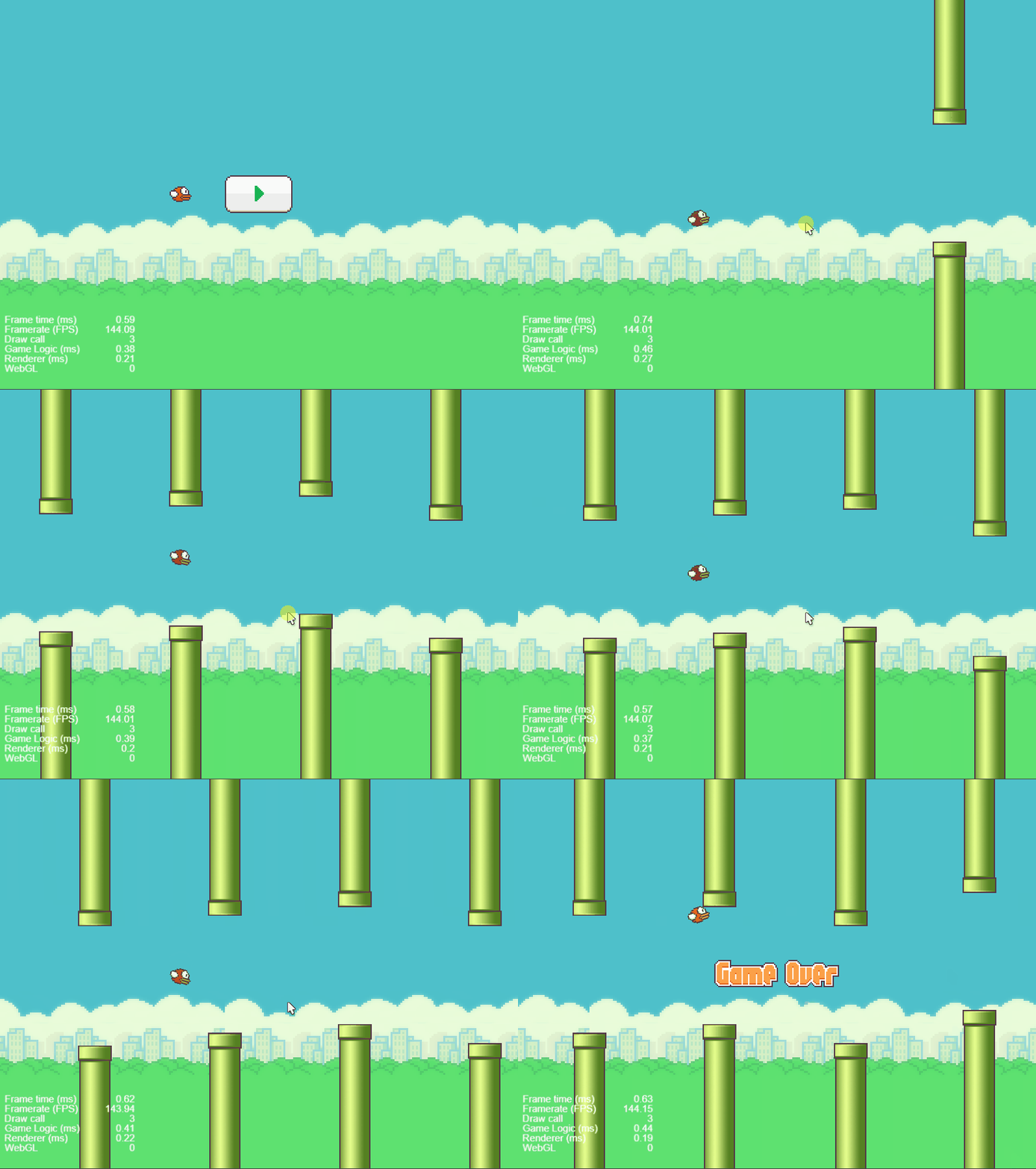
TIPS:点击鼠标左键小鸟跳跃。
素材资源链接
源码实例
层级管理器如下:
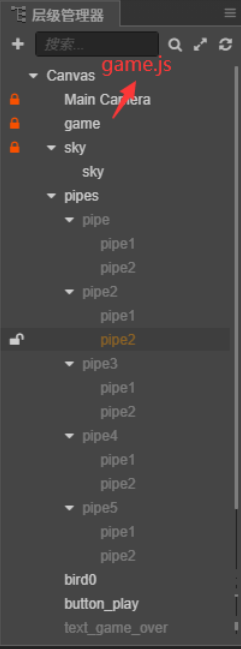
game.js
cc.Class({
    extends: cc.Component,

    properties: {
        sky: cc.Node,//背景节点
        bird: cc.Node,//小鸟节点
        birdSpriteFrame: {//小鸟的帧图片(数组),里面存放三张图片
            default: [],
            type: cc.SpriteFrame
        },
        pipes: cc.Node,//管道集节点
        startButton: cc.Node,//游戏开始
        gameOver: cc.Node,//游戏结束
    },


    //监听屏幕点击事件
    func() {
        console.log("---------func2");
        this.addSpeed = -2;//点击时,加速度置为-2
    },

    //生成随机数[m,n]范围之间
    RandomNum(Min, Max) {
        let Range = Max - Min;
        let Rand = Math.random();
        let num = Min + Math.floor(Rand * Range); //舍去
        return num;
    },

    //游戏开始
    OnStartGame() {
        this.isPlaying = true;
        this.startButton.active = false;
    },

    // LIFE-CYCLE CALLBACKS:

    // onLoad () {},

    start() {
        // this.oldTime = new Date().getTime()
        this.addSpeed = 0;//初始化加速度
        this.sprite = this.bird.getComponent(cc.Sprite)//获取小鸟节点的Sprite组件(精灵组件)
        this.curSpriteFrame = 0;//初始化当前精灵帧数组的下标
        this.isPlaying = false;//游戏是否开始标志位
        this.isGameOver = false;//游戏是否结束标志位
        // console.log(this.sprite)
        // console.log(this.birdSpriteFrame)

        //游戏开始就随机
        // for (let child of this.pipes.children) {
        //     child._children[0].y = this.RandomNum(-350, -250);
        //     child._children[1].y = this.RandomNum(250, 300);
        // }
    },

    update(dt) {
        if (false == this.isPlaying || true == this.isGameOver) return;
        this.sky.x -= 2;//每帧向左移动2个像素
        if (this.sky.x <= -800)//如果背景节点的x坐标小于等于-800,将其置为0
            this.sky.x = 0;


        //管道左移且高度随机
        for (let child of this.pipes.children) {
            child.x -= 2;
            if (child.x <= -600) {
                child.x = 400;
                // child._children[0].y = this.RandomNum(-350, -250);
                // child._children[1].y = this.RandomNum(250, 300);
                child.y = Math.random() * 100 - 50;
                child.active = true;//管道一开始不可见,之后可见
            }

            //碰撞检测算法,TIPS:管道的宽度52,高度是420。小鸟的宽度是34,高度是24。
            if (this.bird.x - child.x > -43 && this.bird.x - child.x < 43 && child.active != false) {
                //默认情况下管道高度的一半在Canvas内,child.y是随机高度。
                if (this.bird.y < -78 + child.y || this.bird.y > 78 + child.y) {
                    console.log("游戏结束");
                    this.isGameOver = true;
                    this.gameOver.active = true;
                    return;
                }
            }

        }

        // let t = new Date().getTime() - this.oldTime;
        // // console.log(t)
        // if (t != 0) t /= 2000;

        // this.h = 0.5 * 9.8 * (Math.pow(t, 2));
        // // console.log(h)
        // this.bird.y -= this.h;
        // this.bird.angle = -this.h * 18;

        this.addSpeed += 0.05;//加速度每一帧增加0.05
        this.bird.y -= this.addSpeed;//每一帧小鸟节点的y坐标减小addSpeed的大小
        this.bird.angle = -this.addSpeed * 10;//每一帧小鸟的角度等于加速度乘以-10
        //小鸟向上飞则轮询精灵帧图片
        if (this.addSpeed < 0)
            //小鸟节点的当前精灵帧数组的下标每一帧加1
            ++this.curSpriteFrame;
        //小鸟向下降则置为第一张精灵帧图片即可
        else
            this.curSpriteFrame = 0;
        //小鸟精灵组件的当前图片等于小鸟当前精灵帧下标对应的图片
        this.sprite.spriteFrame = this.birdSpriteFrame[this.curSpriteFrame];
        // console.log(this.curSpriteFrame)
        //当小鸟节点的当前精灵帧数组的下标大于2时,重置为-1。
        if (this.curSpriteFrame > 2)
            this.curSpriteFrame = -1;
    },
});
CocosCreator简单小鸟穿越隧道小游戏_ufgnix0802的博客-CSDN博客_cocos 小鸟躲避](ufgnix0802.blog.csdn.net/article/det…)
开启掘金成长之旅!这是我参与「掘金日新计划 · 2 月更文挑战」的第 6 天, 点击查看活动详情****

