1. DOM节点种类
1. 元素节点    特指页面中所有标签

2. 属性节点    书写在标签身上的属性
  + 属性节点不作为独立节点出现,只用于修饰标签使用

3. 文本节点    所有的文本内容(包含了换行和空格)

4. 注释节点    所有的注释内容(包含了换行和空格)
案例
<body>
<div id="box">
你好
<span>hello</span>
<span>world</span>
世界
</div>
</body>
div元素中有多少个一级节点?
1. 文本节点 一个换行+四个空格+你好+一个换行+四个空格
2. 元素节点 span标签
3. 文本节点 一个换行+四个空格
4. 注释节点 注释内容
5. 文本节点 一个换行+四个空格
6. 元素节点 span标签
7. 文本节点 一个换行+四个空格+世界+一个换行+两个空格
2. 获取节点
第一类: 获取元素节点
    - 获取非常规元素节点
      + html: document.documentElement
      + head: document.head
      + body: document.body
    - 获取常规元素节点
      + document.get....系列
      + document.queryS....系列
第二类: 获取该节点的属性节点、父节点、父元素节点、子节点、子元素节点
1. childNodes
  + 语法: 父节点.childNodes
  + 得到: 该父节点下的所有子一级节点

2. children
  + 语法: 父节点.children
  + 得到: 该父节点下的所有子一级元素节点

3. firstChild
  + 语法: 父节点.firstChild
  + 得到: 该父节点下的第一个子节点

4. firstElementChild
  + 语法: 父节点.firstElementChild
  + 得到: 该父节点下的第一个子元素节点

5. lastChild
  + 语法: 父节点.lastChild
  + 得到: 该父节点下的最后一个子节点

6. lastElementChild
  + 语法: 父节点.lastElementChild
  + 得到: 该父节点下的最后一个子元素节点

7. previousSibling
  + 语法: 节点.previousSibling
  + 得到: 该节点的上一个兄弟节点

8. previousElementSibling
  + 语法: 节点.previousElementSibling
  + 得到: 该节点的上一个兄弟元素节点

9. nextSibling
  + 语法: 节点.nextSibling
  + 得到: 该节点的下一个兄弟节点

10. nextElementSibling
  + 语法: 节点.nextElementSibling
  + 得到: 该节点的下一个兄弟元素节点

11. parentNode
  + 语法: 节点.parentNode
  + 得到: 该节点的父节点

12. parentElement
  + 语法: 节点.parentElement
  + 得到: 该节点的父元素节点

13. attributes
  + 语法: 节点.attributes
  + 得到: 该节点的所有属性节点
3. 节点的属性
- 节点的属性: 描述节点的信息
常见的节点属性有三种
  1.类型 nodeType
    + 用一个数字来区分不同的节点,给每一个节点做了一个编号
    + 元素节点: 1
    + 属性节点: 2
    + 文本节点: 3
    + 注释节点: 8

  2.名称 nodeName
    + 元素节点: 大写的标签名
    + 属性节点: 属性名
    + 文本节点: #text
    + 注释节点: #comment

  3.内容 nodeValue
    + 元素节点: null
    + 属性节点: 属性值
    + 文本节点: 文本内容(包含换行和空格)
    + 注释节点: 注释内容(包含换行和空格)
案例
<body>
<div id="box1">
hello
world
</div>
</body>
</html>
<script>
var ele = document.querySelector('#box');
var attr = ele.attributes[0]
var text = ele.childNodes[2]
var comment = ele.childNodes[1]
console.log('元素节点的类型:', ele.nodeType)
console.log('属性节点的类型:', attr.nodeType)
console.log('文本节点的类型:', text.nodeType)
console.log('注释节点的类型:', comment.nodeType)
console.log('元素节点的名称:', ele.nodeName)
console.log('属性节点的名称:', attr.nodeName)
console.log('文本节点的名称:', text.nodeName)
console.log('注释节点的名称:', comment.nodeName)
console.log('元素节点的内容:', ele.nodeValue)
console.log('属性节点的内容:', attr.nodeValue)
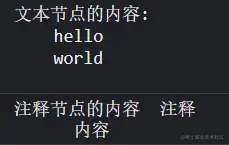
console.log('文本节点的内容:', text.nodeValue)
console.log('注释节点的内容', comment.nodeValue)
</script>
4. 创建节点
+ 就是使用 js 创建出一个节点来,但是没有插入到页面中
1. 创建元素节点 createElement
  + 语法: document.createElement('标签名')
  + 返回值: 一个被创建的标签
  + 注意: 你可以自定义标签名
2. 创建文本节点 createTextNode
  + 语法: document.createTextNode('文本内容')
  + 返回值: 文本节点
5. 插入节点
+ 就是把一个节点方法哦另一个节点内当子节点使用
1. appendChild()
  + 语法: 父节点.appendChild(子节点)
  + 作用: 把子节点插入到父节点内,并放到最后的位置
2. insertBefore()
+ 语法: 父节点.appendBefore(要插入子节点,在哪个子节点前面)
6. 删除节点
+ 就是把一个节点从本身位置删除
1. removeChild()
  + 语法: 父节点.removeChild(子节点)
  + 作用: 把子节点从父节点中移除
2. remove()
  + 语法: 节点.remove()
  + 作用: 把该节点自己干掉
7. 替换节点
1. replaceChild()
    + 语法: 父节点.replaceChild(换上节点,换下节点)
    + 作用: 在父节点内,换上节点 替换掉 换下节点
8. 克隆节点
+ 就是把一个节点复制 一个一模一样的出来
1. cloneNode()
  + 语法: 节点.cloneNode(参数)
    - 参数默认值为false: 表示不克隆后代节点

    - 如果参数值为true : 表示  克隆后代节点
      var cloneDiv = ele.cloneNode(true);



