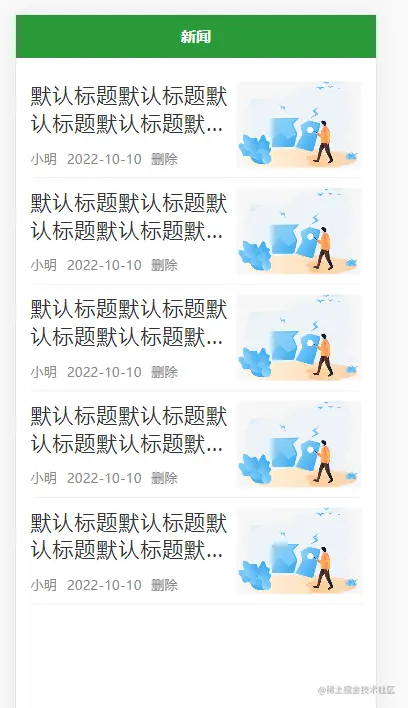
首页样式
<template>
<view class="home">
<view class="content">
<view class="item" v-for="item in 5">
<view class="text">
<view class="title">默认标题默认标题默认标题默认标题默认标题默认标题默认标题默认标题默认标题</view>
<view class="info">
<text>小明</text>
<text>2022-10-10</text>
<text>删除</text>
</view>
</view>
<view class="pic">
<image src="../../static/images/nopic.jpg" mode="aspectFill"></image>
</view>
</view>
</view>
</view>
</template>
<script>
export default {
data() {
return {
}
},
onLoad() {
},
methods: {
}
}
</script>
<style lang="scss" scoped>
.home {
.content {
padding: 30rpx;
.item {
// 弹性布局,使文字和图片在一行显示
display: flex;
// 两端对齐
justify-content: space-between;
padding: 20rpx 0;
border-bottom: 1rpx solid #eee;
.text {
flex:1;
// 下面这三行是为了给标题和作者添加边距
// 给文字加弹性盒模型,会使标题和作者时间显示在一行
display: flex;
// 使标题和作者纵向排列
flex-direction: column;
// 标题和作者上下两端对齐
justify-content: space-between;
// 使文字和图片有20的间隔
padding-right: 20rpx;
.title {
font-size: 44rpx;
color: #333;
// 使文字对齐,没看出效果来,不知道什么用
text-align: justify;
// 下面是标题超出两行省略号显示
text-overflow: -o-ellipsis-lastline;
overflow: hidden; //溢出内容隐藏
text-overflow: ellipsis; //文本溢出部分用省略号表示
display: -webkit-box; //特别显示模式
-webkit-line-clamp: 2; //行数
line-clamp: 2;
-webkit-box-orient: vertical; //盒子中内容竖直排列
}
.info {
font-size: 28rpx;
color:#888;
// 给作者、时间部分文字间隔
text {
padding-right: 20rpx;
}
}
}
.pic {
width: 260rpx;
height: 180rpx;
image{
width: 100%;
height: 100%;
}
}
}
}
}
</style>