关于我页面搭建
相关链接
都是开始整关于自己页面了,肯定需要把与自己相关的展示出来,例如你的github,gitee,掘金,csdn等等。当然,这里建议把Hexo和你使用的相关主题的链接也展示一下,毕竟,使用了别人开源的东西,多少要表示一下,哈哈。下面我的具体操作:
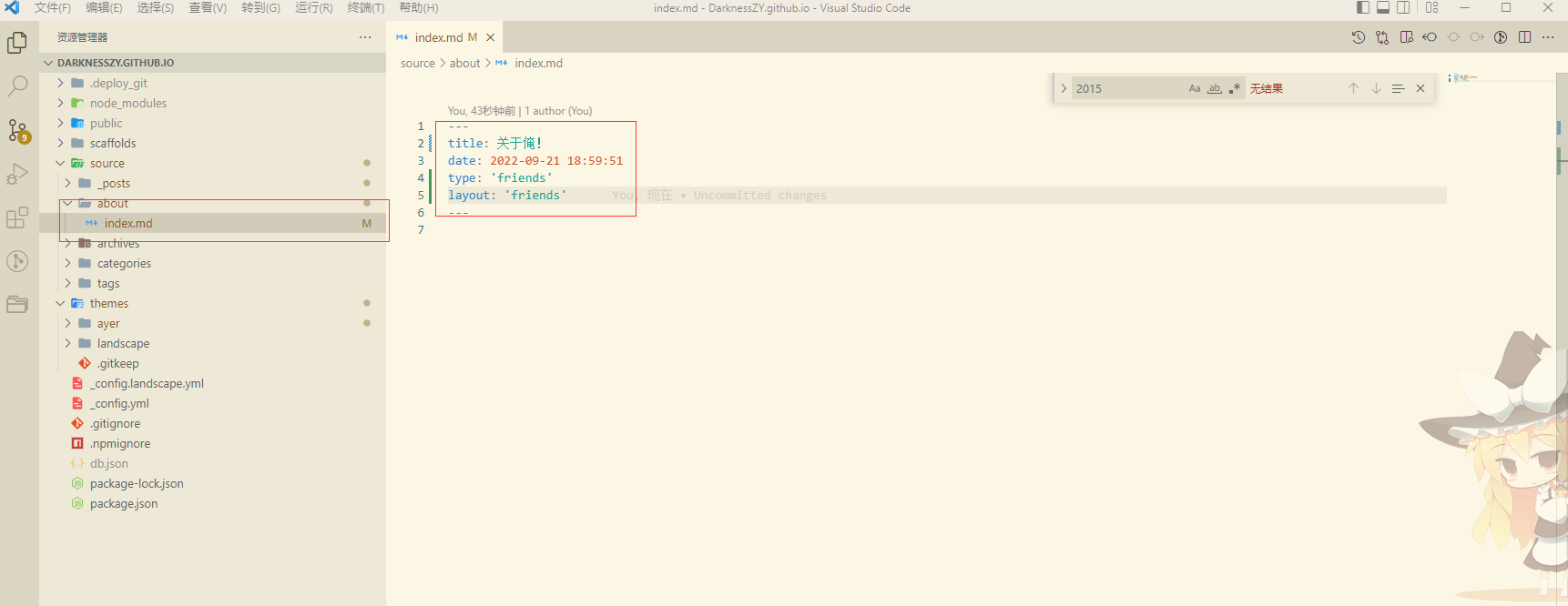
在根目录下的source新建about文件夹,about=>index.md,写入如下图的内容,其中type: 'friends' 和layout: 'friends'是ayer主题原作者封装好的友情链接布局及操作,当然在此之前需要在themes=>ayer=>_config.yml的侧边栏菜单配置menu下配置 关于我: /about
链接相关配置也是在themes=>ayer=>_config.yml下配置,找到friends_link,图片地址和github链接填自己的
# 友情链接
friends_link:
  DarknessZY:
    url: https://github.com/DarknessZY
    img: /images/github.png
  耀耀切克闹灬:
    url: https://juejin.cn/user/1781681116679854/columns
    img: /images/juejin.png
  Hexo官网:
    url: https://hexo.io
    img: /images/hexo.png
  Ayer主题: #网站名称
    #网站地址
    url: https://github.com/Shen-Yu/hexo-theme-ayer
    #网站图片(可忽略不写)
    img: /images/ayer.png
然后执行hexo命令,页面上就显示出来了:
个人介绍
这块不能想之前那样直接写markdown就行了,需要自己写页面了,例如我的就是:找到ayer主题下的原作者写的友情链接的封装,themes=>ayer=>layout=>_partial=>friends.ejs,当然我的页面随便画画的,自己看着舒服就行了,最下面两个img标签,放的是收款码,有钱的捧个钱场,具体代码和效果如下:
<section class="outer">
<% if(theme.friends_link && theme.friends_link.length != 0){ %>
<h1 class="page-type-title">关于俺!</h1>
<!-- 打赏 -->
<div>
<p style="font-size: 25px;font-weight: bolder;color: #dee1e6;">秋梨膏!请我杯喝茶怎么样!</p>
</div>
<div id="reword-out">
<div id="reward-btn">
<%= __('post.reward') %>
</div>
</div>
<!-- 介绍 -->
<div>
<div>
<p style="font-size: 25px;font-weight: bolder;color: #dee1e6;"> 一位正在北漂的菜鸡程序员</p>
</div>
<div>
<div>
<span style="color: red;"> 姓名:张耀 </span>
</div>
<hr/>
<div>
<span style="color: blue;"> QQ:2498652509 </span>有志同道合的小伙伴们可以加我qq,验证消息填'博客'+'你的姓名',我就会通过!
</div>
<hr/>
<div>
<span style="color:greenyellow;">现居地:北京朝阳 </span>
</div>
<hr/>
<div>
<span style="color:orange;">家乡:湖北汉川 </span>小县城一个,装满了故事,我有故事,你有酒吗?
</div>
<hr/>
</div>
</div>
<!-- 链接 -->
<div>
<p style="font-size: 25px;font-weight: bolder;color: #dee1e6;"> 点击进去看看吧!</p>
</div>
<ul id="friends_link">
<% for (var i in theme.friends_link){ %>
<li class="friends_li">
<a href="<%- url_for(theme.friends_link[i].url) %>" target="_blank" class="search-title"
<% if (theme.friends_link[i].description){ %>title="<%= theme.friends_link[i].description %>" <% } %>>
<% if (theme.friends_link[i].img){ %>
<img src="<%- url_for(theme.friends_link[i].img) %>">
<% } else { %>
<i class="ri-user-fill"></i>
<% } %>
<%= i %>
</a>
</li>
<% } %>
</ul>
<%}%>
</section>
具体页面如下: