Security框架深度解析
1.执行流程图
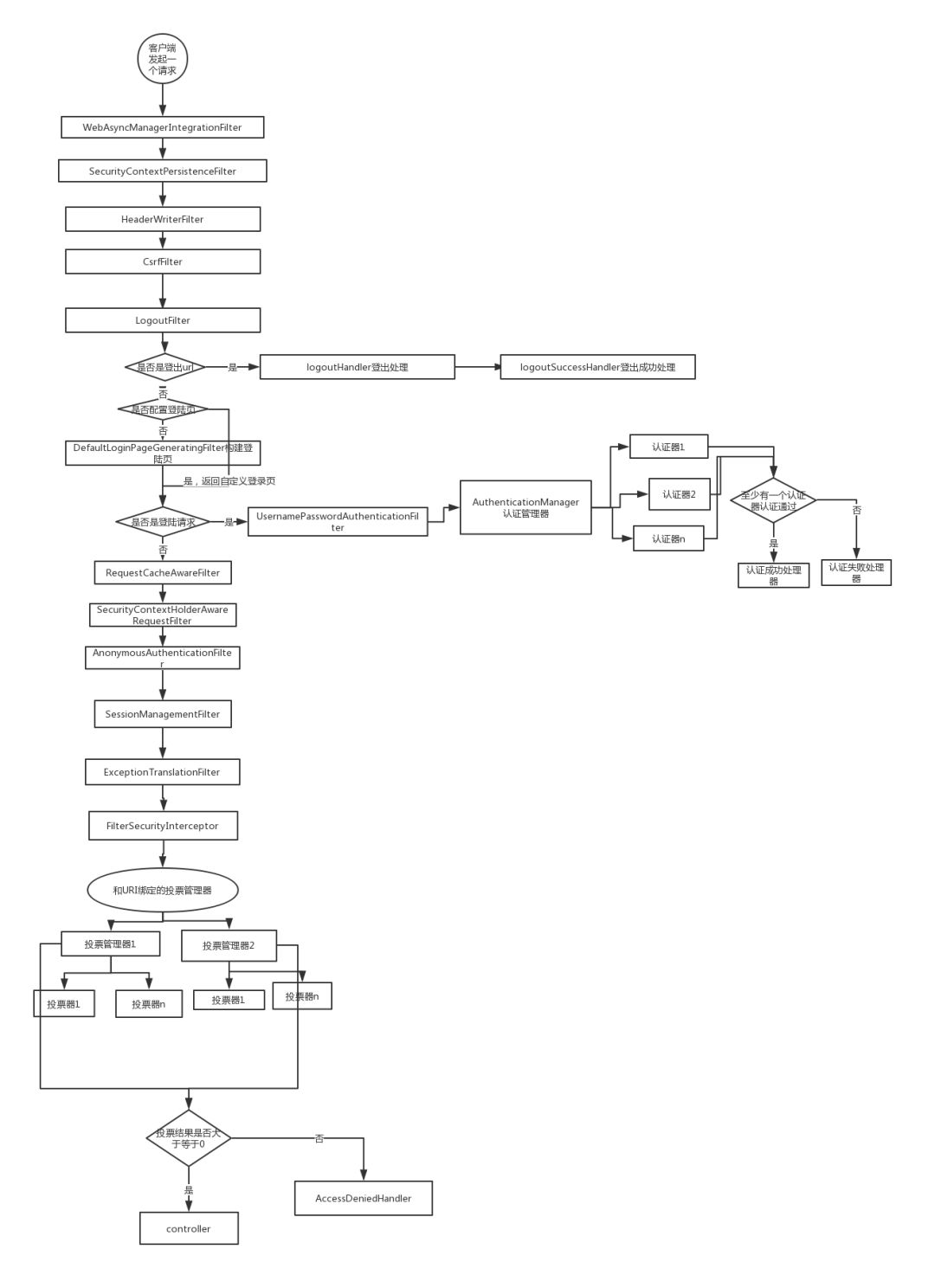 2.登录认证
1.UsernamePasswordAuthenticationFilter
- 类结构
public class UsernamePasswordAuthenticationFilter extends AbstractAuthenticationProcessingFilter {
public static final String SPRING_SECURITY_FORM_USERNAME_KEY = "username";

public static final String SPRING_SECURITY_FORM_PASSWORD_KEY = "password";

private static final AntPathRequestMatcher DEFAULT_ANT_PATH_REQUEST_MATCHER = new AntPathRequestMatcher("/login",
        "POST");

private String usernameParameter = SPRING_SECURITY_FORM_USERNAME_KEY;

private String passwordParameter = SPRING_SECURITY_FORM_PASSWORD_KEY;

private boolean postOnly = true;

public UsernamePasswordAuthenticationFilter() {
    super(DEFAULT_ANT_PATH_REQUEST_MATCHER);
}

public UsernamePasswordAuthenticationFilter(AuthenticationManager authenticationManager) {
    super(DEFAULT_ANT_PATH_REQUEST_MATCHER, authenticationManager);
}
}
-
关键方法:
-
attemptAuthentication(request, response)
@Override
    public Authentication attemptAuthentication(HttpServletRequest request, HttpServletResponse response)
            throws AuthenticationException {
        if (this.postOnly && !request.getMethod().equals("POST")) {
            throw new AuthenticationServiceException("Authentication method not supported: " + request.getMethod());
        }
        String username = obtainUsername(request);
        username = (username != null) ? username : "";
        username = username.trim();
        String password = obtainPassword(request);
        password = (password != null) ? password : "";
        UsernamePasswordAuthenticationToken authRequest = new UsernamePasswordAuthenticationToken(username, password);
        // Allow subclasses to set the "details" property
        setDetails(request, authRequest);
        return this.getAuthenticationManager().authenticate(authRequest);
    }

protected void setDetails(HttpServletRequest request, UsernamePasswordAuthenticationToken authRequest) {
        authRequest.setDetails(this.authenticationDetailsSource.buildDetails(request));
    }
-
-
方法解析
- 获取username和password封装成UsernamePasswordAuthenticationToken(authRequest)对象
- 继续给authRequest设置session等信息
- 前两个步骤总结起来就是初始化UsernamePasswordAuthenticationToken对象
- **调用认证器开始认证
2.AuthenticationMananger
ProviderManager
-
第一次调用的是匿名认证器,判读是否是需要的认证器
@Override public boolean supports(Class<?> authentication) { return (AnonymousAuthenticationToken.class.isAssignableFrom(authentication)); } -
第二次调用的认证器(DaoAuthenticationProvider)里面的认证才是输入账号和密码后的认证类型
@Override
    public boolean supports(Class<?> authentication) {
        return (UsernamePasswordAuthenticationToken.class.isAssignableFrom(authentication));
    }
3.正式认证
1.执行authenticate方法
// 关键代码
try {
user = retrieveUser(username, (UsernamePasswordAuthenticationToken) authentication);
            }
2. 调用retrieveUser()方法
-
先对password进行encode(编码),来完成后续的匹配
-
然后验证用户名
try {
/**
这里调用UserDetailService的loadUserByUsername,也就是我们后面要重写的类的方法
*/
UserDetails loadedUser = this.getUserDetailsService().loadUserByUsername(username);
            if (loadedUser == null) {
                throw new InternalAuthenticationServiceException(
                        "UserDetailsService returned null, which is an interface contract violation");
            }
            return loadedUser;
        }
3.调用preAuthenticationChecks.check()方法来检查用户是否被(锁定,禁用等)
-
@Override
    public void check(UserDetails user) {
        if (!user.isAccountNonLocked()) {
            this.logger.debug("Failed to authenticate since user account is locked");
            throw new LockedException(
                    this.messages.getMessage("AccountStatusUserDetailsChecker.locked", "User account is locked"));
        }
        if (!user.isEnabled()) {
            this.logger.debug("Failed to authenticate since user account is disabled");
            throw new DisabledException(
                    this.messages.getMessage("AccountStatusUserDetailsChecker.disabled", "User is disabled"));
        }
        if (!user.isAccountNonExpired()) {
            this.logger.debug("Failed to authenticate since user account is expired");
            throw new AccountExpiredException(
                    this.messages.getMessage("AccountStatusUserDetailsChecker.expired", "User account has expired"));
        }
        if (!user.isCredentialsNonExpired()) {
            this.logger.debug("Failed to authenticate since user account credentials have expired");
            throw new CredentialsExpiredException(this.messages
                    .getMessage("AccountStatusUserDetailsChecker.credentialsExpired", "User credentials have expired"));
        }
    }
4.调用additionalAuthenticationChecks()方法
- 判读密码是否为空
- 将authentication里面的密码(Credentials)和userDetail里面的密码(Credentials)进行对比
5.调用postAuthenticationChecks()方法检查用户是否密码过期
6.检查该用户是否有缓存,没有就放进缓存(Map)
7.调用createSuccessAuthentication()来创建该认证对象(认证成功此时)
UsernamePasswordAuthenticationToken result = new UsernamePasswordAuthenticationToken(principal,
      authentication.getCredentials(), this.authoritiesMapper.mapAuthorities(user.getAuthorities()));
3.授权认证
- 默认的路径配置拦截
- 涉及到自定义权限拦截时用到
- 方法级别的权限拦截
这里列出关键的钩子函数
1.FilterInvocationSecurityMetadataSource接口
-
实现自定义拦截
-
实现接口的的方法
@Override
    public Collection<ConfigAttribute> getAttributes(Object o) throws IllegalArgumentException {
      /**
      o可转换为FilterInvocation
      可获取对应的uri和method等
      */

    }

    @Override
    public Collection<ConfigAttribute> getAllConfigAttributes() {
        return null;
    }

    @Override
    public boolean supports(Class<?> aClass) {
        return FilterInvocation.class.isAssignableFrom(aClass);
    }
2. AccessDecisionManager
-
最终决定该次请求是否有效
@Override
    public void decide(Authentication authentication, Object o, Collection<ConfigAttribute> collection) throws AccessDeniedException, InsufficientAuthenticationException {
        /**
         1.获取认证对象的角色
         2.获取该请求所需的角色集合
         3.判读是否有该角色
         4.决定是否放行
        */
    }

    @Override
    public boolean supports(ConfigAttribute configAttribute) {
        return true;
    }

    @Override
    public boolean supports(Class<?> aClass) {
        return true;
    }