为什么需要 Commit Message 规范?
- 使用 Git 来管理项目时,统一的 Commit Message 规范, 有以下好处
- 可提高项目的整体质量,降低项目成员间的沟通成本,提高个人工程素质
- 可借助于规范的提交信息,便于过滤某些条件快速查找信息
- 可读性好,不必深入看代码即可了解当前提交的信息
来自 Angular 社区 的 Commit Message 规范
<type>(<scope>): <subject>
<BLANK LINE>
<body>
<BLANK LINE>
<footer>
推荐 Commit Message 规范工具 -- commitizen
- commitizen 是一个撰写符合 Commit Message 格式标准的一款命令行工具
- 接下来需要安装依赖包
安装 Commitizen 及其他依赖
  # commitizen 全局安装
  pnpm add commitizen -g
  yarn global add commitizen


  # @commitlint/cli @commitlint/config-conventional
  pnpm add @commitlint/cli @commitlint/config-conventional -D
  yarn add @commitlint/cli @commitlint/config-conventional -D


  # cz-message-helper
  pnpm add cz-message-helper -D
  yarn add cz-message-helper -D


  # husky lint-staged
  pnpm add husky lint-staged -D
  yarn add husky lint-staged -D
如何对 Commitizen 及其他依赖进行配置
- 在package.json中添加commitizen配置
{
  "config": {
    "commitizen": {
      "path": "node_modules/cz-message-helper"
    }
  }
}
- 在项目根目录下创建
.cz-message.js 配置文件 - 查看更多
module.exports = {
language: 'cn'
}
- 在项目根目录下创建
commitlint.config.js 配置文件
module.exports = {
  extends: ['@commitlint/config-conventional'],
  rules: {
    'type-enum': [
      2,
      'always',
      [
        'fix',
        'feat',
        'begin',
        'docs',
        'style',
        'refactor',
        'chore',
        'perf',
        'test',
        'merge',
        'revert',
        'wip'
      ]
    ],
    'type-case': [0],
    'scope-case': [0],
    'subject-case': [0],
    'header-case': [0],
    'body-case': [0],
    'type-empty': [2, 'never'],
    'scope-empty': [0],
    'subject-empty': [2, 'never'],
    'body-empty': [0],
    'subject-full-stop': [0],
    'header-full-stop': [0],
    'body-full-stop': [0],
    'header-max-length': [2, 'always', 100],
    'body-leading-blank': [2, 'always'],
    'footer-leading-blank': [2, 'always']
  }
}
- 在项目根目录下创建
.lintstagedrc.js 配置文件
module.exports = {
  'src/**/*.{js,jsx,ts,tsx,vue}': ['eslint --fix']
}
- husky 初始化安装 和 添加
git commit-msg 和 pre-commit 钩子
npx husky install
npx husky add .husky/commit-msg 'npx --no-install commitlint --edit $1'
npx husky add .husky/pre-commit 'npx lint-staged'
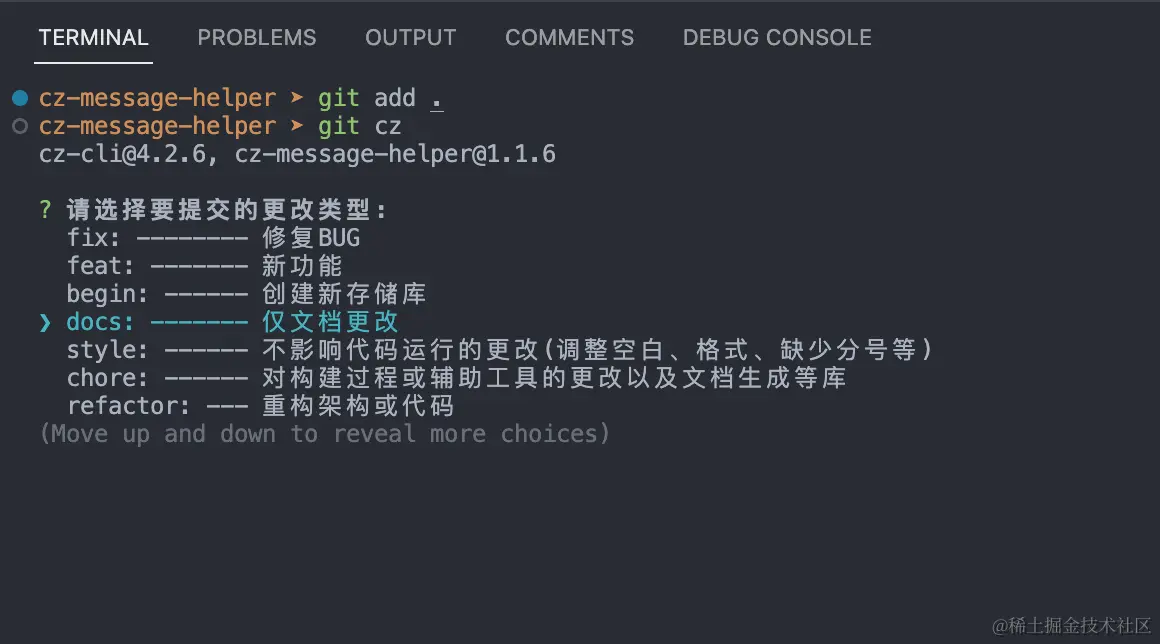
- 接下来你能通过
git add . 和 git cz 进行使用