

本教程使用JavaScript的GeoLocation API来获取用户的位置。这个API调用返回位置坐标和其他地理定位细节。
下面的快速例子中有一个使用GeoLocation API的函数getLatLong()。它调用navigator.geplocation.getCurrentPosition()。这个函数需要定义成功和错误的回调函数。
成功时,它将返回地理位置坐标数组。错误回调包括由API返回的错误代码。这两个回调都在浏览器控制台中写入响应。
用户的位置是一个隐私敏感信息。在进行位置访问工作之前,我们需要意识到这一点。由于它是敏感的,默认情况下,浏览器和底层操作系统将不允许访问用户的位置信息。
**重要的是!**用户必须。
- 在操作系统层面明确地启用位置服务。
- 给予浏览器获取位置信息的许可。
在之前的文章中,我们已经看到了如何使用PHP通过IP地址获得地理定位的信息。
快速实例
function getLatLong() {
	// using the JavaScript GeoLocation API
	// to get the current position of the user
	// if checks for support of geolocation API
	if (navigator.geolocation) {
		navigator.geolocation.getCurrentPosition(
			function(currentPosition) { console.log(currentPosition)},
			function(error) { console.log("Error: " + error.code)}
		);
	} else {
		locationElement.innerHTML = "JavaScript Geolocation API is not supported by this browser.";
	}
}
JavaScript GeoLocation API的getCurrentPosition()函数
下面的代码是使用Geo Location API的快速示例的扩展。它有一个用户界面,可以控制调用JavaScript函数来获取用户的当前位置。
HTML代码的目标是打印由API返回的位置坐标。
JavaScript获取的回调参数包括所有的地理位置细节。回调函数读取纬度和经度,并通过JavaScript将它们显示在HTML目标上。
<!DOCTYPE html>
<html>
<head>
<title>Get User Location from Browser with JavaScript</title>
<link rel='stylesheet' href='style.css' type='text/css' />
<link rel='stylesheet' href='form.css' type='text/css' />
</head>
<body>
    <div class="phppot-container">
        <h1>Get User Location from Browser with JavaScript</h1>
        <p>This example uses JavaScript's GeoLocation API.</p>
        <p>Click below button to get your latitude and longitude
            coordinates.</p>
        <div class="row">
            <button onclick="getLatLong()">Get Lat Lng Location
                Coordinates</button>
        </div>
        <div class="row">
            <p id="location"></p>
        </div>
    </div>
    <script>
	var locationElement = document.getElementById("location");
    function getLatLong() {
        // using the JavaScript GeoLocation API
        // to get current position of the user
        // if checks for support of geolocation API
        if (navigator.geolocation) {
            navigator.geolocation.getCurrentPosition(
                displayLatLong, displayError);
        } else {
            locationElement.innerHTML = "JavaScript Geolocation API is not supported by this browser.";
        }
    }

    /**
     * displays the latitude and longitude from the current position
     * coordinates returned by the geolocation api.
     */
    function displayLatLong(currentPosition) {
        locationElement.innerHTML = "Latitude: "
            + currentPosition.coords.latitude
            + "<br>Longitude: "
            + currentPosition.coords.longitude;
    }

    /**
     * displays error based on the error code received from the
     * JavaScript geolocation API
     */
    function displayError(error) {
        switch (error.code) {
            case error.PERMISSION_DENIED:
                locationElement.innerHTML = "Permission denied by user to get location."
                break;
            case error.POSITION_UNAVAILABLE:
                locationElement.innerHTML = "Location position unavailable."
                break;
            case error.TIMEOUT:
                locationElement.innerHTML = "User location request timed out."
                break;
            case error.UNKNOWN_ERROR:
                locationElement.innerHTML = "Unknown error in getting location."
                break;
        }
    }
	</script>
</body>
</html>
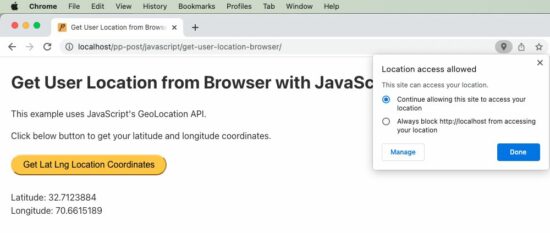
在上面的例子脚本中,我们有一个函数用于处理错误。在通过浏览器获取用户位置时,包含这个函数很重要。因为,默认情况下,用户的权限设置会被禁用。
所以大多数时候,当这个脚本被调用时,我们会得到错误。因此,我们应该有这个处理程序声明,并作为回调传递给getCurrentPosition函数。一旦出错,JavaScript将调用这个错误处理程序。
地理定位API的输出
以下是由JavaScript地理位置API返回的输出格式。我们将主要使用结果中的纬度和经度。在获得用户的动态位置时,可以使用 "速度"。在本教程的最后,我们也会看到这一点。
{
  coords = {
    latitude: 30.123456,
    longitude: 80.0253546,
    altitude: null,
    accuracy: 49,
    altitudeAccuracy: null,
    heading: null,
    speed: null,
  },
  timestamp: 1231234897623
}
通过地理编码获得用户位置
我们可以通过传递纬度和经度来获得用户的位置,如下所示。有许多不同的服务提供商,下面是一个使用Google APIs的例子。
const lookup = position => {
	const { latitude, longitude } = position.coords;
	fetch(`http://maps.googleapis.com/maps/api/geocode/json?latlng=${latitude},${longitude}`)
		.then(response => response.json())
		.then(data => console.log(data)); //
}
使用watchPosition()从浏览器获取动态用户位置
这里是本教程的一个有趣部分。如何获得用户的动态位置,也就是当他在移动时。
我们应该使用GeoLocation API的另一个函数来获取移动中的动态位置坐标。函数*watchPosition()*被用来通过JavaScript实现这一目的。
为了测试这个脚本,在车辆行驶过程中在移动浏览器中运行它,以获得用户的动态位置。
我在下面介绍了与之相关的代码部分。你可以从项目的压缩包中获得完整的脚本,它可以免费下载。
var locationElement = document.getElementById("location");
		function getLatLong() {
			// note the usage of watchPosition, this is the difference
			// this returns the dynamic user position from browser
			if (navigator.geolocation) {
				navigator.geolocation.watchPosition(displayLatLong,
						displayError);
			} else {
				locationElement.innerHTML = "JavaScript Geolocation API is not supported by this browser.";
			}
		}
