本文章讲解react-beautiful-dnd 的拖拽复制功能
效果展示
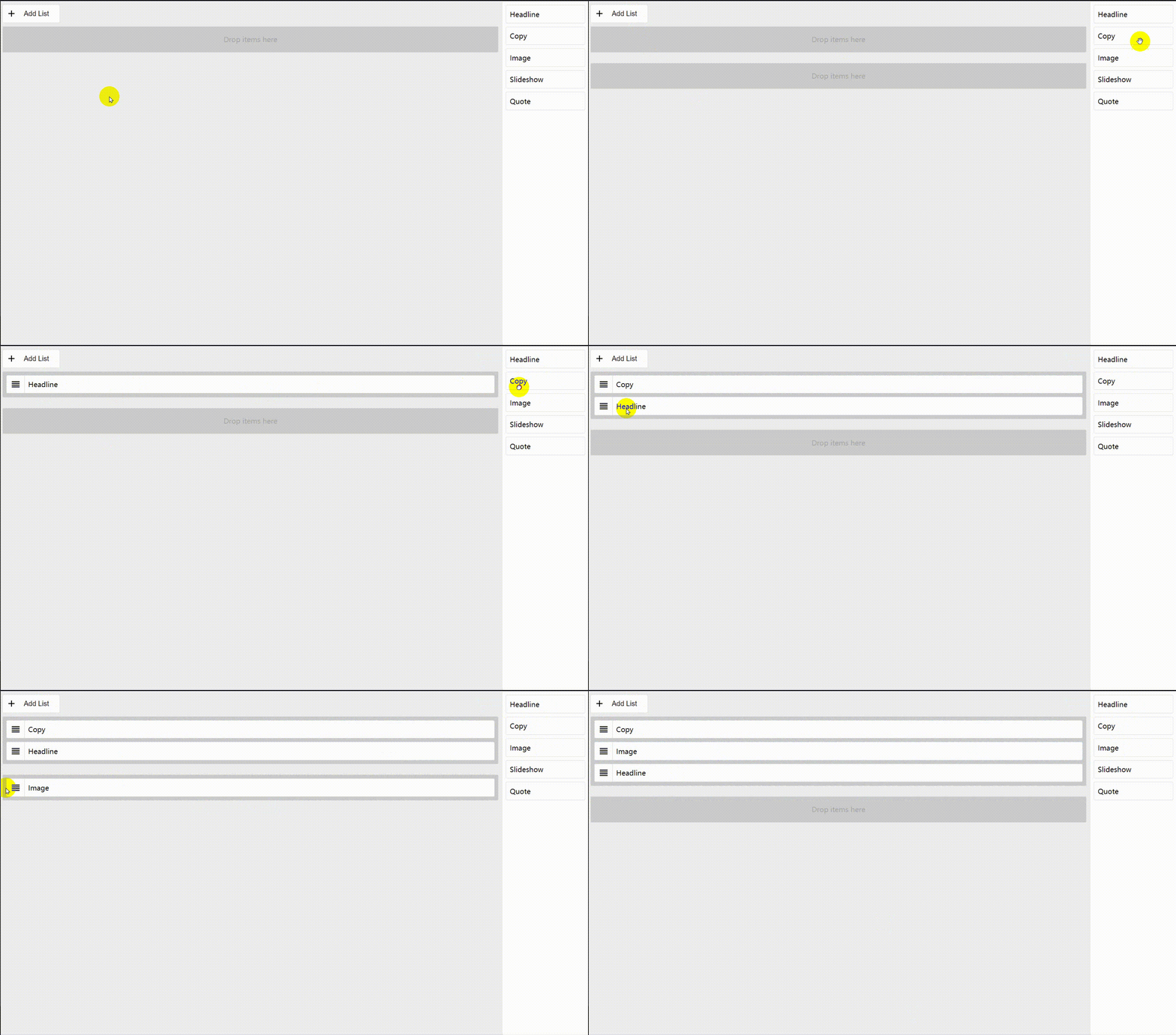
使用的依赖
"react-beautiful-dnd": "10.0.4",
"styled-components": "3.4.9",
"uuid": "3.3.2"
代码
import React, { Component } from 'react';
import ReactDOM from 'react-dom';
import uuid from 'uuid/v4';
import styled from 'styled-components';
import { DragDropContext, Droppable, Draggable } from 'react-beautiful-dnd';
// import console = require('console');
// a little function to help us with reordering the result
const reorder = (list, startIndex, endIndex) => {
const result = Array.from(list);
const [removed] = result.splice(startIndex, 1);
result.splice(endIndex, 0, removed);
return result;
};
const copy = (source, destination, droppableSource, droppableDestination) => {
console.log('==> dest', destination);
const sourceClone = Array.from(source);
const destClone = Array.from(destination);
const item = sourceClone[droppableSource.index];
destClone.splice(droppableDestination.index, 0, { ...item, id: uuid() });
return destClone;
};
const move = (source, destination, droppableSource, droppableDestination) => {
const sourceClone = Array.from(source);
const destClone = Array.from(destination);
const [removed] = sourceClone.splice(droppableSource.index, 1);
destClone.splice(droppableDestination.index, 0, removed);
const result = {};
result[droppableSource.droppableId] = sourceClone;
result[droppableDestination.droppableId] = destClone;
return result;
};
const Content = styled.div`
margin-right: 200px;
`;
const Item = styled.div`
display: flex;
user-select: none;
padding: 0.5rem;
margin: 0 0 0.5rem 0;
align-items: flex-start;
align-content: flex-start;
line-height: 1.5;
border-radius: 3px;
background: #fff;
border: 1px ${props => (props.isDragging ? 'dashed #4099ff' : 'solid #ddd')};
`;
const Clone = styled(Item)`
+ div {
display: none !important;
}
`;
const Handle = styled.div`
display: flex;
align-items: center;
align-content: center;
user-select: none;
margin: -0.5rem 0.5rem -0.5rem -0.5rem;
padding: 0.5rem;
line-height: 1.5;
border-radius: 3px 0 0 3px;
background: #fff;
border-right: 1px solid #ddd;
color: #000;
`;
const List = styled.div`
border: 1px
${props => (props.isDraggingOver ? 'dashed #000' : 'solid #ddd')};
background: #fff;
padding: 0.5rem 0.5rem 0;
border-radius: 3px;
flex: 0 0 150px;
font-family: sans-serif;
`;
const Kiosk = styled(List)`
position: absolute;
top: 0;
right: 0;
bottom: 0;
width: 200px;
`;
const Container = styled(List)`
margin: 0.5rem 0.5rem 1.5rem;
background: #ccc;
`;
const Notice = styled.div`
display: flex;
align-items: center;
align-content: center;
justify-content: center;
padding: 0.5rem;
margin: 0 0.5rem 0.5rem;
border: 1px solid transparent;
line-height: 1.5;
color: #aaa;
`;
const Button = styled.button`
display: flex;
align-items: center;
align-content: center;
justify-content: center;
margin: 0.5rem;
padding: 0.5rem;
color: #000;
border: 1px solid #ddd;
background: #fff;
border-radius: 3px;
font-size: 1rem;
cursor: pointer;
`;
const ButtonText = styled.div`
margin: 0 1rem;
`;
const ITEMS = [{id: uuid(),content: 'Headline'},{id: uuid(),content: 'Copy'},{id: uuid(),content: 'Image'},{id: uuid(),content: 'Slideshow'},{id: uuid(),content: 'Quote'}];
class App extends Component {
state = {
[uuid()]: []
};
onDragEnd = result => {
const { source, destination } = result;
console.log('==> result', result);
// dropped outside the list
if (!destination) {
return;
}
switch (source.droppableId) {
case destination.droppableId:
this.setState({
[destination.droppableId]: reorder(
this.state[source.droppableId],
source.index,
destination.index
)
});
break;
case 'ITEMS':
this.setState({
[destination.droppableId]: copy(
ITEMS,
this.state[destination.droppableId],
source,
destination
)
});
break;
default:
this.setState(
move(
this.state[source.droppableId],
this.state[destination.droppableId],
source,
destination
)
);
break;
}
};
addList = e => {
this.setState({ [uuid()]: [] });
};
// Normally you would want to split things out into separate components.
// But in this example everything is just done in one place for simplicity
render() {
return (
<DragDropContext onDragEnd={this.onDragEnd}>
<Droppable droppableId="ITEMS" isDropDisabled={true}>
{(provided, snapshot) => (
<Kiosk
innerRef={provided.innerRef}
isDraggingOver={snapshot.isDraggingOver}>
{ITEMS.map((item, index) => (
<Draggable
key={item.id}
draggableId={item.id}
index={index}>
{(provided, snapshot) => (
<React.Fragment>
<Item
innerRef={provided.innerRef}
{...provided.draggableProps}
{...provided.dragHandleProps}
isDragging={snapshot.isDragging}
style={
provided.draggableProps
.style
}>
{item.content}
</Item>
{snapshot.isDragging && (
<Clone>{item.content}</Clone>
)}
</React.Fragment>
)}
</Draggable>
))}
</Kiosk>
)}
</Droppable>
<Content>
<Button onClick={this.addList}>
<svg width="24" height="24" viewBox="0 0 24 24">
<path
fill="currentColor"
d="M19,13H13V19H11V13H5V11H11V5H13V11H19V13Z"
/>
</svg>
<ButtonText>Add List</ButtonText>
</Button>
{Object.keys(this.state).map((list, i) => {
console.log('==> list', list);
return (
<Droppable key={list} droppableId={list}>
{(provided, snapshot) => (
<Container
innerRef={provided.innerRef}
isDraggingOver={
snapshot.isDraggingOver
}>
{this.state[list].length
? this.state[list].map(
(item, index) => (
<Draggable
key={item.id}
draggableId={item.id}
index={index}>
{(
provided,
snapshot
) => (
<Item
innerRef={
provided.innerRef
}
{...provided.draggableProps}
isDragging={
snapshot.isDragging
}
style={
provided
.draggableProps
.style
}>
<Handle
{...provided.dragHandleProps}>
<svg
width="24"
height="24"
viewBox="0 0 24 24">
<path
fill="currentColor"
d="M3,15H21V13H3V15M3,19H21V17H3V19M3,11H21V9H3V11M3,5V7H21V5H3Z"
/>
</svg>
</Handle>
{item.content}
</Item>
)}
</Draggable>
)
)
: !provided.placeholder && (
<Notice>
Drop items here
</Notice>
)}
{provided.placeholder}
</Container>
)}
</Droppable>
);
})}
</Content>
</DragDropContext>
);
}
}
// Put the things into the DOM!
ReactDOM.render(<App />, document.getElementById('root'));