共同点都是消息队列,有mq的特性
队列(先进先出原则)
RocketMQ
吞吐量经过了双十一的检验,比RabbitMQ好。
阿里开发的,阿里系用的比较多些。
RabbitMQ
RabbitMQ采用Erlang语言开发,是实现高级消息队列协议的开源消息中间件。
它的官网有个兔子。Rabbit意味兔子。
特点
性能很好,延时低
吞吐量到万级,相对低,功能完备
有良好管理界面用来管理mq
社区相对比较活跃
稳定
Kafka
特点:
吞吐量十万级,比RabbitMQ更好,是除了RocketMQ之外的一个选择。有些公司也在用。
rocketmq底层封装
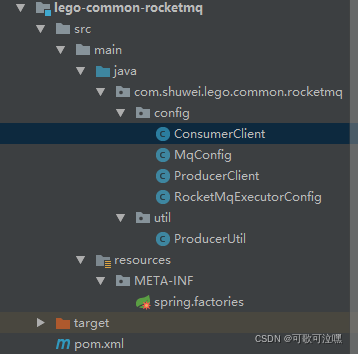
1、pom
<?xml version="1.0" encoding="UTF-8"?>
<project xmlns="http://maven.apache.org/POM/4.0.0"
         xmlns:xsi="http://www.w3.org/2001/XMLSchema-instance"
         xsi:schemaLocation="http://maven.apache.org/POM/4.0.0 http://maven.apache.org/xsd/maven-4.0.0.xsd">
    <parent>
        <artifactId>lego-common</artifactId>
        <groupId>com.lego</groupId>
        <version>1.0.7</version>
    </parent>
    <modelVersion>4.0.0</modelVersion>
    <version>1.1.2</version>

    <artifactId>lego-common-rocketmq</artifactId>
    <dependencies>
        <dependency>
            <groupId>com.lego</groupId>
            <artifactId>lego-common-core</artifactId>
            <version>${lego-common-core.version}</version>
        </dependency>
        <dependency>
            <groupId>com.aliyun.openservices</groupId>
            <artifactId>ons-client</artifactId>
        </dependency>
    </dependencies>
</project>
2、ConsumerClient
@Configuration
@AllArgsConstructor
public class ConsumerClient {

    private final MqConfig mqConfig;


    @PostConstruct
    public void init() {
        List<MqConfig.ConsumerGroup> consumerGroups = mqConfig.getConsumerGroups();
        if (!CollectionUtils.isEmpty(consumerGroups)) {
            Properties properties = mqConfig.getMqProperties();
            for (MqConfig.ConsumerGroup consumerGroup : consumerGroups) {
                properties.setProperty(PropertyKeyConst.GROUP_ID, consumerGroup.getGroupId());
                Consumer consumerBean = ONSFactory.createConsumer(properties);
                //订阅关系
                List<MqConfig.Consumer> consumers = consumerGroup.getConsumers();
                for (MqConfig.Consumer consumer : consumers) {
                    consumerBean.subscribe(consumer.getTopic(), consumer.getTag(),
                            SpringUtil.getBean(consumer.getBeanName()));
                }
                consumerBean.start();
            }
        }
    }

}
3、MqConfig
/**
 * MQ配置加载
 *
 * @author jaffee
 */
@Data
@Configuration
@ConfigurationProperties(prefix = "rocketmq")
public class MqConfig {

    private String accessKey;
    private String secretKey;
    private String nameSrvAddr;

    private List<ConsumerGroup> consumerGroups;

    public Properties getMqProperties() {
        Properties properties = new Properties();
        properties.setProperty(PropertyKeyConst.AccessKey, this.accessKey);
        properties.setProperty(PropertyKeyConst.SecretKey, this.secretKey);
        properties.setProperty(PropertyKeyConst.NAMESRV_ADDR, this.nameSrvAddr);
        //设置发送超时时间,单位毫秒
        properties.setProperty(PropertyKeyConst.SendMsgTimeoutMillis, "4000");
        return properties;
    }

    @Data
    public static class ConsumerGroup {
        private String groupId;
        private List<Consumer> consumers;
    }

    @Data
    public static class Consumer {
        private String topic;
        private String tag;
        private String beanName;
    }
}
4、ProducerClient
/**
 * MQ配置注入生成消息实例
 *
 * @author jaffee
 */
@Configuration
@AllArgsConstructor
public class ProducerClient {

    private final MqConfig mqConfig;

    @Bean(initMethod = "start", destroyMethod = "shutdown")
    public ProducerBean buildProducer() {
        //ProducerBean用于将Producer集成至Spring Bean中
        ProducerBean producer = new ProducerBean();
        producer.setProperties(mqConfig.getMqProperties());
        return producer;
    }
}
5、RocketMqExecutorConfig
/**
 * RocketMq 线程池配置
 * @author jaffee
 */
@Configuration
public class RocketMqExecutorConfig {

    @Bean("rocketMqExecutor")
    public ExecutorService getThreadPool() {
        int corePoolSize = Runtime.getRuntime().availableProcessors() * 2 + 1;
        ThreadFactory threadFactory = new ThreadFactoryBuilder()
                .setNamePrefix("rocket-pool-").build();
        return new ThreadPoolExecutor(
                corePoolSize, corePoolSize * 2, 10,
                TimeUnit.SECONDS,
                new LinkedBlockingDeque<>(), threadFactory, new ThreadPoolExecutor.CallerRunsPolicy()
        );


    }
}
6、ProducerUtil
/**

 * MQ发送消息

 *

 * @author jaffee

 */

@AllArgsConstructor

public class ProducerUtil {


    private static final LegoLogger LOGGER = LegoLogger.getLogger(ProducerUtil.class);

    private final ProducerBean producer;


    @Autowired

    @Qualifier("rocketMqExecutor")

    private final ExecutorService executorConfig;


    /**

     * 同步发送消息

     *

     * @param topic       消息topic

     * @param messageBody 消息body内容,生产者自定义内容

     * @return success:SendResult or error:null

     */

    public SendResult sendMsg(String topic, String messageBody) {

        return this.sendMsg(topic, null, messageBody, null);

    }


    /**

     * 同步发送消息

     *

     * @param topic       消息topic

     * @param msgTag      标签,可用于消息小分类标注

     * @param messageBody 消息body内容,生产者自定义内容

     * @param msgKey      消息key值,建议设置全局唯一,可不传,不影响消息投递

     * @return success:SendResult or error:null

     */

    public SendResult sendMsg(String topic, String msgTag, String messageBody, String msgKey) {

        Message msg = new Message(topic, msgTag, msgKey, messageBody.getBytes(StandardCharsets.UTF_8));

        return this.send(msg, Boolean.FALSE);

    }


    /**

     * 同步发送定时/延时消息

     *

     * @param topic       消息topic

     * @param messageBody 消息body内容,生产者自定义内容

     * @param delayTime   服务端发送消息时间,立即发送输入0或比更早的时间

     * @return success:SendResult or error:null

     */

    public SendResult sendTimeMsg(String topic, String messageBody, long delayTime) {

        return this.sendTimeMsg(topic, null, messageBody, null, delayTime);

    }


    /**

     * 同步发送定时/延时消息

     *

     * @param topic       消息topic

     * @param msgTag      标签,可用于消息小分类标注,对消息进行再归类

     * @param messageBody 消息body内容,生产者自定义内容

     * @param msgKey      消息key值,建议设置全局唯一值,可不设置,不影响消息收发

     * @param delayTime   服务端发送消息时间,立即发送输入0或比更早的时间

     * @return success:SendResult or error:null

     */

    public SendResult sendTimeMsg(String topic, String msgTag, String messageBody, String msgKey, long delayTime) {

        Message msg = new Message(topic, msgTag, msgKey, messageBody.getBytes(StandardCharsets.UTF_8));

        msg.setStartDeliverTime(delayTime);

        return this.send(msg, Boolean.FALSE);

    }


    /**

     * 发送单向消息

     */

    public void sendOneWayMsg(String topic, String messageBody) {

        this.sendOneWayMsg(topic, null, messageBody, null);

    }


    /**

     * 发送单向消息

     */

    public void sendOneWayMsg(String topic, String msgTag, String messageBody, String msgKey) {

        Message msg = new Message(topic, msgTag, msgKey, messageBody.getBytes(StandardCharsets.UTF_8));

        this.send(msg, Boolean.TRUE);

    }


    /**

     * 普通消息发送发放

     *

     * @param msg      消息

     * @param isOneWay 是否单向发送

     */

    private SendResult send(Message msg, Boolean isOneWay) {

        try {

            if (isOneWay) {

                 //由于在 oneway 方式发送消息时没有请求应答处理,一旦出现消息发送失败,则会因为没有重试而导致数据丢失。

                //若数据不可丢,建议选用同步或异步发送方式。

                producer.sendOneway(msg);

                success(msg, "单向消息MsgId不返回");

                return null;

            } else {

                //可靠同步发送

                SendResult sendResult = producer.send(msg);

                //获取发送结果,不抛异常即发送成功

                if (sendResult != null) {

                    success(msg, sendResult.getMessageId());

                    return sendResult;

                } else {

                    error(msg, null);

                    return null;

                }

            }

        } catch (Exception e) {

            error(msg, e);

            return null;

        }

    }


    /**

     * 异步发送普通消息

     *

     * @param topic       消息topic

     * @param messageBody 消息body内容,生产者自定义内容,二进制形式的数据

     */

    public void sendAsyncMsg(String topic, String messageBody) {

        this.sendAsyncMsg(topic, null, messageBody, null);

    }


    /**

     * 异步发送普通消息

     *

     * @param topic       消息topic

     * @param msgTag      标签,可用于消息小分类标注,对消息进行再归类

     * @param messageBody 消息body内容,生产者自定义内容,二进制形式的数据

     * @param msgKey      消息key值,建议设置全局唯一值,可不设置,不影响消息收发

     */

    public void sendAsyncMsg(String topic, String msgTag, String messageBody, String msgKey) {

        producer.setCallbackExecutor(executorConfig);

        Message msg = new Message(topic, msgTag, msgKey, messageBody.getBytes(StandardCharsets.UTF_8));

        try {

            producer.sendAsync(msg, new SendCallback() {

                @Override

                public void onSuccess(final SendResult sendResult) {

                    assert sendResult != null;

                    success(msg, sendResult.getMessageId());

                }


                @Override

                public void onException(final OnExceptionContext context) {

                    //出现异常意味着发送失败,为了避免消息丢失,建议缓存该消息然后进行重试。

                    error(msg, context.getException());

                }

            });

        } catch (ONSClientException e) {

            error(msg, e);

        }

    }


    private void error(Message msg, Exception e) {

        LOGGER.error("发送MQ消息失败-- Topic:{}, Key:{}, tag:{}, body:{}",

                msg.getTopic(), msg.getKey(), msg.getTag(),

                new String(msg.getBody(), StandardCharsets.UTF_8));

        LOGGER.error("errorMsg --- {}", e.getMessage());

    }


    private void success(Message msg, String messageId) {

        LOGGER.info("发送MQ消息成功 -- Topic:{} ,msgId:{} , Key:{}, tag:{}, body:{}",

                msg.getTopic(), messageId, msg.getKey(), msg.getTag(),

                new String(msg.getBody(), StandardCharsets.UTF_8));

    }


}```
本文使用 文章同步助手 同步