

创建数据库
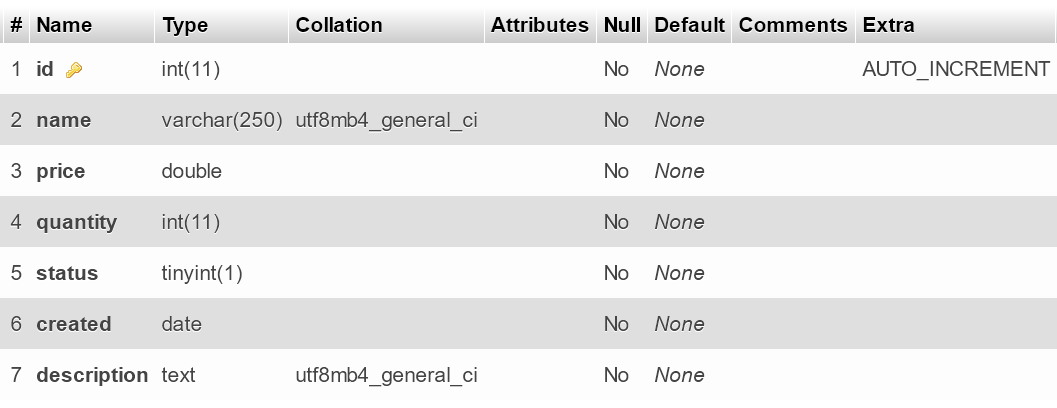
创建名为codeigniter4_db的新数据库。这个数据库有1个表。产品表。
--
-- Table structure for table `product`
--

CREATE TABLE `product` (
  `id` int(11) NOT NULL PRIMARY KEY AUTO_INCREMENT,
  `name` varchar(250) NOT NULL,
  `price` double NOT NULL,
  `quantity` int(11) NOT NULL,
  `status` tinyint(1) NOT NULL,
  `created` date NOT NULL,
  `description` text NOT NULL,
  `category_id` int(11) NOT NULL
) ENGINE=InnoDB DEFAULT CHARSET=utf8mb4;

--
-- Dumping data for table `product`
--

INSERT INTO `product` (`name`, `price`, `quantity`, `status`, `created`, `description`, `category_id`) VALUES
('Tivi 1', 20, 4, 1, '2021-07-13', 'good', 1),
('Tivi 2', 63, 15, 0, '2020-08-11', 'good', 1),
('Laptop 1', 24, 12, 1, '2021-08-12', 'good', 2),
('Laptop 2', 60, 34, 1, '2020-08-12', 'good', 2),
('Laptop 3', 23, 27, 0, '2020-08-17', 'good', 3),
('Computer 1', 4.5, 2, 1, '2021-08-20', 'ABC', 3),
('Computer 2', 111, 222, 1, '2021-09-25', 'AAA', 7),
('Computer 3', 33333, 888, 0, '2021-10-11', 'abc', 2),
('ABC', 20, 4, 1, '2021-07-12', 'good', 7),
('ABC', 20, 4, 1, '2021-07-12', 'good', 7),
('ABC', 20, 4, 1, '2021-07-12', 'good', 7),
('ABC', 20, 4, 1, '2021-07-12', 'good', 7),
('ABC', 20, 4, 1, '2021-07-12', 'good', 7);
产品表的结构
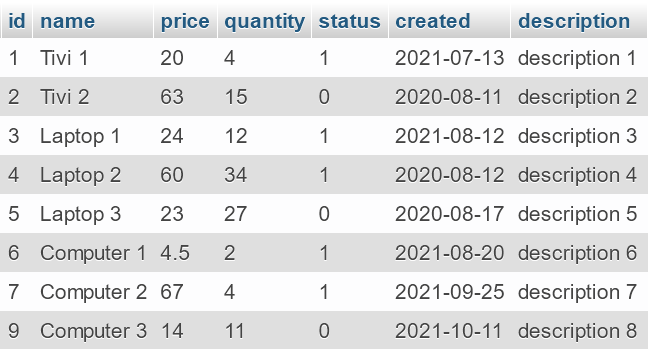
产品表的数据
下载并安装CodeIgniter 4
下载最新版本的CodeIgniter 4,并将源代码解压到名为LearnCodeIgniter4WithRealApps的新文件夹。
将公共文件夹中的index.php和htaccess文件剪切到项目的根文件夹中。
打开根文件夹中的index.php,找到第16行,将路径替换为Paths.php文件,如下所示。
$pathsPath = realpath(FCPATH . '/app/Config/Paths.php');
打开app/Config文件夹中的App.php,找到第39行,在$indexPage变量中删除index.php字符串,如下所示。
public $indexPage = '';
设置BASE URL
打开app/Config文件夹中的App.php文件。设置**$baseURL**变量的值,如下所示。
public $baseURL = 'http://localhost:8091/LearnCodeIgniter4WithRealApps/';
配置数据库连接
打开app/Config文件夹中的Database.php文件,添加如下值连接到数据库。
<?php

public $default = [
	'hostname' => 'localhost',
	'username' => 'root',
	'password' => '',
	'database' => 'codeigniter4_db',
	'port'     => 3306,
];
创建控制器
在app/Controllers文件夹下创建名为Demo.php的新PHP文件,如下所示。
<?php

namespace App\Controllers;

class Demo extends BaseController
{
	protected $table = 'product';
	private $db;

	public function __construct()
	{
		$this->db = \Config\Database::connect();
	}

	public function demo1()
	{
		$data['count'] = $this->db->table($this->table)->countAllResults();
		return view('demo/index', $data);
	}

	public function demo2()
	{
		$data['count'] = $this->db->table($this->table)->where(["status" => 1])->countAllResults();
		return view('demo/index', $data);
	}

}
创建视图
在app/Views文件夹下创建名为Demo的新文件夹。在这个文件夹中,创建新的PHP文件,命名如下。
索引视图
在demo文件夹中,创建名为index.php的新的PHP文件,如下所示。
<html>

	<head>
		<title>Query Builder Class in CodeIgniter 4</title>
	</head>

	<body>

		Count: <?= $count ?>

	</body>

</html>
定义路线
打开app/Config文件夹中的Routes.php文件。设置默认控制器如下。
$routes->get('/', 'Demo::demo1');
$routes->get('/demo', 'Demo::demo1');
$routes->get('/demo/demo1', 'Demo::demo1');
$routes->get('/demo/demo2', 'Demo::demo2');
CodeIgniter 4项目的结构

运行应用程序
使用以下网址访问Demo控制器中的demo1动作:http://localhost:8095/LearnCodeIgniter4WithRealApps/demo/demo1
输出
Count: 8
访问Demo控制器中的demo2动作,网址如下:http://localhost:8095/LearnCodeIgniter4WithRealApps/demo/demo2
输出
Count: 5
