下载并安装CodeIgniter 4
下载最新版本的CodeIgniter 4,并将源代码解压到名为LearnCodeIgniter4WithRealApps的新文件夹。
将公共文件夹中的index.php和htaccess文件剪切到项目的根文件夹中。
打开根文件夹中的index.php,找到第16行,将路径替换为Paths.php文件,如下所示。
$pathsPath = realpath(FCPATH . '/app/Config/Paths.php');
打开app/Config文件夹中的App.php,找到第39行,在$indexPage变量中删除index.php字符串,如下所示。
public $indexPage = '';
设置BASE URL
打开app/Config文件夹中的App.php文件。设置**$baseURL**变量的值,如下所示。
public $baseURL = 'http://localhost:8091/LearnCodeIgniter4WithRealApps/';
创建控制器
在app/Controllers文件夹下创建名为Demo.php的新PHP文件,如下所示。
<?php

namespace App\Controllers;

class Demo extends BaseController
{
	public function index()
	{
		session()->set('id', 123);
		session()->set('username', 'acc1');
		session()->set('product', array(
			'id' => 'p01',
			'name' => 'name 1',
			'price' => 4.5
		));
		session()->set('fullName', 'Name 1');

		// Remove Session
		session()->remove('fullName');

		return $this->response->redirect(site_url('demo/index2'));
	}

	public function index2()
	{
		if (session()->has('id')) {
			$data['id'] = session('id');
		}
		if (session()->has('username')) {
			$data['username'] = session('username');
		}
		if (session()->has('product')) {
			$product = session('product');
			$data['product'] = $product;
		}
		if (session()->has('fullName')) {
			$data['fullName'] = session('fullName');
		}
		return view('demo/index', $data);
	}
}
创建视图
在app/Views文件夹下创建名为Demo的新文件夹。在这个文件夹中,创建名为index.php的新PHP文件,如下所示。
<html>

	<head>
		<title>Session in Codeigniter 4</title>
	</head>

	<body>

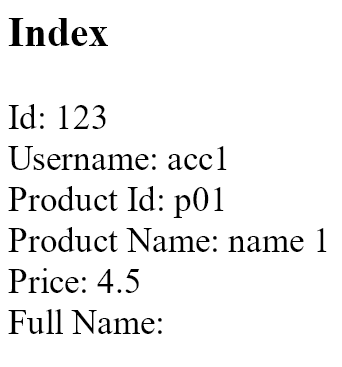
		<h3>Index</h3>
		Id: <?= $id ?>
		<br>
		Username: <?= $username ?>
		<br>
		Product Id: <?= $product['id'] ?>
		<br>
		Product Name: <?= $product['name'] ?>
		<br>
		Price: <?= $product['price'] ?>
		<br>
		Full Name: <?= isset($fullName) ? $fullName : '' ?>

	</body>

</html>
设置默认控制器
打开app/Config文件夹中的Routes.php文件。设置默认控制器,如下所示。
$routes->get('/', 'Demo::index');
$routes->get('/demo/index2', 'Demo::index2');
CodeIgniter项目的结构

(adsbygoogle = window.adsbygoogle || []).push({})。
运行应用程序
用以下网址访问Demo控制器中的索引动作**:http://localhost:8095/LearnCodeIgniter4WithRealApps/demo/index**
輸出